⚠ 這是歷史版本頁面 — 查看 ActivePresenter 最新版本 →

- 目前版本10.1.0
- 更新日期2025-10-24
- 檔案大小154 MB
- 檔案名稱ActivePresenter_v10.1.0_setup.exe
- 作業系統Windows 7 64 / Windows 8 64 / Windows 10 64 / Windows 11
- 支援語系English
- 授權型式試用版
- 開發商 Atomi Systems, Inc.
- 軟體分類Windows 軟體 / 影像設計
##
編輯短評
ActivePresenter 是一款整合螢幕錄影與電子學習教材編輯的 Windows 工具,能錄製螢幕操作、加入標註、剪輯影片,並產出具互動性的 HTML5 教材,例如軟體示範、模擬操作與測驗題目。它最大的辨識度在於「錄製+編輯+互動」一條龍,不必在錄影軟體與剪輯軟體之間切換。開發商持續維護,近一年更新頻率穩定,在同類工具中屬於功能完整但知名度中等的選擇,使用者評價普遍正面。
這套軟體適合教育工作者、企業講師或需要製作教學影片的內容創作者,尤其是要設計互動式測驗或軟體操作模擬的場景。與一般純錄影工具相比,它多了教材編排與互動功能,但學習曲線也相對高一些;若只需要簡單錄影,輕量工具可能更省事。需注意的是,它提供的是試用版,且介面僅有英文,Windows 與 macOS 皆有版本,使用前建議先確認功能是否符合需求。
##
翻譯排程處理中,以下暫以英文原文呈現
軟體介紹
ActivePresenter includes all the tools needed to record screen, annotate, edit screencast videos, and create interactive eLearning contents in HTML5.
ActivePresenter is a screencasting and eLearning software for Windows PC which can be used to create software demonstrations, software simulations, and quizzes. Record screen, make screencasts, video tutorials & interactive eLearning contents now!
This program is a versatile all-in-one screen recording and eLearning authoring tool. Designed to meet the needs of educators, corporate trainers, and content creators, it allows users to create interactive presentations, tutorials, and software simulations.
The app is particularly popular for its combination of screen recording and advanced editing capabilities, making it a powerful solution for creating polished and professional content without the need for multiple tools.
Highlights
Smart Capture
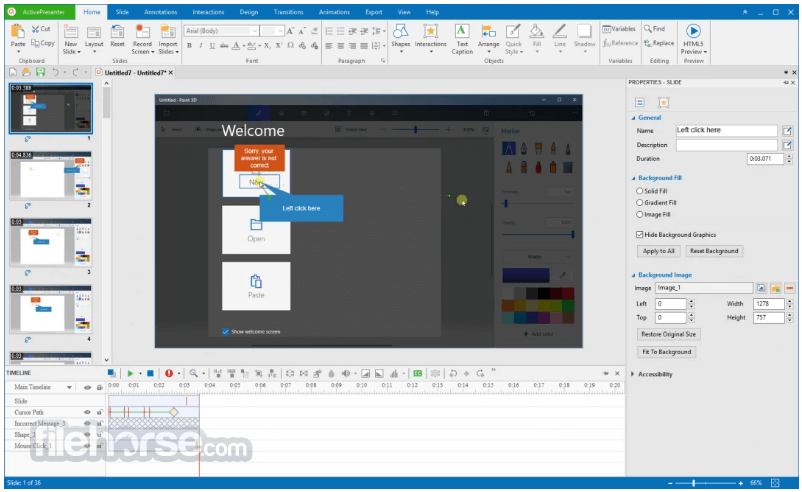
Capture screen when mouse clicked or key pressed. Each action is captured as a slide which explains in detail what the viewer should follow to master the lesson.
Full Motion Recording
Record screen as a full-motion video and embed it in a slide for further editing with annotations, voice-over, zoom-n-pan, closed captions, and animation effects.
Microphone & Speakers Recording
Record system audio and audio from the microphone simultaneously while recording the screen. Recording voice-overs and narration separately is also available.
Webcam Recording [New]
Record screen and webcam at the same time or record webcam videos separately, all depending on your need.
Audio & Video Editing
Edit audio and video without quality loss. Supported operations include cut, delete, crop, split, join, blur, change playback speed, change volume, and insert freeze-frame.
Style (Color & Effect)
Make polished and high-quality screencast videos and training simulations with various line/fill/text styles and shadow effects.
Green Screen Effect for Video [New]
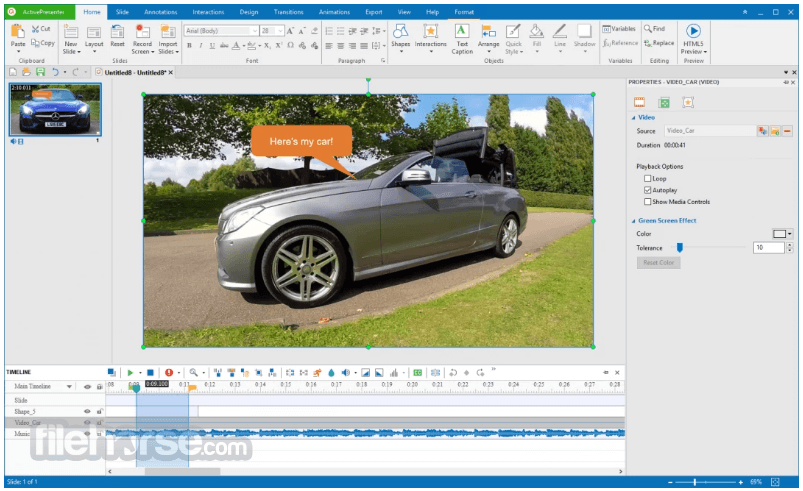
Integrate live-action footage to enhance video presentations by layering two images/videos together based on chroma range.
Video
Export contents to popular video formats including MP4, AVI, WMV, WebM, and MKV. A balance between output size and video quality with frame rate, keyframe, and quality options.
Shapes & Freeform [Enhanced]
Choose from dozens of shapes. Draw custom vector shapes and paths using the freeform Shape and Scribble tools.
Responsive Design [New]
Design fully-responsive, mobile-ready eLearning contents. Easily convert regular projects to responsive ones.
Interactivity
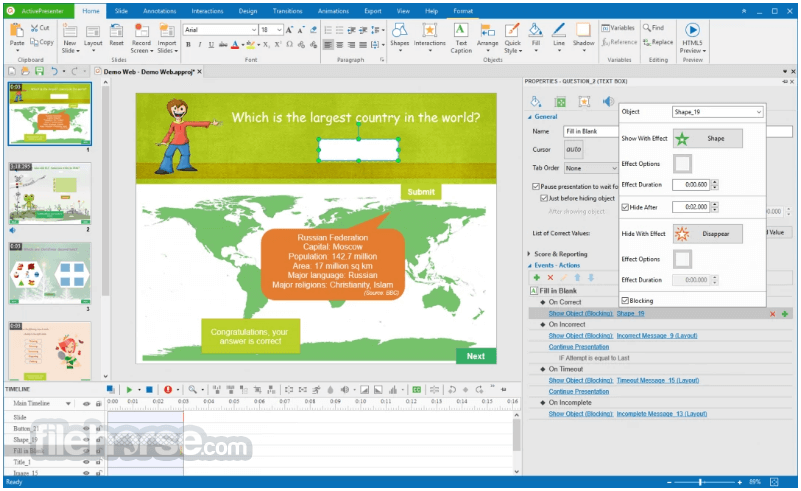
The flexible event-action mechanism with rich event and action types allows defining different learning scenarios based on viewers’ responses at each step.
Quizzes
Create virtually any kind of assessment or survey with nine different types of questions.
Slide Pool & Randomization
Design professional random quizzes with slide pools & random slides to prevent viewers from remembering and predicting answers.
HTML5
Export contents to HTML5 which can run on any modern web browsers and devices (PC, macOS, iOS, Android, Windows Phone, etc.).
SCORM & xAPI
Support SCORM and xAPI, two most popular eLearning specifications which are widely supported by many Learning Management Systems (LMS).
User Interface
It boasts a clean, intuitive interface that resembles popular video editing and design tools. The workspace is divided into clearly defined areas for timeline editing, canvas preview, and property customization.
Key functions are easily accessible via a ribbon-style toolbar, and the drag-and-drop functionality simplifies the editing process. The software also includes a helpful "Getting Started" guide and tooltips for new users.
Installation and Setup
Screen Recording:
Is ActivePresenter free?
It offers a Free version with basic features. The Pro version unlocks advanced editing and eLearning tools.
Can I use ActivePresenter for professional video editing?
Yes, the built-in video editor is powerful enough for professional editing, though it’s best suited for instructional content.
Does ActivePresenter support macOS?
Yes, the app is available for both Windows and macOS.
What file formats does ActivePresenter support?
It supports multiple formats including MP4, AVI, WMV, HTML5, and SCORM-compliant packages.
Is it suitable for beginners?
Absolutely! The user-friendly interface and built-in tutorials make it accessible for beginners.
Alternatives
Camtasia: Similar screen recording and editing capabilities but at a higher price point.
Adobe Captivate: Advanced eLearning authoring features but with a steeper learning curve.
OBS Studio: Free and open-source, but lacks built-in editing tools.
Snagit: Simplified screen recording and annotation, ideal for quick tasks.
ScreenPal: High-quality screen recording and editing for PC users.
Pricing
Free Version:
Limited features but suitable for basic screen recording and editing.
Pro Edition:
Pricing starts at $199 for a perpetual license.
Volume discounts and educational pricing available.
System Requirements
OS: Windows 11, 10, 8 or 7 (64-bit recommended)
RAM: 4GB (8GB or more recommended)
Disk Space: 2GB minimum
PROS
ActivePresenter is a robust and versatile tool that caters to a wide range of content creators. Its powerful combination of screen recording, video editing, and eLearning authoring features makes it a standout choice for educators, trainers, and professionals.
While the Pro version may seem pricey, the value it offers justifies the investment for serious users. With its intuitive interface and rich feature set, it remains a top contender in its category.
Note: Watermark on output for any file format except for videos.
Also Available: Download ActivePresenter for Mac
Download ActivePresenter Latest Version Why is this app published on FileHorse? (More info)
ActivePresenter is a screencasting and eLearning software for Windows PC which can be used to create software demonstrations, software simulations, and quizzes. Record screen, make screencasts, video tutorials & interactive eLearning contents now!
This program is a versatile all-in-one screen recording and eLearning authoring tool. Designed to meet the needs of educators, corporate trainers, and content creators, it allows users to create interactive presentations, tutorials, and software simulations.
The app is particularly popular for its combination of screen recording and advanced editing capabilities, making it a powerful solution for creating polished and professional content without the need for multiple tools.
Highlights
Smart Capture
Capture screen when mouse clicked or key pressed. Each action is captured as a slide which explains in detail what the viewer should follow to master the lesson.
Full Motion Recording
Record screen as a full-motion video and embed it in a slide for further editing with annotations, voice-over, zoom-n-pan, closed captions, and animation effects.
Microphone & Speakers Recording
Record system audio and audio from the microphone simultaneously while recording the screen. Recording voice-overs and narration separately is also available.
Webcam Recording [New]
Record screen and webcam at the same time or record webcam videos separately, all depending on your need.
Audio & Video Editing
Edit audio and video without quality loss. Supported operations include cut, delete, crop, split, join, blur, change playback speed, change volume, and insert freeze-frame.
Style (Color & Effect)
Make polished and high-quality screencast videos and training simulations with various line/fill/text styles and shadow effects.
Green Screen Effect for Video [New]
Integrate live-action footage to enhance video presentations by layering two images/videos together based on chroma range.
Video
Export contents to popular video formats including MP4, AVI, WMV, WebM, and MKV. A balance between output size and video quality with frame rate, keyframe, and quality options.
Shapes & Freeform [Enhanced]
Choose from dozens of shapes. Draw custom vector shapes and paths using the freeform Shape and Scribble tools.
Responsive Design [New]
Design fully-responsive, mobile-ready eLearning contents. Easily convert regular projects to responsive ones.
Interactivity
The flexible event-action mechanism with rich event and action types allows defining different learning scenarios based on viewers’ responses at each step.
Quizzes
Create virtually any kind of assessment or survey with nine different types of questions.
Slide Pool & Randomization
Design professional random quizzes with slide pools & random slides to prevent viewers from remembering and predicting answers.
HTML5
Export contents to HTML5 which can run on any modern web browsers and devices (PC, macOS, iOS, Android, Windows Phone, etc.).
SCORM & xAPI
Support SCORM and xAPI, two most popular eLearning specifications which are widely supported by many Learning Management Systems (LMS).
User Interface
It boasts a clean, intuitive interface that resembles popular video editing and design tools. The workspace is divided into clearly defined areas for timeline editing, canvas preview, and property customization.
Key functions are easily accessible via a ribbon-style toolbar, and the drag-and-drop functionality simplifies the editing process. The software also includes a helpful "Getting Started" guide and tooltips for new users.
Installation and Setup
- Download the installer from the official Atomi Systems website or FileHorse.
- Follow the simple installation wizard. It has a lightweight setup, making it quick to install.
- Choose between the Free or Pro version during setup (Free version has limited features).
- Launch the software and configure initial settings like project defaults and preferred language.
Screen Recording:
- Open this program and select "Record Video" or "Record Software Simulation."
- Customize the recording area and audio input.
- Press the record button and capture your screen activities.
- Import media files or use recorded content.
- Use the timeline editor to trim, split, and merge clips.
- Add annotations, transitions, and effects as needed.
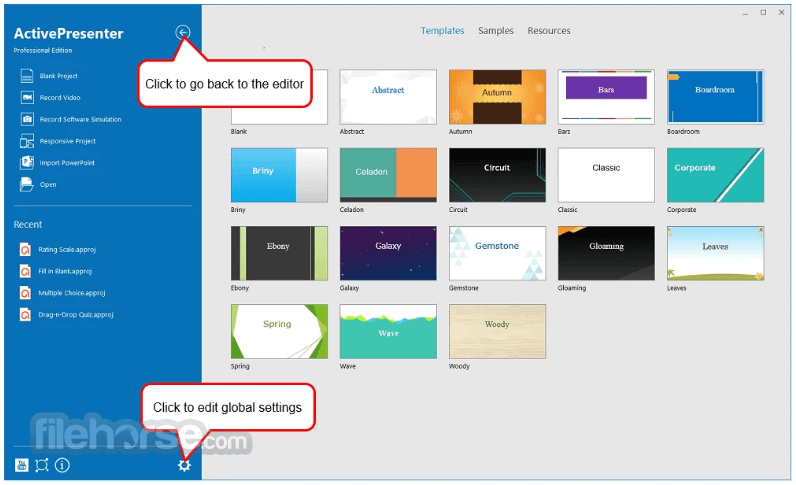
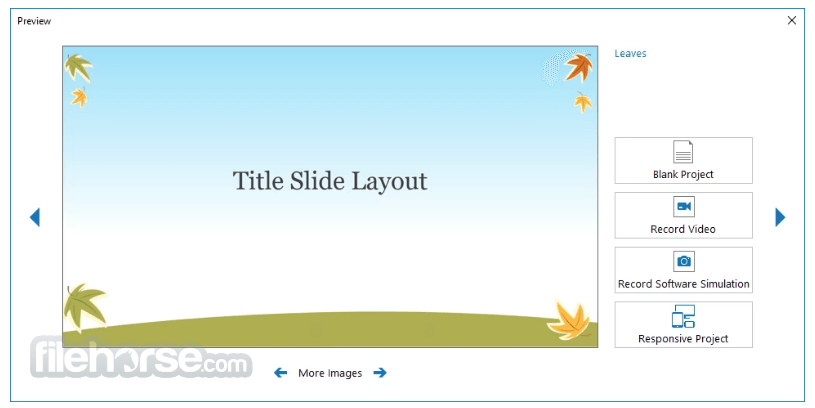
- Select "New Project" and choose templates or start from scratch.
- Insert interactive elements and quizzes from the toolbar.
- Preview the project and export it to the desired format.
Is ActivePresenter free?
It offers a Free version with basic features. The Pro version unlocks advanced editing and eLearning tools.
Can I use ActivePresenter for professional video editing?
Yes, the built-in video editor is powerful enough for professional editing, though it’s best suited for instructional content.
Does ActivePresenter support macOS?
Yes, the app is available for both Windows and macOS.
What file formats does ActivePresenter support?
It supports multiple formats including MP4, AVI, WMV, HTML5, and SCORM-compliant packages.
Is it suitable for beginners?
Absolutely! The user-friendly interface and built-in tutorials make it accessible for beginners.
Alternatives
Camtasia: Similar screen recording and editing capabilities but at a higher price point.
Adobe Captivate: Advanced eLearning authoring features but with a steeper learning curve.
OBS Studio: Free and open-source, but lacks built-in editing tools.
Snagit: Simplified screen recording and annotation, ideal for quick tasks.
ScreenPal: High-quality screen recording and editing for PC users.
Pricing
Free Version:
Limited features but suitable for basic screen recording and editing.
Pro Edition:
Pricing starts at $199 for a perpetual license.
Volume discounts and educational pricing available.
System Requirements
OS: Windows 11, 10, 8 or 7 (64-bit recommended)
RAM: 4GB (8GB or more recommended)
Disk Space: 2GB minimum
PROS
- Comprehensive screen recording and editing features.
- User-friendly interface.
- Excellent for eLearning content creation.
- Free version available for basic needs.
- Supports multiple export formats and LMS integration.
- Limited design templates compared to some competitors.
- Advanced interactivity features have a learning curve.
ActivePresenter is a robust and versatile tool that caters to a wide range of content creators. Its powerful combination of screen recording, video editing, and eLearning authoring features makes it a standout choice for educators, trainers, and professionals.
While the Pro version may seem pricey, the value it offers justifies the investment for serious users. With its intuitive interface and rich feature set, it remains a top contender in its category.
Note: Watermark on output for any file format except for videos.
Also Available: Download ActivePresenter for Mac
Download ActivePresenter Latest Version Why is this app published on FileHorse? (More info)
##
影片介紹
##
畫面截圖
- 2026-06-11 ActivePresenter 10.5.1 178 MB
- 2026-05-19 ActivePresenter 10.5.0 176 MB
- 2026-04-28 ActivePresenter 10.1.2 153 MB
- 2026-01-30 ActivePresenter 10.1.1 153 MB
- 2025-10-24 ActivePresenter 10.1.0 154 MB
- 2025-08-30 ActivePresenter 10.0.0 131 MB
- 2025-04-08 ActivePresenter 9.3.0 82.9 MB
- 2025-01-23 ActivePresenter 9.2.0 72.9 MB