
- 目前版本3.4.2
- 更新日期2026-02-12
- 檔案大小47.45 MB
- 檔案名稱Aegisub-3.4.2.exe
- 作業系統Windows 7 / Windows 8 / Windows 10
- 支援語系English
- 授權型式開源軟體
- 開發商 Rodrigo Braz Monteiro
- 軟體分類Windows 軟體 / 影片軟體
##
編輯短評
Aegisub 是一套免費、開源、跨平台的字幕編輯軟體,主要用來建立與修改字幕,並能快速將字幕對齊音訊時間軸。它最鮮明的特色是內建即時影片預覽,以及針對字幕樣式設計提供的多種強大工具,讓字幕的排版與特效設定更直覺。這套軟體最初是為了改善動畫字幕組在製作字幕時的繁瑣流程而誕生,在同類工具中屬於歷史悠久且評價普遍不錯的選擇,目前仍持續維護,但更新步調不算頻繁。
它特別適合需要精細控制字幕時間軸與樣式的使用者,例如動畫字幕組、影片創作者,或是對字幕排版有較高要求的剪輯工作者。與同分類中其他偏重播放或解碼的工具不同,Aegisub 專注於字幕編輯本身,因此在字幕處理上更為深入,但相對地它不具備影片播放或轉檔功能。軟體以開放原始碼形式釋出,可免費使用,目前僅提供英文介面,且僅支援 Windows 平台,使用前需留意這幾點。
##
翻譯排程處理中,以下暫以英文原文呈現
軟體介紹
Aegisub is a free, cross-platform open-source app for creating and modifying subtitles. It makes it quick and easy to time subtitles to audio and features many powerful tools for styling them, including a built-in real-time video preview.
Aegisub subtitle editor was created as a tool to make typesetting, particularly in anime fansubs, a less painful experience.
At the time of the start of the project, many other programs that supported the Advanced Substation Alpha format lacked (and in many cases, still lack; development on several competing programs has since been dropped for various reasons completely unrelated to this tool) many vital functions, or were too buggy and/or unreliable to be really useful.
Since then, Aegisub 64-bit has grown into a fully-fledged, highly customizable subtitle editor.
It features a lot of convenient tools to help you with timing, typesetting, editing, and translating subtitles, as well as a powerful scripting environment called Automation (originally mostly intended for creating karaoke effects, Automation can now be used for much else, including creating macros and various other convenient tools).
Full Features
Subtitle Creation and Editing: It allows users to create and edit subtitles with ease. Users can input text, adjust timing, and customize styling options such as font, color, and size.
Advanced Timing Controls: The software offers precise timing controls, including frame-level accuracy, to ensure seamless synchronization of subtitles with video content.
Subtitle Styling: Users can customize the appearance of subtitles by adjusting font styles, colors, outlines, shadows, and more.
Automation Tools: It provides automation tools for tasks such as batch timing, spell-checking, and audio waveform visualization, streamlining the subtitle creation process.
Collaboration Features: The program supports collaboration by allowing multiple users to work on the same project simultaneously, facilitating efficient teamwork in subtitle production.
User Interface
It features a user-friendly interface with a customizable layout.
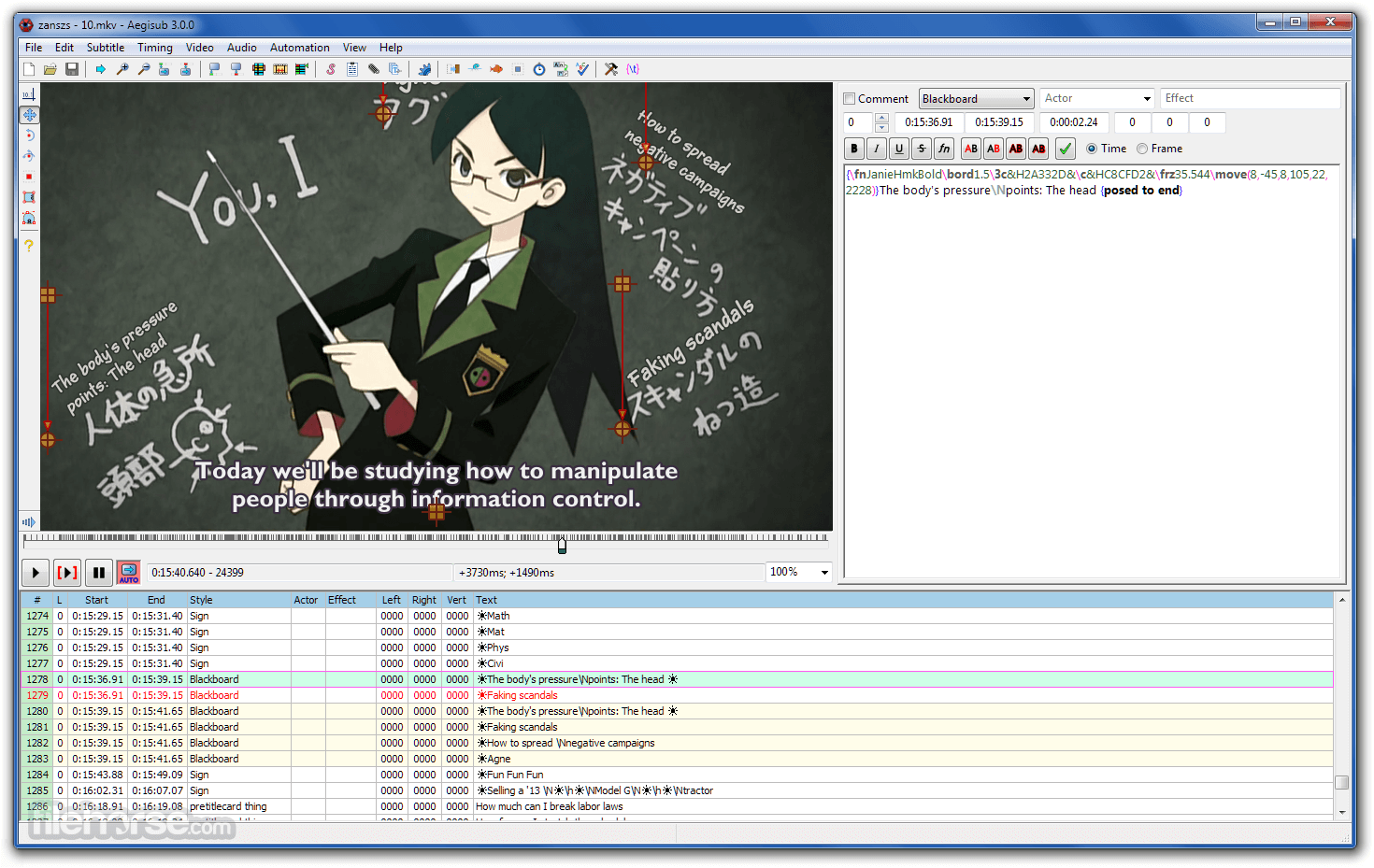
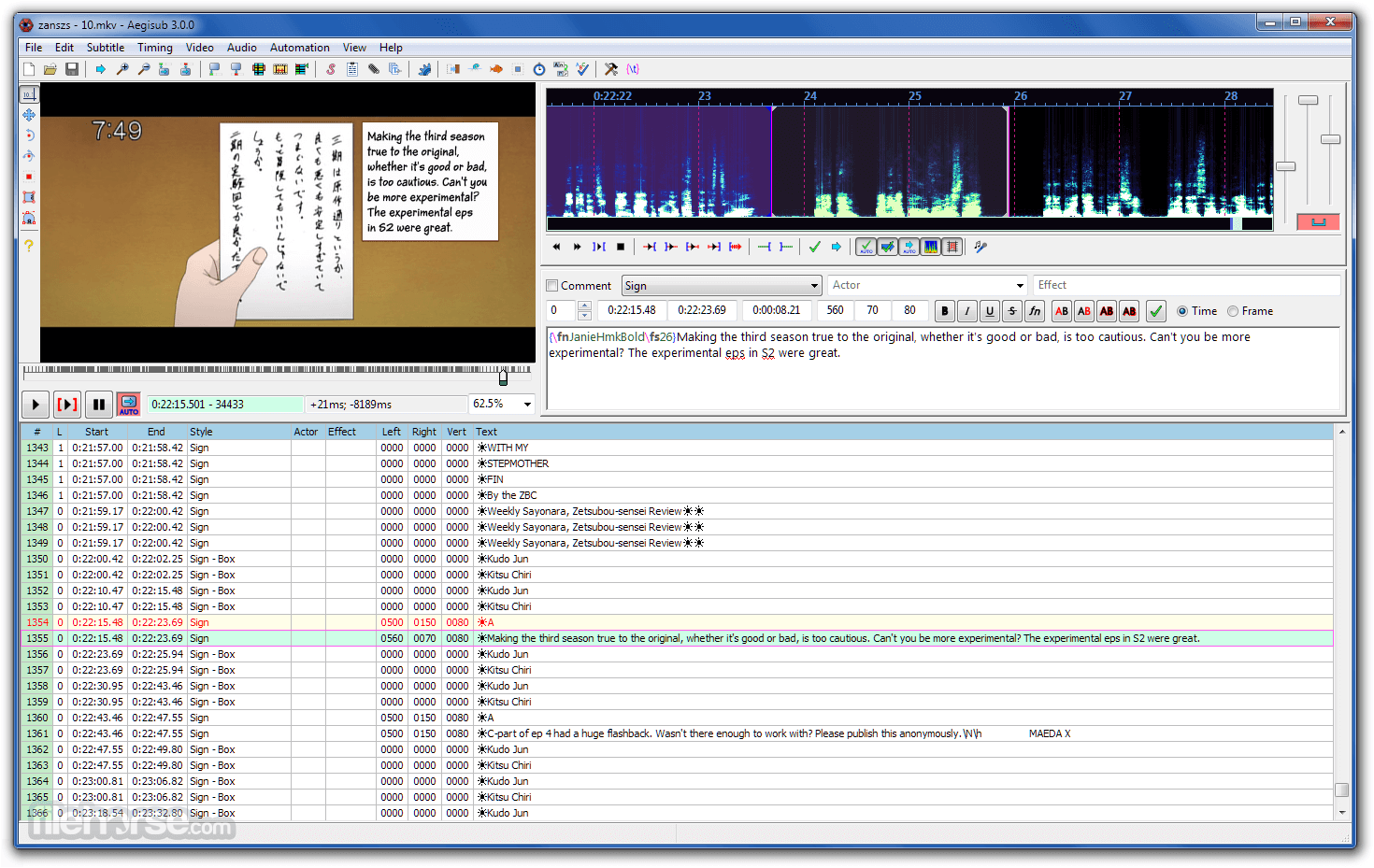
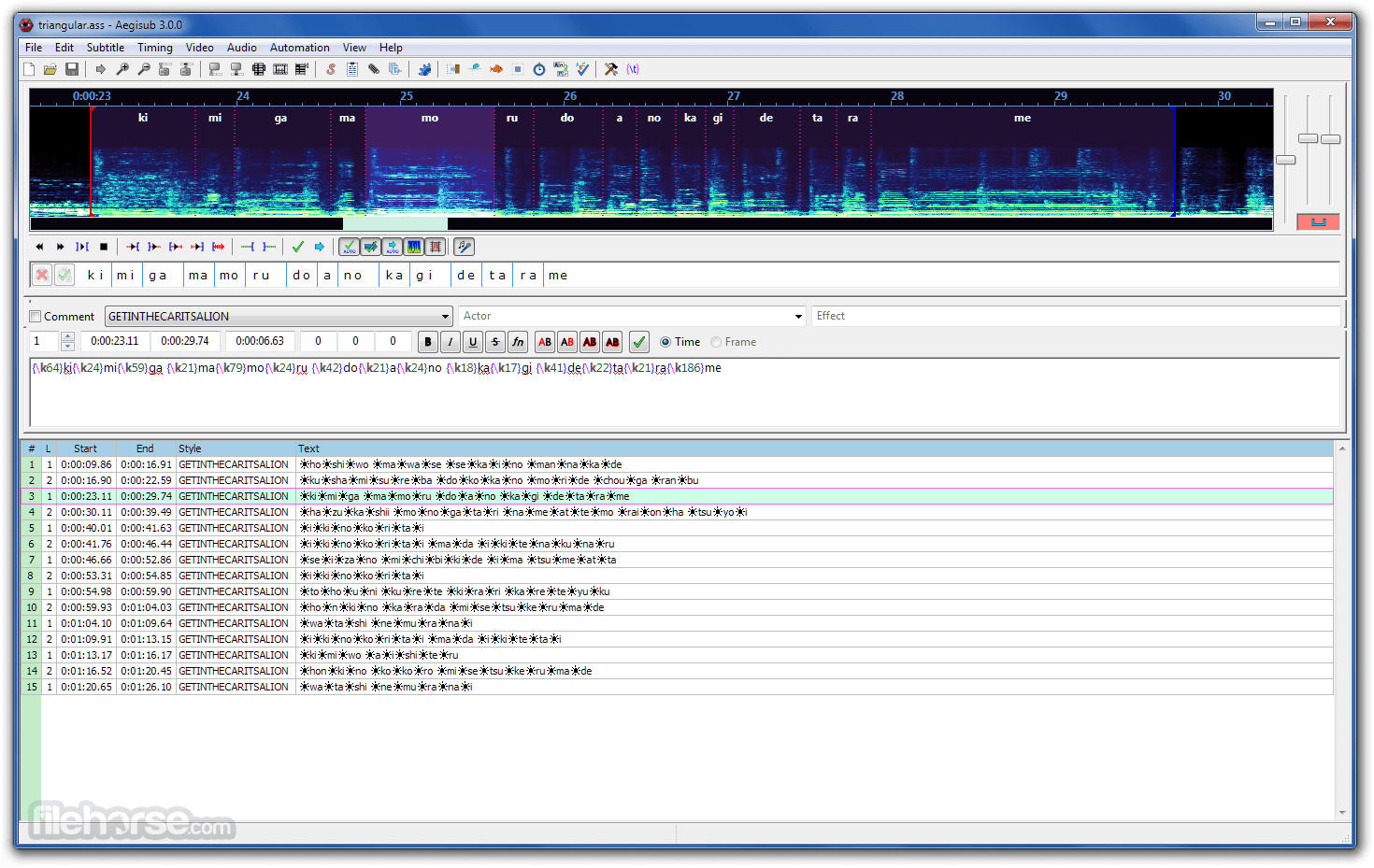
The main workspace consists of a video preview pane, a subtitle editing grid, and various toolbars for accessing editing functions and options.
The interface is intuitive and well-organized, making it easy for users to navigate and utilize the software's features efficiently.
Installation and Setup
Installing this program is straightforward. Users can download the software from the official website or trusted repositories like FileHorse.
The installation process is simple and typically requires only a few clicks to complete.
Once installed, users can launch the app and begin using it immediately.
How to Use
Is Aegisub for PC compatible with all video formats?
It supports a wide range of video formats, including popular formats such as MP4, AVI, MKV, and more. However, compatibility may vary depending on the codecs used in the video file.
Can I collaborate with others on subtitle projects using Aegisub?
Yes, it offers collaboration features that allow multiple users to work on the same project simultaneously. Users can easily share project files and collaborate in real-time.
Does Aegisub provide spell-checking capabilities?
Yes, it includes a built-in spell-checking feature to help users identify and correct spelling errors in subtitles.
Can I customize the appearance of subtitles in Aegisub?
Absolutely, it provides extensive customization options for subtitle styling, including font styles, colors, outlines, shadows, and more.
Is Aegisub free to use?
Yes, Aegisub is an open-source software available for free to users. There are no subscription fees or hidden costs associated with its usage.
Alternatives
Subtitle Edit - A feature-rich subtitle editing software with support for various formats and advanced synchronization tools.
Subtitle Workshop - A user-friendly subtitle editor with multi-language support and batch processing capabilities.
Pricing
The program is completely FREE to use, as it is an open-source software distributed under the GNU General Public License.
System Requirements
Download Aegisub Latest Version Why is this app published on FileHorse? (More info)
Aegisub subtitle editor was created as a tool to make typesetting, particularly in anime fansubs, a less painful experience.
At the time of the start of the project, many other programs that supported the Advanced Substation Alpha format lacked (and in many cases, still lack; development on several competing programs has since been dropped for various reasons completely unrelated to this tool) many vital functions, or were too buggy and/or unreliable to be really useful.
Since then, Aegisub 64-bit has grown into a fully-fledged, highly customizable subtitle editor.
It features a lot of convenient tools to help you with timing, typesetting, editing, and translating subtitles, as well as a powerful scripting environment called Automation (originally mostly intended for creating karaoke effects, Automation can now be used for much else, including creating macros and various other convenient tools).
Full Features
- Unicode in UTF-7, UTF-8, UTF-16LE and UTF-16BE encodings
- Importing non-Unicode subtitles from over 30 different character encodings, including Shift_JIS, allowing you to resume work on any subtitles regardless of your system locale settings
- Loading advanced Substation Alpha (.ass), Substation Alpha (.ssa), Subrip (.srt), and Plain-Text (.txt) (with actor data) subtitle formats
- Full tag conversion from SRT to ASS
- Multiple Undo levels
- Powerful Automation module using the Lua scripting language to create advanced karaoke effects (including per-syllable effects, similar to AssCalc) - or any other kind of subtitles manipulation
- Syntax highlighting
- A font collector to collect all fonts used in a script into a folder
- Opening of videos via Avisynth for a true preview of subtitles using VSFilter, in any format supported by DirectShow
- Aspect ratio overriding for anamorphic videos
- Variable Frame Rate videos via timecodes file (v1 and v2), including exporting processed times for hard subbing
- Display of video coordinates under the mouse and simple auto-positioning support
- An audio mode that allows you to open files in any format that your DirectShow can decode, including Wave, mp3, Ogg Vorbis, AAC, AC3, and others
- Powerful audio timing and playback mode, including full support for karaoke manipulation
- Functions and hotkeys easily synchronize audio/video and subtitles
- Time shifting and manipulation by timestamps or frame numbers (once video or timecodes are loaded)
- Advanced find and replace with support for Regular Expressions
- Cut/Copy/Paste subtitles via plain-text format, so they can be pasted in any plain-text editor
- A translation assistant to easily translate subtitles into another language
- Styling assistant to quickly pick styles for each line in subtitles
- A Styles manager that allows you to categorize subtitle styles, making working on several projects painless
- Keyframe navigation for fast seeking to scene boundaries
- Several subtitle manipulation macros, such as making timing continuous or recombining double lines after OCR
- Highlighting of subtitles that are visible on the current video frame, and a button to select those
- Preview subtitle changes immediately by pressing Ctrl+Enter
- Shortcut buttons to set text as bold, italic, underline, strikeout, change the font, or any of the 4 colors
- An extensive manual with detailed instructions and tutorials for typesetting and program usage
Subtitle Creation and Editing: It allows users to create and edit subtitles with ease. Users can input text, adjust timing, and customize styling options such as font, color, and size.
Advanced Timing Controls: The software offers precise timing controls, including frame-level accuracy, to ensure seamless synchronization of subtitles with video content.
Subtitle Styling: Users can customize the appearance of subtitles by adjusting font styles, colors, outlines, shadows, and more.
Automation Tools: It provides automation tools for tasks such as batch timing, spell-checking, and audio waveform visualization, streamlining the subtitle creation process.
Collaboration Features: The program supports collaboration by allowing multiple users to work on the same project simultaneously, facilitating efficient teamwork in subtitle production.
User Interface
It features a user-friendly interface with a customizable layout.
The main workspace consists of a video preview pane, a subtitle editing grid, and various toolbars for accessing editing functions and options.
The interface is intuitive and well-organized, making it easy for users to navigate and utilize the software's features efficiently.
Installation and Setup
Installing this program is straightforward. Users can download the software from the official website or trusted repositories like FileHorse.
The installation process is simple and typically requires only a few clicks to complete.
Once installed, users can launch the app and begin using it immediately.
How to Use
- Import Video: Start by importing the video file for which you want to create subtitles.
- Create Subtitles: Use the subtitle editing grid to input and time subtitles according to the video content.
- Customize Styling: Customize the appearance of subtitles by adjusting font styles, colors, and other styling options.
- Sync Subtitles: Ensure accurate synchronization of subtitles with the video using the advanced timing controls.
- Export Subtitles: Once subtitles are finalized, export them in the desired format for use with video playback software.
Is Aegisub for PC compatible with all video formats?
It supports a wide range of video formats, including popular formats such as MP4, AVI, MKV, and more. However, compatibility may vary depending on the codecs used in the video file.
Can I collaborate with others on subtitle projects using Aegisub?
Yes, it offers collaboration features that allow multiple users to work on the same project simultaneously. Users can easily share project files and collaborate in real-time.
Does Aegisub provide spell-checking capabilities?
Yes, it includes a built-in spell-checking feature to help users identify and correct spelling errors in subtitles.
Can I customize the appearance of subtitles in Aegisub?
Absolutely, it provides extensive customization options for subtitle styling, including font styles, colors, outlines, shadows, and more.
Is Aegisub free to use?
Yes, Aegisub is an open-source software available for free to users. There are no subscription fees or hidden costs associated with its usage.
Alternatives
Subtitle Edit - A feature-rich subtitle editing software with support for various formats and advanced synchronization tools.
Subtitle Workshop - A user-friendly subtitle editor with multi-language support and batch processing capabilities.
Pricing
The program is completely FREE to use, as it is an open-source software distributed under the GNU General Public License.
System Requirements
- Operating System: Windows 11, 10, 8, or 7
- Processor: 1 GHz or faster
- RAM: 512 MB or more
- Disk Space: 100 MB of free space
- Comprehensive subtitle editing features
- Precise timing controls
- Extensive customization options
- Collaboration support
- Open-source and free to use
- This product is not developed actively anymore
- Learning curve for beginners
- Occasional stability issues
- Limited support for some advanced subtitle formats
Download Aegisub Latest Version Why is this app published on FileHorse? (More info)
##
畫面截圖
- 2026-02-12 Aegisub 3.4.2 47.45 MB
- 2025-01-02 Aegisub 3.4.1 47.45 MB
- 2014-12-07 Aegisub 3.2.2 (32-bit) 18.69 MB
- 2014-12-07 Aegisub 3.2.2 (64-bit) 19.92 MB