⚠ 這是歷史版本頁面 — 查看 Moho Pro 最新版本 →

- 目前版本13.5
- 更新日期2021-04-27
- 檔案大小308 MB
- 檔案名稱Moho135_Win.zip
- 作業系統Windows 10 (64-bit) / Windows 11
- 支援語系English
- 授權型式未分類
- 開發商 LOSTMARBLE LLC.
- 軟體分類Windows 軟體 / 影像設計
##
編輯短評
Moho Pro 是一套專業級 2D 動畫軟體,前身是 Anime Studio Pro,主打市場上最強悍的 2D 骨架綁定系統,並融合傳統逐格動畫工具,讓使用者能更快產出專業成果。它的辨識度來自 Smart Bones™、Smart Warp 與針對動畫優化的貝茲曲線控制,加上時間軸、物理模擬、動態追蹤與 64 位元架構,功能相當完整。此軟體自 2021 年起持續收錄更新,近期仍維持維護,在同類工具中屬於評價普遍不錯的熱門選擇。
這套軟體適合追求效率的專業動畫師,尤其是想以 2D 骨架綁定取代傳統逐格繪製的工作流程,在角色動畫、動態分鏡或商業短片製作上都很實用。與其他 2D 動畫工具相比,它的優勢在於綁定系統的深度與整合性,但學習曲線較陡,且介面僅提供英文,沒有中文版。授權方式未明確分類,平台涵蓋 Windows 與 macOS,使用前需留意版本相容性與語言門檻。
##
翻譯排程處理中,以下暫以英文原文呈現
軟體介紹
Everything you need to make amazing, professional animation. Moho (formerly Anime Studio Pro) offers the most powerful 2D rigging system of the market and mix it with traditional animation tools, allowing to get professional results easier and faster.
Moho Pro is perfect for professionals looking for a more efficient alternative to traditional animation.
With an intuitive interface and robust features such Smart Bones™, Smart Warp, Bezier handles optimized for animation, frame-by-frame tools, a professional Timeline, physics, motion tracking, motion graphs, 64-bit architecture and much more.
It delivers advanced animation tools to speed up your workflow and combines cutting-edge features with powerful technology for the most unique animation program for digital artists.
Features and Highlights
Revolutionary Smart Bones™
Smart Bones is an incredible feature that reduces or entirely removes distortion around your character's joints - specifically around knees and elbows. Group a set of points and use the Smart Bones control levers to create 3D looking motion that you can easily repeat with the turn of a dial.
FBX Support for Unity™ Game Developers
Unity™ game developers and users will now be able to use FBX support of animated 2D content in Moho Pro, eliminating the need to create rigid sprites for game development and providing the ability to get the exact look and feel that they want. FBX, the adaptable file format for 3D animation from Autodesk®, is the most common method for integrating animated 2D and 3D assets in Unity.
Bone Constraints
Several major enhancements have been made to Moho's bone features. The new bone constraints feature will include rigging options that will help set up characters that are more complex and powerful. The independent angle constraint allows a bone to maintain its global angle similar to a camera crane and is not affected by inverse kinematics or its bone parents. Ideal uses for bone constraints include robotic arms or feet on characters that maintain constraints when the rest of the leg is moving.
Import Photoshop Files
Import your existing Photoshop files with all layers intact. Changes made in Photoshop instantly appear in the imported file in Anime Studio, allowing you to continually refine your Photoshop document. Many Photoshop features are supported in the imported PSD files, including blending modes, layer opacity, smart objects, and smart filters. Groups are also supported and can be set up in Photoshop to automatically get imported into The app as switch layers for quick animating.
Real-Time Media Connection
The new Real-Time Media Connection in Anime Studio automatically updates image, movie, and audio files in your imported Anime Studio files when edited in an external program. This is a great workflow enhancement for individuals and production studios alike.
Media foundation
The 64-bit Windows version of Moho will now use Media Foundation. It is no longer necessary to install QuickTime to import popular audio and video formats like MP3, AAC, MP4, and QuickTime. When exporting animations on Windows 7 and higher, the application can create movies using the Windows Media Foundation media library. When exporting animations on Windows XP and higher, the application can create movies using the DirectShow media library.
GPU Acceleration
Graphics Processing Unit (GPU) Acceleration takes advantage of your computer's hardware, boosting performance and quality for several layer types while allowing you to see exactly what the tool is doing as you apply a stroke or shape to the Workspace. The performance boost will help reduce pixelation and artifacting when working with certain graphical elements, such as Vector and Image layers.
Nested Layer Controls
Previously, bones could only control their direct children. Now, bones can control the children of their children. If you have a group inside a bone layer and then vector layers inside that group, the bone layer can manipulate the artwork in those vector layers if nested layer control is turned on. This allows for more powerful rigging options, while simultaneously simplifying and allow more organization in the layer hierarchy.
Flexi-Binding
Flexi-Binding allows you to isolate the influence of a set of bones from the rest of the skeleton. For example, only the right arm bones should affect the artwork for the right arm. This lessens (or eliminates) the need to separate artwork on frame zero, and then put it back together again with the Offset Bone tool. This is a great new feature for images and vectors.
Adjustable Particle Source
With Particle Layers, you can now use any shape, even ones that contain gaps, as an origin point for your particles. To do this, simply put your reference layer on the bottom of the Particle Layer folder. Turn on "Use base layer as source" in your Layer Settings and you're set!
Enhanced Depth of Field
Now when you create a Depth of Field effect through the Project Settings, you will get a visual representation of where your focus will be on the Workspace by using the Orbit Tool. This is a great addition if you have a hard time remembering what the settings for Depth of Field will do to change the effect. Placing the focus line closer to assets will ensure they are in focus, while everything else is blurry, depending on your focus range.
Scripting
More scripting access and control. It offers advanced scripting support and updates. More functions and data structures of the program have been exposed through the scripting API, allowing advanced technical users to create more personalized tools and add-ons.
Layer Comps
Export multiple layers individually with one click. Layer comps are useful if you want to export only selected items in your scene so that you can composite them externally in third party software. For example, you can create a layer comp that relates to background elements, another that relates to characters, and another that relates to foreground elements or titles. Turn groups on and off until you get elements that logically belong together. Then create a new layer comp from that group. At render time, you can then choose to render specific layer comps as a movie file.
Flexible Import and HD Export Capabilities
Anime Studio can import several kinds of other media files into an animation project. Import QuickTime®, AVI or MPEG-4 video, or even 3D scenes from Poser. Image-Based Modeling allows you to create 3D objects from 2D vector layers. And the included Content Library contains hundreds of ready to use characters, props and more.
Patch Layers
Patch Layers were designed for constructing characters and are similar to masks by allowing you to hide certain parts of a layer. Create each body part separately and then hide the overlapping lines. Adjust the size of the patch to perfectly blend the layers to get the desired style.
64-Bit Architecture
Moho Anime Studio is a 64-bit application. Improvements in speed and memory will be noticed by all those who use 64-bit machines. Improve rendering speeds and preview performance.
Timeline Markers
Take notes and make comments on the timeline for future reference.
Shy Bones
Hide and see only the bones that you currently need.
Image Cropping Tool
Crop your images easily and directly in Anime Studio.
Copying Content
Easily copy layers and content from one document to another.
Copy and Paste Keyframes
Copy and paste keyframes and animations from one layer to another or even to another document.
Alternatives
Adobe Animate – Industry-standard for 2D animations.
Toon Boom Harmony – Professional-grade animation tools.
OpenToonz – Free, open-source animation software.
Clip Studio Paint – Great for frame-by-frame animation.
Krita Animation – Free, beginner-friendly 2D animation.
Synfig Studio – Open-source vector-based animation.
Pencil2D – Simple and lightweight 2D animation tool.
Blender (Grease Pencil) – 2D/3D hybrid animation tool.
PROS
Also Available: Download Moho Anime Studio for Mac
Download Moho Anime Studio Latest Version Why is this app published on FileHorse? (More info)
Moho Pro is perfect for professionals looking for a more efficient alternative to traditional animation.
With an intuitive interface and robust features such Smart Bones™, Smart Warp, Bezier handles optimized for animation, frame-by-frame tools, a professional Timeline, physics, motion tracking, motion graphs, 64-bit architecture and much more.
It delivers advanced animation tools to speed up your workflow and combines cutting-edge features with powerful technology for the most unique animation program for digital artists.
Features and Highlights
Revolutionary Smart Bones™
Smart Bones is an incredible feature that reduces or entirely removes distortion around your character's joints - specifically around knees and elbows. Group a set of points and use the Smart Bones control levers to create 3D looking motion that you can easily repeat with the turn of a dial.
FBX Support for Unity™ Game Developers
Unity™ game developers and users will now be able to use FBX support of animated 2D content in Moho Pro, eliminating the need to create rigid sprites for game development and providing the ability to get the exact look and feel that they want. FBX, the adaptable file format for 3D animation from Autodesk®, is the most common method for integrating animated 2D and 3D assets in Unity.
Bone Constraints
Several major enhancements have been made to Moho's bone features. The new bone constraints feature will include rigging options that will help set up characters that are more complex and powerful. The independent angle constraint allows a bone to maintain its global angle similar to a camera crane and is not affected by inverse kinematics or its bone parents. Ideal uses for bone constraints include robotic arms or feet on characters that maintain constraints when the rest of the leg is moving.
Import Photoshop Files
Import your existing Photoshop files with all layers intact. Changes made in Photoshop instantly appear in the imported file in Anime Studio, allowing you to continually refine your Photoshop document. Many Photoshop features are supported in the imported PSD files, including blending modes, layer opacity, smart objects, and smart filters. Groups are also supported and can be set up in Photoshop to automatically get imported into The app as switch layers for quick animating.
Real-Time Media Connection
The new Real-Time Media Connection in Anime Studio automatically updates image, movie, and audio files in your imported Anime Studio files when edited in an external program. This is a great workflow enhancement for individuals and production studios alike.
Media foundation
The 64-bit Windows version of Moho will now use Media Foundation. It is no longer necessary to install QuickTime to import popular audio and video formats like MP3, AAC, MP4, and QuickTime. When exporting animations on Windows 7 and higher, the application can create movies using the Windows Media Foundation media library. When exporting animations on Windows XP and higher, the application can create movies using the DirectShow media library.
GPU Acceleration
Graphics Processing Unit (GPU) Acceleration takes advantage of your computer's hardware, boosting performance and quality for several layer types while allowing you to see exactly what the tool is doing as you apply a stroke or shape to the Workspace. The performance boost will help reduce pixelation and artifacting when working with certain graphical elements, such as Vector and Image layers.
Nested Layer Controls
Previously, bones could only control their direct children. Now, bones can control the children of their children. If you have a group inside a bone layer and then vector layers inside that group, the bone layer can manipulate the artwork in those vector layers if nested layer control is turned on. This allows for more powerful rigging options, while simultaneously simplifying and allow more organization in the layer hierarchy.
Flexi-Binding
Flexi-Binding allows you to isolate the influence of a set of bones from the rest of the skeleton. For example, only the right arm bones should affect the artwork for the right arm. This lessens (or eliminates) the need to separate artwork on frame zero, and then put it back together again with the Offset Bone tool. This is a great new feature for images and vectors.
Adjustable Particle Source
With Particle Layers, you can now use any shape, even ones that contain gaps, as an origin point for your particles. To do this, simply put your reference layer on the bottom of the Particle Layer folder. Turn on "Use base layer as source" in your Layer Settings and you're set!
Enhanced Depth of Field
Now when you create a Depth of Field effect through the Project Settings, you will get a visual representation of where your focus will be on the Workspace by using the Orbit Tool. This is a great addition if you have a hard time remembering what the settings for Depth of Field will do to change the effect. Placing the focus line closer to assets will ensure they are in focus, while everything else is blurry, depending on your focus range.
Scripting
More scripting access and control. It offers advanced scripting support and updates. More functions and data structures of the program have been exposed through the scripting API, allowing advanced technical users to create more personalized tools and add-ons.
Layer Comps
Export multiple layers individually with one click. Layer comps are useful if you want to export only selected items in your scene so that you can composite them externally in third party software. For example, you can create a layer comp that relates to background elements, another that relates to characters, and another that relates to foreground elements or titles. Turn groups on and off until you get elements that logically belong together. Then create a new layer comp from that group. At render time, you can then choose to render specific layer comps as a movie file.
Flexible Import and HD Export Capabilities
Anime Studio can import several kinds of other media files into an animation project. Import QuickTime®, AVI or MPEG-4 video, or even 3D scenes from Poser. Image-Based Modeling allows you to create 3D objects from 2D vector layers. And the included Content Library contains hundreds of ready to use characters, props and more.
Patch Layers
Patch Layers were designed for constructing characters and are similar to masks by allowing you to hide certain parts of a layer. Create each body part separately and then hide the overlapping lines. Adjust the size of the patch to perfectly blend the layers to get the desired style.
64-Bit Architecture
Moho Anime Studio is a 64-bit application. Improvements in speed and memory will be noticed by all those who use 64-bit machines. Improve rendering speeds and preview performance.
Timeline Markers
Take notes and make comments on the timeline for future reference.
Shy Bones
Hide and see only the bones that you currently need.
Image Cropping Tool
Crop your images easily and directly in Anime Studio.
Copying Content
Easily copy layers and content from one document to another.
Copy and Paste Keyframes
Copy and paste keyframes and animations from one layer to another or even to another document.
Alternatives
Adobe Animate – Industry-standard for 2D animations.
Toon Boom Harmony – Professional-grade animation tools.
OpenToonz – Free, open-source animation software.
Clip Studio Paint – Great for frame-by-frame animation.
Krita Animation – Free, beginner-friendly 2D animation.
Synfig Studio – Open-source vector-based animation.
Pencil2D – Simple and lightweight 2D animation tool.
Blender (Grease Pencil) – 2D/3D hybrid animation tool.
PROS
- Powerful Rigging System – Advanced bone rigging tools.
- Smooth Animation Workflow – Intuitive timeline and tools.
- Vector-Based Drawing – Scalable, high-quality graphics.
- Physics and Smart Bones – Realistic motion effects.
- Affordable One-Time Purchase – No subscription required.
- Steep Learning Curve – Requires time to master.
- Limited 3D Support – Not ideal for complex 3D work.
- Basic Audio Editing – Lacks advanced sound tools.
- Fewer Community Resources – Less tutorials than rivals.
- Occasional Performance Issues – Lag with complex scenes.
Also Available: Download Moho Anime Studio for Mac
Download Moho Anime Studio Latest Version Why is this app published on FileHorse? (More info)
##
畫面截圖
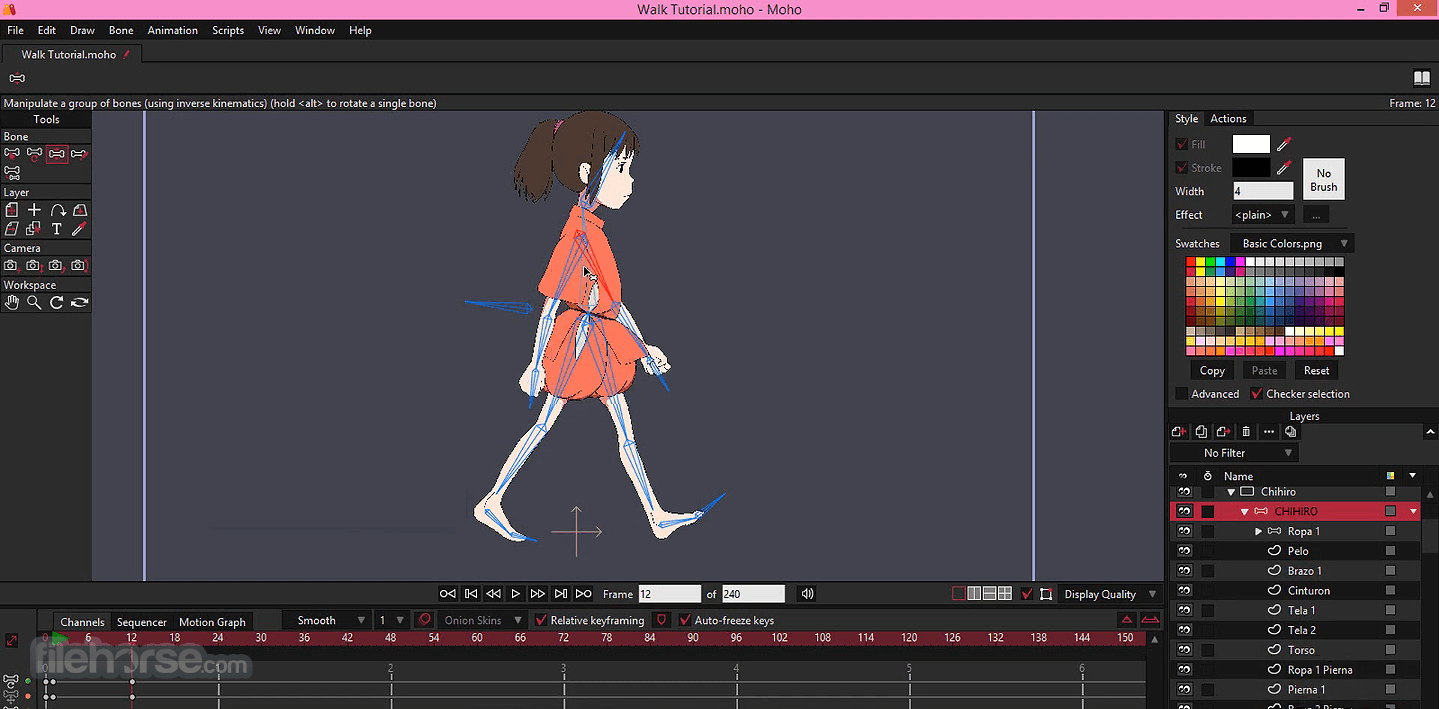


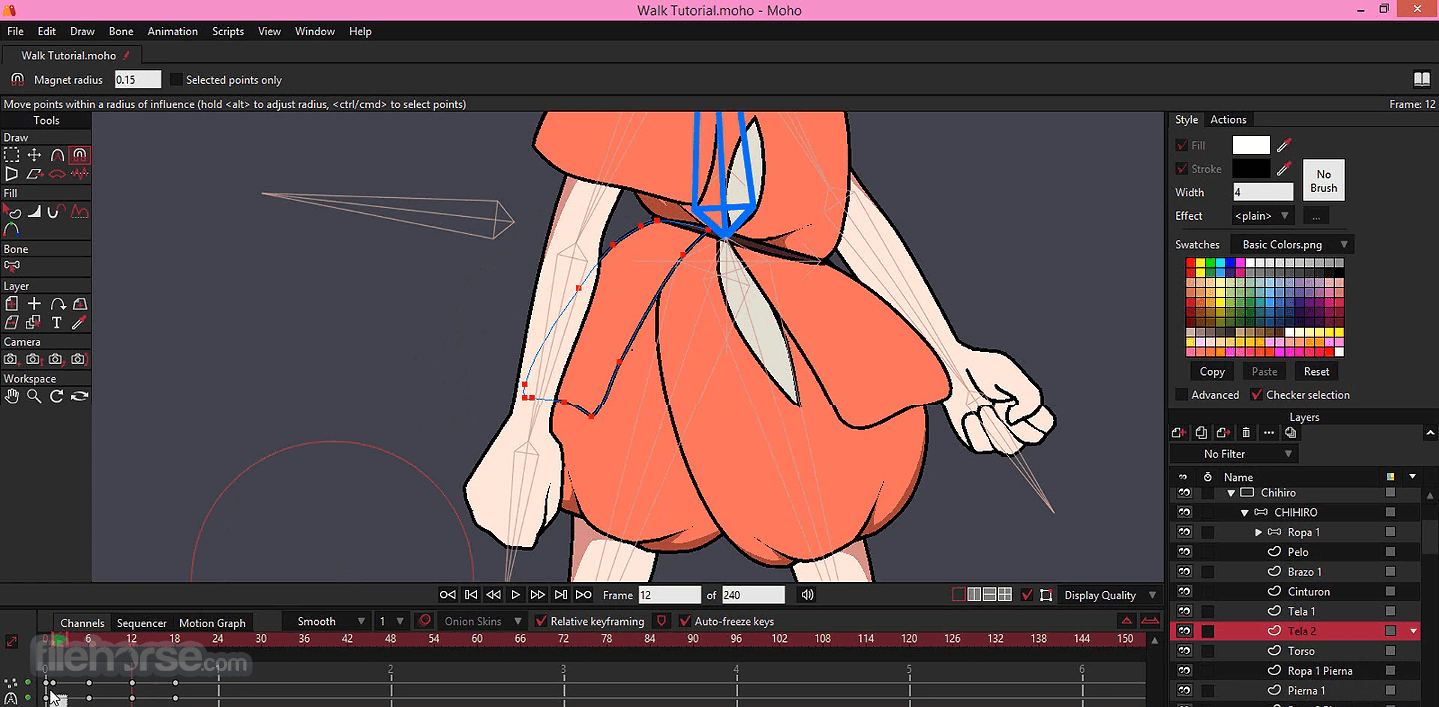
- 2025-11-10 Moho Pro 14.4
- 2023-09-27 Moho Pro 14.0 471 MB
- 2022-05-29 Moho Pro 13.5.5 481 MB
- 2022-04-29 Moho Pro 13.5.4 481 MB
- 2022-04-07 Moho Pro 13.5.3 480.71 MB
- 2021-11-09 Moho Pro 13.5.2 315.74 MB
- 2021-04-27 Moho Pro 13.5 308 MB