⚠ 這是歷史版本頁面 — 查看 AS SSD Benchmark 最新版本 →

AS SSD Benchmark 2.0.6821
v 2.0.6821
Windows
免費軟體
7/10 (32)
- 目前版本2.0.6821
- 更新日期2018-09-05
- 檔案大小260.62 KB
- 檔案名稱AS SSD Benchmark.zip
- 作業系統Windows XP / XP64 / Vista / Vista64 / Windows 7 / Windows 7 64 / Windows 8 / Windows 8 64
- 支援語系English
- 授權型式免費軟體
- 開發商 Alexej Schepeljanski
- 軟體分類Windows 軟體 / 系統優化
##
編輯短評
AS SSD Benchmark 是一款專為 Windows 平台設計的 SSD 效能測試工具,主要用來量測固態硬碟的循序與隨機讀寫速度、存取時間以及 IOPS 表現。它最特別的地方在於測試時會繞過系統快取,直接對磁碟進行真實讀寫,因此得到的數據更能反映 SSD 的實際效能,而非被快取機制美化後的結果。這套軟體自推出以來長期維持更新,雖然使用者數量不算大眾,但在 SSD 測試領域中屬於口碑穩定的老牌工具。
這款軟體適合想確認 SSD 真實效能、比較不同型號差異,或是剛換新硬碟想驗證讀寫速度是否達標的使用者。與 CrystalDiskMark 等替代工具相比,AS SSD Benchmark 的優勢在於繞過快取的測試方式更嚴苛,但介面與數據呈現相對陽春,且僅提供英文介面。軟體本身為免費授權,免安裝即可執行,使用上沒有太多門檻,不過測試時會對 SSD 產生實際寫入負載,建議在非系統碟或閒置狀態下進行。
##
翻譯排程處理中,以下暫以英文原文呈現
軟體介紹
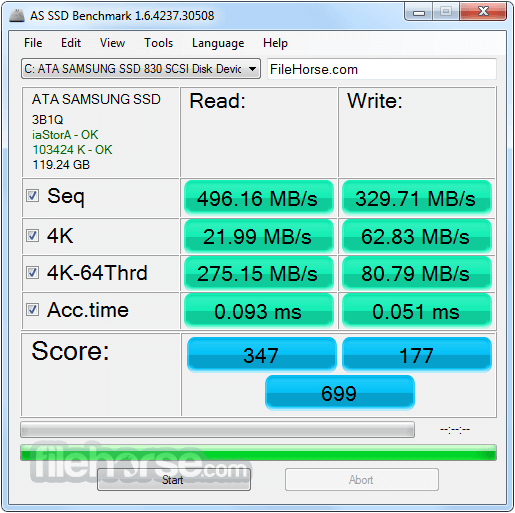
Test the sequential or random read/write performance without using the cache. AS SSD Benchmark reads/writes a 1 GByte file as well as randomly chosen 4K blocks.
Additionally, it performs the tests using 1 or 64 threads and determines the SSD's access time.
AS SSD Benchmark for Windows 11/10 is a free utility software designed specifically for testing the performance of solid-state drives (SSDs).
It provides users with a straightforward and reliable method to measure the sequential and random read/write speeds of their SSDs, as well as access times and IOPS (Input/Output Operations Per Second).
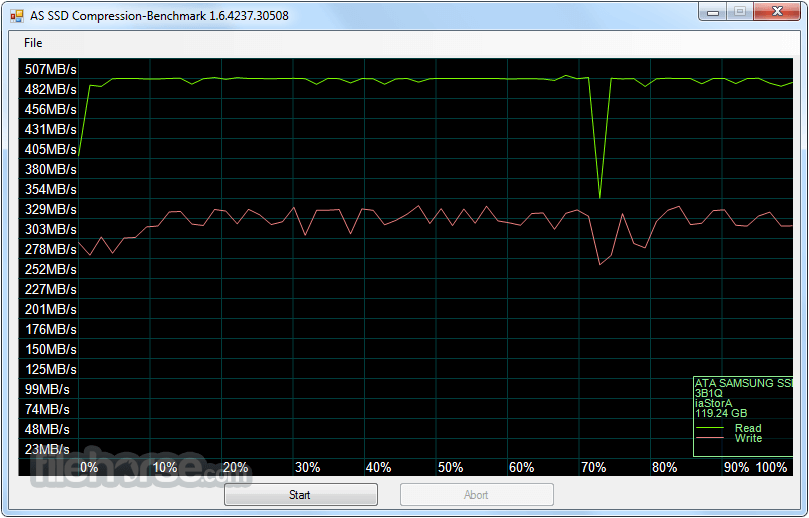
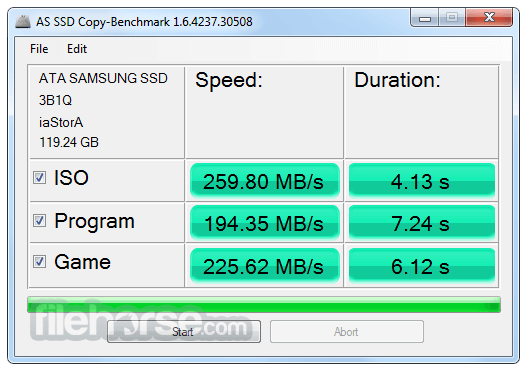
Two extra benchmark tests examine the drive's behavior when (1) copying a few big files, a lot of small files, and a mixture of file sizes by using cached copy functions of your OS, as well as (2) reading/writing data depending on the data's compressibility.
It uses incompressible data in its testing of SSDs, essentially providing information that would be consistent with using the heaviest workload; thus, lower speeds are expected.
Key Features
It features a minimalist yet intuitive user interface. Upon launching the application, users are presented with a clean layout where they can select the drive they want to test and start the benchmarking process with just a few clicks.
The interface is well-organized, making it easy for both novice and experienced users to navigate through the various options and settings.
Installation and Setup
Installation of this tool is straightforward and hassle-free. Users can choose to download either the installer version for traditional installation or the portable version for use without installation. Once downloaded, simply run the installer and follow the on-screen instructions to complete the setup process. The portable version can be extracted to any location and launched directly without any installation steps.
How to Use
FAQs
Can AS SSD Benchmark be used to test both internal and external SSDs?
Yes, it supports testing of both internal and external SSDs, including NVMe, SATA, and USB drives.
Does AS SSD Benchmark for PC provide any advanced testing options?
While the program focuses on basic performance testing, it does offer options to customize the test duration and queue depth for more advanced users.
Is AS SSD Benchmark compatible with Windows 11 and 10?
Yes, AS SSD Benchmark is fully compatible with Windows 11/10, as well as earlier versions of Windows.
Can AS SSD Benchmark be used to compare the performance of different SSD models?
Yes, it provides detailed results that allow users to compare the performance of different SSDs easily.
Is AS SSD Benchmark free to use?
Yes, the tool is completely FREE to download and use.
Alternatives
CrystalDiskMark - Similar to this program, CrystalDiskMark offers comprehensive SSD performance testing with a focus on sequential and random read/write speeds.
ATTO Disk Benchmark - ATTO Disk Benchmark is another popular tool for testing the performance of storage devices, including SSDs and HDDs, with customizable testing parameters.
HD Tune Pro - HD Tune is a versatile disk utility that includes benchmarking features alongside other disk health monitoring and error checking tools.
Pricing
The program is available for 100% FREE, with no cost associated with downloading or using the software.
System Requirements
AS SSD Benchmark is an excellent tool for users looking to evaluate the performance of their solid-state drives quickly and accurately. Its straightforward interface, comprehensive testing capabilities, and support for various SSD types make it a valuable addition to any user's toolkit, whether they are casual PC enthusiasts or professionals in need of detailed performance metrics.
With its free availability and ease of use, it stands out as a top choice for SSD benchmarking needs on the Windows platform.
Note: Requires .NET Framework. An SSD to test with 3GB of free space on it.
Download AS SSD Benchmark Latest Version Why is this app published on FileHorse? (More info)
Additionally, it performs the tests using 1 or 64 threads and determines the SSD's access time.
AS SSD Benchmark for Windows 11/10 is a free utility software designed specifically for testing the performance of solid-state drives (SSDs).
It provides users with a straightforward and reliable method to measure the sequential and random read/write speeds of their SSDs, as well as access times and IOPS (Input/Output Operations Per Second).
Two extra benchmark tests examine the drive's behavior when (1) copying a few big files, a lot of small files, and a mixture of file sizes by using cached copy functions of your OS, as well as (2) reading/writing data depending on the data's compressibility.
It uses incompressible data in its testing of SSDs, essentially providing information that would be consistent with using the heaviest workload; thus, lower speeds are expected.
Key Features
- Sequential and random read/write speed testing.
- Access time testing.
- IOPS (Input/Output Operations Per Second) measurement.
- Support for NVMe, SATA, and USB drives.
- Detailed results presentation with clear graphs and statistics.
- Simple and intuitive user interface.
- Portable version available for use without installation.
It features a minimalist yet intuitive user interface. Upon launching the application, users are presented with a clean layout where they can select the drive they want to test and start the benchmarking process with just a few clicks.
The interface is well-organized, making it easy for both novice and experienced users to navigate through the various options and settings.
Installation and Setup
Installation of this tool is straightforward and hassle-free. Users can choose to download either the installer version for traditional installation or the portable version for use without installation. Once downloaded, simply run the installer and follow the on-screen instructions to complete the setup process. The portable version can be extracted to any location and launched directly without any installation steps.
How to Use
- Launch the app.
- Select the drive you want to test from the drop-down menu.
- Click the "Start" button to begin the benchmarking process.
- Wait for the benchmark to complete, which usually takes a few minutes.
- Once the benchmark is finished, review the results presented in the application window.
FAQs
Can AS SSD Benchmark be used to test both internal and external SSDs?
Yes, it supports testing of both internal and external SSDs, including NVMe, SATA, and USB drives.
Does AS SSD Benchmark for PC provide any advanced testing options?
While the program focuses on basic performance testing, it does offer options to customize the test duration and queue depth for more advanced users.
Is AS SSD Benchmark compatible with Windows 11 and 10?
Yes, AS SSD Benchmark is fully compatible with Windows 11/10, as well as earlier versions of Windows.
Can AS SSD Benchmark be used to compare the performance of different SSD models?
Yes, it provides detailed results that allow users to compare the performance of different SSDs easily.
Is AS SSD Benchmark free to use?
Yes, the tool is completely FREE to download and use.
Alternatives
CrystalDiskMark - Similar to this program, CrystalDiskMark offers comprehensive SSD performance testing with a focus on sequential and random read/write speeds.
ATTO Disk Benchmark - ATTO Disk Benchmark is another popular tool for testing the performance of storage devices, including SSDs and HDDs, with customizable testing parameters.
HD Tune Pro - HD Tune is a versatile disk utility that includes benchmarking features alongside other disk health monitoring and error checking tools.
Pricing
The program is available for 100% FREE, with no cost associated with downloading or using the software.
System Requirements
- Operating System: Windows XP/Vista/7/8/10/11
- Processor: 1 GHz or faster
- RAM: 512 MB or more
- Disk Space: 10 MB of free space
- Simple and intuitive user interface.
- Comprehensive SSD performance testing.
- Support for NVMe, SATA, and USB drives.
- Portable version available.
- Free to use with no limitations.
- It's been a long time since there was an update on the official website.
- Limited advanced testing options compared to some other benchmarking tools.
- Windows-only support may limit usage for users on other operating systems.
AS SSD Benchmark is an excellent tool for users looking to evaluate the performance of their solid-state drives quickly and accurately. Its straightforward interface, comprehensive testing capabilities, and support for various SSD types make it a valuable addition to any user's toolkit, whether they are casual PC enthusiasts or professionals in need of detailed performance metrics.
With its free availability and ease of use, it stands out as a top choice for SSD benchmarking needs on the Windows platform.
Note: Requires .NET Framework. An SSD to test with 3GB of free space on it.
Download AS SSD Benchmark Latest Version Why is this app published on FileHorse? (More info)
##
畫面截圖
- 2026-03-27 AS SSD Benchmark 2.0.7316 260.65 KB
- 2018-09-05 AS SSD Benchmark 2.0.6821 260.62 KB
- 2018-05-01 AS SSD Benchmark 2.0.6694 260.38 KB
- 2017-10-03 AS SSD Benchmark 2.0.6485 260.14 KB
- 2016-05-23 AS SSD Benchmark 1.9.5986 259.76 KB
- 2012-12-31 AS SSD Benchmark 1.7.4739 279.59 KB
- 2012-06-08 AS SSD Benchmark 1.6.4237 258.11 KB