⚠ 這是歷史版本頁面 — 查看 Ashampoo Photo Recovery 最新版本 →

Ashampoo Photo Recovery 1.0.5
v 1.0.5
Windows
商業試用
6.98/10 (35)
- 目前版本1.0.5
- 更新日期2017-04-12
- 檔案大小8.83 MB
- 檔案名稱ashampoo_photo_recovery_1.0.5_sm.exe
- 作業系統Windows 7 / Windows 8 / Windows 10 / Windows 11
- 支援語系English
- 授權型式商業試用
- 開發商 Ashampoo
- 軟體分類Windows 軟體 / 備份還原
##
編輯短評
Ashampoo Photo Recovery 是一款專為照片救援設計的 Windows 工具,主要解決因誤刪、記憶卡故障或技術問題而遺失照片的困境。它支援 HEIF 與更新的 RAW 格式,並透過 64 位元架構提升掃描與驗證速度,同時強化對可攜式儲存裝置的偵測。這款軟體在備份還原分類中屬於小眾選擇,評價中等,開發商 Ashampoo 持續提供更新,但近期更新頻率不高。
這款工具適合需要搶救珍貴影像的使用者,例如婚禮、旅遊或兒童成長紀錄的照片。當你意外刪除或記憶卡損壞時,它能派上用場。相較於同分類其他工具,它專注於照片救援,但僅提供試用版,且介面僅有英文,使用前需留意。若你追求更全面的備份方案,可能需要考慮其他軟體,但若單純想救回照片,它是一個可嘗試的選項。
##
翻譯排程處理中,以下暫以英文原文呈現
軟體介紹
Ashampoo Photo Recovery helps you easily recover photos that were lost either by accident or due to technical failure. Deleted photos by mistake? Your memory card has become defective? Photos hold an irreplaceable, immaterial value.
That's when you'll be glad you have Ashampoo Photo Recovery at your disposal, the photo recovery specialist!
What`s New
Completely revamped user interface with a sleek, modern design
Up to 50% faster processing for JPG and PNG files
Expanded metadata support, including EXIF and XMP formats
Better compatibility with the latest RAW formats (Canon, Nikon, DNG, and more)
Enhanced stability for more dependable recovery performance
Features and Highlights
These events will cause the loss of your digital photos:
Alternatives
PhotoRec: Developed by the same author, Photorec is focused solely on file recovery and lacks TestDisk's partition recovery features.
Recoverit: A popular alternative for Windows users, offering a user-friendly interface and robust file recovery capabilities.
R-Studio: A comprehensive data recovery software with advanced features suitable for both novice and expert users.
Disk Drill: Known for its intuitive interface and extensive file recovery options, Disk Drill is available for both Windows and macOS.
EaseUS Data Recovery Wizard: Offers a wizard-based approach to data recovery, making it accessible to users of all skill levels.
Recuva: User-friendly software to recover deleted files from Windows computers, recycle bins, digital camera cards, or MP3 players.
Requirements
Operating System: Windows® 11, 10
An Internet connection is required to activate the program. The program license is verified repeatedly at regular intervals.
PROS
Download Ashampoo Photo Recovery Latest Version Why is this app published on FileHorse? (More info)
- Fully Windows 11 compatible
- More performance with 64-bit support
- New supported formats (HEIF, updated RAW support)
- Faster scanning and verification of deleted photos
- Future-proof technology with improved codec use
- Enhanced removable storage detection
That's when you'll be glad you have Ashampoo Photo Recovery at your disposal, the photo recovery specialist!
What`s New
Completely revamped user interface with a sleek, modern design
Up to 50% faster processing for JPG and PNG files
Expanded metadata support, including EXIF and XMP formats
Better compatibility with the latest RAW formats (Canon, Nikon, DNG, and more)
Enhanced stability for more dependable recovery performance
Features and Highlights
- Finds images in PDF, EXE, or word files.
- Recovers photos from damaged RAW files.
- Convenient presets for many uses cases.
- Optimized for over 20 RAW formats.
- Also optimized for Windows 10/11 and high-resolution displays.
- Special search filter for rare formats (e.g. APCDOC, PSD, TGA, PCX, SGI).
- Supports modern formats (JPEG 2000, WebP, JPEG XR).
- Over 20 different RAW formats supported!
- Search by size or resolution for better results.
- Recover individual frames from multi-page images (animations etc.).
- Recover deleted or corrupted image files.
- Scan all available drives.
- Recover photos from formatted disks.
These events will cause the loss of your digital photos:
- Photos have been deleted by mistake
- The memory card in your digital camera or cellphone is defective
- A USB flash drive has been formatted or has become defective
- The memory card in your cellphone has been formatted
- The file system is corrupt
- Select Drive or Location – Choose the disk, folder, or external storage where lost photos may be.
- Start Scan – Click the "Search for images" button to begin scanning for recoverable photos.
- Filter Results – Use filters (file format, size, date) to narrow down the results.
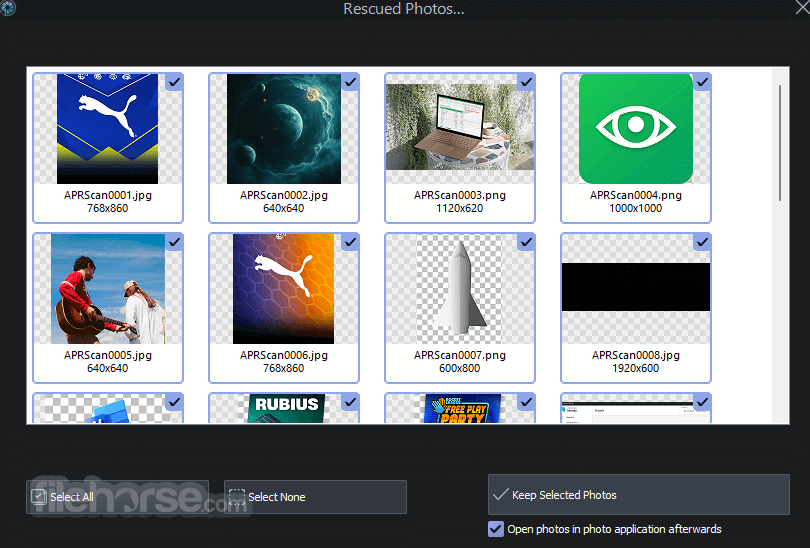
- Preview Found Photos – Check the recovered images in the preview panel.
- Select Images to Recover – Mark the photos you want to restore.
- Choose a Save Location – Select a safe folder (preferably a different drive) to restore the images.
- Click Recover – Press the "Recover" button to restore selected photos.
- Verify Recovered Files – Open the saved images to ensure they were successfully recovered.
- Backup Your Photos – Save your images in multiple locations to prevent future loss.
Alternatives
PhotoRec: Developed by the same author, Photorec is focused solely on file recovery and lacks TestDisk's partition recovery features.
Recoverit: A popular alternative for Windows users, offering a user-friendly interface and robust file recovery capabilities.
R-Studio: A comprehensive data recovery software with advanced features suitable for both novice and expert users.
Disk Drill: Known for its intuitive interface and extensive file recovery options, Disk Drill is available for both Windows and macOS.
EaseUS Data Recovery Wizard: Offers a wizard-based approach to data recovery, making it accessible to users of all skill levels.
Recuva: User-friendly software to recover deleted files from Windows computers, recycle bins, digital camera cards, or MP3 players.
Requirements
Operating System: Windows® 11, 10
An Internet connection is required to activate the program. The program license is verified repeatedly at regular intervals.
PROS
- User-Friendly Interface
- Fast Recovery Process
- Supports Multiple File Formats
- Preview Before Recovery
- Automatic Deep Scan Option
- Limited Free Version Features
- No Advanced Editing Tools
- Occasional Scan Inaccuracies
- Lacks Cloud Integration
- High Resource Usage
Download Ashampoo Photo Recovery Latest Version Why is this app published on FileHorse? (More info)
##
畫面截圖


- 2025-05-28 Ashampoo Photo Recovery 3.0.0 10.2 MB
- 2017-04-12 Ashampoo Photo Recovery 1.0.5 8.83 MB