
ASUS GPU Tweak III 2.1.6.0
v 2.1.6.0
Windows
免費軟體
6.9/10 (53)
- 目前版本2.1.6.0
- 更新日期2026-08-08
- 檔案大小113.26 MB
- 檔案名稱GPU Tweak III Install.exe
- 作業系統Windows 10 / Windows 11
- 支援語系English
- 授權型式免費軟體
- 開發商 Asus
- 軟體分類Windows 軟體 / 系統優化
##
編輯短評
ASUS GPU Tweak III 是華碩推出的顯示卡調校工具,主要讓玩家與硬體愛好者能針對 NVIDIA 與 AMD 顯示卡進行效能最佳化,包含超頻、電壓與風扇曲線等進階設定。它最大的辨識度在於介面比前代更直覺,同時強化監控功能與穩定性,官方也持續提供更新,屬於同類工具中長期維護的熱門選擇,評價普遍不錯。
這套軟體適合想嘗試超頻但不想碰複雜指令的玩家,無論新手或老手都能透過圖形化介面調整參數,並即時觀察溫度與時脈。與其他通用系統優化工具相比,它專注在顯示卡本身,功能更深入,但僅支援 Windows 且介面為英文,使用前需留意主機板或顯示卡相容性;授權為免費,可直接下載使用。
##
翻譯排程處理中,以下暫以英文原文呈現
軟體介紹
ASUS GPU Tweak III is a powerful PC utility designed for enthusiasts and gamers who want to optimize their graphics card performance. Developed by ASUS, this software offers advanced monitoring and tweaking capabilities for users looking to get the most out of their NVIDIA and AMD GPUs.
GPU Tweak III builds upon the success of its predecessors with a more intuitive interface, enhanced features, and improved stability.
Whether you're an overclocking veteran or a novice looking to experiment with your GPU settings, it provides the tools you need to push your hardware to the limit.
Key Features
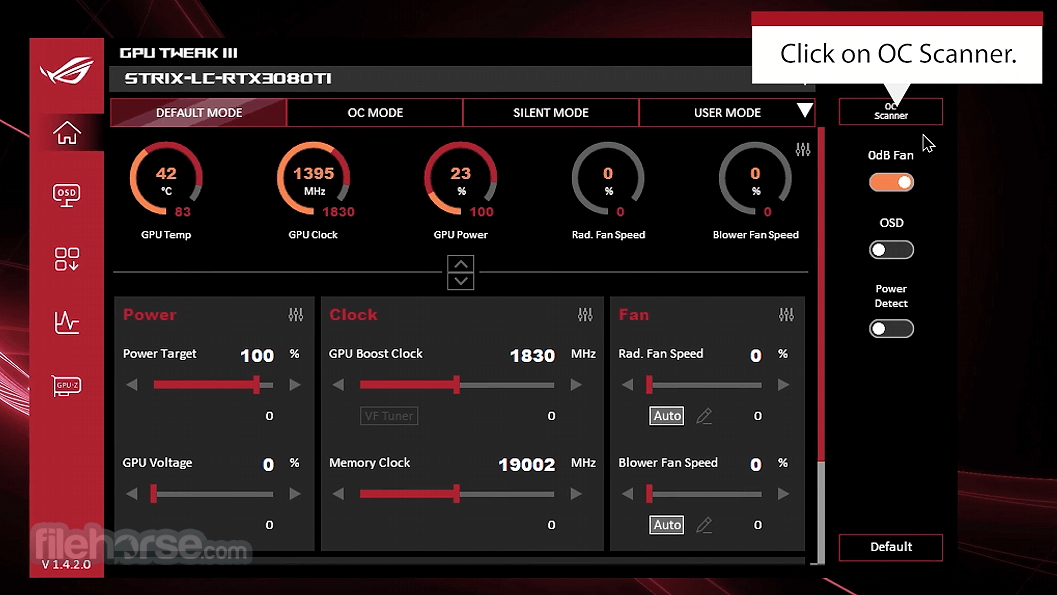
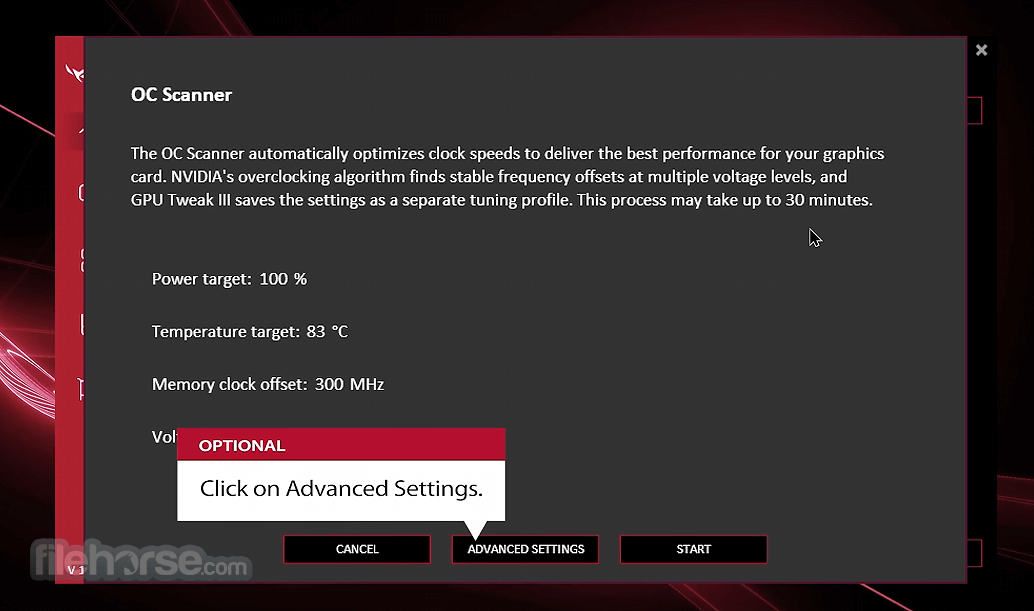
One-Click Overclocking: It includes a "One-Click Overclocking" feature, allowing users to automatically tune their GPU settings for optimal performance with minimal effort. This feature is particularly useful for those who are new to overclocking and want a safe and easy way to boost their GPU’s performance.
Advanced Tuning Options: For experienced users, the software offers detailed control over GPU settings, including core clock, memory clock, voltage, and fan speeds. These can be adjusted manually to fine-tune performance and stability.
Real-Time Monitoring: It provides real-time monitoring of GPU parameters, such as temperature, clock speeds, voltage, and fan speed. This information is displayed in a customizable on-screen display (OSD), which can be overlaid on your games and applications.
Customizable Profiles: Users can create and switch between multiple profiles, each with its own unique settings. This allows for quick adaptation to different scenarios, such as gaming, video rendering, or power-saving modes.
Fan Control: The software includes an advanced fan control module, enabling users to set custom fan curves or choose from pre-defined profiles to balance noise and cooling performance.
Gaming Booster: This feature helps free up system resources by shutting down unnecessary processes and services, allocating more resources to your game for smoother performance.
Aura Sync Integration: For users with ASUS Aura Sync compatible hardware, it allows synchronization of RGB lighting effects across devices, providing a cohesive aesthetic for your gaming setup.
User Interface
The user interface of ASUS GPU Tweak III has been redesigned to be more intuitive and user-friendly compared to its predecessor.
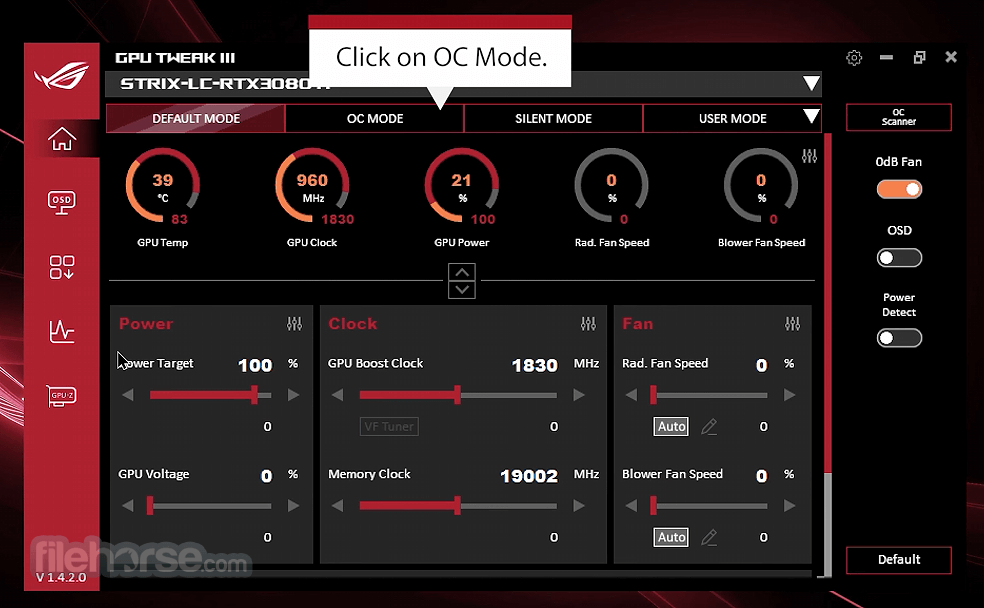
The main dashboard provides a clear overview of your GPU’s status, with key metrics like temperature, clock speeds, and usage displayed prominently. Navigation is straightforward, with tabs for monitoring, overclocking, fan control, and profile management.
The settings menu is easily accessible, allowing users to configure the software to their liking. Overall, the UI is clean, modern, and designed to accommodate both novice and advanced users.
What`s New
The app now boasts a redesigned interface that prioritizes essential functions, while the VF Tuner has been revamped to simplify manual overclocking.
Exclusive features like 0dB fan technology have been upgraded with automatic profile switching and session logging for enhanced monitoring. Additionally, you can now track more system stats using the plugin and personalize GT3 with customizable interface backgrounds and colors.
Installation and Setup
Download: Visit the official ASUS website or FileHorse and download the installer for this tool. Make sure to select the correct version for your GPU (NVIDIA or AMD).
Installation: Run the installer and follow the on-screen instructions. You may need to restart your PC after installation.
Initial Setup: Upon launching the software for the first time, it will perform an initial scan of your system to detect your GPU and apply default settings. You can then proceed to create custom profiles or start using the one-click overclocking feature.
Driver Updates: It's recommended to update your GPU drivers to the latest version before using the software, as this can help prevent compatibility issues.
How to Use
Basic Overclocking:
Is ASUS GPU Tweak III compatible with non-ASUS GPUs?
While the software is optimized for ASUS GPUs, it can work with other brands as well, but some features may be limited.
Can GPU Tweak III damage my graphics card?
Overclocking always carries some risk, but the software includes safety measures like temperature and voltage limits to reduce the risk of damage.
How can I reset to default settings?
Click the “Default” button in the overclocking tab to revert all changes.
Why is the fan speed not changing?
Make sure the “Fan Auto” mode is disabled and that you have selected a custom fan profile.
Does GPU Tweak III support multiple GPUs?
Yes, the software supports multiple GPUs, but overclocking settings must be applied individually for each GPU.
Alternatives
MSI Afterburner: A popular alternative offering similar overclocking and monitoring capabilities with extensive customization options.
EVGA Precision X1: Tailored for EVGA graphics cards, this software provides robust overclocking features and real-time monitoring.
AMD Radeon Software: For AMD GPU users, this software provides built-in overclocking, monitoring, and performance tuning.
NVIDIA Inspector: A lightweight tool offering basic overclocking and monitoring features for NVIDIA GPUs.
Pricing
This program is available as a FREE download from the ASUS website.
There are no paid versions or additional costs for unlocking features, making it an accessible tool for all ASUS GPU users.
System Requirements
ASUS GPU Tweak III is a comprehensive tool for both novice and advanced users looking to optimize their graphics card performance. With its combination of user-friendly design, advanced overclocking features, and robust monitoring capabilities, it’s an excellent choice for ASUS GPU owners.
While it may not be as versatile as some competitors when used with non-ASUS hardware, it remains a powerful and accessible option for enhancing your gaming and computing experience.
Download ASUS GPU Tweak III Latest Version Why is this app published on FileHorse? (More info)
GPU Tweak III builds upon the success of its predecessors with a more intuitive interface, enhanced features, and improved stability.
Whether you're an overclocking veteran or a novice looking to experiment with your GPU settings, it provides the tools you need to push your hardware to the limit.
Key Features
One-Click Overclocking: It includes a "One-Click Overclocking" feature, allowing users to automatically tune their GPU settings for optimal performance with minimal effort. This feature is particularly useful for those who are new to overclocking and want a safe and easy way to boost their GPU’s performance.
Advanced Tuning Options: For experienced users, the software offers detailed control over GPU settings, including core clock, memory clock, voltage, and fan speeds. These can be adjusted manually to fine-tune performance and stability.
Real-Time Monitoring: It provides real-time monitoring of GPU parameters, such as temperature, clock speeds, voltage, and fan speed. This information is displayed in a customizable on-screen display (OSD), which can be overlaid on your games and applications.
Customizable Profiles: Users can create and switch between multiple profiles, each with its own unique settings. This allows for quick adaptation to different scenarios, such as gaming, video rendering, or power-saving modes.
Fan Control: The software includes an advanced fan control module, enabling users to set custom fan curves or choose from pre-defined profiles to balance noise and cooling performance.
Gaming Booster: This feature helps free up system resources by shutting down unnecessary processes and services, allocating more resources to your game for smoother performance.
Aura Sync Integration: For users with ASUS Aura Sync compatible hardware, it allows synchronization of RGB lighting effects across devices, providing a cohesive aesthetic for your gaming setup.
User Interface
The user interface of ASUS GPU Tweak III has been redesigned to be more intuitive and user-friendly compared to its predecessor.
The main dashboard provides a clear overview of your GPU’s status, with key metrics like temperature, clock speeds, and usage displayed prominently. Navigation is straightforward, with tabs for monitoring, overclocking, fan control, and profile management.
The settings menu is easily accessible, allowing users to configure the software to their liking. Overall, the UI is clean, modern, and designed to accommodate both novice and advanced users.
What`s New
The app now boasts a redesigned interface that prioritizes essential functions, while the VF Tuner has been revamped to simplify manual overclocking.
Exclusive features like 0dB fan technology have been upgraded with automatic profile switching and session logging for enhanced monitoring. Additionally, you can now track more system stats using the plugin and personalize GT3 with customizable interface backgrounds and colors.
Installation and Setup
Download: Visit the official ASUS website or FileHorse and download the installer for this tool. Make sure to select the correct version for your GPU (NVIDIA or AMD).
Installation: Run the installer and follow the on-screen instructions. You may need to restart your PC after installation.
Initial Setup: Upon launching the software for the first time, it will perform an initial scan of your system to detect your GPU and apply default settings. You can then proceed to create custom profiles or start using the one-click overclocking feature.
Driver Updates: It's recommended to update your GPU drivers to the latest version before using the software, as this can help prevent compatibility issues.
How to Use
Basic Overclocking:
- Open this app and navigate to the “Overclocking” tab.
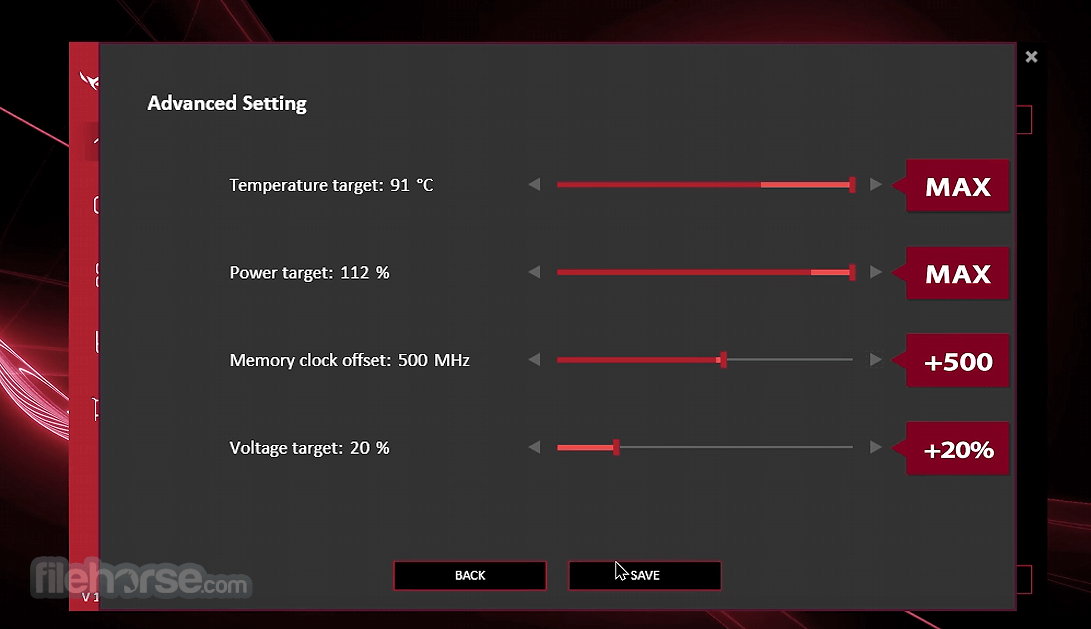
- Use the sliders to adjust the core clock, memory clock, and voltage.
- Click “Apply” to activate the new settings.
- Click on the “OC Mode” button in the main dashboard.
- The software will automatically adjust settings for optimal performance.
- Go to the “Profile” tab and click “Add New.”
- Customize the GPU settings, fan speed, and RGB lighting.
- Save the profile and switch between profiles as needed.
- Open the “Monitor” tab to view real-time data.
- Customize the OSD settings to display GPU metrics while gaming.
- Navigate to the “Fan” tab.
- Adjust the fan curve manually or choose a pre-defined profile.
Is ASUS GPU Tweak III compatible with non-ASUS GPUs?
While the software is optimized for ASUS GPUs, it can work with other brands as well, but some features may be limited.
Can GPU Tweak III damage my graphics card?
Overclocking always carries some risk, but the software includes safety measures like temperature and voltage limits to reduce the risk of damage.
How can I reset to default settings?
Click the “Default” button in the overclocking tab to revert all changes.
Why is the fan speed not changing?
Make sure the “Fan Auto” mode is disabled and that you have selected a custom fan profile.
Does GPU Tweak III support multiple GPUs?
Yes, the software supports multiple GPUs, but overclocking settings must be applied individually for each GPU.
Alternatives
MSI Afterburner: A popular alternative offering similar overclocking and monitoring capabilities with extensive customization options.
EVGA Precision X1: Tailored for EVGA graphics cards, this software provides robust overclocking features and real-time monitoring.
AMD Radeon Software: For AMD GPU users, this software provides built-in overclocking, monitoring, and performance tuning.
NVIDIA Inspector: A lightweight tool offering basic overclocking and monitoring features for NVIDIA GPUs.
Pricing
This program is available as a FREE download from the ASUS website.
There are no paid versions or additional costs for unlocking features, making it an accessible tool for all ASUS GPU users.
System Requirements
- OS: Windows 11, 10, 8 or 7 (64-bit)
- GPU: ASUS or compatible NVIDIA/AMD GPUs
- RAM: 4 GB minimum
- Storage: 200 MB available space
- Internet Connection: Required for updates and online features
- User-friendly interface with advanced options for enthusiasts.
- Real-time monitoring and customizable OSD.
- One-click overclocking for beginners.
- Free to use with no hidden costs.
- Limited support for non-ASUS GPUs.
- Occasional stability issues reported with certain driver versions.
- Can be overwhelming for complete beginners.
ASUS GPU Tweak III is a comprehensive tool for both novice and advanced users looking to optimize their graphics card performance. With its combination of user-friendly design, advanced overclocking features, and robust monitoring capabilities, it’s an excellent choice for ASUS GPU owners.
While it may not be as versatile as some competitors when used with non-ASUS hardware, it remains a powerful and accessible option for enhancing your gaming and computing experience.
Download ASUS GPU Tweak III Latest Version Why is this app published on FileHorse? (More info)
##
影片介紹
##
畫面截圖
- 2026-08-08 ASUS GPU Tweak III 2.1.6.0 113.26 MB
- 2026-06-25 ASUS GPU Tweak III 2.1.4.0 113.18 MB
- 2026-06-18 ASUS GPU Tweak III 2.1.3.3 113.18 MB
- 2026-05-05 ASUS GPU Tweak III 2.1.1.7 107.94 MB
- 2026-03-23 ASUS GPU Tweak III 2.1.0.2 107.12 MB
- 2026-01-27 ASUS GPU Tweak III 2.0.8.5 107.09 MB
- 2025-12-20 ASUS GPU Tweak III 2.0.7.3 107.14 MB
- 2025-09-13 ASUS GPU Tweak III 2.0.3.2 106.22 MB