⚠ 這是歷史版本頁面 — 查看 Core Temp 最新版本 →

- 目前版本1.17.1
- 更新日期2021-04-12
- 檔案大小1.22 MB
- 檔案名稱Core-Temp-setup.exe
- 作業系統Windows 7 / Windows 8 / Windows 10 / Windows 11
- 支援語系English
- 授權型式免費軟體
- 開發商 Arthur Liberman
- 軟體分類Windows 軟體 / 系統優化
##
編輯短評
Core Temp 是一款专为 Windows 平台设计的处理器温度监控工具,核心功能是实时侦测 CPU 每个核心的温度,并随系统负载变化即时显示波动。它的最大辨识度在于能逐一呈现每颗核心的热状态,且不依赖特定主板,兼容性广泛,操作上既简单又提供高度自定义选项。这款软件体积轻巧、占用资源少,自推出以来持续更新,维护相当活跃,在同类工具中评价普遍不错,是监控 CPU 温度的热门选择。
Core Temp 适合超频玩家、系统维护者或任何需要掌握电脑负载时热状态的人,尤其在执行高负载任务或排查过热问题时,它能提供即时数据。相较于 FileHippo App Manager 或 Glary Utilities 这类多功能系统优化工具,Core Temp 更专注单一功能,取舍在于功能单纯但深度足够,适合追求轻量解决方案的用户。它是免费软件,仅支持 Windows 平台,介面为英文,中文用户可能需要适应,但整体而言,若你需要可靠且不占资源的温度监控,这款工具值得一试。
##
翻譯排程處理中,以下暫以英文原文呈現
軟體介紹
Core Temp is a compact, no-fuss, small-footprint, yet powerful program to monitor processor temperature and other vital information. What makes Core Temp unique is the way it works.
It is capable of displaying the temperature of each core of every processor in your system! You can see temperature fluctuations in real time with varying workloads. Core Temp is also motherboard-agnostic. The app is easy to use, while also enabling a high level of customization and expandability.
Its primary function is to monitor the temperature of your computer's processor (CPU) in real-time, providing crucial information about thermal performance and power consumption.
What makes this tool unique is its ability to display temperature readings for each core of your processor, allowing users to see precise temperature data on a granular level. It also supports most modern x86 processors, making it compatible with a broad range of CPUs from Intel, AMD, and VIA.
The tool is widely used by system builders, overclockers, and everyday users who want to keep their hardware safe from overheating or performance throttling. Its small size and efficient design mean it runs with minimal system impact, offering peace of mind without draining resources.
Features
Real-Time CPU Temperature Monitoring: The program tracks each core's temperature in real time, making it easy to see potential thermal spikes that could indicate issues like dust buildup, failing fans, or thermal paste degradation.
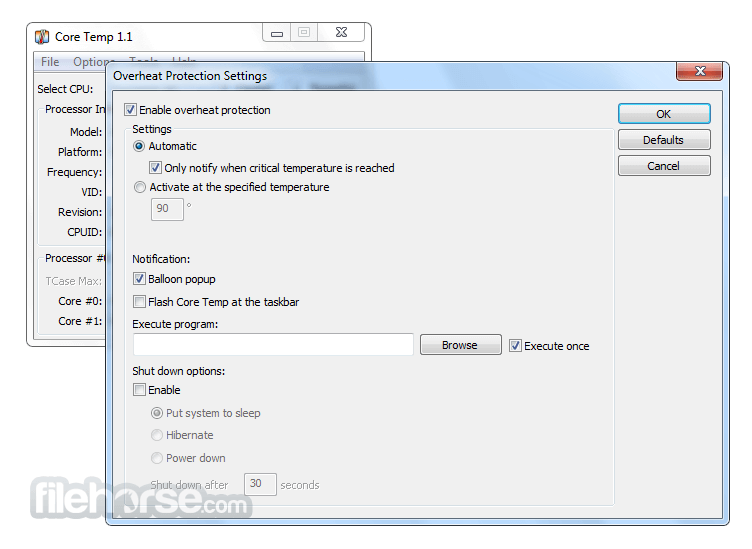
Overheat Protection: It comes with customizable overheat protection. Users can set warning notifications when temperatures hit dangerous levels, giving them a chance to resolve issues before damage occurs.
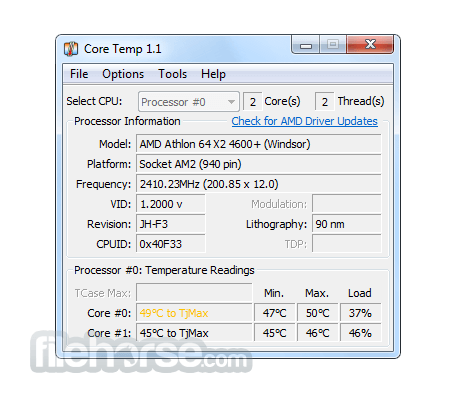
Detailed Processor Information: It provides detailed information about your processor, including model, platform, frequency, and CPUID. This data is particularly useful for system builders and overclockers.
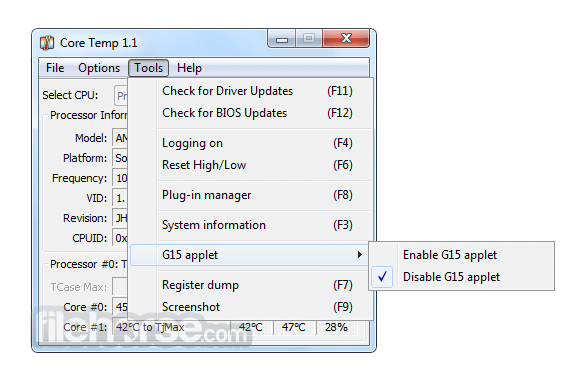
Logging and Reporting: It can log temperature data, allowing you to review historical records of your CPU's thermal performance over time. This feature is especially helpful for those performing hardware stress tests or trying to diagnose performance bottlenecks.
Plugin Support: The app supports additional plugins, such as Core Temp Grapher, which visualizes temperature data in graph form over time. It’s a handy feature for users who prefer visual representations of performance metrics.
Supported AMD Processors:
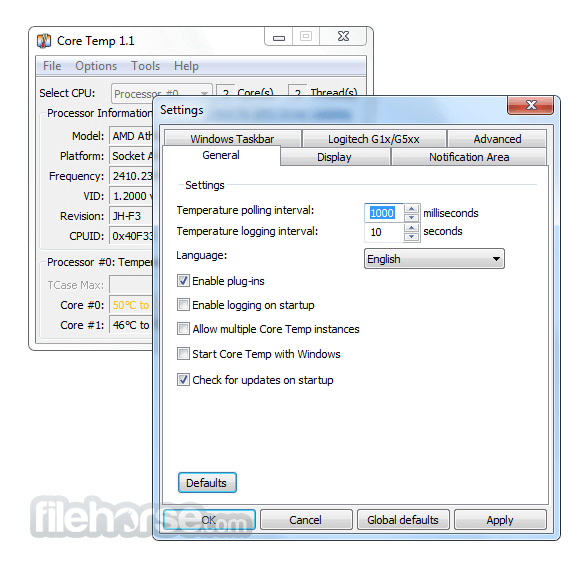
Core Temp’s interface is simple and straightforward. The main window displays core temperatures for each CPU thread, with details like load percentages and power consumption listed below.
It uses color-coded numbers to help users quickly identify problem areas (e.g., red for dangerously high temperatures). Users can also view CPU model, platform type, and frequency in the same window, making this tool both compact and information-dense.
The tool's design favors function over form, making it easy to navigate but not visually flashy. Advanced users will appreciate the minimalistic design, but beginners may initially find it lacking in polish compared to more modern software.
Nevertheless, its simplicity ensures that there are no unnecessary distractions, letting users focus solely on the critical temperature data.
Installation and Setup
Basic Monitoring: After launching this app, the software will automatically begin monitoring your CPU's temperature. The core temperatures are displayed in real-time, and you can minimize the app to the system tray, where it will continue to run in the background.
Overheating Alerts: To enable overheat protection, go to the "Options" menu, then to "Overheat Protection," and set a threshold temperature. When the CPU exceeds this limit, it can either display a warning or execute an action, like putting your computer to sleep.
Temperature Logging: If you want to log temperature data over time, go to "File" > "Log File," select a destination, and choose how frequently the software should record temperature data.
Plugins: Users who prefer graphical data representations can install plugins like Core Temp Grapher. These are available on the official website under the "Add-ons" section.
FAQ
Is Core Temp compatible with all CPUs?
It supports modern x86 processors, including Intel, AMD, and VIA processors. For older CPUs, check the compatibility list on the official website.
Does Core Temp affect system performance?
No, the tool is designed to be lightweight and consumes minimal system resources.
How accurate is Core Temp’s temperature reading?
The app pulls temperature data directly from the processor's Digital Thermal Sensor (DTS), so the readings are highly accurate.
Can Core Temp display temperatures in Fahrenheit?
Yes, you can switch between Celsius and Fahrenheit in the "Options" menu.
What happens if the CPU reaches its thermal limit?
Core Temp's overheat protection will trigger, and the software can execute a predefined action, such as shutting down the system, to prevent damage.
Alternatives
HWMonitor - A popular hardware monitoring tool that tracks not only CPU temperature but also voltages, fan speeds, and other hardware statistics.
Open Hardware Monitor - An open-source alternative that tracks CPU, GPU, and motherboard temperature, along with voltage and fan speed.
Speccy - Developed by the makers of CCleaner, Speccy offers an in-depth look at your PC’s hardware, including temperature monitoring for various components.
AIDA64 - A comprehensive system information and diagnostics tool, AIDA64 offers more advanced features but comes with a price tag.
Pricing
The program is FREE to use, though it is occasionally bundled with third-party software during installation. Users should pay attention to the installer to avoid unwanted programs.
System Requirements
Download Core Temp Latest Version Why is this app published on FileHorse? (More info)
It is capable of displaying the temperature of each core of every processor in your system! You can see temperature fluctuations in real time with varying workloads. Core Temp is also motherboard-agnostic. The app is easy to use, while also enabling a high level of customization and expandability.
Its primary function is to monitor the temperature of your computer's processor (CPU) in real-time, providing crucial information about thermal performance and power consumption.
What makes this tool unique is its ability to display temperature readings for each core of your processor, allowing users to see precise temperature data on a granular level. It also supports most modern x86 processors, making it compatible with a broad range of CPUs from Intel, AMD, and VIA.
The tool is widely used by system builders, overclockers, and everyday users who want to keep their hardware safe from overheating or performance throttling. Its small size and efficient design mean it runs with minimal system impact, offering peace of mind without draining resources.
Features
Real-Time CPU Temperature Monitoring: The program tracks each core's temperature in real time, making it easy to see potential thermal spikes that could indicate issues like dust buildup, failing fans, or thermal paste degradation.
Overheat Protection: It comes with customizable overheat protection. Users can set warning notifications when temperatures hit dangerous levels, giving them a chance to resolve issues before damage occurs.
Detailed Processor Information: It provides detailed information about your processor, including model, platform, frequency, and CPUID. This data is particularly useful for system builders and overclockers.
Logging and Reporting: It can log temperature data, allowing you to review historical records of your CPU's thermal performance over time. This feature is especially helpful for those performing hardware stress tests or trying to diagnose performance bottlenecks.
Plugin Support: The app supports additional plugins, such as Core Temp Grapher, which visualizes temperature data in graph form over time. It’s a handy feature for users who prefer visual representations of performance metrics.
Supported AMD Processors:
- All FX series.
- All APU series.
- All Phenom / Phenom II series.
- All Athlon II series.
- All Turion II series.
- All Athlon64 series.
- All Athlon64 X2 series.
- All Athlon64 FX series.
- All Turion64 series.
- All Turion64 X2 series.
- All Sempron series. (K8 and up based)
- All Opteron processors.
- Single Core Opterons starting with SH-C0 revision and up. (K8-based)
- All Core i3, i5, i7 series.
- All Atom processors.
- All Core Solo series.
- All Core Duo series.
- All Core 2 Duo series.
- All Core 2 Quad series.
- All Core 2 Extreme series.
- All Celeron-M 400 and 500 series.
- All Celeron series.
- All Pentium series.
- All Xeon (Core-based) processors.
Core Temp’s interface is simple and straightforward. The main window displays core temperatures for each CPU thread, with details like load percentages and power consumption listed below.
It uses color-coded numbers to help users quickly identify problem areas (e.g., red for dangerously high temperatures). Users can also view CPU model, platform type, and frequency in the same window, making this tool both compact and information-dense.
The tool's design favors function over form, making it easy to navigate but not visually flashy. Advanced users will appreciate the minimalistic design, but beginners may initially find it lacking in polish compared to more modern software.
Nevertheless, its simplicity ensures that there are no unnecessary distractions, letting users focus solely on the critical temperature data.
Installation and Setup
- Download the setup file from the official website or FileHorse.
- Double-click the downloaded file to begin the installation process.
- Follow the on-screen prompts, ensuring that you decline any third-party software offers (Core Temp’s installer occasionally includes bundled software).
- Once installed, launch this app. You’ll immediately see your processor's temperature data displayed on the main window.
- There’s little configuration needed for basic use. However, advanced users can customize various options under the "Options" tab, such as setting the temperature polling intervals or enabling overheating protection notifications.
Basic Monitoring: After launching this app, the software will automatically begin monitoring your CPU's temperature. The core temperatures are displayed in real-time, and you can minimize the app to the system tray, where it will continue to run in the background.
Overheating Alerts: To enable overheat protection, go to the "Options" menu, then to "Overheat Protection," and set a threshold temperature. When the CPU exceeds this limit, it can either display a warning or execute an action, like putting your computer to sleep.
Temperature Logging: If you want to log temperature data over time, go to "File" > "Log File," select a destination, and choose how frequently the software should record temperature data.
Plugins: Users who prefer graphical data representations can install plugins like Core Temp Grapher. These are available on the official website under the "Add-ons" section.
FAQ
Is Core Temp compatible with all CPUs?
It supports modern x86 processors, including Intel, AMD, and VIA processors. For older CPUs, check the compatibility list on the official website.
Does Core Temp affect system performance?
No, the tool is designed to be lightweight and consumes minimal system resources.
How accurate is Core Temp’s temperature reading?
The app pulls temperature data directly from the processor's Digital Thermal Sensor (DTS), so the readings are highly accurate.
Can Core Temp display temperatures in Fahrenheit?
Yes, you can switch between Celsius and Fahrenheit in the "Options" menu.
What happens if the CPU reaches its thermal limit?
Core Temp's overheat protection will trigger, and the software can execute a predefined action, such as shutting down the system, to prevent damage.
Alternatives
HWMonitor - A popular hardware monitoring tool that tracks not only CPU temperature but also voltages, fan speeds, and other hardware statistics.
Open Hardware Monitor - An open-source alternative that tracks CPU, GPU, and motherboard temperature, along with voltage and fan speed.
Speccy - Developed by the makers of CCleaner, Speccy offers an in-depth look at your PC’s hardware, including temperature monitoring for various components.
AIDA64 - A comprehensive system information and diagnostics tool, AIDA64 offers more advanced features but comes with a price tag.
Pricing
The program is FREE to use, though it is occasionally bundled with third-party software during installation. Users should pay attention to the installer to avoid unwanted programs.
System Requirements
- Operating System: Windows 7, 8, 10, and 11 (32-bit and 64-bit).
- Processor: Modern x86 CPUs (Intel, AMD, VIA).
- Memory: 512 MB or more.
- Storage: Less than 2 MB.
- Lightweight and minimal system resource usage.
- Real-time temperature monitoring with core-specific data.
- Customizable overheating protection.
- Supports most modern processors.
- Free to use.
- Lack of official support and updates.
- No graphical data visualization by default.
- The interface may feel outdated for some users.
- Occasionally bundled with unwanted third-party software during installation.
Download Core Temp Latest Version Why is this app published on FileHorse? (More info)
##
畫面截圖
- 2026-05-03 Core Temp 1.20.1 1.61 MB
- 2026-04-05 Core Temp 1.20.0 1.61 MB
- 2025-10-19 Core Temp 1.19.5 1.54 MB
- 2023-09-25 Core Temp 1.18.1 1.23 MB
- 2022-12-05 Core Temp 1.18.0 1.23 MB
- 2021-04-12 Core Temp 1.17.1 1.22 MB
- 2021-04-04 Core Temp 1.17 1.22 MB
- 2020-08-09 Core Temp 1.16 1.2 MB