⚠ 這是歷史版本頁面 — 查看 Corsair Utility Engine - iCUE 最新版本 →

Corsair Utility Engine - iCUE 4.28.177
v 4.28.177
Windows
免費軟體
7.2/10 (72)
- 目前版本4.28.177
- 更新日期2022-09-22
- 檔案大小1.1 GB
- 檔案名稱iCUESetup_4.28.177_release.msi
- 作業系統Windows 10 (64-bit) / Windows 11
- 支援語系English
- 授權型式免費軟體
- 開發商 CORSAIR
- 軟體分類Windows 軟體 / 系統優化
##
編輯短評
Corsair Utility Engine(iCUE)是 CORSAIR 自家推出的硬體管理工具,主要用來統一控制旗下鍵盤、滑鼠、耳機、水冷散熱器等周邊裝置。它最有辨識度的特色,是能針對每顆 RGB 燈光做細部調整,同時也提供按鍵重設、巨集錄製與效能監控等功能,讓玩家不必為了不同裝置安裝多套軟體。這套工具自推出以來持續獲得品牌用戶關注,目前仍維持更新,但頻率不算密集;在系統優化分類中屬於中段班的熱門選擇,評價人數不多,整體評價中等偏上。
如果你手上有好幾款 CORSAIR 的周邊,iCUE 幾乎是必裝的整合中樞,尤其適合喜歡把燈效同步到整台主機的玩家。與 FileHippo App Manager、Rufus 或 Glary Utilities 這類通用系統工具相比,iCUE 的定位完全不同,它無法取代那些軟體,但能提供其他工具做不到的硬體深度控制。需要注意的是,它僅支援 Windows 平台,介面目前只有英文,且必須搭配 CORSAIR 自家裝置才能發揮完整功能;若你只用單一裝置,也可以考慮安裝,但得接受它佔用一定系統資源。
##
翻譯排程處理中,以下暫以英文原文呈現
軟體介紹
Corsair used to have a reputation for only creating RAM modules. But in recent years, they’ve expanded into the market of gaming peripherals. Now they’re one of the leaders of installing RBG lighting in all kinds of electronic devices.
Corsair’s peripherals have a reputation for allowing you to customize virtually all aspects of their appearance and functionality. It gives you a complete application that lets you manage every device you have.
Easy-to-use Management Tool
Ever since the Corsair Gaming brand launched, it has gained a lot of popularity. It can be utilized to advertise several different kinds of devices, such as keyboards, mice, mousepads, and headsets. Each one of these devices is designed specifically for gamers.
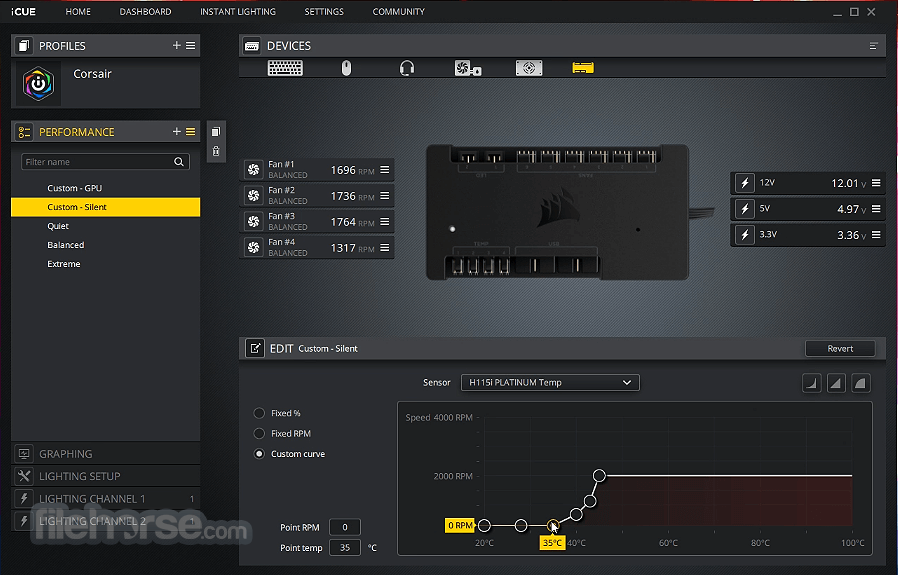
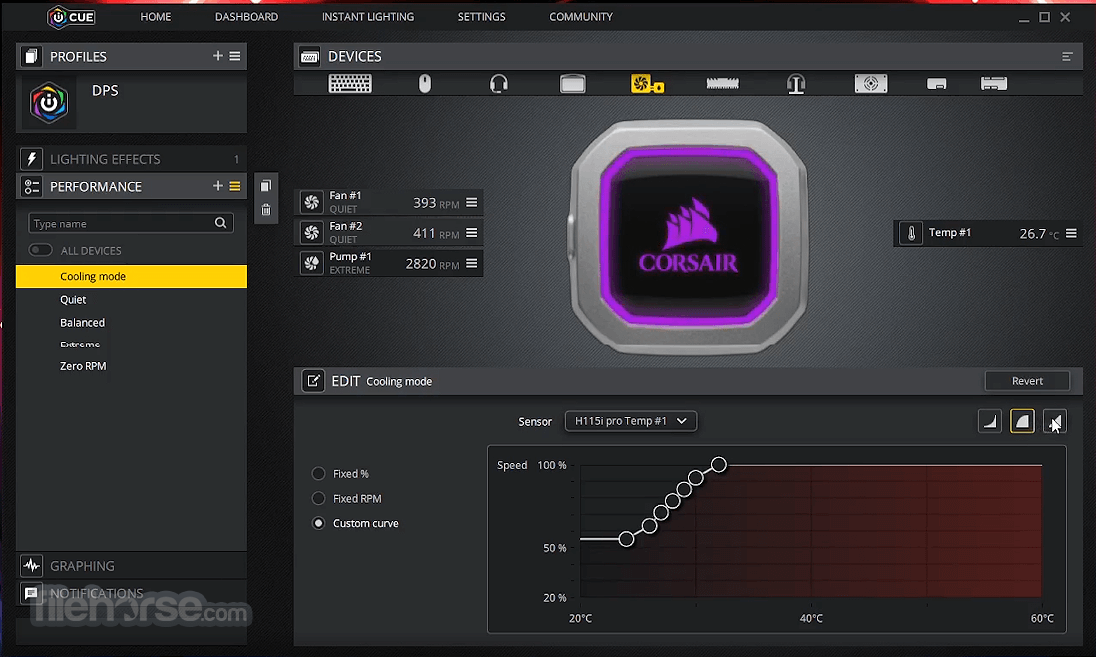
With all these peripherals to organize, the Corsair Utility Engine - iCUE lets you manage them in one location by creating profiles for them. That way, a separate preset will be established for each peripheral. Then, instead of having to change the settings of the device, you can quickly select the preset of that device.
Helpful Configuration Options
This utility offers so many advanced customization options. For example, when you’re configuring your macros, the utility will record things like clicks, keys pressed, scrolling, mouse movement, and delays.
With iCUE, virtually any type of lighting effect can be created. This is a big reason that people select this device to use. To simplify things, the advanced mode should be disabled. There are many popular effects to choose from which have fewer customization choices.
Several DPI ranges may be established for your mouse. As for your Corsair headset, the application gives you the ability to create equalizer presets for it. You can also manage them too with the application.
Total Personalization and Control Over Your Corsair Branded Peripherals
Corsair Utility Engine - iCUE is one of the best peripheral management applications available. Even novices will have an easy time accessing and using it.
The utility gives you so many customization choices for your devices, such as control over its look and behavior. And if you want to find your way around without much effort, then you’ll love its GUI feature.
How to Use
OS: Windows 10 or Windows 11 (latest updates recommended)
CPU: Intel Core i3 or AMD equivalent
RAM: 4 GB minimum
Storage: 1 GB available disk space
USB: At least one free USB 2.0/3.0 port
Internet: Required for software updates
PROS
Download Corsair Utility Engine - iCUE Latest Version Why is this app published on FileHorse? (More info)
Corsair’s peripherals have a reputation for allowing you to customize virtually all aspects of their appearance and functionality. It gives you a complete application that lets you manage every device you have.
Easy-to-use Management Tool
Ever since the Corsair Gaming brand launched, it has gained a lot of popularity. It can be utilized to advertise several different kinds of devices, such as keyboards, mice, mousepads, and headsets. Each one of these devices is designed specifically for gamers.
With all these peripherals to organize, the Corsair Utility Engine - iCUE lets you manage them in one location by creating profiles for them. That way, a separate preset will be established for each peripheral. Then, instead of having to change the settings of the device, you can quickly select the preset of that device.
Helpful Configuration Options
This utility offers so many advanced customization options. For example, when you’re configuring your macros, the utility will record things like clicks, keys pressed, scrolling, mouse movement, and delays.
With iCUE, virtually any type of lighting effect can be created. This is a big reason that people select this device to use. To simplify things, the advanced mode should be disabled. There are many popular effects to choose from which have fewer customization choices.
Several DPI ranges may be established for your mouse. As for your Corsair headset, the application gives you the ability to create equalizer presets for it. You can also manage them too with the application.
Total Personalization and Control Over Your Corsair Branded Peripherals
Corsair Utility Engine - iCUE is one of the best peripheral management applications available. Even novices will have an easy time accessing and using it.
The utility gives you so many customization choices for your devices, such as control over its look and behavior. And if you want to find your way around without much effort, then you’ll love its GUI feature.
How to Use
- Install the iCUE software on your Windows PC
- Launch iCUE and detect connected Corsair devices
- Customize RGB lighting profiles and effects
- Create and assign macros to devices
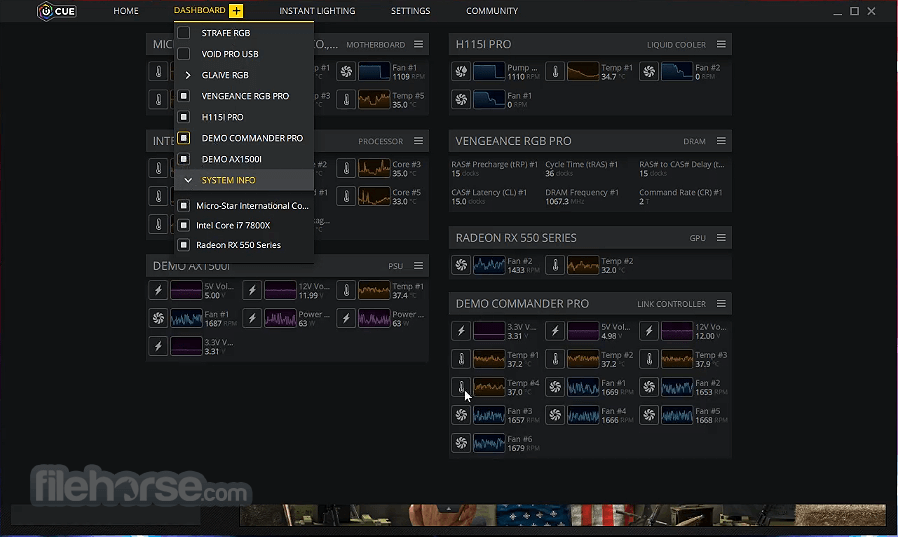
- Monitor system temps and performance metrics
- Sync lighting across multiple Corsair devices
- Save profiles to onboard memory (if supported)
- Update firmware through the iCUE interface
- Back up and export iCUE profiles
OS: Windows 10 or Windows 11 (latest updates recommended)
CPU: Intel Core i3 or AMD equivalent
RAM: 4 GB minimum
Storage: 1 GB available disk space
USB: At least one free USB 2.0/3.0 port
Internet: Required for software updates
PROS
- Powerful device customization options
- Advanced RGB lighting control
- Real-time hardware monitoring
- Profile syncing across devices
- User-friendly interface design
- High RAM usage during operation
- Occasional device detection issues
- Software updates may cause bugs
- Limited compatibility with non-Corsair gear
Download Corsair Utility Engine - iCUE Latest Version Why is this app published on FileHorse? (More info)
##
畫面截圖
- 2026-08-08 Corsair Utility Engine - iCUE 5.49.34 3.2 MB
- 2023-01-31 Corsair Utility Engine - iCUE 4.33.138 1.1 GB
- 2023-01-07 Corsair Utility Engine - iCUE 4.32.129 1.1 GB
- 2022-12-07 Corsair Utility Engine - iCUE 4.31.168 1.1 GB
- 2022-12-03 Corsair Utility Engine - iCUE 4.30.162 1.1 GB
- 2022-09-22 Corsair Utility Engine - iCUE 4.28.177 1.1 GB
- 2022-09-13 Corsair Utility Engine - iCUE 4.28.174 1.1 GB
- 2022-08-16 Corsair Utility Engine - iCUE 4.27.168 1 GB