- 目前版本2026.1.77
- 更新日期2026-05-25
- 作業系統Windows 7 / Windows 8 / Windows 10 / Windows 11
- 支援語系English
- 授權型式未分類
- 開發商 Devart
- 軟體分類Windows 軟體 / 開發者工具
##
翻譯排程處理中,以下暫以英文原文呈現
軟體介紹
dbForge Studio for MySQL is a universal GUI tool for MySQL and MariaDB database development, management, and administration.
The IDE allows you to create and execute queries, develop and debug stored routines, automate database object management, analyze table data via an intuitive interface.
The MySQL client delivers data and schema comparison and synchronization tools, database reporting tools, backup options with scheduling, and much more.
Database Development
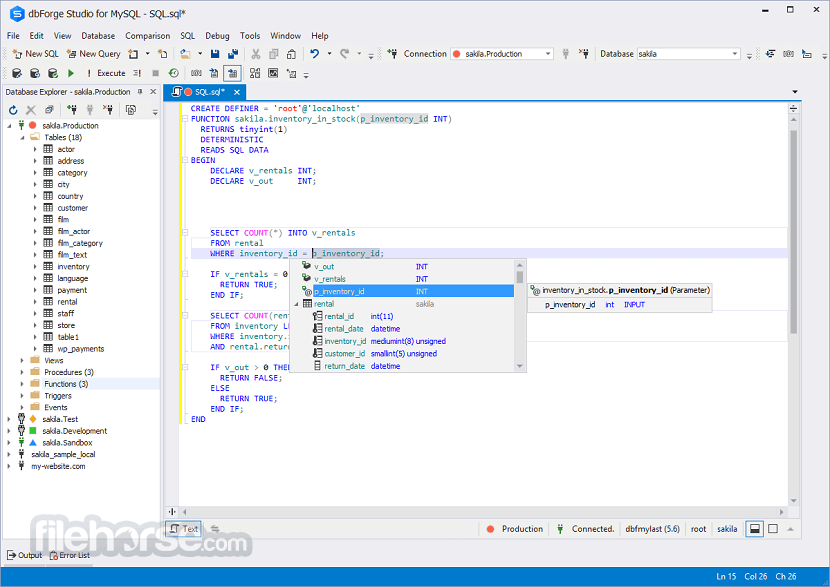
The building, editing, and running queries, as well as measuring and optimizing query performance get much simpler with the following functionality: MySQL Code Completion, SQL code formatting, SQL syntax check, MySQL Debugger, and Query Profiler.
Database Design
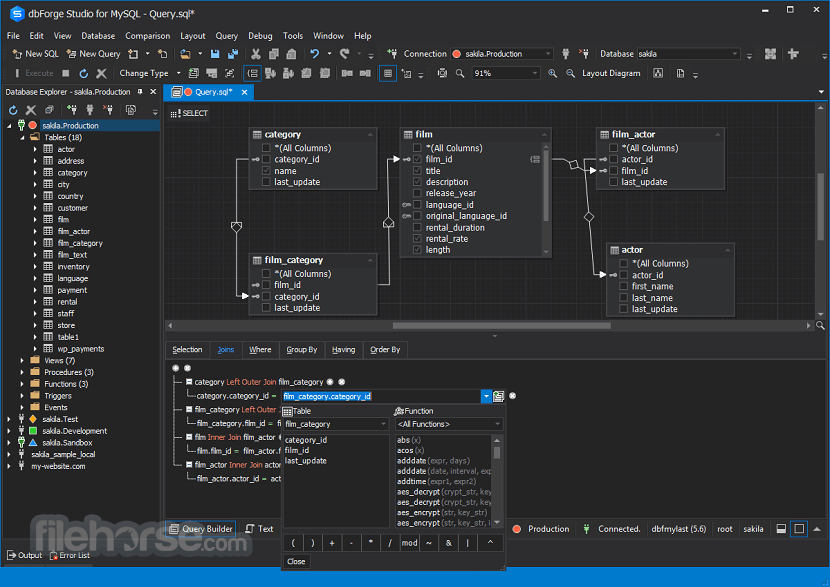
Database design tools allow users to create a database diagram, objects, projects, as well as to compare and synchronize database schemas efficiently and in a user-friendly interface. Download dbForge Studio for MySQL for PC now!
Database Administration
With these features, users can manage their accounts, set up permissions, monitor open sessions, and their activity, as well as perform table maintenance. In addition, it is possible to back up and restore databases to/from a backup file.
Data Reports and Analysis
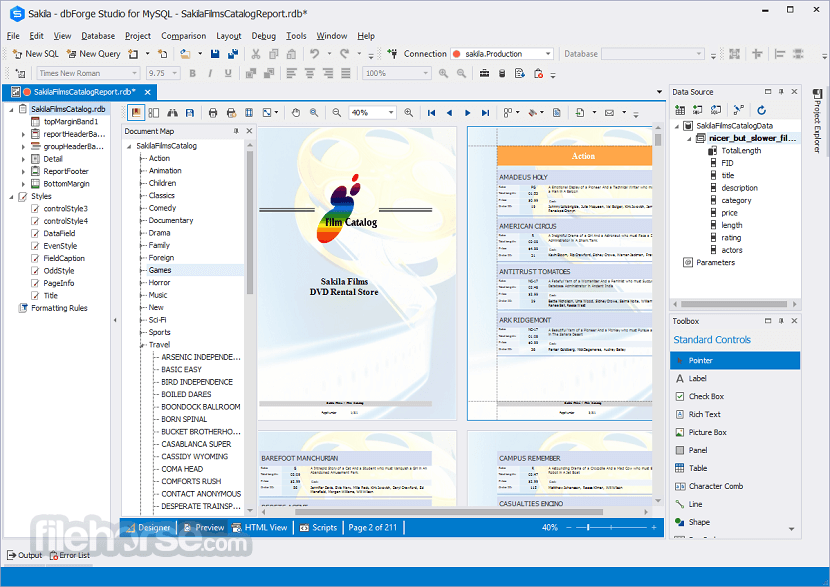
The creation of data reports and pivot tables, as well as data comparison and synchronization, may take much time and effort while your work can be more productive using the following features.
What’s New
Features and Highlights
dbForge Studio for MySQL offers four editions to cater to various needs:
Enterprise ($29.95/month)
Full-featured edition with advanced tools for database design, development, and administration, including source control, extensive data analysis, and automated reporting.
Professional ($19.95/month)
Advanced features edition with robust coding, development, and data export/import capabilities.
Standard ($9.95/month)
Essential features edition for basic database management and development.
Express (Free)
Basic functionality for lightweight usage.
Features range from coding assistance and visual query building to data export, schema comparison, and cloud integration.
Requirements and compatibility
Microsoft Windows 7/8/8.1/10/11
.NET Framework is pre-installed in Microsoft Windows 7/8/8.1/10/11.
Services Compatibility
StrongDM
Compatibility:
Database version compatibility:
SSL/SSH for secure data transmission
Cloud platform support:
Download dbForge Studio for MySQL Latest Version Why is this app published on FileHorse? (More info)
The IDE allows you to create and execute queries, develop and debug stored routines, automate database object management, analyze table data via an intuitive interface.
The MySQL client delivers data and schema comparison and synchronization tools, database reporting tools, backup options with scheduling, and much more.
Database Development
The building, editing, and running queries, as well as measuring and optimizing query performance get much simpler with the following functionality: MySQL Code Completion, SQL code formatting, SQL syntax check, MySQL Debugger, and Query Profiler.
Database Design
Database design tools allow users to create a database diagram, objects, projects, as well as to compare and synchronize database schemas efficiently and in a user-friendly interface. Download dbForge Studio for MySQL for PC now!
Database Administration
With these features, users can manage their accounts, set up permissions, monitor open sessions, and their activity, as well as perform table maintenance. In addition, it is possible to back up and restore databases to/from a backup file.
Data Reports and Analysis
The creation of data reports and pivot tables, as well as data comparison and synchronization, may take much time and effort while your work can be more productive using the following features.
What’s New
- Connectivity support for MySQL 9.0
- Support for HeatWave-specific commands
- Support for Kamatera MySQL Cloud
- Redesigned Query History
- Database Diagrams: Quick selection of all relations
- Database Diagrams: Labeling of database objects with individual colors
- Data Editor: Copy Data As > CSV
- Data Editor: Copy Data As > EXCEL
- Data Generator: Append timestamp to the file name
- Generate Scripts: Include security permissions
- Generation of comparison reports from the command line
- Quick access to Devart Academy
Features and Highlights
- SQL Query Profiler
- Code Completion (MySQL Intellisense)
- Syntax Highlighting
- Visual Query Builder
- Quick Info about schema objects
- SQL Code Beautifier (code formatter)
- Automatic syntax check on the fly
- Database Diagram
- Schema Comparison and Sync
- The visual schema objects editor
- Object viewer for quick browsing of objects MySQL
- Server Variables Window
- Security Manager (manage user accounts and privileges)
- Session Manager
- Service Control for starting and stopping MySQL servers
- Table Maintenance Wizard and Flush Dialog
- Support for all MySQL server versions 3.23-5.x
- Support for all MariaDB server versions 5.5-10.0
- Secure connections via SSL/SSH
- HTTP connections via PHP tunnel
- Support for UTF-8 databases
- Work with MySQL embedded server
- Direct access to MySQL server without client libraries
- MySQL pluggable authentication and Windows authentication on connecting to MySQL server (PAM)
- Support for Windows authentication when creating a connection to MySQL server
- Working with MySQL on Amazon RDS and on Amazon Aurora
- Percona PAM Authentication for MySQL
- Sphinx Search Engine
dbForge Studio for MySQL offers four editions to cater to various needs:
Enterprise ($29.95/month)
Full-featured edition with advanced tools for database design, development, and administration, including source control, extensive data analysis, and automated reporting.
Professional ($19.95/month)
Advanced features edition with robust coding, development, and data export/import capabilities.
Standard ($9.95/month)
Essential features edition for basic database management and development.
Express (Free)
Basic functionality for lightweight usage.
Features range from coding assistance and visual query building to data export, schema comparison, and cloud integration.
Requirements and compatibility
Microsoft Windows 7/8/8.1/10/11
.NET Framework is pre-installed in Microsoft Windows 7/8/8.1/10/11.
Services Compatibility
StrongDM
Compatibility:
Database version compatibility:
- MySQL: Versions 5.5 to 8.3
- MariaDB: Versions 5.5 to 11.4
- Percona: Versions 5.5 to 8.1
- MySQL 9.0 Connectivity Support
SSL/SSH for secure data transmission
Cloud platform support:
- Amazon RDS and Amazon Aurora
- Azure MySQL
- Google Cloud Platform
- Alibaba Cloud
- Tencent Cloud
- Aiven Cloud
- DigitalOcean Managed Database
- Kamatera Performance Cloud
- Galera Cluster
- Sphinx Search Engine
- Oracle MySQL Database Service
- MySQL embedded server
- Support for AWS Identity and Access Management (IAM) database authentication
- HTTP connections via PHP tunnel
- Support for UTF-8 databases
- Direct access to MySQL server without client libraries
- Support for Windows authentication for MySQL server connections
- Support for MySQL pluggable authentication and Windows authentication for MySQL server connections using PAM, including Percona PAM Authentication for MySQL
- Intuitive and User-Friendly Interface
- Advanced Database Management Tools
- Comprehensive SQL Debugging Features
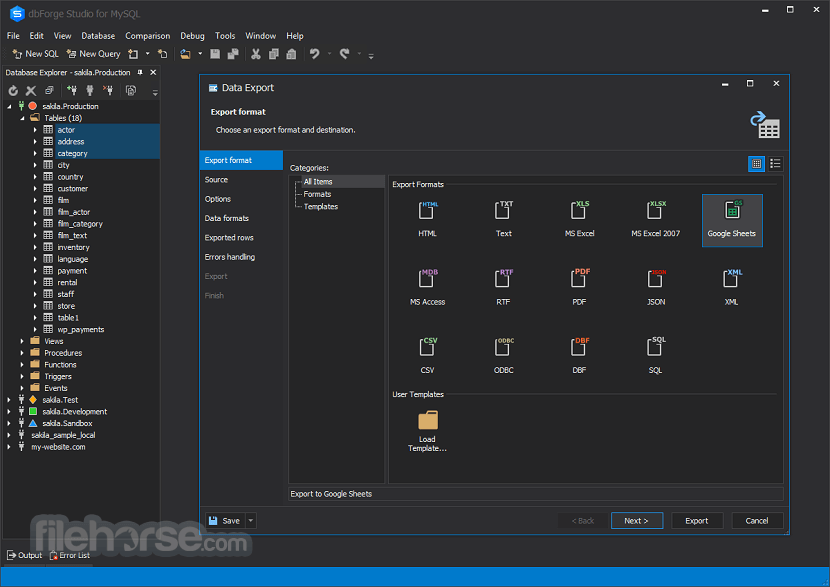
- Efficient Data Export and Import Options
- Powerful Query Building Capabilities
- Limited Free Edition Features
- Occasional Performance Lag
- Lack of Native Cloud Integration
- Steep Learning Curve for Beginners
Download dbForge Studio for MySQL Latest Version Why is this app published on FileHorse? (More info)
##
畫面截圖