⚠ 這是歷史版本頁面 — 查看 DiskGenius 最新版本 →

- 目前版本5.50
- 更新日期2023-03-14
- 檔案大小63.46 MB
- 檔案名稱DGEngSetup5501488.exe
- 作業系統Windows 7 / Windows 8 / Windows 10 / Windows 11
- 支援語系English
- 授權型式試用版
- 開發商 Eassos Ltd.
- 軟體分類Windows 軟體 / 系統優化
##
編輯短評
DiskGenius 是一款以分割區管理為核心的 Windows 工具,同時具備檔案救援能力,能在不同資料遺失情境下協助找回檔案。它最鮮明的特色是將分割區操作與資料復原整合在同一介面,可調整、分割、格式化或複製分割區,也能建立系統映像備份。這套軟體自 2019 年起持續收錄更新,近一年內仍有多次版本釋出,屬於活躍維護的產品;在同類工具中評價普遍不錯,雖非最熱門,但有一定使用者基礎。
它適合需要頻繁調整硬碟分割區、或遭遇誤刪檔案而想自行嘗試救援的 Windows 使用者。與 Rufus、Glary Utilities 等替代軟體相比,DiskGenius 的取捨在於功能更集中於分割區與資料救援,而非系統清理或開機碟製作,因此若你只需要單一用途,它可能略顯厚重。需留意的是,此版本為試用授權,且介面僅提供英文,對不熟悉英文操作介面的使用者來說,上手門檻會稍高一些。
##
翻譯排程處理中,以下暫以英文原文呈現
軟體介紹
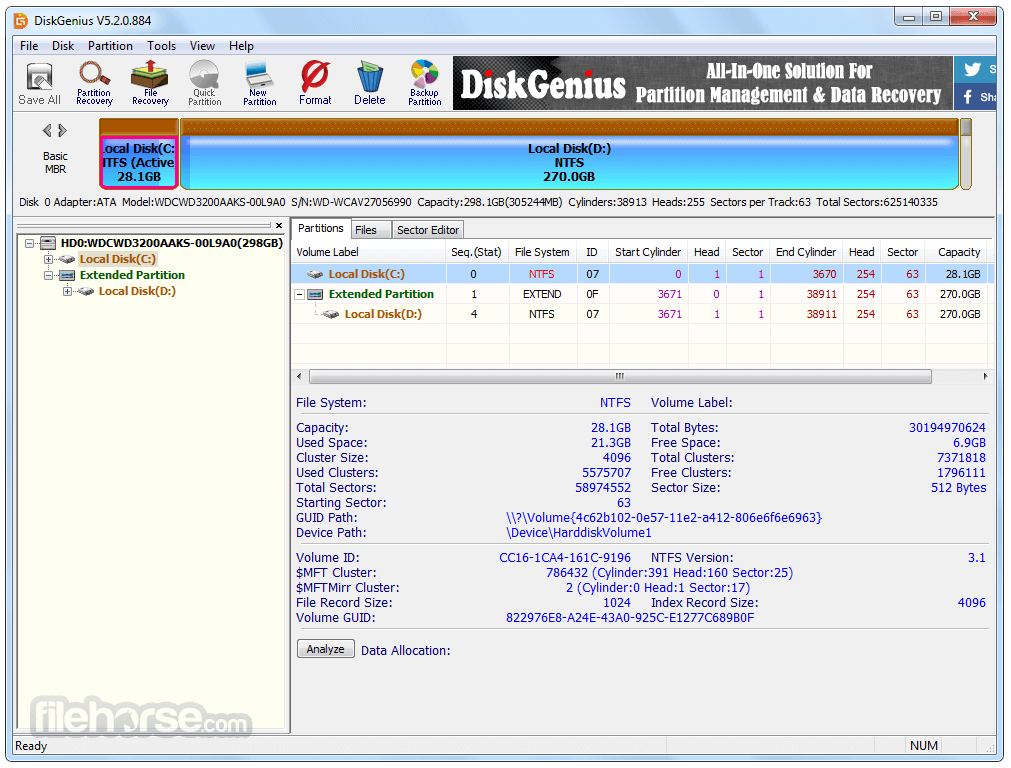
DiskGenius (formerly PartitionGuru) will recover your files in different data loss situations and get you out of trouble. DiskGenius is a full-featured partition manager, which is designed to optimize disk usage for Windows users.
It allows you to resize, extend, split, create, delete, format, hides, copy, and erase partition to maximize disk space use. Create a system image backup for current Windows with simple clicks to keep the operating system under protection!
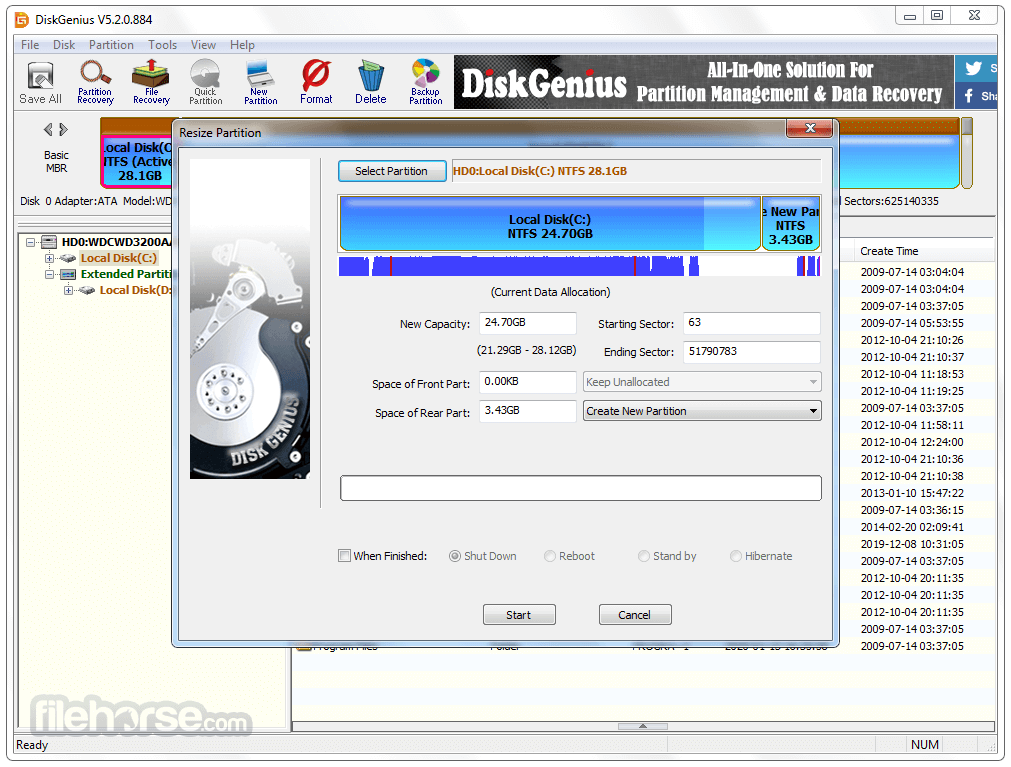
Safely and easily change the existing partition size or divide a partition into two smaller ones without losing any data. One-click partition a hard drive. It's very convenient to partition a new hard drive or repartition disk that contains partitions already.
Permanently erase existing and deleted data in a partition so that files cannot be recovered by any method well protecting sensitive data. Disk Genius can help you create and format a partition with the desired filesystem format.
It supports NTFS, exFAT, FAT32, FAT16, FAT12, EXT2, EXT3, and EXT4 file systems. Create a WinPE bootable disk and you can manage disk partition when a system crashes or there is no operating system on your computer.
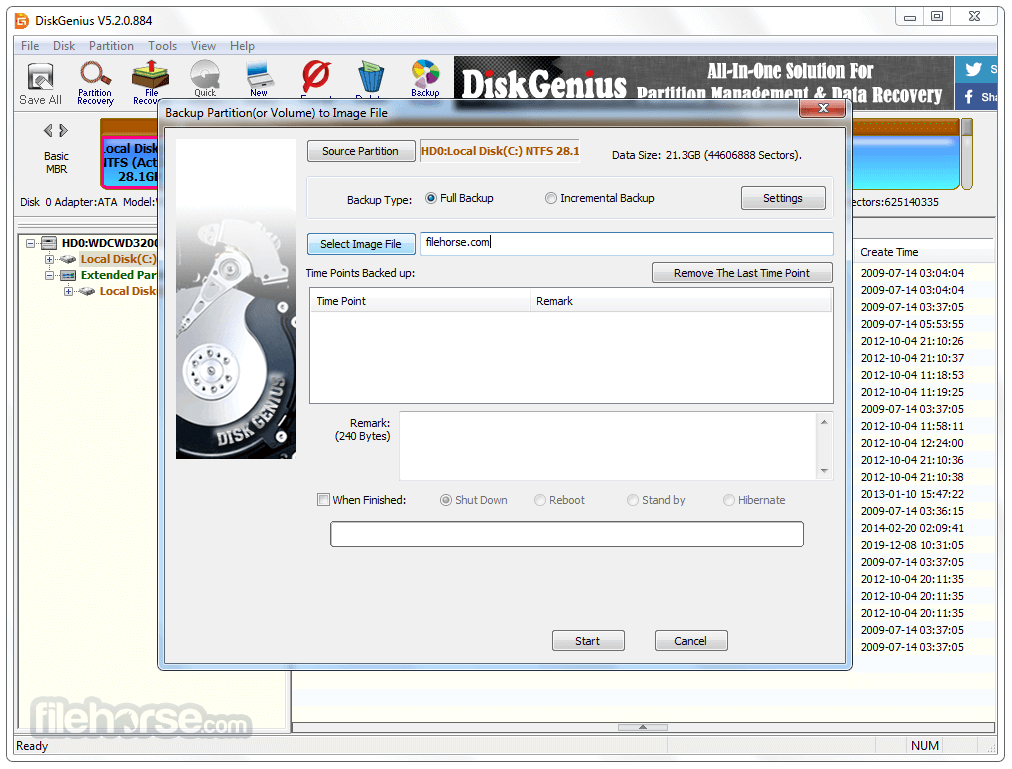
DiskGenius provides an all-in-one partition backup solution to fully protect your data against any potential risks.
Image Partition
Efficiently back up everything on partition into one compressed file via several clicks, so that you can restore data from the image file when data loss or disaster occurs.
Clone Partition
Copy all data from one partition to another without interrupting any running programs, assuring you a copy 100% identical to the original drive.
Browse image files
Browse and retrieve files in the image file without restoring partition, and copy desired files/folders to a target location.
Supported file systems
Support backing up partitions formatted as NTFS, exFAT, FAT32, FAT16, FAT12, Ext2, Ext3 and Ext4.
Features and Highlights
What`s New
Permanent File Deletion: If a partition cannot be locked after choosing "Delete Directory Entry," the software restarts into WinPE to complete the operation.
BitLocker Encryption: For operations like formatting, partition cloning, or disk cloning involving BitLocker-encrypted partitions:
Limitations: Resizing partitions within dynamic volumes is not supported.
USB disks now refresh correctly upon insertion.
Resolved display issues for exFAT and FAT32 partitions marked as damaged.
Fixed incorrect capacity display for USB drives with ISO partitions.
Alternatives
EaseUS Partition Master: A comprehensive partition management tool that allows users to effortlessly resize, merge, split, and format partitions. It also provides features like disk cloning and data recovery.
MiniTool Partition Wizard: A versatile partition management software offering a wide range of features, including partition resizing, conversion, and cloning. It supports various file systems and provides advanced options for disk optimization.
AOMEI Partition Assistant: A reliable partition manager with a user-friendly interface. It enables users to resize, merge, and split partitions easily. It also offers features like disk cloning, data migration, and OS migration.
Paragon Partition Manager: A powerful partition management solution with advanced features such as partition alignment, file system optimization, and secure disk wiping. It supports both basic and dynamic disks and provides comprehensive disk partitioning options.
Pricing
Standard
Personal License for 1 PC - $69.90
Includes essential features for everyday use, enabling users to recover lost data, manage disk partitions, and perform backups for partitions and hard drives.
Professional
Personal license for 1 PC - $ 99.90
Featuring a full suite of capabilities, including Load Current Partition Intelligently, access to Ext4/3/2 drives, BitLocker data recovery, RAID data recovery, and more.
System Requirements
DiskGenius is fully compatible with the latest Windows 11 and Windows Server 2022, designed to meet the needs of individuals, businesses, and enterprises alike.
PROS
Download DiskGenius Latest Version Why is this app published on FileHorse? (More info)
It allows you to resize, extend, split, create, delete, format, hides, copy, and erase partition to maximize disk space use. Create a system image backup for current Windows with simple clicks to keep the operating system under protection!
Safely and easily change the existing partition size or divide a partition into two smaller ones without losing any data. One-click partition a hard drive. It's very convenient to partition a new hard drive or repartition disk that contains partitions already.
Permanently erase existing and deleted data in a partition so that files cannot be recovered by any method well protecting sensitive data. Disk Genius can help you create and format a partition with the desired filesystem format.
It supports NTFS, exFAT, FAT32, FAT16, FAT12, EXT2, EXT3, and EXT4 file systems. Create a WinPE bootable disk and you can manage disk partition when a system crashes or there is no operating system on your computer.
DiskGenius provides an all-in-one partition backup solution to fully protect your data against any potential risks.
Image Partition
Efficiently back up everything on partition into one compressed file via several clicks, so that you can restore data from the image file when data loss or disaster occurs.
Clone Partition
Copy all data from one partition to another without interrupting any running programs, assuring you a copy 100% identical to the original drive.
Browse image files
Browse and retrieve files in the image file without restoring partition, and copy desired files/folders to a target location.
Supported file systems
Support backing up partitions formatted as NTFS, exFAT, FAT32, FAT16, FAT12, Ext2, Ext3 and Ext4.
Features and Highlights
- Provide basic partition operation include create a new partition, delete partition, hide partition. You can specify the detail parameters of partitions.
- Support many types of fixed disks such as IDE, SCSI, and SATA, etc. It also supports USB flash Disk, USB hard disk, memory card.
- Support the FAT12/FAT16/FAT32/NTFS file system.
- Can read files on the EXT2/EXT3 file system. Support Linux Logical Volume Management (LVM2).
- Support the GUID partition table style. Support GPT disks.
- Can quickly format FAT12/FAT16/FAT32/NTFS partitions. You can specify cluster size or select the option to compress the NTFS partition while formatting.
- Can browse any files in any supported partitions including hidden partitions, and also including the files that can not be accessed in the normal way. Even you can forcibly delete the files in supported partitions.
- Support assign or remove drive letters.
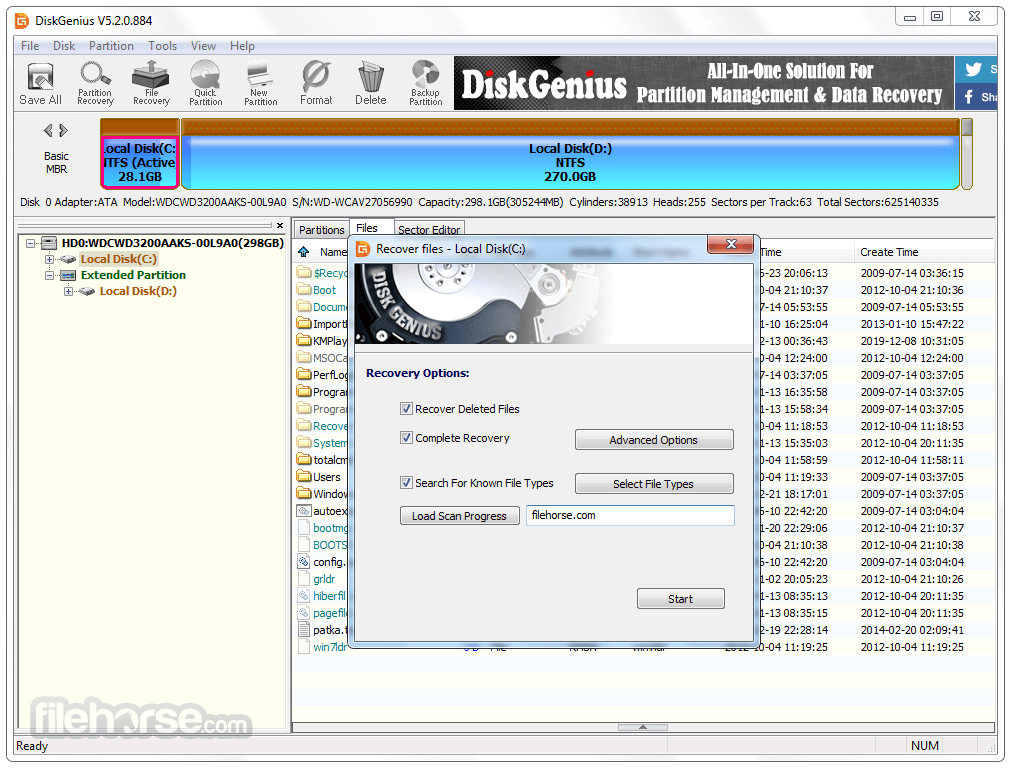
- Support deleted files recovery and recover files from formatted or inaccessible FAT12/FAT16/FAT32/NTFS partitions.
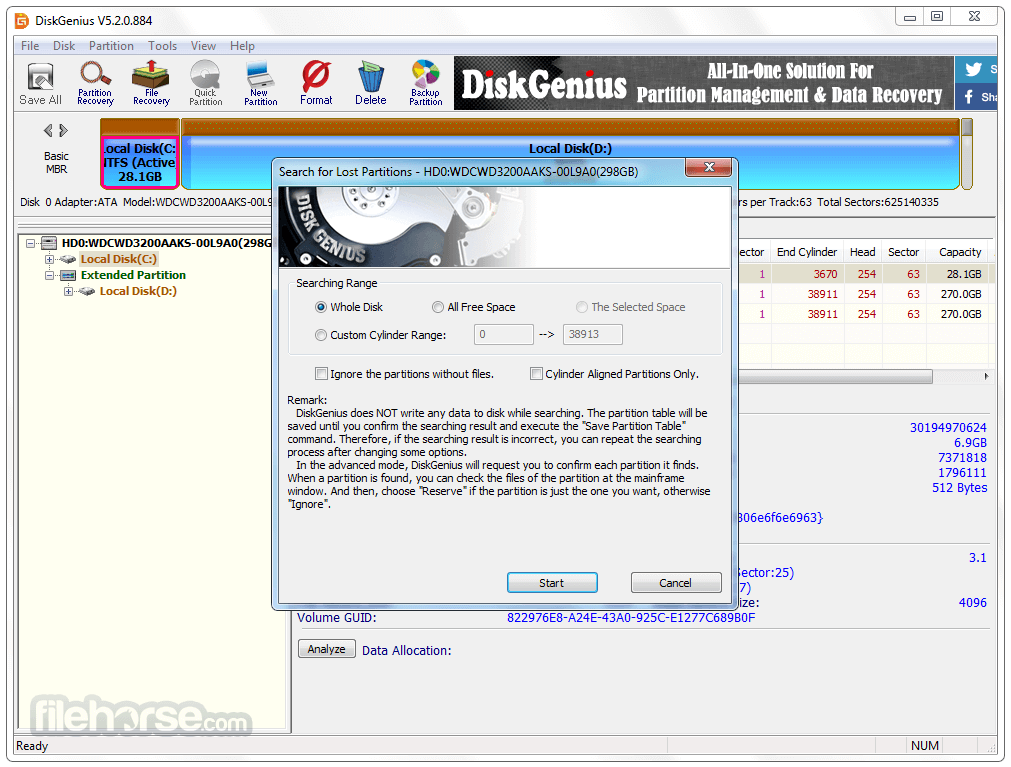
- Support lost partitions recovery (rebuild partition table). During the recovery operation, you can immediately see the files in the lost partitions. This is the best way to determine whether the partition found by Disk Genius is just you are looking for. Even you can recover lost files from the partition while the partition table is not saved to disk.
- Can backup partition table to a file or restore it from the file.
- Can backup whole partition to image file and restore partition from image file.
- Support copying partitions. Provide three copying modes include "Copy all sectors", "Copy all valid sectors" and "Copy all files".
- Support copying disks. Also, provide three copying modes like partitions copying.
- Support VMWare virtual disk file (".vmdk" file). Operate it like ordinary disks.
- Can copy files (from or to the virtual disk), recover lost files from the virtual disk file while the VMWare virtual machine is not running.
- Support ".img", ".ima" image file format.
- Support make USB-FDD and USB-ZIP mode bootable disk.
What`s New
Permanent File Deletion: If a partition cannot be locked after choosing "Delete Directory Entry," the software restarts into WinPE to complete the operation.
BitLocker Encryption: For operations like formatting, partition cloning, or disk cloning involving BitLocker-encrypted partitions:
- Encryption is temporarily disabled and restored afterward.
- Encryption is removed if necessary to ensure smooth execution.
Limitations: Resizing partitions within dynamic volumes is not supported.
USB disks now refresh correctly upon insertion.
Resolved display issues for exFAT and FAT32 partitions marked as damaged.
Fixed incorrect capacity display for USB drives with ISO partitions.
Alternatives
EaseUS Partition Master: A comprehensive partition management tool that allows users to effortlessly resize, merge, split, and format partitions. It also provides features like disk cloning and data recovery.
MiniTool Partition Wizard: A versatile partition management software offering a wide range of features, including partition resizing, conversion, and cloning. It supports various file systems and provides advanced options for disk optimization.
AOMEI Partition Assistant: A reliable partition manager with a user-friendly interface. It enables users to resize, merge, and split partitions easily. It also offers features like disk cloning, data migration, and OS migration.
Paragon Partition Manager: A powerful partition management solution with advanced features such as partition alignment, file system optimization, and secure disk wiping. It supports both basic and dynamic disks and provides comprehensive disk partitioning options.
Pricing
Standard
Personal License for 1 PC - $69.90
Includes essential features for everyday use, enabling users to recover lost data, manage disk partitions, and perform backups for partitions and hard drives.
Professional
Personal license for 1 PC - $ 99.90
Featuring a full suite of capabilities, including Load Current Partition Intelligently, access to Ext4/3/2 drives, BitLocker data recovery, RAID data recovery, and more.
System Requirements
DiskGenius is fully compatible with the latest Windows 11 and Windows Server 2022, designed to meet the needs of individuals, businesses, and enterprises alike.
PROS
- Comprehensive Disk Management Tools
- Data Recovery Capabilities
- Partition Backup and Restore
- User-Friendly Interface
- Supports Multiple File Systems
- Limited Features in Free Version
- Relatively High Pricing
- No MacOS Compatibility
- Occasional System Resource Usage
Download DiskGenius Latest Version Why is this app published on FileHorse? (More info)
##
畫面截圖
- 2026-05-26 DiskGenius 6.20 64.64 MB
- 2025-12-05 DiskGenius 6.11 62.44 MB
- 2025-10-30 DiskGenius 6.01 62.02 MB
- 2025-04-17 DiskGenius 6.00 58.81 MB
- 2024-08-16 DiskGenius 5.61 61.64 MB
- 2024-06-19 DiskGenius 5.60 61.33 MB
- 2023-08-01 DiskGenius 5.51 61.36 MB
- 2023-03-14 DiskGenius 5.50 63.46 MB