
- 軟體名稱EaseUS Todo PCTrans Free
- 目前版本9.8
- 更新日期2017-09-27
- 檔案大小9.15MB
- 檔案名稱pctrans.exe
- 作業系統Windows 7 / Windows 8 / Windows 10 / Windows 11
- 支援語系English
- 授權型式試用版
- 開發商 EaseUS
- 軟體分類Windows 軟體 / 備份還原
編輯短評
EaseUS Todo PCTrans Free 是一款專為 Windows 使用者設計的電腦資料遷移工具,旨在解決換新機時需將檔案備份至隨身碟或外接硬碟的繁瑣過程。它最顯著的特色在於能像搬家公司一樣,將重要文件、照片、音樂以及已安裝的程式直接傳送到新電腦中。該軟體經過長期維護且更新活躍,在同類工具中屬於評價穩定的選擇。
這款軟體適合需要快速將舊電腦資料轉移至新機的使用者,特別是希望省去重新安裝應用程式麻煩的情境。相較於單純的檔案壓縮或備份替代方案,它更側重於系統遷移的便捷性。使用者在下載前需留意,此版本為試用版且僅支援英文語系,請確認操作習慣是否適應。
軟體介紹
使用這款轉移工具,你再也無需手動將照片、音樂、影片、Office、PDF 文件或文字檔案載入儲存裝置,然後再貼到另一台電腦。只要輕鬆移動任何你想要的內容即可。
- 免費遷移 2 GB 資料與 5 個程式 - 全新功能!
- 在舊款與新款 Windows 電腦之間免費轉移資料、應用程式與帳戶。
- 無需重新安裝,即可將程式與軟體移至另一顆 HDD/SSD 或外接磁碟。
- 體驗 5-10 倍更快的有線連線,實現無縫的電腦對電腦資料傳輸。
換新電腦卻猶豫要不要重新安裝應用程式?升級到 Windows 10 或最新的 Windows 11?想從舊電腦複製你最愛的 Steam 遊戲?EaseUS Todo PCTrans Free 能幫你解決這些麻煩。
這款免費的電腦遷移軟體可以安全地將程式從一台電腦轉移到另一台電腦,並讓應用程式在 Windows 中繼續正常運作。它能批次移動軟體,而且不會遺漏任何項目。透過這種直接的電腦對電腦轉移,一切都不會改變。你不再需要在新裝置上重新下載應用程式,因為所有內容都會一次載入完成。
轉移帳戶與設定
你是否曾把舊電腦上的東西搬到新電腦,卻發現用起來不順手?你必須在新電腦上重新設定帳戶、密碼、個人檔案,並個人化桌面。
EaseUS 免費電腦轉移軟體可以在電腦之間遷移你的帳戶設定,包括使用者名稱、登入密碼、桌面個人化、電源設定,以及 C:\Users 中的其他使用者資料。如此一來,你只需簡單設定,就能無縫地繼續使用新電腦。
在 Windows 中轉移
EaseUS Todo PCTrans Free 可在執行相同版本 Windows 系統的兩台電腦之間進行安全轉移,或將資料從執行舊版 Windows 的電腦遷移到進階版 Windows 的電腦,例如從 Windows 7 遷移到 Windows 11。
- 從 32 位元轉移到 64 位元
- 從 Windows 10 遷移到 Windows 11
- 從 Windows 10 遷移到 Windows 10
- 從 Windows 8.1 遷移到 Windows 8.1/10/11
- 從 Windows 8 遷移到 Windows 8/8.1/10/11
- 從 Windows 7 遷移到 Windows 7/8/8.1/10/11
- 從 Windows XP 遷移到 Windows XP/Vista/7/8/8.1/10/11
- 從 Windows Vista 遷移到 Windows Vista/7/8/8.1/10/11
步驟 1:選擇透過網路連線進行轉移
在舊電腦與新電腦上同時執行應用程式,然後選取「PC to PC」轉移模式。
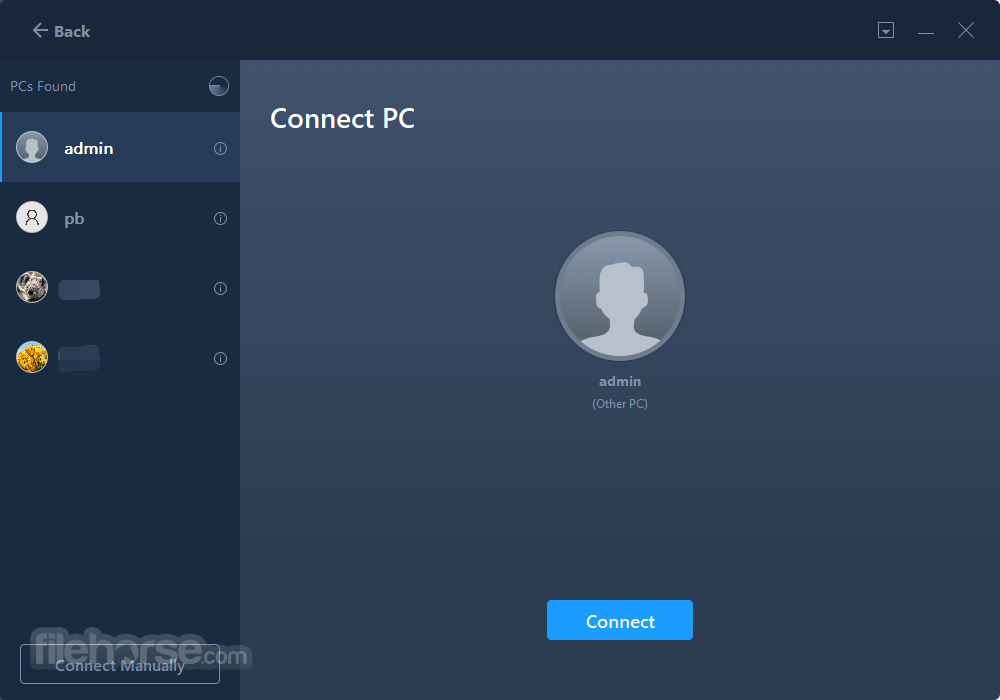
步驟 2:選擇要連線的電腦
產品會列出正在執行 EaseUS Todo PCTrans 的電腦。選取你要連線的電腦。
步驟 3:設定轉移方向
將一台電腦設定為來源電腦,並選取轉移方向。
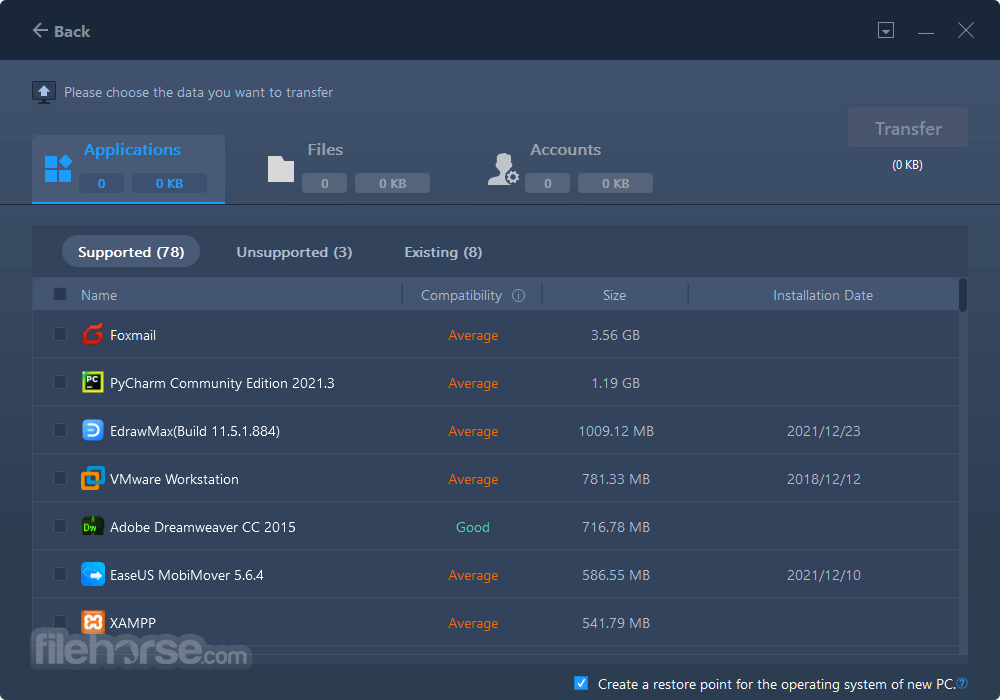
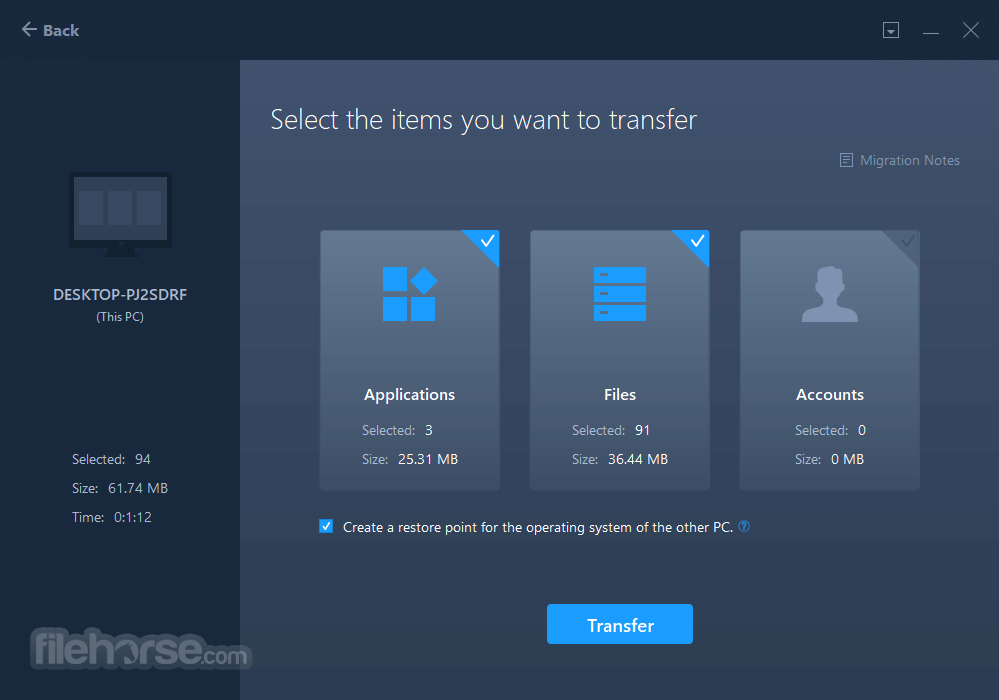
步驟 4:按一下進行轉移
編輯你想要轉移的內容,然後按一下「轉移」按鈕。
價格方案
免費方案
- 在兩台電腦或磁碟之間轉移2GB 檔案或資料夾。
- 轉移5 個程式(例如 Line、WhatsApp、Zoom 等)。
- 轉移使用者的帳戶與設定。
- 清理或移動磁碟上的 2GB 檔案。
- 解除安裝與修復應用程式。
- 免費技術支援。
- 在電腦與磁碟之間轉移無限量的資料與檔案。
- 轉移無限量的程式(例如 Office、Adobe 軟體、QuickBooks 等)。
- 轉移使用者的帳戶與設定。
- 清理 C 槽,移動無限量的大型檔案。
- 解除安裝與修復應用程式。
- 在本機磁碟之間轉移遊戲。
- 尋找 Windows 與 Office 產品金鑰,從故障電腦救援資料。
- 免費技術支援。
- 一份授權可用於 2 台電腦。
EaseUS Todo PCTrans 是免費的嗎?我應該在舊電腦還是新電腦上購買?
是的,EaseUS Todo PCTrans 有免費版本。免費版可轉移 2GB 資料與 5 個程式。如果你想享受無限轉移,可以升級到專業版。
我可以從 Windows 7/8/10 轉移到 Windows 11 嗎?
可以,這款 EaseUS 檔案轉移軟體完全支援。你可以將所有資料從舊電腦(Windows 7/8/8.1/10)轉移到更高版本的 Windows(Windows 11)。
替代方案
PCmover:在電腦之間遷移檔案、設定與使用者設定檔。
Acronis True Image:提供完整的備份與還原功能,包括電腦遷移能力,確保順利轉移到新電腦。
Clonezilla:一款開源的磁碟複製軟體,讓使用者能建立硬碟的精確副本,適合進階使用者。
更新內容
- 支援電腦之間的有線資料傳輸。
- 將 PC-PC、備份、救援整合到單一選單。
- 非核心功能整合到單一 UI 入口。
- 標準化單向連線流程。
- 改善還原時的磁碟辨識。
- Adobe 軟體
- Apple 應用程式
- Zoom
- Spotify
- AutoCAD
- Dropbox
- Google Chrome
- Microsoft Office
- McAfee
- Microsoft OneDrive
- Microsoft 365
- Youtube
- Netflix
- Windows Live
- 還有更多!
- Windows 11/10/8/7
- Windows Server 2022
- Windows Server 2019
- Windows Server 2016
- Windows Server 2012
- Windows Server 2008
- Windows Server 2003
- 簡單且使用者友善的介面
- 高效率的資料轉移工具
- 支援多種轉移模式
- 保留檔案完整性
- 相容於多種 Windows 版本
- 免費版功能有限
- 偶爾會出現轉移速度問題
- 不支援所有檔案類型
- 需要穩定的網路才能獲得最佳使用體驗
- 可能會略過某些程式設定
下載 EaseUS Todo PCTrans Free 最新版本 為什麼這個應用程式會發佈在 FileHorse 上?(更多資訊)
畫面截圖
4 張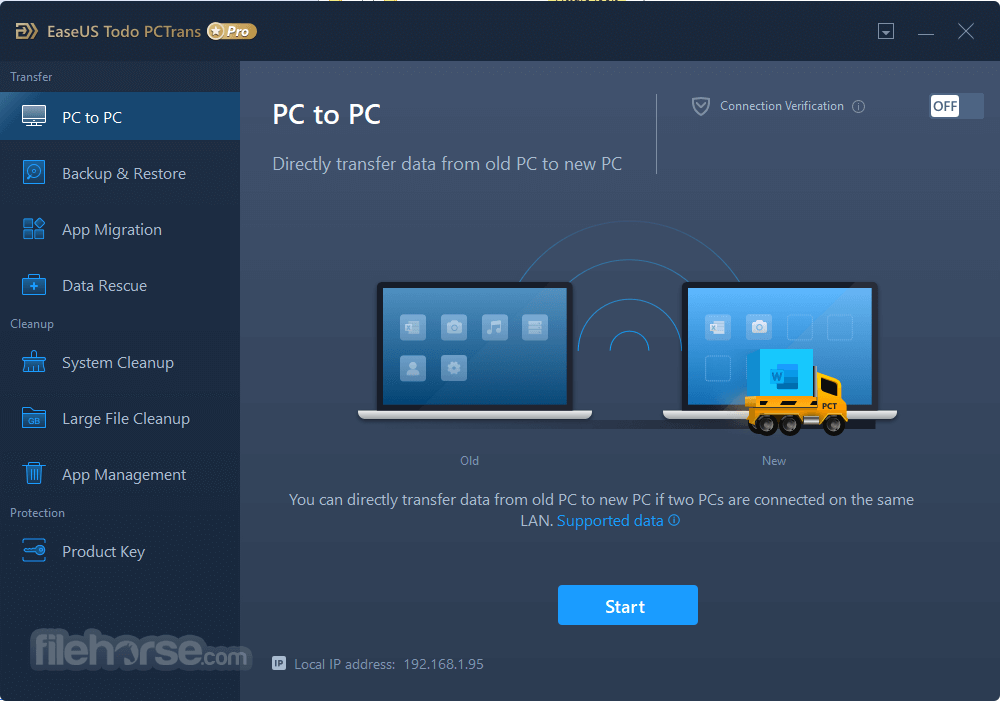

更新日誌
9.8EaseUS Todo PC Trans Free is basically a PC transfer app for people who want to transfer all their files from an old PC to a new one without the hassle of backing everything up to USB sticks, DVDs or external hard drives first.
The easiest way to describe EaseUS Todo PC Trans Free is to imagine it as being like a secure moving day truck for all your important documents, files, folders, photos, music and even installed programs and applications, one that takes care of all the headaches for you, and transports them all to your new computer.
EaseUS claim that EaseUS Todo PC Trans Free is ‘the best PC transfer assistant for Windows.’ Well, we can’t guarantee that you’ll agree with that, but we can guarantee that it works with Windows XP, Vista, 7, 8 and even 10. PC Trans also works if your new PC is Windows 10, and your old one in still stuck in the technological stone age of Windows XP.
All things considered, EaseUS Todo PC Trans Free is virtually effort free on your part to use, and the interface and step by step guide should let you transfer all your files and apps in a stress-free process. What PC Trans Free stops you from having to install every single program on your new PC one by one.
For PC Trans Free to work, you will need a LAN or patch cable hooked into both your old and new PC, and for PC Trans Free to be installed on both computers. You may also find that turning off your antivirus and firewalls will help. But that’s it. The rest should be relatively straightforward.
Key Features:
- Transfer files from one PC to another without having to back up the entire hard drive first.
- Works with Windows XP, Vista, 7, 8, 10.
- Simple setup and operation.
- Step by step guide.
- LAN cable is the only other accessory required.
EaseUS Todo PC Trans Free only has one catch, and that is the free of ‘trial version’ only lets you transfer two apps or programs for free, after that you have to pay. There is however no expiration date or time limit on the Free version, and you can transfer as many files as you want.
歷史版本
完整清單 →- 2025-11-18 EaseUS Todo PCTrans Free 14.2.3 1.5 MB
- 2018-12-20 EaseUS TODO PCTrans Free 10.0 for PC Windows 22.14MB
- 2018-12-20 EaseUS TODO PCTrans Free 10.0 22.14MB
- 2018-04-19 EaseUS TODO PCTrans Free 9.9 9.24MB
- 2017-09-27 EaseUS TODO PCTrans Free 9.8 9.15MB
- 2017-05-24 EaseUS TODO PCTrans Free 9.5 6.07MB