⚠ 這是歷史版本頁面 — 查看 Easy2Boot 最新版本 →

- 目前版本2.19
- 更新日期2023-01-02
- 檔案大小34.72 MB
- 檔案名稱Easy2Boot_v2.19.exe
- 作業系統Windows 10 / Windows 11
- 支援語系English
- 授權型式免費軟體
- 開發商 Easy2Boot Team
- 軟體分類Windows 軟體 / 系統優化
##
編輯短評
Easy2Boot 是一款專為製作可開機媒體而設計的免費工具,主要解決系統維護者或管理員需要建立多種可開機隨身碟或硬碟分割區的需求。它的最大特色在於能建立多種分割區格式,並支援 NTFS 或 FAT 檔案系統,甚至可產生 PTN 檔案以執行安全啟動,靈活性相當高。軟體持續有更新,但頻率不高,使用者評價普遍不錯,不過參與評分的人數不多,屬於小眾但實用的工具。
這套工具適合需要頻繁處理系統安裝、救援或測試的技術人員,尤其當你必須在同一媒體上容納多個開機映像時,它的分割區彈性會比 Rufus 這類單純寫入映像的工具更佔優勢。不過相對地,操作介面較為複雜,且僅提供英文介面,對不熟悉指令或分割區概念的使用者門檻較高。軟體為免費授權,僅支援 Windows 平台,使用前建議先閱讀官方文件以發揮完整功能。
##
翻譯排程處理中,以下暫以英文原文呈現
軟體介紹
The Easy2Boot program is designed to let you create media files that are bootable. People who maintain computer systems or work as system administrators will find this software program to be quite useful.
After numerous tests, there were hardly any circumstances where media files were corrupt. One extra feature of E2B is for creating PTN files to execute secure boots.
The tool can create several kinds of partitions, making it quite flexible. If you need the media to be NTFS or FAT compliant, then you can make that happen, too. All this flexibility gives the user more options and the choice of the hardware configuration.
If you have existing computers with a corrupt BIOS, you can run this app to make them functional again. Most people don’t have to format their hard drive with this tool, though. That is what makes this boot software program so convenient.
Easy2Boot can handle virtually any file type quite well. Most developers want to enable their computer systems to be compatible with this software. The technology used here establishes performance standards that are not usually available in modern devices and systems.
There have been a few versions of this tool released because its core programming cannot be changed that much to accommodate other platforms. This is actually a good thing about this tool because it doesn’t bother users with constant upgrades and updates. Meanwhile, the program stays relevant as time goes on.
Therefore, when you use the first version of this software, you won’t need to get another version of it because it’ll still stay functional.
Alternatives
If you are looking for Easy2Boot alternatives, we recommend downloading Rufus or UNetbootin.
How to Use
What is Easy2Boot used for?
Easy2Boot is a multiboot USB creation tool that allows you to boot multiple ISO, IMG, VHD, and other disk image files from a single USB drive. It is commonly used by IT technicians and advanced users to carry operating systems, recovery tools, antivirus rescues, and diagnostic utilities on one portable device.
How is Easy2Boot different from tools like Rufus?
Unlike single-ISO tools such as Rufus, Easy2Boot allows you to simply copy multiple ISO files onto a prepared USB drive without reformatting it each time. It dynamically lists compatible images in its boot menu, making it highly flexible for managing many operating systems or utilities on one drive.
Does Easy2Boot support UEFI and Secure Boot?
Yes, newer versions of Easy2Boot support both Legacy BIOS and UEFI booting. However, Secure Boot compatibility may require additional configuration or specific E2B setups, depending on the ISO being used. Users should check official documentation for compatibility details.
Is Easy2Boot suitable for beginners?
Easy2Boot is powerful but not always beginner-friendly. It offers advanced customization options and scripting capabilities, which make it ideal for IT professionals. Casual users may prefer simpler tools if they only need to create a single bootable USB.
Is Easy2Boot still relevant in 2026?
Yes. In 2026, Easy2Boot remains relevant for technicians and power users who need flexible multiboot solutions. While newer tools exist, Easy2Boot continues to be updated and is valued for its versatility and broad image format support.
Pricing
Easy2Boot is completely free to download and use.
There are no subscription fees or mandatory payments required for its core functionality.
System Requirements
Download Easy2Boot Latest Version Why is this app published on FileHorse? (More info)
After numerous tests, there were hardly any circumstances where media files were corrupt. One extra feature of E2B is for creating PTN files to execute secure boots.
The tool can create several kinds of partitions, making it quite flexible. If you need the media to be NTFS or FAT compliant, then you can make that happen, too. All this flexibility gives the user more options and the choice of the hardware configuration.
If you have existing computers with a corrupt BIOS, you can run this app to make them functional again. Most people don’t have to format their hard drive with this tool, though. That is what makes this boot software program so convenient.
Easy2Boot can handle virtually any file type quite well. Most developers want to enable their computer systems to be compatible with this software. The technology used here establishes performance standards that are not usually available in modern devices and systems.
There have been a few versions of this tool released because its core programming cannot be changed that much to accommodate other platforms. This is actually a good thing about this tool because it doesn’t bother users with constant upgrades and updates. Meanwhile, the program stays relevant as time goes on.
Therefore, when you use the first version of this software, you won’t need to get another version of it because it’ll still stay functional.
Alternatives
If you are looking for Easy2Boot alternatives, we recommend downloading Rufus or UNetbootin.
How to Use
- Extract the downloaded ZIP archive
- Run Make_E2B.exe as Administrator
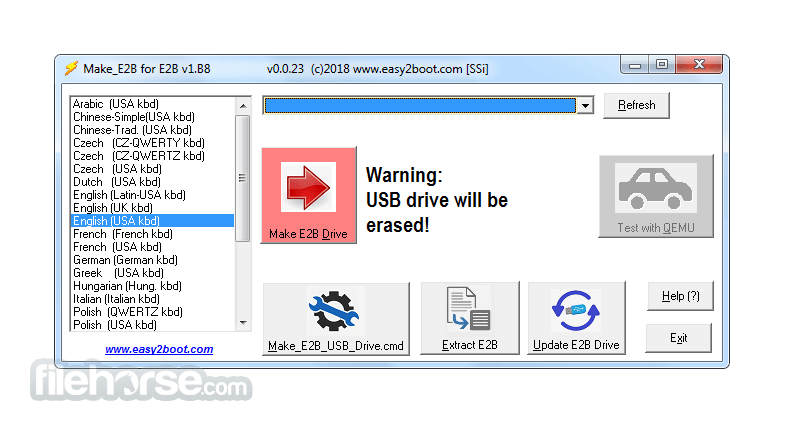
- Select your USB drive and click "Make E2B Drive."
- Copy ISO files to the correct folders on the USB
- Reboot your PC and boot from the E2B USB
- Choose the ISO you want to boot from the menu
- Follow on-screen instructions for installation or use
What is Easy2Boot used for?
Easy2Boot is a multiboot USB creation tool that allows you to boot multiple ISO, IMG, VHD, and other disk image files from a single USB drive. It is commonly used by IT technicians and advanced users to carry operating systems, recovery tools, antivirus rescues, and diagnostic utilities on one portable device.
How is Easy2Boot different from tools like Rufus?
Unlike single-ISO tools such as Rufus, Easy2Boot allows you to simply copy multiple ISO files onto a prepared USB drive without reformatting it each time. It dynamically lists compatible images in its boot menu, making it highly flexible for managing many operating systems or utilities on one drive.
Does Easy2Boot support UEFI and Secure Boot?
Yes, newer versions of Easy2Boot support both Legacy BIOS and UEFI booting. However, Secure Boot compatibility may require additional configuration or specific E2B setups, depending on the ISO being used. Users should check official documentation for compatibility details.
Is Easy2Boot suitable for beginners?
Easy2Boot is powerful but not always beginner-friendly. It offers advanced customization options and scripting capabilities, which make it ideal for IT professionals. Casual users may prefer simpler tools if they only need to create a single bootable USB.
Is Easy2Boot still relevant in 2026?
Yes. In 2026, Easy2Boot remains relevant for technicians and power users who need flexible multiboot solutions. While newer tools exist, Easy2Boot continues to be updated and is valued for its versatility and broad image format support.
Pricing
Easy2Boot is completely free to download and use.
There are no subscription fees or mandatory payments required for its core functionality.
System Requirements
- OS: Windows 7, 8, 10, or 11 (32-bit or 64-bit)
- CPU: Intel/AMD processor with 1 GHz or faster
- RAM: Minimum 1 GB (2 GB recommended)
- USB Drive: 8 GB or larger (FAT32/NTFS supported)
- Admin rights required to install and configure
- Supports multiple ISO file formats
- No need to format USB again for new ISOs
- Compatible with UEFI and Legacy BIOS
- Highly customizable boot menus
- Free and regularly updated tool
- The user interface is not beginner-friendly
- Initial setup can be a bit complex
- Limited support for Secure Boot
- Requires manual folder organization
- Documentation may overwhelm new users
Download Easy2Boot Latest Version Why is this app published on FileHorse? (More info)
##
畫面截圖
- 2026-02-18 Easy2Boot 2.21 34.9 MB
- 2024-01-29 Easy2Boot 2.20 34.74 MB
- 2023-01-02 Easy2Boot 2.19 34.72 MB
- 2022-11-03 Easy2Boot 2.18 34.7 MB
- 2022-10-28 Easy2Boot 2.17 34.7 MB
- 2022-10-15 Easy2Boot 2.16 34.71 MB
- 2022-08-02 Easy2Boot 2.15 32.12 MB