⚠ 這是歷史版本頁面 — 查看 Eye Candy 最新版本 →

- 目前版本7.2.3.176
- 更新日期2021-06-11
- 檔案大小48.5 MB
- 檔案名稱eye-candy-7-7.2.3.176.exe
- 作業系統Windows 7 / Windows 8 / Windows 10 / Windows 11
- 支援語系English
- 授權型式商業試用
- 開發商 Exposure Software, LLC.
- 軟體分類Windows 軟體 / 影像設計
##
編輯短評
Eye Candy 是一套專為 Photoshop 設計的濾鏡外掛,主要解決在 Photoshop 中難以手工繪製的寫實特效問題,例如火焰、閃電、煙霧、爬蟲類皮膚等,都能以接近真實的細節呈現。它的最大辨識度在於操作介面:特效以圖示取代文字選單,預設效果只需滑鼠懸停就能快速預覽,大幅減少反覆點擊的流程。這套外掛由 Exposure Software 長期維護,更新頻率不算頻繁但仍在持續,在影像設計同類工具中屬於評價普遍不錯的小眾選擇。
這套工具適合經常使用 Photoshop 做影像合成或視覺設計的使用者,尤其是需要快速產生特定材質或自然現象效果時,能省下不少摸索時間。與其用 Photoshop 內建濾鏡逐步堆疊,Eye Candy 提供的是更直覺的單一步驟方案,但代價是它必須依附在 Photoshop 環境下運作,無法獨立開啟。授權方面為試用版,僅提供英文介面,Windows 與 macOS 皆有版本,下載前需留意試用限制是否符合你的工作流程。
##
翻譯排程處理中,以下暫以英文原文呈現
軟體介紹
Eye Candy renders realistic effects that are difficult or impossible to achieve in Photoshop alone, such as Fire, Chrome, and the new Lightning. Effects like Animal Fur, Smoke, and Reptile Skin are rendered in exquisite detail down to individual hairs, turbulent wisps, and shiny scales.
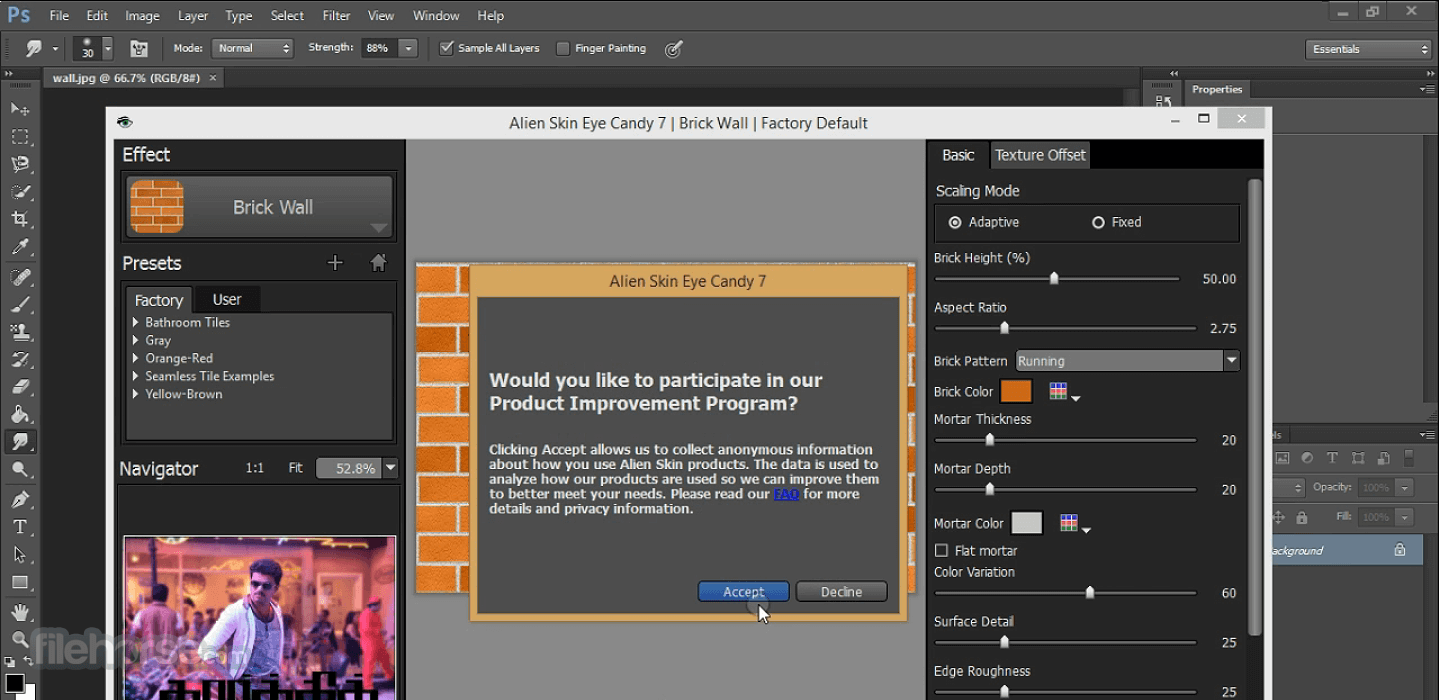
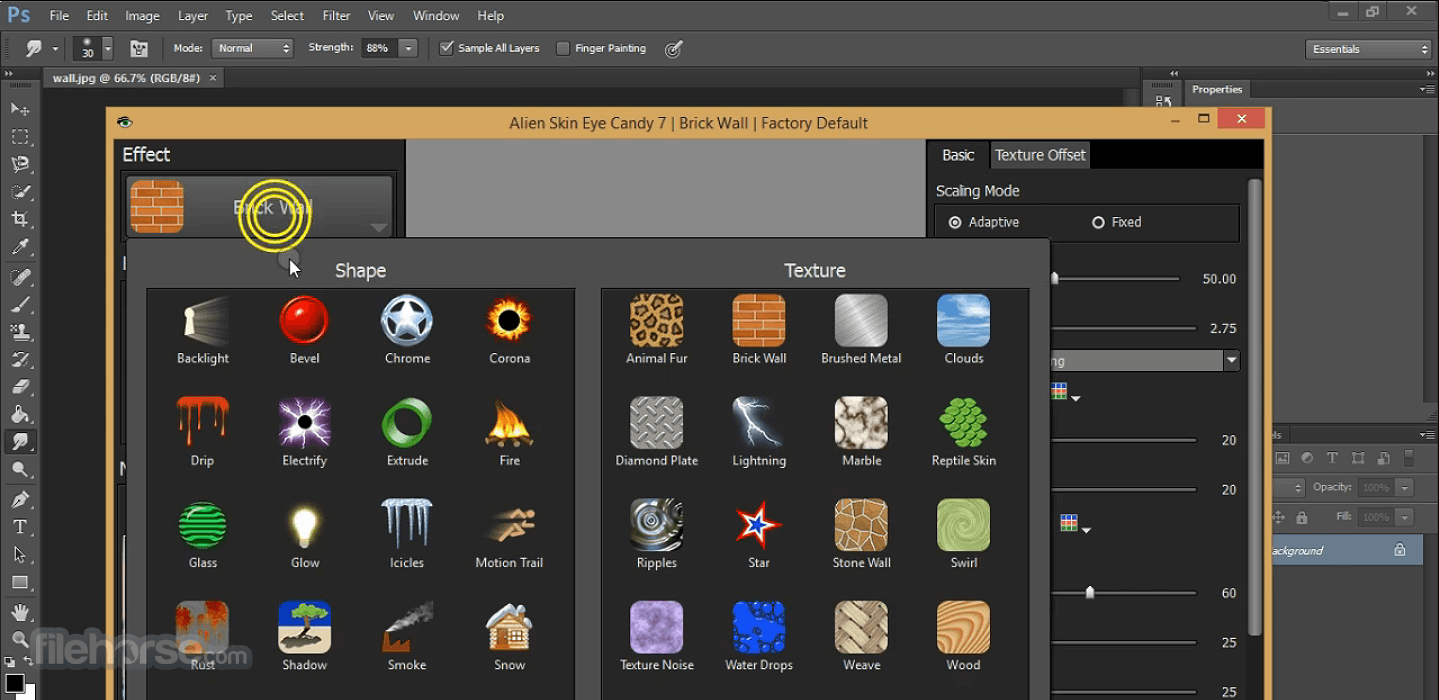
It helps you quickly explore and design looks. In the plugin, effects are chosen through easy-to-recognize icons rather than text menus. Presets are rapidly previewed by simply mousing over them. The theme is less clicking and more visual browsing.
The theme is less clicking and more visual browsing. The tool is now a single entry in Photoshop’s filter menu. That means that you can explore all of the effects without leaving the window. Instead of choosing an effect category by reading a text list, you’ll see icons that show typical uses of each effect.
In the preference panel, you can choose how the effect is rendered in a new layer. If you prefer the software approach, you can have the new layer include just the effect and not a copy of your original artwork.
Many effects use transparency, so I moved the transparency display control out of the preference panel and put it under the main preview. This lets you quickly switch the background between checkerboard, black, white, or a custom solid color.
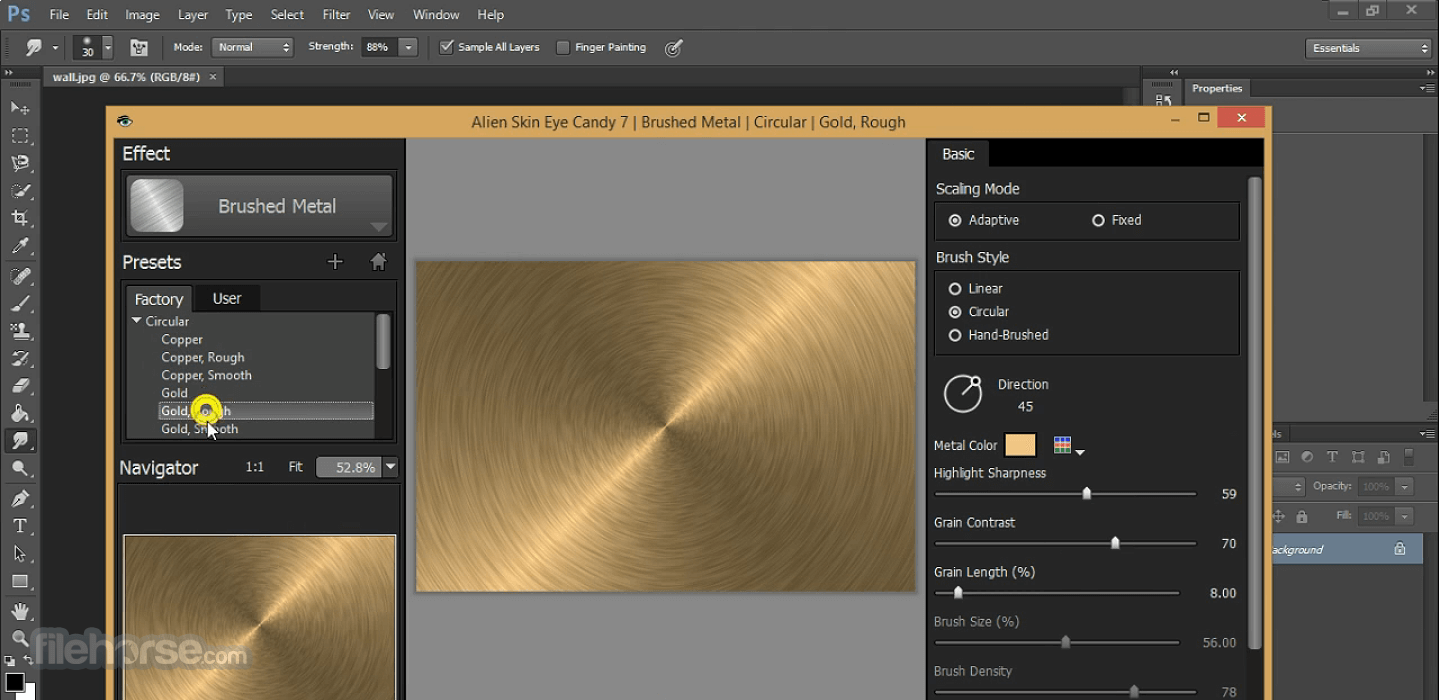
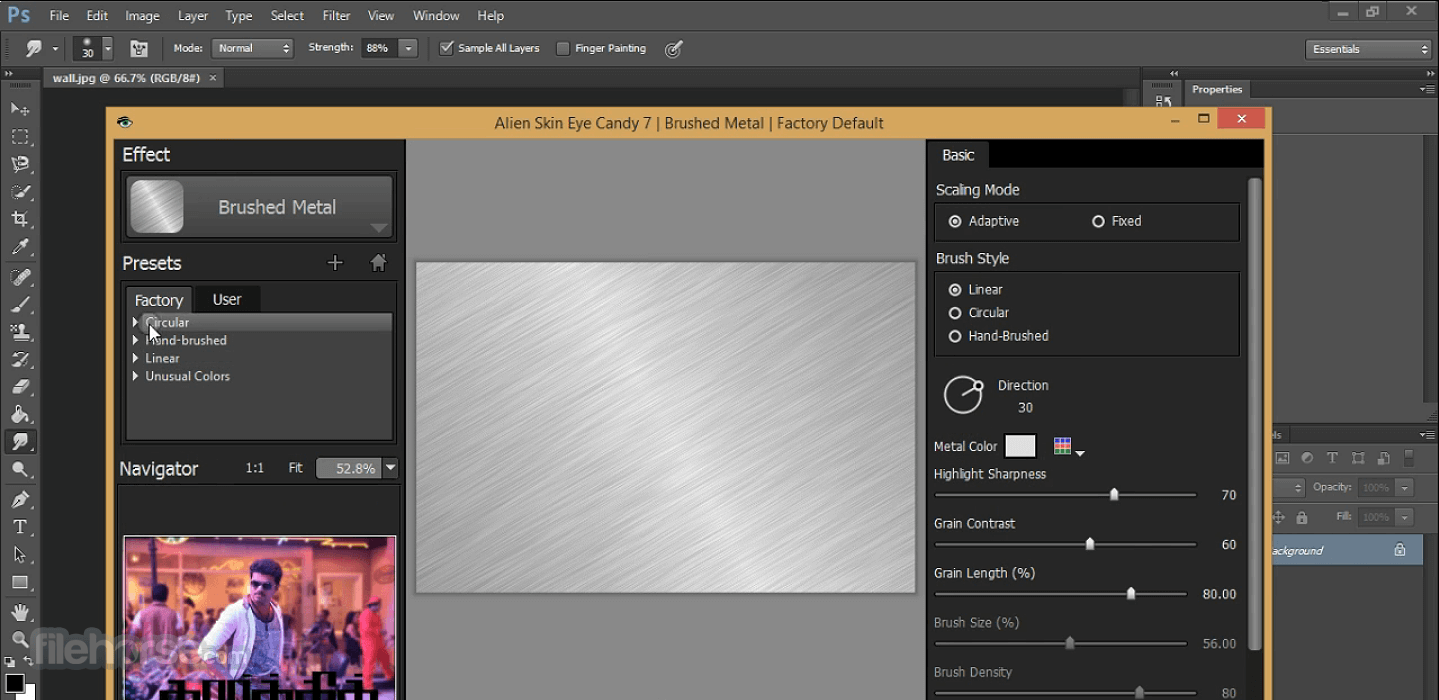
Once you choose an effect, you can explore presets fast using the navigator, which is a small preview that instantly updates. You don’t even have to click. Just mouse over preset names, and the navigator shows how the effect will look in your design. In the screenshot below, you can see the navigator in the lower left.
Features and Highlights
Zillions of Effects
It has grown over 19 years to handle a huge range of graphic design tasks, from subtle extruded edges to glitzy chrome. There are 32 effect categories, over 1000 presets, and controls to let you create an unlimited number of your own styles.
Realistic Effects
Realism sets Eye Candy effects apart from the generic filters built into Photoshop. Effects like Animal Fur, Smoke, and Reptile Skin are rendered in exquisite detail down to individual hairs, turbulent wisps, and shiny scales. It helps designs look natural and organic.
Adaptation
It scales effects to match the size of your current artwork. That makes it less likely that you will have to tweak a preset to make it look good.
Non-Destructive Editing
Effects are drawn into a new layer, leaving your original artwork untouched. It can also work as a Smart Filter, which lets you modify or remove the effect later.
Professional Features
It can handle images in CMYK mode and 16-bit/channel, which are needed for professional print work. And, you can save any look as a preset to consistently recreate it in future projects.
What’s New
What is Eye Candy, and what is it used for?
Eye Candy is a visual effects plugin for Photoshop and other compatible image editors that helps designers create realistic effects like chrome, fire, smoke, glass, shadows, fur, and bevels. According to the official site, it focuses on generating polished, high-quality effects quickly without requiring complex manual editing techniques.
What makes Eye Candy different from standard Photoshop effects?
Eye Candy is known for producing more realistic and natural-looking effects compared to many built-in Photoshop filters. It uses advanced rendering techniques for details like perspective shadows, reflections, textures, and edge handling, which makes it especially popular for text effects, logos, UI elements, and graphic design work.
Is Eye Candy still relevant in 2026?
Yes, Eye Candy is still relevant for designers who want fast, high-quality visual effects without building everything manually in Photoshop. While modern Photoshop tools and AI features have reduced reliance on older plugins, Eye Candy remains valued for its speed, preset system, and ability to generate complex effects with minimal setup.
System Requirements
Also Available: Download Eye Candy for Mac
Download Eye Candy Latest Version Why is this app published on FileHorse? (More info)
It helps you quickly explore and design looks. In the plugin, effects are chosen through easy-to-recognize icons rather than text menus. Presets are rapidly previewed by simply mousing over them. The theme is less clicking and more visual browsing.
The theme is less clicking and more visual browsing. The tool is now a single entry in Photoshop’s filter menu. That means that you can explore all of the effects without leaving the window. Instead of choosing an effect category by reading a text list, you’ll see icons that show typical uses of each effect.
In the preference panel, you can choose how the effect is rendered in a new layer. If you prefer the software approach, you can have the new layer include just the effect and not a copy of your original artwork.
Many effects use transparency, so I moved the transparency display control out of the preference panel and put it under the main preview. This lets you quickly switch the background between checkerboard, black, white, or a custom solid color.
Once you choose an effect, you can explore presets fast using the navigator, which is a small preview that instantly updates. You don’t even have to click. Just mouse over preset names, and the navigator shows how the effect will look in your design. In the screenshot below, you can see the navigator in the lower left.
Features and Highlights
Zillions of Effects
It has grown over 19 years to handle a huge range of graphic design tasks, from subtle extruded edges to glitzy chrome. There are 32 effect categories, over 1000 presets, and controls to let you create an unlimited number of your own styles.
Realistic Effects
Realism sets Eye Candy effects apart from the generic filters built into Photoshop. Effects like Animal Fur, Smoke, and Reptile Skin are rendered in exquisite detail down to individual hairs, turbulent wisps, and shiny scales. It helps designs look natural and organic.
Adaptation
It scales effects to match the size of your current artwork. That makes it less likely that you will have to tweak a preset to make it look good.
Non-Destructive Editing
Effects are drawn into a new layer, leaving your original artwork untouched. It can also work as a Smart Filter, which lets you modify or remove the effect later.
Professional Features
It can handle images in CMYK mode and 16-bit/channel, which are needed for professional print work. And, you can save any look as a preset to consistently recreate it in future projects.
What’s New
- User Interface Redesign: Completely rebuilt the interface with a more visual and streamlined workflow for faster effect browsing and easier navigation
- Effect Browser Improvements: Added icon-based effect categories and unified all effects into a single Photoshop filter entry for smoother exploration
- Preset Navigation: Introduced a live preview navigator that instantly displays preset changes while hovering over options
- Layer Rendering Controls: Added flexible layer output settings for better control over how effects are applied to artwork
- Transparency Preview Options: Moved transparency controls directly into the main preview area for quicker background adjustments
- New Effects: Reintroduced popular Xenofex effects, including Lightning, Electrify, and Clouds, with updated rendering technology
- Performance Improvements: Enhanced preview speed and overall responsiveness for faster experimentation and editing
- Expanded Effect Library: Included 32 effect categories and over 1,000 presets covering a wide range of graphic styles and textures
- Realistic Rendering: Improved realism for effects such as fur, smoke, and reptile textures with more detailed and natural-looking results
- Adaptive Scaling: Effects now automatically scale to match artwork dimensions for more consistent output
- Non-Destructive Editing: Added support for Smart Filters and separate effect layers to preserve original artwork
- Professional Workflow Support: Improved handling of CMYK images, 16-bit color depth, and reusable custom presets for print-quality projects
What is Eye Candy, and what is it used for?
Eye Candy is a visual effects plugin for Photoshop and other compatible image editors that helps designers create realistic effects like chrome, fire, smoke, glass, shadows, fur, and bevels. According to the official site, it focuses on generating polished, high-quality effects quickly without requiring complex manual editing techniques.
What makes Eye Candy different from standard Photoshop effects?
Eye Candy is known for producing more realistic and natural-looking effects compared to many built-in Photoshop filters. It uses advanced rendering techniques for details like perspective shadows, reflections, textures, and edge handling, which makes it especially popular for text effects, logos, UI elements, and graphic design work.
Is Eye Candy still relevant in 2026?
Yes, Eye Candy is still relevant for designers who want fast, high-quality visual effects without building everything manually in Photoshop. While modern Photoshop tools and AI features have reduced reliance on older plugins, Eye Candy remains valued for its speed, preset system, and ability to generate complex effects with minimal setup.
System Requirements
- Windows 10 or 11
- 64-bit Windows edition
- Intel Core 2 processor or compatible
- Monitor with 1280×768 resolution or greater
- Adobe Photoshop CC 2015 or newer
- Adobe Photoshop CS6
- User-friendly interface.
- Wide range of editing tools and effects.
- Versatile for various photography styles.
- Offers non-destructive editing.
- Regular updates and support from Exposure Software, LLC.
- May require a learning curve for beginners.
- Some advanced features might be overwhelming.
- Occasional performance issues reported by users.
- Lack of official support and updates.
Also Available: Download Eye Candy for Mac
Download Eye Candy Latest Version Why is this app published on FileHorse? (More info)
##
畫面截圖
- 2026-05-17 Eye Candy 7.2.3.189 48.5 MB
- 2021-06-11 Eye Candy 7.2.3.176 48.5 MB
- 2020-11-03 Eye Candy 7.2.3.143 48.6 MB
- 2020-02-20 Eye Candy 7.2.3.96 48.2 MB
- 2019-04-02 Eye Candy 7.2.3.37 48.2 MB