⚠ 這是歷史版本頁面 — 查看 Folder Size 2.6 (64-bit) 最新版本 →

Folder Size 2.6 (32-bit)
v 2.6 (32-bit)
Windows
免費軟體
6.58/10 (24)
- 目前版本2.6 (32-bit)
- 更新日期2013-02-13
- 檔案大小268 KB
- 檔案名稱FolderSize-2.6-x86.msi
- 作業系統Windows XP64 / Vista64 / Windows 7 64 / Windows 8 64
- 支援語系English
- 授權型式免費軟體
- 開發商 Folder Size
- 軟體分類Windows 軟體 / 系統優化
##
編輯短評
Folder Size 是一款在 Windows 檔案總管中直接顯示資料夾大小的免費工具。它會在詳細資料檢視中新增一個欄位,除了檔案大小,也能顯示資料夾內所有檔案的總大小,並在背景掃描你檢視過的資料夾,讓你不必切換程式就能快速掌握磁碟空間的使用狀況。這個功能對於清理磁碟、找出佔空間的資料夾特別實用。這款軟體歷史悠久,自推出以來持續更新,目前仍維持維護,不過使用者數量不多,評價算是普通,在同類工具中屬於小眾選擇。
如果你經常需要整理硬碟、找出哪些資料夾佔用大量空間,又不想另外開啟磁碟分析軟體,Folder Size 會是很方便的輔助工具。它直接整合進檔案總管,使用上幾乎沒有學習成本。相較於 FileHippo App Manager、Rufus 等熱門工具,Folder Size 功能單一且輕量,但相對缺乏進階的視覺化分析或批次清理功能。軟體以 GNU GPL 授權釋出,目前僅提供英文介面,且僅支援 Windows 平台,使用前需留意語系與系統相容性。
##
翻譯排程處理中,以下暫以英文原文呈現
軟體介紹
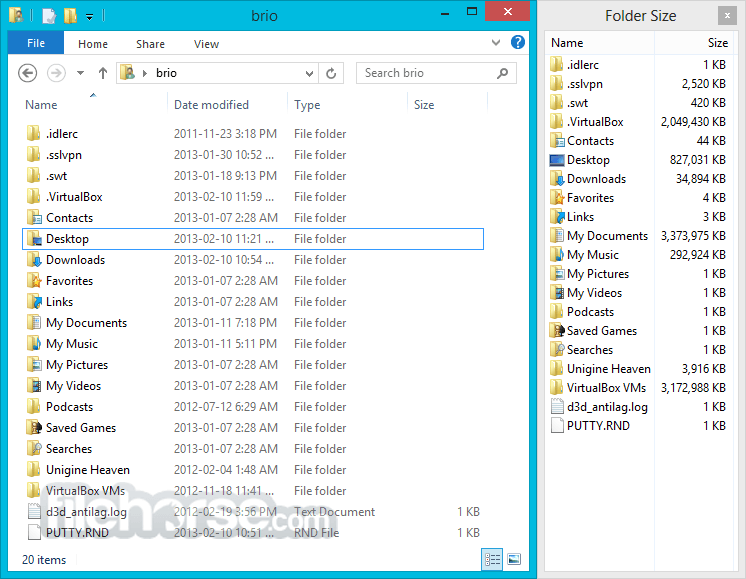
Folder Size for Windows adds a new column to the Details view in Windows Explorer. The new column shows not only the size of files but also the size of folders.
It keeps track of which folders you view, and scans them in the background so you can see the complete size of all files within the folder.
It's very useful for cleaning up your disk. Once you get used to having that information available, a directory listing simply looks incomplete without it! Folder Size for PC may be distributed under the terms of the GNU General Public License.
Key Features
It features an uncluttered and straightforward user interface. The main window is divided into two panes: the left pane displays your folder structure, while the right pane shows detailed information about the selected folder.
The interface is user-friendly and requires no technical expertise, making it accessible to users of all skill levels.
FAQs
Could it display folder sizes in MB, GB, TB, etc. for larger folders?
Absolutely! It can enable this feature through the Folder Size Control Panel.
Folder Size seems to interfere with TravelSafe encryption software on Kingston USB drives.
It recommends considering alternative encryption software for a smoother experience. Additionally, it is looking into implementing an option to disable Folder Size for specific drives, which could address this issue.
Can it incorporate folder sizes into the regular Size column instead of creating a new one?
Initially, it attempted to merge folder sizes into the existing Size column, but there is no documented method to modify the built-in Size column. Despite its efforts, forcing this change didn't yield positive results. If you have an innovative solution for achieving this, I'd appreciate hearing it.
Why is the column named Folder Size instead of just Size?
To prevent confusion with two columns sharing the same name, it opted for "Folder Size" as the distinct identifier for its column.
Alternatives
WinDirStat - A free and open-source disk usage analyzer for Windows that visualizes file and folder sizes using a colorful treemap. It helps users quickly identify large files and space-consuming directories.
TreeSize Free - A fast and user-friendly disk space analyzer that displays folder sizes in a structured, Explorer-like interface. It allows quick scans and integrates directly into the Windows context menu.
WizTree - An ultra-fast disk space analyzer for Windows that reads the NTFS Master File Table to instantly display file and folder sizes. It provides both a detailed file list and a visual treemap for efficient storage analysis.
PROS
In conclusion, Folder Size for Windows is a valuable tool for users seeking to gain insights into their disk space usage and efficiently manage their folders. With its easy-to-use interface, customizable scan options, and graphical representations, it simplifies the process of identifying space-consuming folders.
Whether you are a casual user looking to free up disk space or a power user managing complex file systems, Folder Size tool is a worthy addition to your software toolkit.
Download Folder Size for Windows Latest Version Why is this app published on FileHorse? (More info)
It keeps track of which folders you view, and scans them in the background so you can see the complete size of all files within the folder.
It's very useful for cleaning up your disk. Once you get used to having that information available, a directory listing simply looks incomplete without it! Folder Size for PC may be distributed under the terms of the GNU General Public License.
Key Features
- Don't switch to another program to see folder sizes. It's always there when you're viewing your folders (even in Open and Save file dialog boxes, you can change the view), and it's a great visual cue to help you find the one you're looking for. Not just for disk cleanup, but for any time you need to choose a folder.
- No scanning phase before you can start. As soon as you display the app column, you'll see sizes immediately. Large folders will continue to scan in the background while you browse your folders.
- Explorer will automatically update the folder size column in real-time. No more manual rescanning.
- Background scans won't monopolize your disk. When the app detects that other programs are doing a lot of reading and writing to and from the hard disk being scanned, the background scanning will wait for the other programs to finish.
- If you don't show the FolderSize column for a while, it won't forget what it's already scanned, but the background scanner doesn't stay active. It won't waste any CPU time maintaining the cache on your P2P sharing or gaming machine that's always changing files.
It features an uncluttered and straightforward user interface. The main window is divided into two panes: the left pane displays your folder structure, while the right pane shows detailed information about the selected folder.
The interface is user-friendly and requires no technical expertise, making it accessible to users of all skill levels.
FAQs
Could it display folder sizes in MB, GB, TB, etc. for larger folders?
Absolutely! It can enable this feature through the Folder Size Control Panel.
Folder Size seems to interfere with TravelSafe encryption software on Kingston USB drives.
It recommends considering alternative encryption software for a smoother experience. Additionally, it is looking into implementing an option to disable Folder Size for specific drives, which could address this issue.
Can it incorporate folder sizes into the regular Size column instead of creating a new one?
Initially, it attempted to merge folder sizes into the existing Size column, but there is no documented method to modify the built-in Size column. Despite its efforts, forcing this change didn't yield positive results. If you have an innovative solution for achieving this, I'd appreciate hearing it.
Why is the column named Folder Size instead of just Size?
To prevent confusion with two columns sharing the same name, it opted for "Folder Size" as the distinct identifier for its column.
Alternatives
WinDirStat - A free and open-source disk usage analyzer for Windows that visualizes file and folder sizes using a colorful treemap. It helps users quickly identify large files and space-consuming directories.
TreeSize Free - A fast and user-friendly disk space analyzer that displays folder sizes in a structured, Explorer-like interface. It allows quick scans and integrates directly into the Windows context menu.
WizTree - An ultra-fast disk space analyzer for Windows that reads the NTFS Master File Table to instantly display file and folder sizes. It provides both a detailed file list and a visual treemap for efficient storage analysis.
PROS
- User-friendly and intuitive interface.
- Detailed folder size analysis with customizable options.
- Seamless integration with Windows Explorer.
- Ability to export and print reports.
- Limited historical data; focuses on real-time analysis.
- Lack of official support and new updates.
In conclusion, Folder Size for Windows is a valuable tool for users seeking to gain insights into their disk space usage and efficiently manage their folders. With its easy-to-use interface, customizable scan options, and graphical representations, it simplifies the process of identifying space-consuming folders.
Whether you are a casual user looking to free up disk space or a power user managing complex file systems, Folder Size tool is a worthy addition to your software toolkit.
Download Folder Size for Windows Latest Version Why is this app published on FileHorse? (More info)
##
畫面截圖
- 2026-02-13 Folder Size 2.6 (64-bit) 288 KB
- 2013-02-13 Folder Size 2.6 (32-bit) 268 KB
- 2010-04-06 Folder Size 2.5 (32-bit) 204.8 KB
- 2010-04-06 Folder Size 2.5 (64-bit) 244 KB
- 2007-11-16 Folder Size 2.4 (32-bit) 224.5 KB
- 2007-11-16 Folder Size 2.4 (64-bit) 248 KB
- 2006-03-28 Folder Size 2.3 201.5 KB
- 2006-01-26 Folder Size 2.2 196 KB