⚠ 這是歷史版本頁面 — 查看 FontLab 8.4.3 Build 最新版本 →

- 目前版本8950
- 更新日期2024-09-26
- 檔案大小91.1 MB
- 檔案名稱FontLab-8-Win-Install-8950.exe
- 作業系統Windows 8 (64-bit) / Windows 10 (64-bit) / Windows 11
- 支援語系English
- 授權型式商業試用
- 開發商 Fontlab Ltd, Inc.
- 軟體分類Windows 軟體 / 影像設計
##
編輯短評
FontLab 是一套完整的字型設計環境,不是單純的編輯器,而是涵蓋從草創到輸出的整個流程。無論是從零打造全新字體,還是調整既有字型,它都提供精確的工具來處理字形、間距、字距、微調與匯出。其最具辨識度的特色在於強大的向量繪圖工具,包含貝茲曲線、鋼筆與筆刷支援,讓繪製字形更流暢直覺。這套軟體在專業字型設計師之間口碑普遍不錯,被視為同類工具中的主流選擇,目前仍持續維護,但更新步調不算頻繁。
這套軟體適合專業字型設計師、品牌設計師,或任何需要深入控制字型細節的人。當你正在設計一套全新字型,或需要對既有字體做細部調整與優化時,它會是相當稱職的工作平台。與其他字型編輯工具相比,FontLab 功能更全面,但學習曲線也相對陡峭,需要花時間熟悉。值得注意的是,它提供的是試用版,且介面僅有英文,對中文使用者來說需要一些門檻;不過它同時具備 Windows 與 macOS 版本,跨平台使用者可以無痛轉換。
##
翻譯排程處理中,以下暫以英文原文呈現
軟體介紹
FontLab is more than just a basic font editor—it’s a complete type design environment that supports every step of the font creation process.
Whether you’re designing a brand-new typeface from scratch or refining an existing font, FontLab equips you with the precise tools and features needed to manage glyphs, spacing, kerning, hinting, and font exports.
It’s a favorite among professional type designers for its power, flexibility, and extensive format support.
Main Features
User Interface
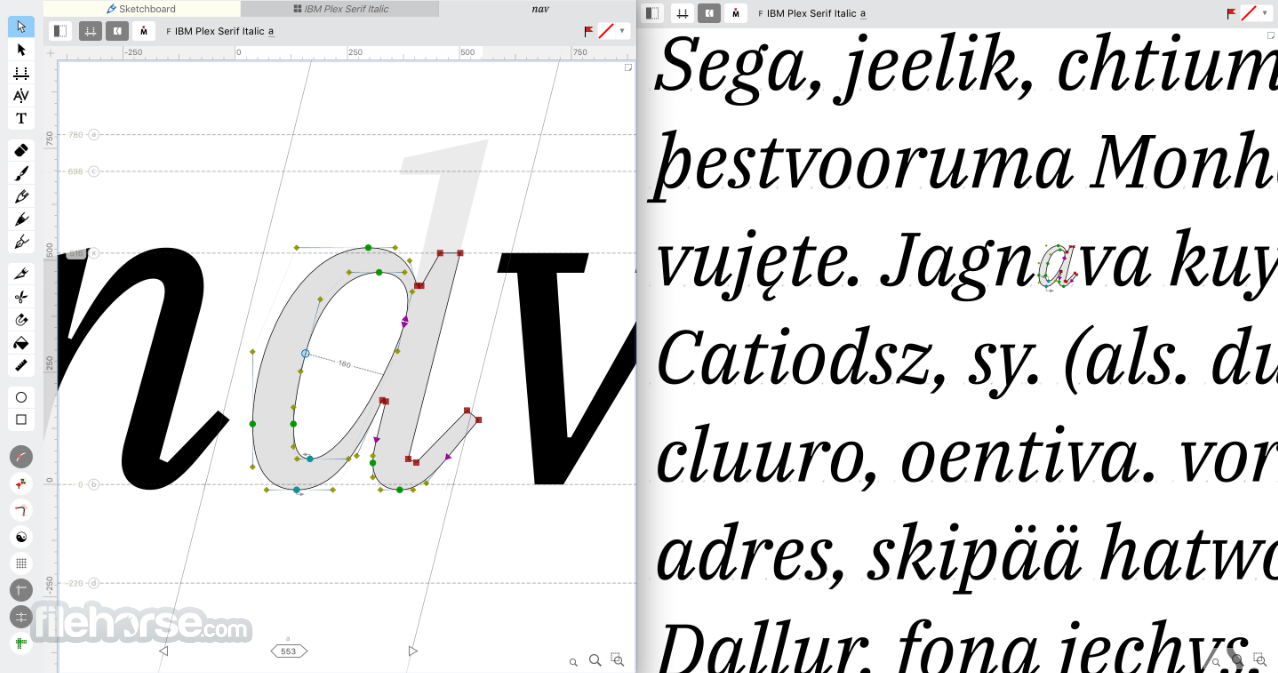
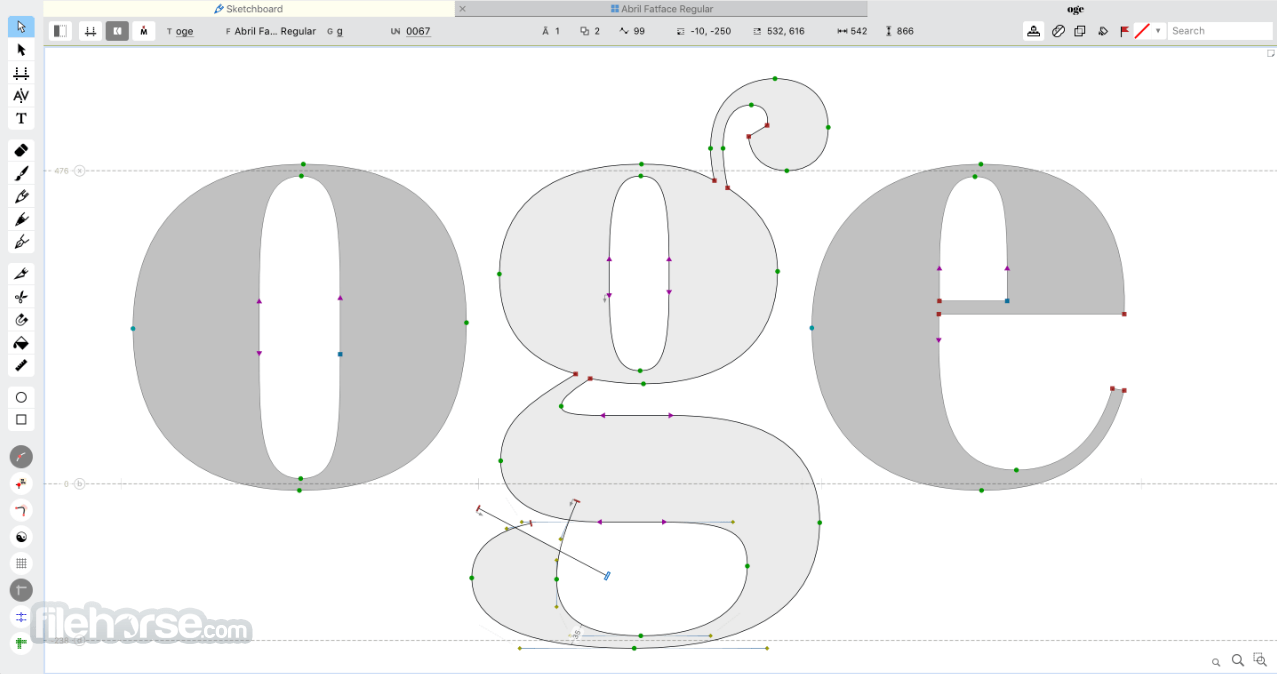
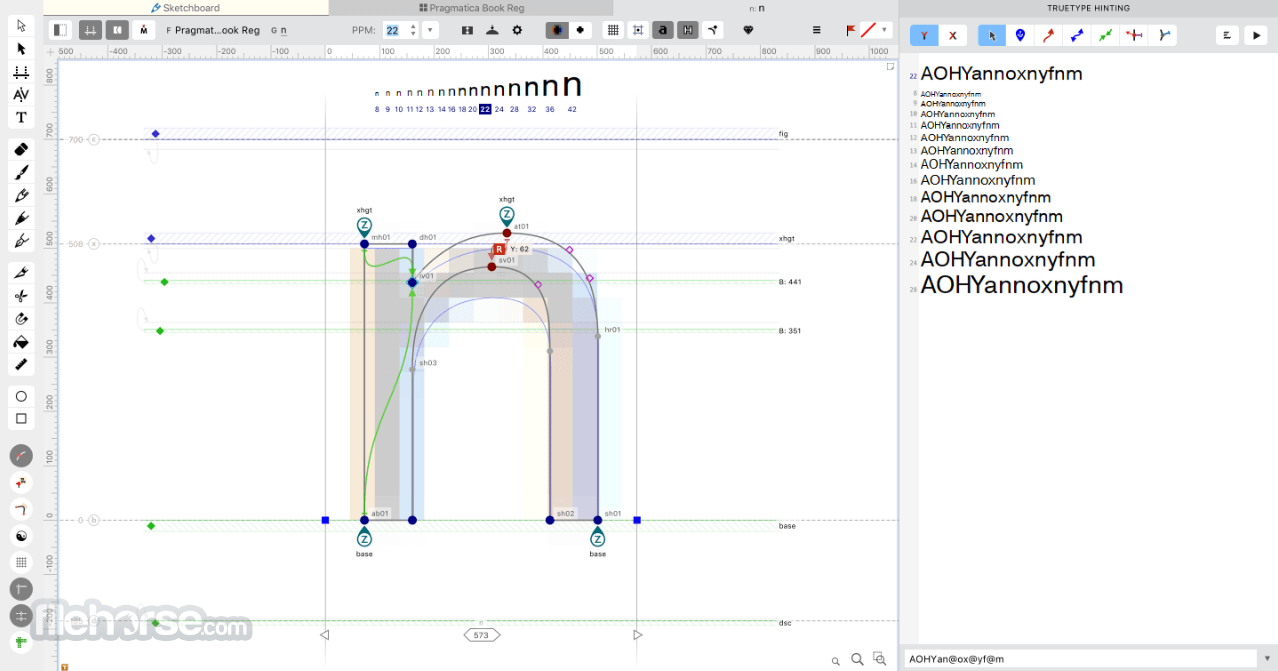
FontLab’s UI is designed for flexibility and power, but it may appear complex to newcomers. It uses a multi-window layout with panels for glyphs, layers, guides, metrics, and drawing tools.
While there is a learning curve, the interface is highly customizable. You can rearrange panels, switch between light and dark modes, and use multiple editing views simultaneously.
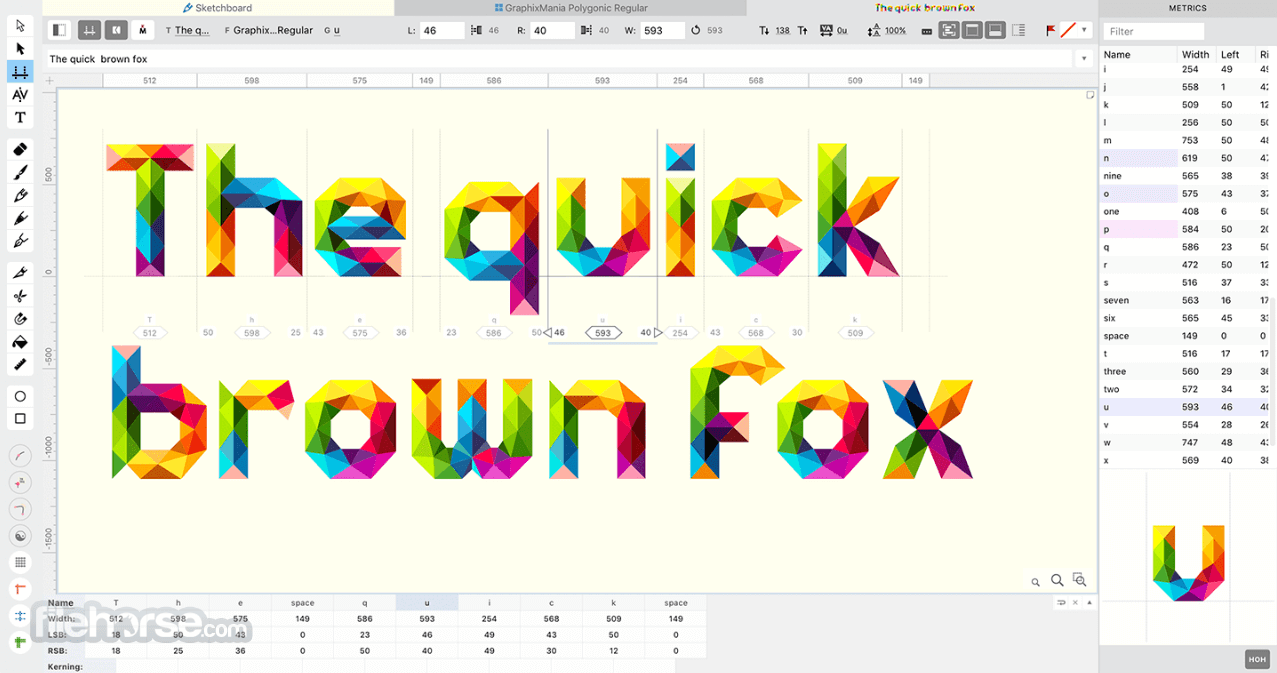
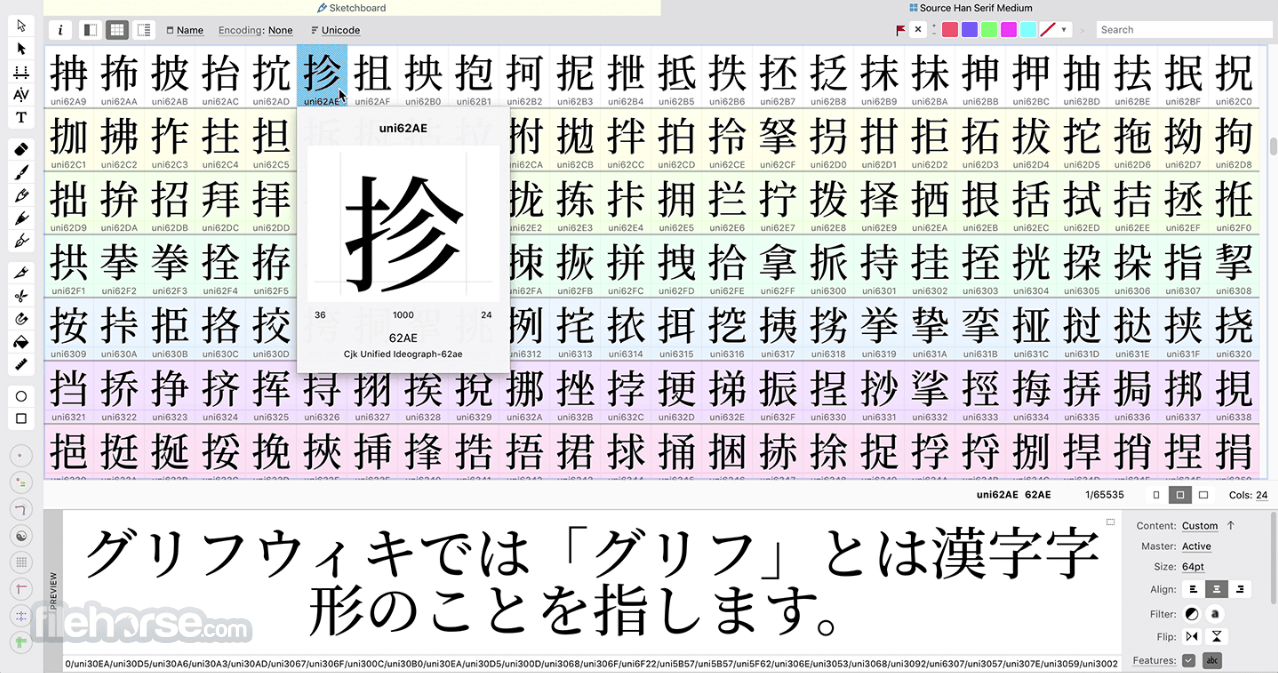
The Glyph Window offers detailed drawing and editing space, while the Font Window provides a bird’s-eye view of your entire typeface. The Metrics Window simplifies spacing and kerning edits.
For professionals, the layered and modular design of the UI is highly productive once mastered.
Installation and Setup
The initial setup includes configuration of font file locations, interface preferences, and font export settings.
What`s New
How to Use
Is FontLab suitable for beginners?
This program is designed for professionals and may be overwhelming for complete beginners. However, the built-in tutorials and community support can help new users get started with the basics.
Can I import existing fonts into FontLab for editing?
Yes, it supports importing TTF, OTF, UFO, and other font formats. It allows full editing and refinement of existing fonts.
Does FontLab support variable fonts?
Yes, it offers extensive support for creating and editing variable fonts using multiple masters and design axes.
Is scripting required to use FontLab?
No, scripting is optional. The software includes Python support for automation and custom tools, but most features are available through the UI.
Can FontLab export web fonts?
Yes, it supports export to WOFF and WOFF2 formats for use in web development.
Alternatives
BirdFont – A more beginner-friendly and open-source option for creating TTF and OTF fonts.
FontCreator – The font editing tools you need to make new fonts or edit existing fonts
Affinity Designer – Not a font editor, but useful for SVG glyph design
Pricing
Student 1-Year: $109 – For academic students, valid for 1 year. Upgradable to lifetime.
Student/Teacher Lifetime: $335 – Lifetime license for students, teachers, and institutions. Includes upgrade discounts.
Course 4 Months: $249 – For schools/teachers, valid for 20 students over 4 months.
Workshop 2-Weeks: $99 – For workshop organizers, valid for 20 participants for 14 days.
Starter (3 Months): $97 – For 1 user on 3 computers. Full features, no recurring fees. Rebuy after expiry.
Pro (Lifetime): $499 – Lifetime license, 1 user/3 devices. Includes updates and expert support. Discounts for future upgrades.
Upgrade (Lifetime License Discounts):
From FontLab 7: $149
From FontLab VI or Studio 5: $299
From Fontographer 5: $399
From TypeTool 3, RoboFont, or Glyphs: $459
Free Trial: 10-day fully functional trial available
System Requirements
FontLab for Windows PC is a powerhouse for professional font designers. It combines an expansive set of tools with deep customization and scripting support to handle virtually every aspect of font creation.
While its complexity and price point may not appeal to hobbyists or newcomers, those serious about type design will find FontLab a valuable, long-term investment.
Note: 10-day trial version.
Also Available: Download FontLab for Mac
Download FontLab Latest Version Why is this app published on FileHorse? (More info)
Whether you’re designing a brand-new typeface from scratch or refining an existing font, FontLab equips you with the precise tools and features needed to manage glyphs, spacing, kerning, hinting, and font exports.
It’s a favorite among professional type designers for its power, flexibility, and extensive format support.
Main Features
- Vector Drawing Tools: Bezier curves, pen tools, and brush support for smooth and intuitive glyph drawing.
- Multiple Master Support: Create and manage variable fonts using multiple design axes.
- Interpolation and Blending: Automate design between font styles like light and bold.
- Font Metrics and Kerning: Detailed controls for spacing and kerning adjustments.
- Bitmap and Color Font Support: Import and edit bitmap and color glyphs, including emoji-style fonts.
- Auto-Hinting and Manual Hinting: Improve on-screen readability with smart hinting tools.
- TrueType and OpenType Support: Work with professional font formats used across platforms.
- Python Scripting: Extend FontLab’s functionality with custom scripts and automation.
- Live Preview and Testing: View how fonts perform in real-time within various applications.
User Interface
FontLab’s UI is designed for flexibility and power, but it may appear complex to newcomers. It uses a multi-window layout with panels for glyphs, layers, guides, metrics, and drawing tools.
While there is a learning curve, the interface is highly customizable. You can rearrange panels, switch between light and dark modes, and use multiple editing views simultaneously.
The Glyph Window offers detailed drawing and editing space, while the Font Window provides a bird’s-eye view of your entire typeface. The Metrics Window simplifies spacing and kerning edits.
For professionals, the layered and modular design of the UI is highly productive once mastered.
Installation and Setup
- Download the latest Windows installer.
- Run the executable and follow the setup wizard.
- Activate the software with a purchased license or use the free trial version.
The initial setup includes configuration of font file locations, interface preferences, and font export settings.
What`s New
- FontLab 8.4 delivers 500+ improvements over 8.0, making it faster, more intuitive, and the biggest upgrade yet.
- Modernized UI with a new dark theme and enhanced drawing tools like Stroke and Brush sketching.
- Improved glyph editing: non-destructive transformations with Delta, visual/numeric measurement, and smart spacing/kern tools.
- Features include variable components, glyph building with Skin, batch export, and action sets.
- Better color/gradient support and compatibility with .glyphs 3, FontForge, COLRv1, and Python 3.
- Smarter Help system, contextual menus, and redesigned widgets for intuitive glyph editing.
- Enhanced zooming with a new unit grid, flexible snapping, and full italic angle support.
- Add named anchors, use components as masks, detach reusable serifs, and scale elements easily.
- Huge performance boosts on Mac — up to 2× faster.
- CJK font support: created with variable components and Unicode Variation Selector sequences.
- Pro features: Match Moves syncs points across masters, and variable mark previews improve accuracy.
- Git-friendly .glyphspackage format now supported, with export tools for QA, organization, and Git push.
- Visually edit variable components and build complex glyphs with an improved Skin filter.
How to Use
- Create a New Font: Start a new project or import an existing font (TTF, OTF, UFO, etc.).
- Design Glyphs: Use the pen tool or import vector outlines to draw glyphs.
- Edit Metrics and Kerning: Use the Metrics window to refine spacing and kerning pairs.
- Add OpenType Features: Include ligatures, stylistic sets, and contextual alternates using FontLab’s feature editor.
- Generate Variable Fonts: Define design axes and interpolate between masters.
- Test and Preview: Use live testing or export a temporary font to see it in action.
- Export: Save the final font in OTF, TTF, WOFF, or other supported formats.
Is FontLab suitable for beginners?
This program is designed for professionals and may be overwhelming for complete beginners. However, the built-in tutorials and community support can help new users get started with the basics.
Can I import existing fonts into FontLab for editing?
Yes, it supports importing TTF, OTF, UFO, and other font formats. It allows full editing and refinement of existing fonts.
Does FontLab support variable fonts?
Yes, it offers extensive support for creating and editing variable fonts using multiple masters and design axes.
Is scripting required to use FontLab?
No, scripting is optional. The software includes Python support for automation and custom tools, but most features are available through the UI.
Can FontLab export web fonts?
Yes, it supports export to WOFF and WOFF2 formats for use in web development.
Alternatives
BirdFont – A more beginner-friendly and open-source option for creating TTF and OTF fonts.
FontCreator – The font editing tools you need to make new fonts or edit existing fonts
Affinity Designer – Not a font editor, but useful for SVG glyph design
Pricing
Student 1-Year: $109 – For academic students, valid for 1 year. Upgradable to lifetime.
Student/Teacher Lifetime: $335 – Lifetime license for students, teachers, and institutions. Includes upgrade discounts.
Course 4 Months: $249 – For schools/teachers, valid for 20 students over 4 months.
Workshop 2-Weeks: $99 – For workshop organizers, valid for 20 participants for 14 days.
Starter (3 Months): $97 – For 1 user on 3 computers. Full features, no recurring fees. Rebuy after expiry.
Pro (Lifetime): $499 – Lifetime license, 1 user/3 devices. Includes updates and expert support. Discounts for future upgrades.
Upgrade (Lifetime License Discounts):
From FontLab 7: $149
From FontLab VI or Studio 5: $299
From Fontographer 5: $399
From TypeTool 3, RoboFont, or Glyphs: $459
Free Trial: 10-day fully functional trial available
System Requirements
- Operating System: Windows 11 or Windows 10 (64-bit)
- Processor: Intel or AMD dual-core processor
- RAM: 4GB minimum (8GB or more recommended)
- Storage: 500MB free disk space
- Display: 1280x800 minimum resolution (Full HD recommended)
- Graphics: Integrated or dedicated graphics card for faster rendering
- Comprehensive type design tools
- Support for modern font technologies (variable fonts, OpenType, color fonts)
- Flexible, customizable UI
- Live preview and testing features
- Excellent format compatibility and import/export support
- Higher price compared to beginner-friendly alternatives
- The interface may feel overwhelming without prior experience
- The Windows version is less optimized than Mac competitors like Glyphs
FontLab for Windows PC is a powerhouse for professional font designers. It combines an expansive set of tools with deep customization and scripting support to handle virtually every aspect of font creation.
While its complexity and price point may not appeal to hobbyists or newcomers, those serious about type design will find FontLab a valuable, long-term investment.
Note: 10-day trial version.
Also Available: Download FontLab for Mac
Download FontLab Latest Version Why is this app published on FileHorse? (More info)
##
影片介紹
##
畫面截圖
- 2026-04-04 FontLab 8.4.3 Build 8984 91.1 MB
- 2024-09-26 FontLab 8.4.2 Build 8950 91.1 MB
- 2024-09-19 FontLab 8.4.2 Build 8942 91.1 MB
- 2024-09-04 FontLab 8.4.1 Build 8932 91.1 MB
- 2024-08-21 FontLab 8.4.1 Build 8926 91.1 MB
- 2024-07-15 FontLab 8.4.0 Build 8898 91.1 MB
- 2024-07-10 FontLab 8.4.0 Build 8895 91.1 MB
- 2024-07-09 FontLab 8.4.0 Build 8894 91.1 MB