⚠ 這是歷史版本頁面 — 查看 iMazing HEIC Converter 最新版本 →

- 目前版本1.0.13
- 更新日期2021-09-22
- 檔案大小31.08 MB
- 檔案名稱iMazingHEICConverterWindows.exe
- 作業系統Windows 7 / Windows 7 64 / Windows 8 / Windows 8 64 / Windows 10 / Windows 10 64
- 支援語系English
- 授權型式免費軟體
- 開發商 DigiDNA
- 軟體分類Windows 軟體 / 影像設計
##
編輯短評
iMazing HEIC Converter 是一款輕量級的影像轉檔工具,專門解決 Apple 裝置拍攝的 HEIC 照片在 Windows 上難以被多數影像軟體開啟的問題。它將 HEIC 轉換為通用的 JPEG 或 PNG 格式,操作介面簡單直覺,無論是初學者還是進階使用者都能快速上手。這款軟體由 DigiDNA 開發,持續有更新維護,不過在 Windows 影像設計分類中屬於小眾工具,使用者評分人數不多,整體評價中等,但對於有轉檔需求的人來說,是個穩定且不佔資源的選擇。
這款工具適合經常從 iPhone 或 iPad 匯出照片、卻需要在 Windows 環境下編輯或分享的使用者,尤其是那些不想為了單一格式轉換而安裝大型影像軟體的人。相較於 Adobe Photoshop 這類功能完整的替代方案,iMazing HEIC Converter 犧牲了進階編輯能力,換來更快的轉檔速度和更低的學習成本。需要注意的是,它目前僅提供英文介面,且為免費軟體,支援 Windows 與 macOS 平台,使用前請確認系統版本相容性,以免安裝時遇到問題。
##
翻譯排程處理中,以下暫以英文原文呈現
軟體介紹
iMazing HEIC Converter is a lightweight image converter that can help users of all knowledge levels to easily transform their HEIC (Apple's High-Efficiency Image) photo files into the popular JPEG and PNG image formats.
Originally introduced on the iOS 11, the new HEIC photo file format has been hailed as one of the most advanced formats for retaining quality elements in photos snapped on the go.
However, since this image format is so new and is not supported by the majority of image editing suites (but it can be natively viewed on Windows 10/Windows 11), it forces PC users to seek for an easy-to-use converter that will transform those images to more user-friendly formats. Free Download HEIC to JPG software for PC!
iMazing Converter provides service of local image conversion, saving you from the hassle of uploading your images (saving your time, bandwidth, and the need to handle online web apps), enabling you to set up conversion batches that are as large or often used as you need.
To be able to run this app on your home PC or laptop, you need to use at least Windows 7 (with .NET Framework 4.5.2) in either 32bit or 64bit variation. Older versions of this OS are not supported.
Your photos and videos in the format you need them
iMazing Converter for PC comes inside a small installation package that can be easily operated by users of all knowledge levels. Essentially all you need to do is to confirm all the procedures the installer requires, and then simply fire up the app that was transferred on your local storage.
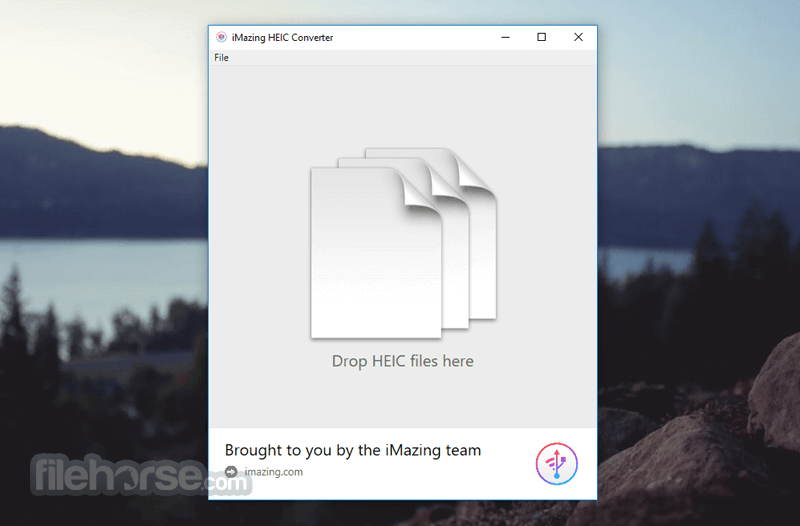
The app focuses on the no-nonsense user interface, featuring only file list area, a toggle for the target file format (JPEG or PNG), and a single “Convert” button in a lower-right corner of the window. Files can be added to the processing batch by simply dragging and dropping files or entire HEIC image folders into the app window.
The conversion process is fast and reliable, retaining with all images their EXIF metadata and color profiles. Before every conversion is started, the app will ask you for the target directory where newly created images will be saved. Old HEIC image files are not deleted or modified in any way. Download HEIC to JPG program for Windows now!
Features and Highlights
Also Available: Download iMazing HEIC Converter for Mac
Download iMazing HEIC Converter Latest Version Why is this app published on FileHorse? (More info)
Originally introduced on the iOS 11, the new HEIC photo file format has been hailed as one of the most advanced formats for retaining quality elements in photos snapped on the go.
However, since this image format is so new and is not supported by the majority of image editing suites (but it can be natively viewed on Windows 10/Windows 11), it forces PC users to seek for an easy-to-use converter that will transform those images to more user-friendly formats. Free Download HEIC to JPG software for PC!
iMazing Converter provides service of local image conversion, saving you from the hassle of uploading your images (saving your time, bandwidth, and the need to handle online web apps), enabling you to set up conversion batches that are as large or often used as you need.
To be able to run this app on your home PC or laptop, you need to use at least Windows 7 (with .NET Framework 4.5.2) in either 32bit or 64bit variation. Older versions of this OS are not supported.
Your photos and videos in the format you need them
- Convert HEIC to JPG
- Convert HEIC to PNG
- Convert HEVC (H.265) to AVC/MP4 (H.264)
- Adjust resolution & quality
- Preserve or remove EXIF metadata
- Drag & Drop files or folders
- Fast and easy to use
- Supports color profiles, including wide-gamut
- 100% Free
iMazing Converter for PC comes inside a small installation package that can be easily operated by users of all knowledge levels. Essentially all you need to do is to confirm all the procedures the installer requires, and then simply fire up the app that was transferred on your local storage.
The app focuses on the no-nonsense user interface, featuring only file list area, a toggle for the target file format (JPEG or PNG), and a single “Convert” button in a lower-right corner of the window. Files can be added to the processing batch by simply dragging and dropping files or entire HEIC image folders into the app window.
The conversion process is fast and reliable, retaining with all images their EXIF metadata and color profiles. Before every conversion is started, the app will ask you for the target directory where newly created images will be saved. Old HEIC image files are not deleted or modified in any way. Download HEIC to JPG program for Windows now!
Features and Highlights
- Convert HEIC files to JPG or PNG – The most reliable way of converting your iPhone photos to more user-friendly file formats on both PC and Mac
- Lightweight and fast conversion – Built from the ground up to convert your images with incredible speed.
- Drag & Drop .heic files or folders – Add as many images as you want with few mouse moves.
- Simple interface for everyone – Add images and click Convert. Nothing more.
- Preserve EXIF metadata
- Support for color profiles, including wide-gamut
- Available on Windows 7, 8, 10, and 11.
- Easy to use with a simple interface.
- Free and lightweight.
- Converts HEIC to JPEG or PNG quickly.
- Maintains image quality during conversion.
- Supports batch conversion.
- Limited to only HEIC format conversions.
- No advanced editing features.
- Windows and macOS only, no mobile version.
- No direct integration with cloud services.
- Occasional slowdowns with large batch conversions.
Also Available: Download iMazing HEIC Converter for Mac
Download iMazing HEIC Converter Latest Version Why is this app published on FileHorse? (More info)
##
影片介紹
##
畫面截圖
- 2026-07-15 iMazing HEIC Converter 2.0.14 38.87 MB
- 2026-05-20 iMazing HEIC Converter 2.0.13 38.86 MB
- 2026-03-10 iMazing HEIC Converter 2.0.12 38.86 MB
- 2026-02-04 iMazing HEIC Converter 2.0.11 39.34 MB
- 2023-05-23 iMazing HEIC Converter 2.0.9 11.6 MB
- 2023-05-16 iMazing HEIC Converter 2.0.8 11.61 MB
- 2023-05-09 iMazing HEIC Converter 2.0.7 11.6 MB
- 2023-04-19 iMazing HEIC Converter 2.0.6 11.62 MB