⚠ 這是歷史版本頁面 — 查看 JoyToKey 最新版本 →

- 目前版本6.9.2
- 更新日期2023-09-10
- 檔案大小2.08 MB
- 檔案名稱JoyToKey_en.exe
- 作業系統Windows 7 / Windows 8 / Windows 10 / Windows 11
- 支援語系English
- 授權型式商業試用
- 開發商 Ryo Ohkubo
- 軟體分類Windows 軟體 / 系統優化
##
編輯短評
JoyToKey 是一款歷史悠久的鍵盤模擬工具,能將遊戲手把的按鈕與搖桿對應到鍵盤按鍵或滑鼠操作,解決許多遊戲不支援手把輸入的問題。它的最大特色是設定彈性高,可針對不同應用程式指定不同配置,且持續更新,評價普遍不錯,在同類工具中算是主流選擇。
適合想用手把玩老遊戲、網頁遊戲或模擬器的玩家,尤其當遊戲本身沒有完整手把支援時。與其他系統優化工具相比,JoyToKey 專注於輸入映射,功能單一但紮實。需注意它是試用版,可能有限制,且僅提供英文介面,Windows 平台限定。
##
翻譯排程處理中,以下暫以英文原文呈現
軟體介紹
JoyToKey is a fully-featured free keyboard emulator that allows Windows users to control their mouse or keyboard inputs using the buttons and thumbsticks of their game controllers.
This is especially useful for a wide variety of games that are built without full gamepad support, which includes numerous web games, standalone game applications, console emulators, and other apps.
With JoyToKey, you can take full control over the functionality of your favorite gamepad and enable its buttons and sticks to operate keyboard (single or multiple) strokes and/or mouse movement, with target application never noticing the difference.
In addition to being used for game software, It can also help general users who want to improve their general efficiency in various non-gaming apps and productivity software suites.
This is especially true for users who want to simplify their workflow and bind various frequently used shortcuts and macros to the specific button of their gamepad.
With YouToKey you can create specific profiles for all your favorite or most used programs (such as Photoshop or Web Browser) and automate specific tasks by assigning them to button presses on your game controller.
Joy To Key can be used for free under a shareware license, it is portable and does not feature installer/uninstaller, and it only requires the presence of a working gamepad to function. Joy2Key is safe & secure, tested to be virus-free.
All of its files are in their original form. Enjoy!
Features and Highlights
JoyToKey is a portable Windows application that can be started both from local storage or from a portable USB flash stick. The creator of the app has not made a separate installer/uninstall package available for public use.
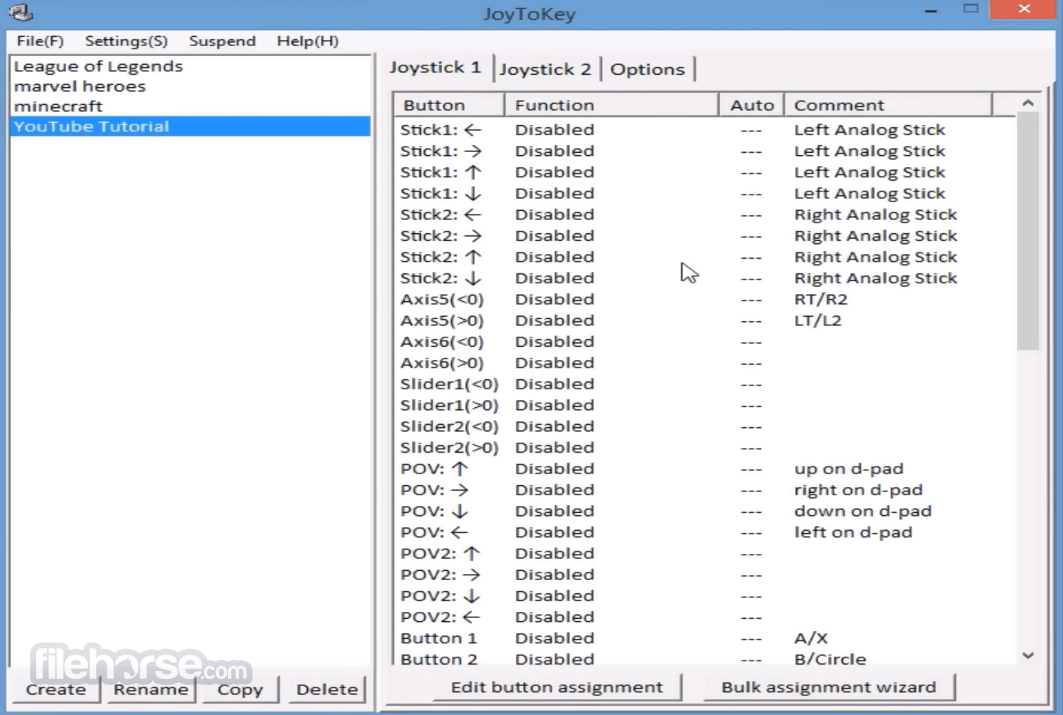
The main interface window of Joy2Key features two panes that list all the created gamepad profiles, and the in-depth listing of button commands for each selected profile. Keyboard or mouse command can be assigned to each game controller button either manually or with the use of Auto Setting Wizard which will prompt you to provide a command for each of the detected buttons and axis.
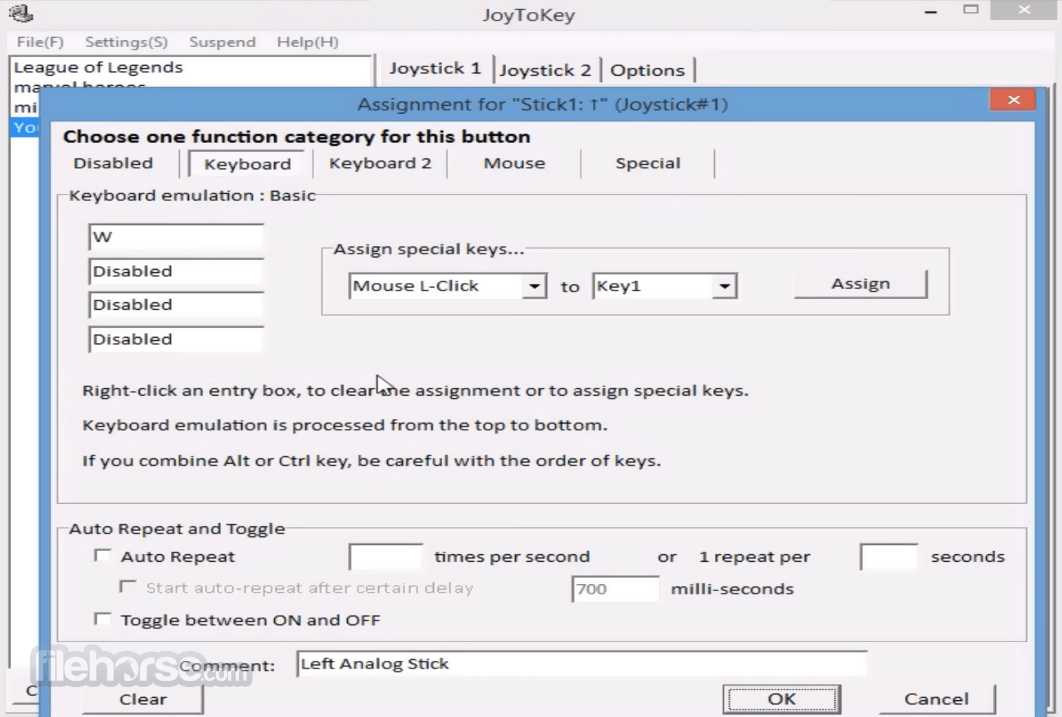
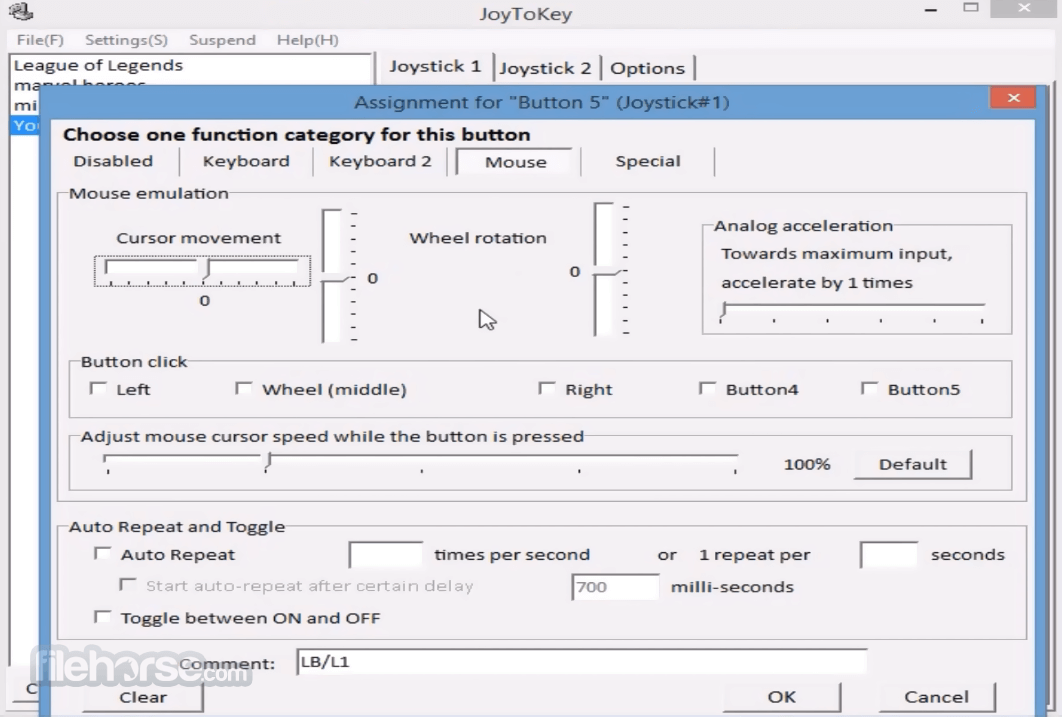
Configuration screen features four distinct tabs and a “Disable” section for temporarily stopping the emulation of your game controller. There you can also set specific settings for emulating keyboard and mouse and optimize how your game controller is reacting in various situations.
You can freely download it and evaluate it without any limitation in functionality, but after trial for continued usage, please consider purchasing a license key.
How to Use
Operating System: Windows 11, 10, 8, 7
PROS
Download JoyToKey Latest Version Why is this app published on FileHorse? (More info)
This is especially useful for a wide variety of games that are built without full gamepad support, which includes numerous web games, standalone game applications, console emulators, and other apps.
With JoyToKey, you can take full control over the functionality of your favorite gamepad and enable its buttons and sticks to operate keyboard (single or multiple) strokes and/or mouse movement, with target application never noticing the difference.
In addition to being used for game software, It can also help general users who want to improve their general efficiency in various non-gaming apps and productivity software suites.
This is especially true for users who want to simplify their workflow and bind various frequently used shortcuts and macros to the specific button of their gamepad.
With YouToKey you can create specific profiles for all your favorite or most used programs (such as Photoshop or Web Browser) and automate specific tasks by assigning them to button presses on your game controller.
Joy To Key can be used for free under a shareware license, it is portable and does not feature installer/uninstaller, and it only requires the presence of a working gamepad to function. Joy2Key is safe & secure, tested to be virus-free.
All of its files are in their original form. Enjoy!
Features and Highlights
- Support for creation and instantaneous use of multiple virtual game controllers.
- 16 configurable game controller profiles.
- Ability to launch external programs or URL addresses on the press of the game controller button.
- Full support for managing advanced emulation of media controls (volume up/down, prev/next/play/stop).
- In-depth button alias feature.
- Switching between multiple key assignments.
- Define specific priorities among multiple game controllers.
- Support for command-line arguments.
- Designate custom locations of configuration files.
- Associate profiles to target applications.
- Automatic switching of profiles depending on the currently focused application.
JoyToKey is a portable Windows application that can be started both from local storage or from a portable USB flash stick. The creator of the app has not made a separate installer/uninstall package available for public use.
The main interface window of Joy2Key features two panes that list all the created gamepad profiles, and the in-depth listing of button commands for each selected profile. Keyboard or mouse command can be assigned to each game controller button either manually or with the use of Auto Setting Wizard which will prompt you to provide a command for each of the detected buttons and axis.
Configuration screen features four distinct tabs and a “Disable” section for temporarily stopping the emulation of your game controller. There you can also set specific settings for emulating keyboard and mouse and optimize how your game controller is reacting in various situations.
You can freely download it and evaluate it without any limitation in functionality, but after trial for continued usage, please consider purchasing a license key.
How to Use
- Start JoyToKey tool
- In the right panel, double-click the "Button 1" row
- Press the 'A' key to assign it to the button, then click "OK"
- Open Notepad
- With the cursor inside Notepad, press "Button 1" on your joystick; the 'a' character should appear
Operating System: Windows 11, 10, 8, 7
PROS
- Customizable key assignments
- Supports multiple profiles
- Compatible with various applications
- Lightweight and efficient
- Enhances gaming experience
- Limited to Windows OS
- Requires manual configuration
- No official support for macOS
- May not support all controllers
- Lacks advanced features
Download JoyToKey Latest Version Why is this app published on FileHorse? (More info)
##
畫面截圖
- 2026-04-30 JoyToKey 7.3.3 3.38 MB
- 2025-11-24 JoyToKey 7.3.2 3.38 MB
- 2025-10-20 JoyToKey 7.3.1 3.38 MB
- 2025-08-28 JoyToKey 7.3.0 3.37 MB
- 2025-07-21 JoyToKey 7.2.0 3.37 MB
- 2025-01-13 JoyToKey 7.1.0 2.95 MB
- 2024-03-25 JoyToKey 6.9.3 2.1 MB
- 2023-09-10 JoyToKey 6.9.2 2.08 MB