- 目前版本2.4.10
- 更新日期2026-05-11
- 檔案大小37.3 MB
- 檔案名稱Loopback.zip
- 作業系統macOS 14.0 Sonoma or later
- 支援語系English
- 授權型式商業試用
- 開發商 Rogue Amoeba Software, Inc.
- 軟體分類Mac 軟體 / 音訊軟體
##
翻譯排程處理中,以下暫以英文原文呈現
軟體介紹
Loopback is a professional audio routing application for macOS developed by Rogue Amoeba, designed to give Mac users complete control over how audio is routed between applications and devices.
Think of it as a virtual patch bay for the audio on your Mac — without cables. With Loopback for Mac, you can create virtual audio devices that blend sound from multiple software sources and audio hardware, then send that combined output anywhere on your system.
Whether you’re a podcaster needing to combine mic input with music, a streamer sending game audio to Zoom, or a musician routing audio into a DAW, it makes it possible with flexibility and precision.
Main Features
Combine Audio Sources: Pull audio from multiple apps and physical devices into a single virtual device.
Powerful Channel Options: Add multiple output channels and customize routing visually.
Pass-Thru Device: Create simple routes between apps with minimal configuration.
System-Wide Virtual Devices: Virtual devices Loopback app creates appear in macOS as real audio sources.
Works With Any App: Route audio from apps like Music, Zoom, or DAWs like Logic/Ableton.
Works With Hardware: Include USB mics and interfaces in your virtual mixes.
Intuitive Wire-Style UI: Visual cables make creating complex setups clearer.
User Interface
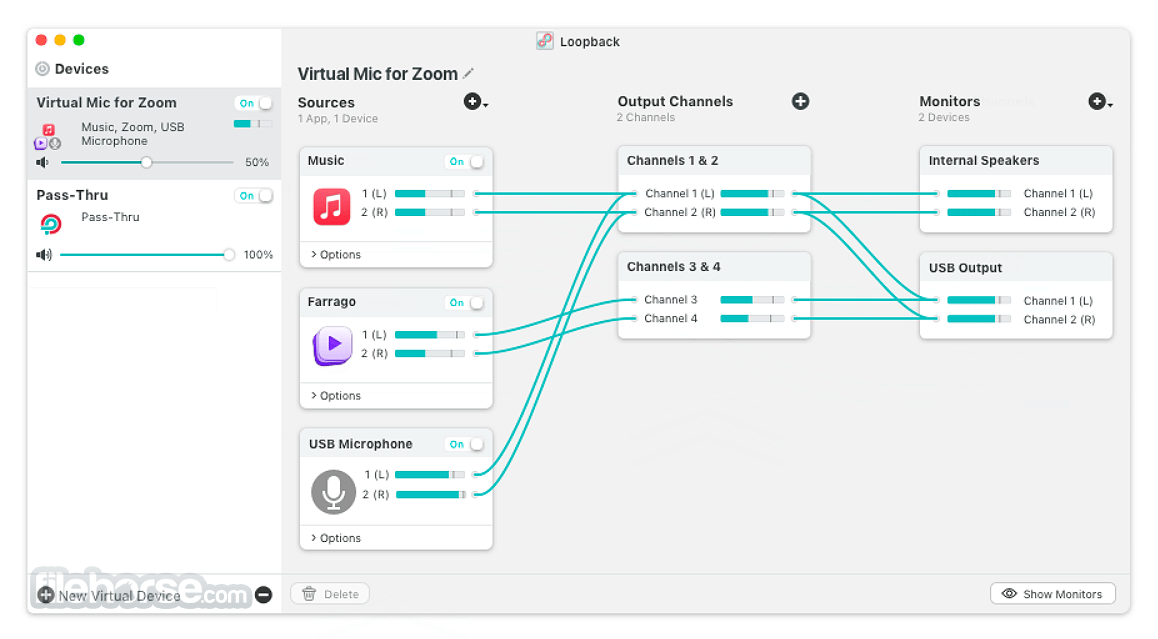
Loopback’s interface is built around a visual, wire-style canvas where virtual audio devices are created and configured.
Each virtual device includes a sources column where you add applications and hardware, an output channels section, and an optional monitor. Users drag and connect elements much like in a graphics editor to define how audio flows.
Though it handles complex routing workflows, the interface stays approachable, letting beginners start with simple pass-thru devices while offering deep customization for advanced users.
FileHorse team recommends this product for anyone serious about advanced audio routing on macOS.
Installation and Setup
To install Loopback app, download the app from Rogue Amoeba’s official website and drag it from your Downloads folder into the Applications folder.
Launching it the first time prompts installation of the underlying Audio Routing Kit (ARK) and requests system permissions for routing audio, including microphone and audio access.
You must enter your administrator password to complete these steps. Once installed, the app will be ready to create virtual devices.
Uninstallation is handled from the app’s Help menu, which cleans up virtual devices and components.
How to Use
What is Loopback used for?
Loopback routes and merges audio from apps and hardware, letting you combine, redirect, and manage audio system-wide for recording, streaming, meetings, or production.
Is Loopback free?
No. It offers a trial mode with limitations, and the full version requires a paid license.
How much does Loopback cost?
A single-user license costs $99 USD, with occasional bundle discounts available with other Rogue Amoeba apps.
Can Loopback combine mic input and music?
Yes. You can blend voice, music, system sound, and other sources into one virtual device.
Does Loopback work with streaming tools?
Yes. You can select Loopback virtual devices as inputs in OBS, Ecamm Live, Zoom, and other apps that accept audio sources.
Alternatives
Blackhole – A free macOS virtual audio device tool for routing sound between applications.
SoundSource – Rogue Amoeba’s simpler audio control utility with limited routing features.
Audio Hijack – Another Rogue Amoeba app focused on audio recording with some routing capabilities.
Pricing
The app license: $99 USD, local taxes may apply.
Bundles with other Rogue Amoeba software offer savings.
Free TRIAL available with feature limitations.
System Requirements
OS: macOS 10.15 or later (check latest Rogue Amoeba requirements).
Processor: Intel or Apple Silicon-based Mac.
Disk Space: Sufficient for app + virtual device infrastructure.
Permissions: Requires Audio Access and Microphone access for ARK.
PROS
Loopback is a uniquely capable audio routing application for macOS, combining power and flexibility with an intuitive visual interface.
It fills a niche that few other tools do, letting you mix and route audio from apps and devices without cables or complicated system hacks.
While its price point may be high for casual users, professionals, podcasters, and creators who rely on precise audio control will find its capabilities well worth the investment.
Download Loopback for Mac Latest Version Why is this app published on FileHorse? (More info)
Think of it as a virtual patch bay for the audio on your Mac — without cables. With Loopback for Mac, you can create virtual audio devices that blend sound from multiple software sources and audio hardware, then send that combined output anywhere on your system.
Whether you’re a podcaster needing to combine mic input with music, a streamer sending game audio to Zoom, or a musician routing audio into a DAW, it makes it possible with flexibility and precision.
Main Features
Combine Audio Sources: Pull audio from multiple apps and physical devices into a single virtual device.
Powerful Channel Options: Add multiple output channels and customize routing visually.
Pass-Thru Device: Create simple routes between apps with minimal configuration.
System-Wide Virtual Devices: Virtual devices Loopback app creates appear in macOS as real audio sources.
Works With Any App: Route audio from apps like Music, Zoom, or DAWs like Logic/Ableton.
Works With Hardware: Include USB mics and interfaces in your virtual mixes.
Intuitive Wire-Style UI: Visual cables make creating complex setups clearer.
User Interface
Loopback’s interface is built around a visual, wire-style canvas where virtual audio devices are created and configured.
Each virtual device includes a sources column where you add applications and hardware, an output channels section, and an optional monitor. Users drag and connect elements much like in a graphics editor to define how audio flows.
Though it handles complex routing workflows, the interface stays approachable, letting beginners start with simple pass-thru devices while offering deep customization for advanced users.
FileHorse team recommends this product for anyone serious about advanced audio routing on macOS.
Installation and Setup
To install Loopback app, download the app from Rogue Amoeba’s official website and drag it from your Downloads folder into the Applications folder.
Launching it the first time prompts installation of the underlying Audio Routing Kit (ARK) and requests system permissions for routing audio, including microphone and audio access.
You must enter your administrator password to complete these steps. Once installed, the app will be ready to create virtual devices.
Uninstallation is handled from the app’s Help menu, which cleans up virtual devices and components.
How to Use
- Open this app after installation.
- Click the “New Virtual Device” button to create a routing device.
- Add audio sources by selecting applications (like Music, Zoom) or hardware devices (like your mic).
- Choose output channels and wire them to route sound exactly where you want it.
- If necessary, include a monitor to hear live audio from the device.
- Open another app (such as OBS or Zoom) and choose your Loopback virtual device as the audio input or output.
- Save configurations for later use.
What is Loopback used for?
Loopback routes and merges audio from apps and hardware, letting you combine, redirect, and manage audio system-wide for recording, streaming, meetings, or production.
Is Loopback free?
No. It offers a trial mode with limitations, and the full version requires a paid license.
How much does Loopback cost?
A single-user license costs $99 USD, with occasional bundle discounts available with other Rogue Amoeba apps.
Can Loopback combine mic input and music?
Yes. You can blend voice, music, system sound, and other sources into one virtual device.
Does Loopback work with streaming tools?
Yes. You can select Loopback virtual devices as inputs in OBS, Ecamm Live, Zoom, and other apps that accept audio sources.
Alternatives
Blackhole – A free macOS virtual audio device tool for routing sound between applications.
SoundSource – Rogue Amoeba’s simpler audio control utility with limited routing features.
Audio Hijack – Another Rogue Amoeba app focused on audio recording with some routing capabilities.
Pricing
The app license: $99 USD, local taxes may apply.
Bundles with other Rogue Amoeba software offer savings.
Free TRIAL available with feature limitations.
System Requirements
OS: macOS 10.15 or later (check latest Rogue Amoeba requirements).
Processor: Intel or Apple Silicon-based Mac.
Disk Space: Sufficient for app + virtual device infrastructure.
Permissions: Requires Audio Access and Microphone access for ARK.
PROS
- Powerful, flexible audio routing.
- Intuitive visual routing canvas.
- Combines apps and hardware.
- System-wide virtual devices.
- Works with professional tools (OBS, DAWs).
- Bundled discounts available.
- Free trial lets you test features.
- Relatively expensive for casual users.
- No undo for routing changes.
- Settings can be complex for beginners.
- No share/export config feature (in some versions).
- Trial limitations (noise overlay).
- Requires permission setup.
- Focused on macOS only.
Loopback is a uniquely capable audio routing application for macOS, combining power and flexibility with an intuitive visual interface.
It fills a niche that few other tools do, letting you mix and route audio from apps and devices without cables or complicated system hacks.
While its price point may be high for casual users, professionals, podcasters, and creators who rely on precise audio control will find its capabilities well worth the investment.
Download Loopback for Mac Latest Version Why is this app published on FileHorse? (More info)
##
畫面截圖