- 目前版本5.5.5
- 更新日期2026-07-13
- 檔案大小59.5 MB
- 檔案名稱PhotoSweeper_X.dmg
- 作業系統macOS 10.15 Catalina or later
- 支援語系English
- 授權型式試用版
- 開發商 Overmacs Team
- 軟體分類Mac 軟體 / 影像設計
##
翻譯排程處理中,以下暫以英文原文呈現
軟體介紹
PhotoSweeper for Mac is a swift and powerful duplicate photo cleaner built to help you get rid of duplicate or similar photos on your Mac. Easy-to-use, fast, powerful, and beautiful duplicate photo cleaner for the Mac!
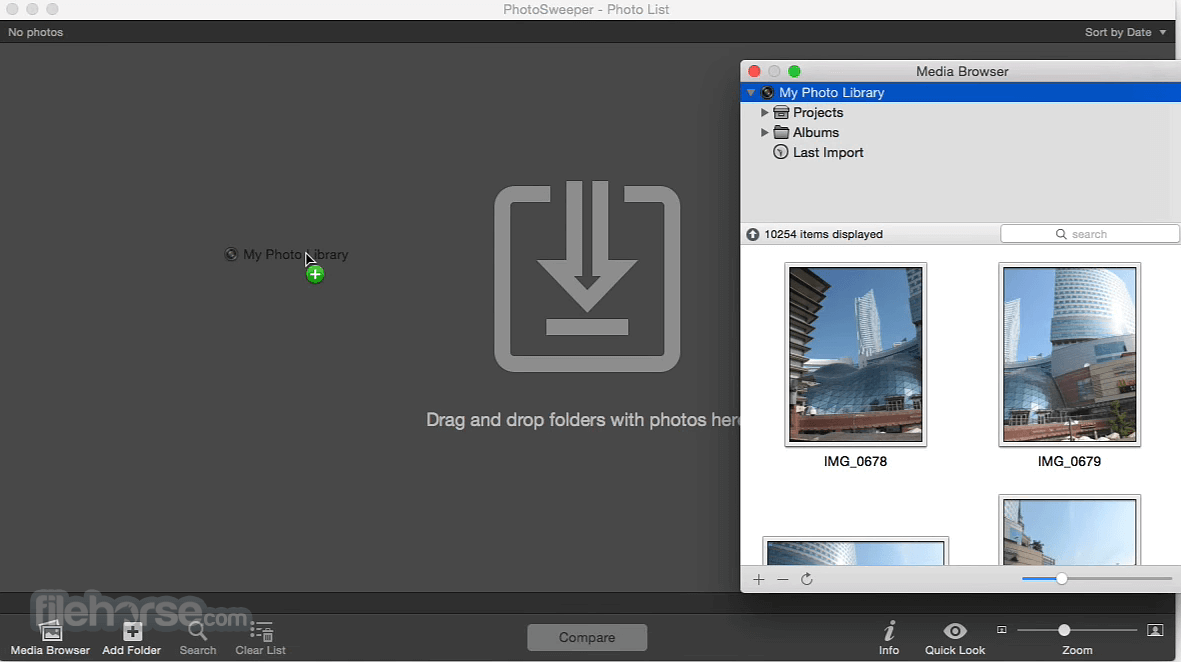
Works smoothly with the new Apple Photos, displaying the library hierarchy and photos with details.
On removal, photos go to a special album. Fully compatible with the latest iPhoto 9, iPhoto 8.x (iLife ‘09), and iPhoto 7.x (iLife ‘08). Duplicate photos are moved to the iPhoto Trash. Fully compatible with Aperture 3.0 and later. The app shows all details of photos and duplicate photos are moved to the Aperture Trash.
Works great with Lightroom CC (6.x). On removal, PhotoSweeper doesn‘t delete files, but marks them as “Rejected” and puts them in a special collection.
Why do you need PhotoSweeper?
Auto Mark
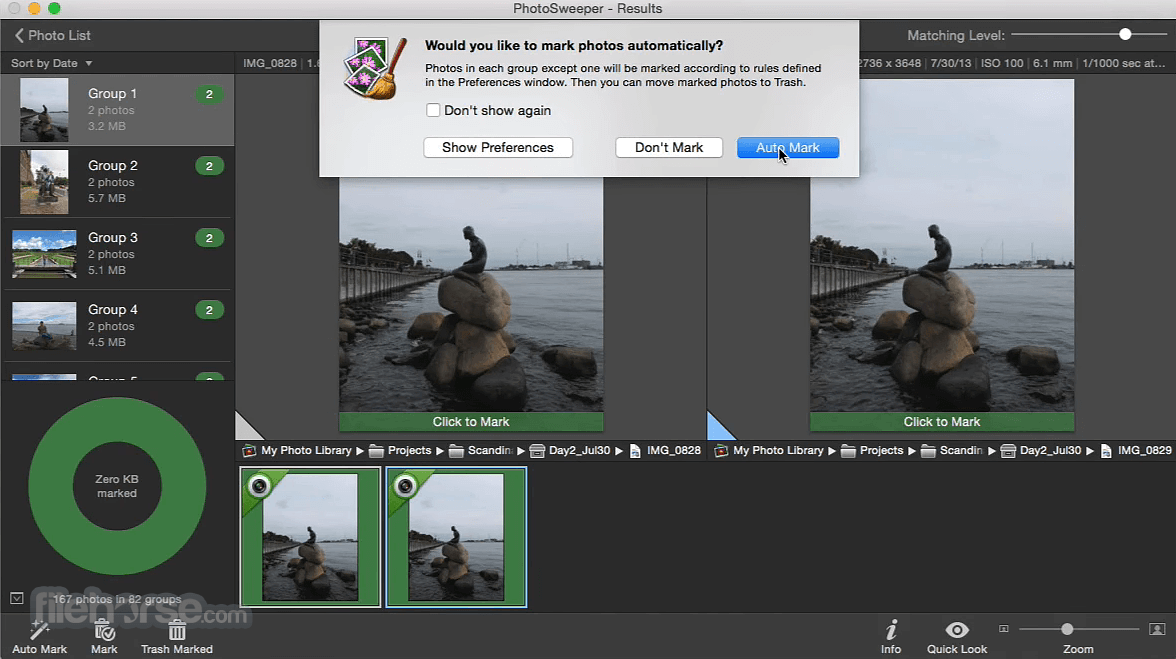
PhotoSweeper for macOS has intuitive adjustable rules which determine what photo should be kept in each group of duplicate photos.
Similar Photos
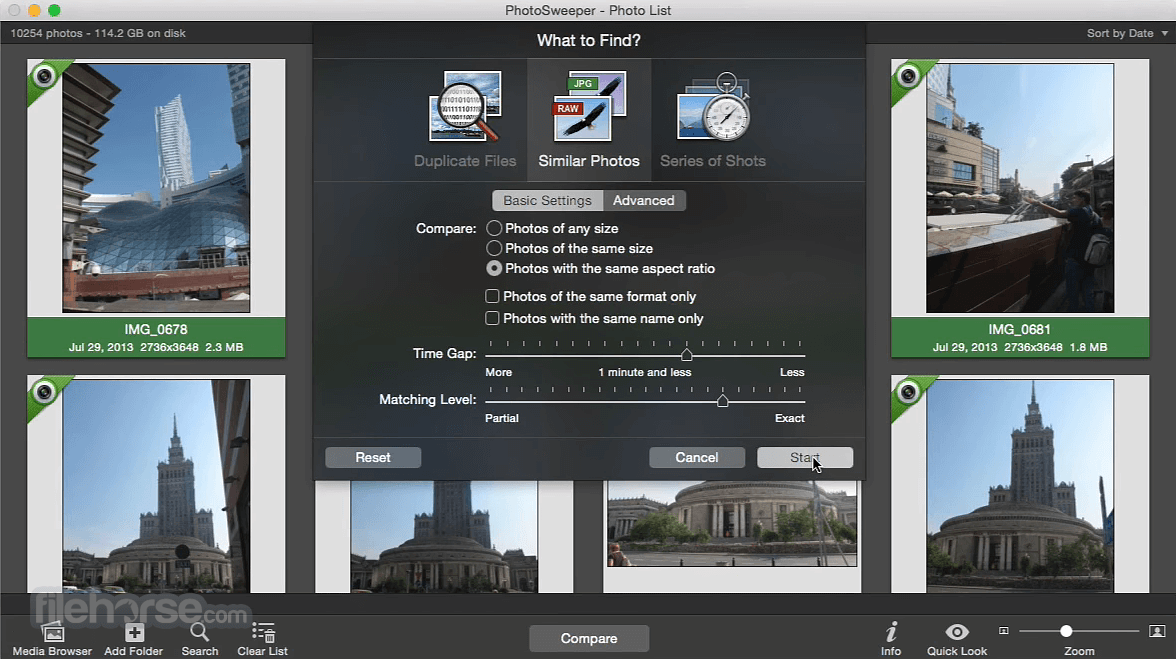
Fast groups similar photos and lets you delete unwanted photos in a few clicks. You determine the similarity between photos.
Series of Shots
Determine a time gap between photos, and the app will find series of shots, help you keep the best photos, and get rid of others.
Auto-Lock
Keep safe already sorted photos. Locked photos are used for comparison but can‘t be marked for removal.
Movies
Compares video files as well. You can add video files not only from your Mac but also from Photos, iPhoto, Aperture, and Lightroom.
Edited Pictures
Finds duplicates with different image dimensions, color saturation, and even edited with applications, such as Photoshop, Pixelmator, etc.
Great Browser
The up-to-date browser with such great features like EXIF Info Panel, Movie Preview, Quick Look, Path Bar, Image Ratings, Color Labels, etc.
Batch Rename
You can bulk rename files while copying or moving them to another folder. It helps you better import photos on your Mac.
Safe Removal
The app never deletes files from a disk or media library directly. If something is wrong, you can restore photos from Trash.
Image Formats
Supports all the popular image formats including RAW ones. Exclusive support of PDF, DNG, and WebP formats.
Viewing Results
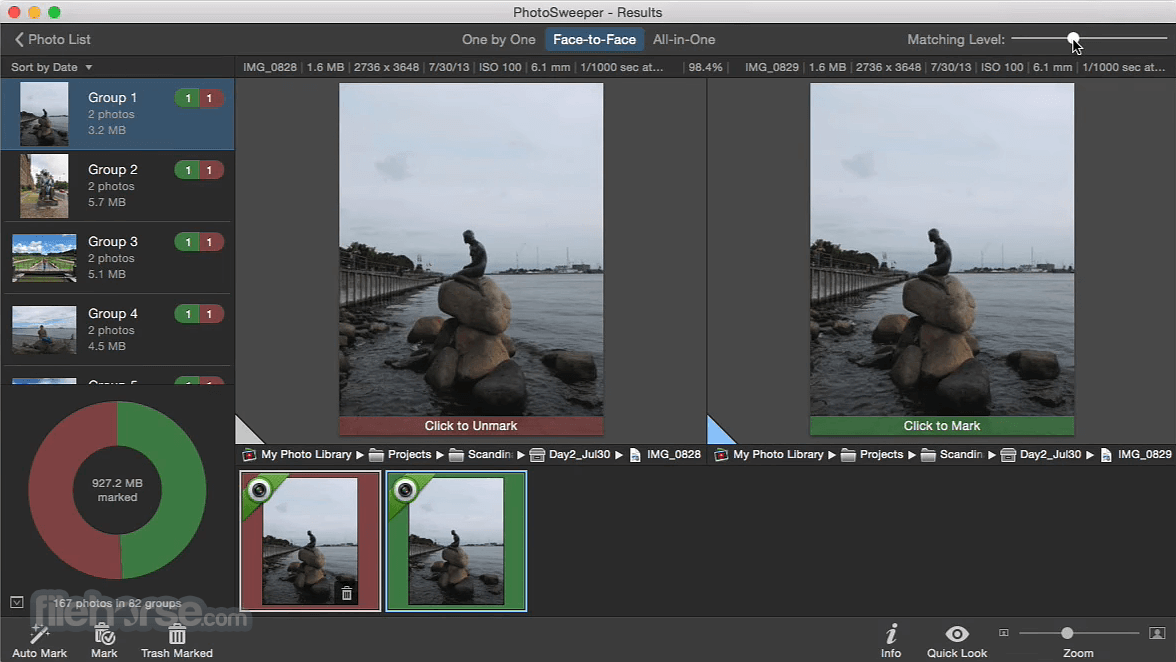
3 comfortable modes for reviewing results: “One by One”, ”Face-to-Face" and “All in One“. Marking a photo with just a click.
Flexible Settings
Powerful multi-settings to easily find duplicates, similar photos, series of shots. You can adjust the matching level in the results on-the-fly.
Fast
Well-optimized, with 64-bits and multi-core processor support, the tool reveals the real power of your Mac. Enjoy fast browsing, comparison, and removal.
OS X El Capitan
The app takes full advantage of the latest features and looks magnificent on macOS El Capitan. Also runs great on Yosemite and Mavericks.
Other Improvements
Photo Sweeper for Mac comes with a list of various other enhancements and modernizations throughout the whole app.
How to Use
macOS 10.13 High Sierra or later
Intel or Apple Silicon (M1/M2) processor
Minimum 4 GB RAM
100 MB of free disk space
Access to photo libraries (Photos, Lightroom, etc.)
PROS
Download PhotoSweeper for Mac Latest Version Why is this app published on FileHorse? (More info)
Works smoothly with the new Apple Photos, displaying the library hierarchy and photos with details.
On removal, photos go to a special album. Fully compatible with the latest iPhoto 9, iPhoto 8.x (iLife ‘09), and iPhoto 7.x (iLife ‘08). Duplicate photos are moved to the iPhoto Trash. Fully compatible with Aperture 3.0 and later. The app shows all details of photos and duplicate photos are moved to the Aperture Trash.
Works great with Lightroom CC (6.x). On removal, PhotoSweeper doesn‘t delete files, but marks them as “Rejected” and puts them in a special collection.
Why do you need PhotoSweeper?
Auto Mark
PhotoSweeper for macOS has intuitive adjustable rules which determine what photo should be kept in each group of duplicate photos.
Similar Photos
Fast groups similar photos and lets you delete unwanted photos in a few clicks. You determine the similarity between photos.
Series of Shots
Determine a time gap between photos, and the app will find series of shots, help you keep the best photos, and get rid of others.
Auto-Lock
Keep safe already sorted photos. Locked photos are used for comparison but can‘t be marked for removal.
Movies
Compares video files as well. You can add video files not only from your Mac but also from Photos, iPhoto, Aperture, and Lightroom.
Edited Pictures
Finds duplicates with different image dimensions, color saturation, and even edited with applications, such as Photoshop, Pixelmator, etc.
Great Browser
The up-to-date browser with such great features like EXIF Info Panel, Movie Preview, Quick Look, Path Bar, Image Ratings, Color Labels, etc.
Batch Rename
You can bulk rename files while copying or moving them to another folder. It helps you better import photos on your Mac.
Safe Removal
The app never deletes files from a disk or media library directly. If something is wrong, you can restore photos from Trash.
Image Formats
Supports all the popular image formats including RAW ones. Exclusive support of PDF, DNG, and WebP formats.
Viewing Results
3 comfortable modes for reviewing results: “One by One”, ”Face-to-Face" and “All in One“. Marking a photo with just a click.
Flexible Settings
Powerful multi-settings to easily find duplicates, similar photos, series of shots. You can adjust the matching level in the results on-the-fly.
Fast
Well-optimized, with 64-bits and multi-core processor support, the tool reveals the real power of your Mac. Enjoy fast browsing, comparison, and removal.
OS X El Capitan
The app takes full advantage of the latest features and looks magnificent on macOS El Capitan. Also runs great on Yosemite and Mavericks.
Other Improvements
Photo Sweeper for Mac comes with a list of various other enhancements and modernizations throughout the whole app.
How to Use
- Launch the app and choose the comparison method
- Drag and drop folders or use media browser to add photos
- Click “Compare” to start finding duplicates or similar files
- Review grouped results and mark files to delete or move
- Use auto-mark rules to speed up the selection process
- Click “Trash Marked” or “Move Marked” to clean up
- Adjust settings for similarity threshold and matching options
- Use side-by-side preview to compare selected photo pairs
- Save results or export lists for future review
macOS 10.13 High Sierra or later
Intel or Apple Silicon (M1/M2) processor
Minimum 4 GB RAM
100 MB of free disk space
Access to photo libraries (Photos, Lightroom, etc.)
PROS
- Fast and accurate duplicate detection
- Supports multiple photo library types
- Flexible comparison and auto-marking options
- Intuitive interface with detailed previews
- Works well with large photo collections
- No free version available
- Limited editing or metadata tools
- Can consume high memory with huge libraries
- Results depend heavily on similarity threshold
- Interface lacks modern design polish
Download PhotoSweeper for Mac Latest Version Why is this app published on FileHorse? (More info)
##
畫面截圖