⚠ 這是歷史版本頁面 — 查看 Move Mouse 最新版本 →

- 目前版本4.18.2
- 更新日期2024-05-31
- 檔案大小1.9 MB
- 檔案名稱movemouse-4.18.2.zip
- 作業系統Windows 7 / Windows 8 / Windows 10 / Windows 11
- 支援語系English
- 授權型式開源軟體
- 開發商 Move Mouse Team
- 軟體分類Windows 軟體 / 系統優化
##
編輯短評
Move Mouse 是一款模擬滑鼠活動的小工具,核心功能是讓游標在指定時間內自動移動,也能模擬鍵盤按鍵與滑鼠左鍵點擊,三種動作可同時執行。它主要解決使用者暫時離開電腦時,系統因閒置而進入待機或鎖定畫面的困擾。這套軟體自推出以來持續更新,開發團隊維持穩定的維護節奏,在同類工具中屬於評價中上的熱門選擇,雖然不是最頂尖,但以開源軟體來說,使用者普遍給予不錯的評價。
這款工具適合需要長時間掛機、遠端操作或自動化簡單流程的使用者,例如離開座位時保持電腦喚醒,或搭配其他腳本完成重複性操作。與 FileHippo App Manager、Rufus 等系統優化工具相比,Move Mouse 專注在滑鼠模擬這個單一用途,功能單純但缺乏進階排程或情境設定。它僅提供英文介面,Windows 平台可免費使用,開源授權讓進階使用者能自行修改原始碼,但若需要圖形化設定或中文支援,就得額外花時間摸索。
##
翻譯排程處理中,以下暫以英文原文呈現
軟體介紹
Move Mouse can be described as a mouse activity simulator application. It performs several different miscellaneous tasks on its own for you. For instance, if you’ve stepped away from the PC for a moment, the application will cause the mouse cursor to move automatically.
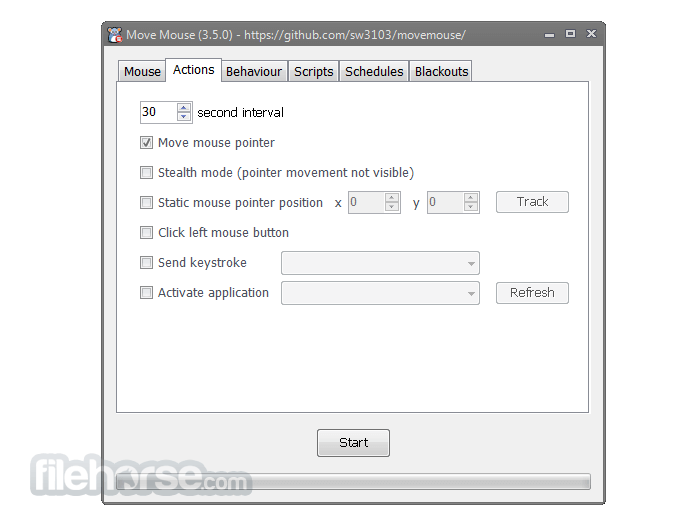
It can also perform keystroke actions as well as the left-click of the mouse. If necessary, all three actions can be performed at once.
Move Mouse isn’t really designed for anyone's purpose. Your creativity allows you to use it for many different things. It can run any application you want, position the pointer on the screen at a specific coordinate, send keystrokes to the screen, and manage a blackout schedule.
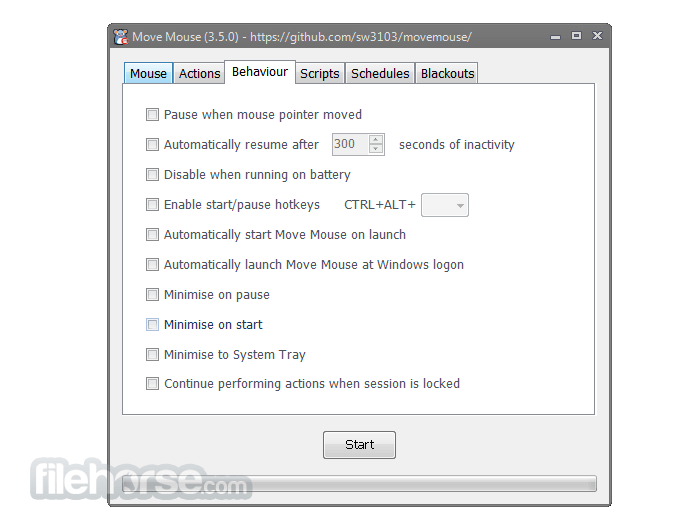
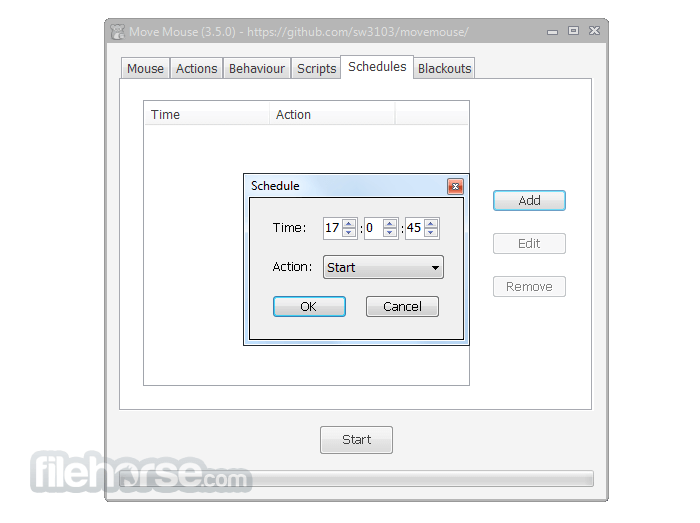
Commands can be run individually or together. Whatever you choose, the commands are performed at the set intervals in which you specify. The program can be scheduled to run at any hour of the day that you want. And if the application is in an idle state, there is the option to have the application continue activity again.
It is simple to keep sessions active with this tool. This comes in handy if you want to keep certain applications active rather than having them go idle. It can also help you handle the spamming notifications windows that come up at an irregular rate.
There is extra functionality that comes with this program too. For instance, you can customize your own scripts and use them for certain events. If you wanted to make start scripts, they can perform a certain action whenever you run the application.
You could make interval scripts that cause actions to happen at set interval phases. You could even make pause scripts that cause things to happen when the application is in a paused state. If you already know how to create scripts, then you will find this feature useful.
As you can see, there are many uses you can get out of this tool.
How to Use
FAQs
Is Move Mouse safe to use on Windows systems?
Yes, it's an open-source app and safe when downloaded from the official GitHub repository.
Can I run Move Mouse on startup automatically?
Yes, there's a built-in option to enable startup in the settings.
Does Move Mouse simulate keyboard input as well?
Yes, you can configure it to simulate keypresses in addition to mouse movement.
Will Move Mouse prevent my computer from sleeping?
Yes, it’s designed to simulate activity to keep your PC awake and active.
Can I schedule specific times for it to run?
Yes, it supports scheduling and conditional triggers to run at set times.
Alternatives
Mouse Jiggler – A lightweight tool to simulate mouse movement
AutoIt – More advanced scripting-based automation (requires scripting skills)
System Requirements
OS: Windows 7, 8, 10, 11
Architecture: 64-bit recommended
.NET Framework: Version 4.7.2 or later
RAM: Minimum 512 MB
Disk Space: Less than 50 MB
PROS
Download Move Mouse Latest Version Why is this app published on FileHorse? (More info)
It can also perform keystroke actions as well as the left-click of the mouse. If necessary, all three actions can be performed at once.
Move Mouse isn’t really designed for anyone's purpose. Your creativity allows you to use it for many different things. It can run any application you want, position the pointer on the screen at a specific coordinate, send keystrokes to the screen, and manage a blackout schedule.
Commands can be run individually or together. Whatever you choose, the commands are performed at the set intervals in which you specify. The program can be scheduled to run at any hour of the day that you want. And if the application is in an idle state, there is the option to have the application continue activity again.
It is simple to keep sessions active with this tool. This comes in handy if you want to keep certain applications active rather than having them go idle. It can also help you handle the spamming notifications windows that come up at an irregular rate.
There is extra functionality that comes with this program too. For instance, you can customize your own scripts and use them for certain events. If you wanted to make start scripts, they can perform a certain action whenever you run the application.
You could make interval scripts that cause actions to happen at set interval phases. You could even make pause scripts that cause things to happen when the application is in a paused state. If you already know how to create scripts, then you will find this feature useful.
As you can see, there are many uses you can get out of this tool.
How to Use
- Download Move Mouse from its GitHub releases page or FileHorse.com
- Extract the ZIP file to a preferred folder
- Run MoveMouse.exe to launch the application
- Configure activity triggers and behavior in the interface
- Set schedules, idle triggers, or random movements as needed
- Minimize the app to run silently in the background
- Use the system tray icon to pause/resume or exit
- Optional: Enable startup with Windows for automation
FAQs
Is Move Mouse safe to use on Windows systems?
Yes, it's an open-source app and safe when downloaded from the official GitHub repository.
Can I run Move Mouse on startup automatically?
Yes, there's a built-in option to enable startup in the settings.
Does Move Mouse simulate keyboard input as well?
Yes, you can configure it to simulate keypresses in addition to mouse movement.
Will Move Mouse prevent my computer from sleeping?
Yes, it’s designed to simulate activity to keep your PC awake and active.
Can I schedule specific times for it to run?
Yes, it supports scheduling and conditional triggers to run at set times.
Alternatives
Mouse Jiggler – A lightweight tool to simulate mouse movement
AutoIt – More advanced scripting-based automation (requires scripting skills)
System Requirements
OS: Windows 7, 8, 10, 11
Architecture: 64-bit recommended
.NET Framework: Version 4.7.2 or later
RAM: Minimum 512 MB
Disk Space: Less than 50 MB
PROS
- Open source and free
- Custom triggers and schedules
- Lightweight with minimal CPU usage
- Easy-to-use user interface
- Prevents screen lock and sleep
- No support for macOS or Linux
- No portable version by default
- Lacks advanced automation logic
- UI feels basic and outdated
- No built-in update checker
Download Move Mouse Latest Version Why is this app published on FileHorse? (More info)
##
畫面截圖
- 2026-04-05 Move Mouse 4.20.0 2 MB
- 2026-03-05 Move Mouse 4.19.3 2 MB
- 2026-02-23 Move Mouse 4.19.2 2 MB
- 2026-01-08 Move Mouse 4.19.1 2 MB
- 2025-12-16 Move Mouse 4.19.0 1.7 MB
- 2024-10-03 Move Mouse 4.18.3 2 MB
- 2024-05-31 Move Mouse 4.18.2 1.9 MB
- 2024-05-05 Move Mouse 4.18.0 1.8 MB