⚠ 這是歷史版本頁面 — 查看 MSI Dragon Center 最新版本 →

MSI Dragon Center 2.0.148
v 2.0.148
Windows
免費軟體
7.8/10 (57)
- 目前版本2.0.148
- 更新日期2024-09-18
- 檔案大小488.66 MB
- 檔案名稱Dragon-Center.zip
- 作業系統Windows 10 / Windows 11
- 支援語系English
- 授權型式免費軟體
- 開發商 MSI
- 軟體分類Windows 軟體 / 系統優化
##
編輯短評
MSI Dragon Center 是微星官方推出的系統整合工具,專為自家主機板、顯示卡與筆電用戶設計,能集中管理硬體設定、調校效能、控制 RGB 燈效,並提供系統診斷與超頻相關功能。它最大的辨識度在於將 Ambient Link 燈光同步整合進來,讓周邊裝置的燈效也能一併控制。這套軟體自 2020 年起持續收錄更新,近期仍維持維護,不過在系統優化分類中屬於小眾工具,使用者評價普遍不錯,但評分人數不多,熱度不算高。
如果你擁有微星品牌的筆電或零組件,想在同一介面調整風扇、電源與燈光,這套會比第三方工具更貼近原廠設定;但若你用的是其他品牌硬體,它基本上派不上用場。與同分類的 Glary Utilities 或 Rufus 相比,Dragon Center 並非通用型優化軟體,而是硬體綁定的控制中心。它為免費軟體,僅支援 Windows 平台,且介面只有英文,沒有中文版,使用前需留意語系門檻。
##
翻譯排程處理中,以下暫以英文原文呈現
軟體介紹
MSI Dragon Center is a comprehensive system utility developed by Micro-Star International, a Taiwanese technology corporation known for their popular video cards, motherboards, monitors, and other PC components, allows owners of MSI hardware (and especially MSI-branded laptops) to manage various PC settings, tune the system, optimize LED lighting, and access wide array of tools for system diagnostics and overclocking.
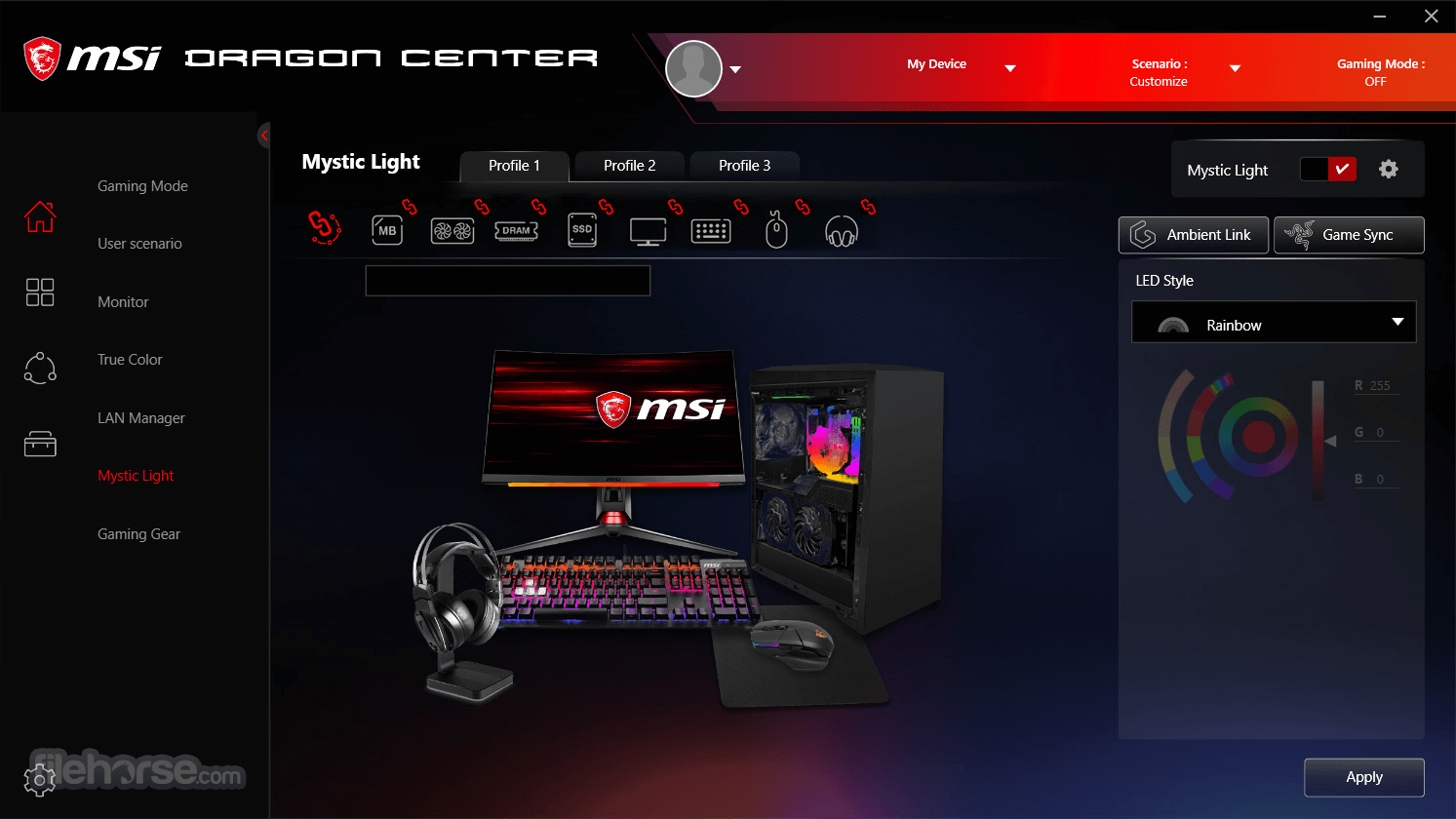
MSI Ambient Link is now part of Dragon Center. Enjoy!
In addition to the tools and features that are integrated directly into this app, the MSI Dragon Center can also integrate services available via other compatible apps.
This is done via the App Portal section, which can provide quick links to installed software solutions such as MSI True Color, Nahimic, XSplit, NVIDIA's GeForce Experience, SCM Control Panel, and SteelSeries Engine.
The user interface of the Dragon Center app utilizes the standard color scheme and layout that are present in many other gaming-focused software solutions offered by this manufacturer.
Its incredible variety of tools is easily accessible via a streamlined tabbed interface that features six distinct areas – App Portal (links to other popular hardware management apps), System Monitor (real-time performance measurements for CPU, GPU, fans, clocks, temperatures, and networking speeds), LED Wizard (keyboard background lighting configurator with support for presets), System Tuner (automatic boosters for VR gaming, file transfer speeds, CPU/GPU performance, Fan usage, and music sound signature, with support for presets), Mobile Center and Tool&Help.
While this application can be used by PC desktop users, laptop users will most likely find the most value from it.
The biggest feature of this control panel app comes not only in the form of real-time hardware monitoring and automatic system tuner abilities, but the presence of adjustable user profiles, enabling home and business users to quickly transform their PC into suitable modes of operation (from a bright and flashy gaming-ready rig to a quiet and subdued machine for multimedia consumption). MSI Dragon Center is 100% FREE and is optimized for use on all modern versions of Windows OS (Windows 8, 10, and 11).
SUPPORTED MODELS
Motherboard
(If your computer OS is below Windows 10 Version, please download MSI Mystic Light software)
GT / GS / GE / GP / GL / Alpha / Bravo Series Laptop - With Per-Key RGB Keyboard and 10th Gen. Intel® processor
Desktop & Monitor
Intel 11&12th&13th MEG, MPG, MAG Gaming Series (Except Infinite S3 11th/Infinite 11th/ Codex/ Meta Series.)
Peripherals
What is MSI Dragon Center, and what can you do with it?
MSI Dragon Center is a software suite from MSI that lets you monitor and manage your MSI hardware (motherboard, GPU, laptop settings). You can use it to check system information (temperatures, fan speeds, CPU/GPU load), adjust performance profiles, control RGB lighting, and configure fan behavior and other system settings.
What performance modes and customization options does Dragon Center offer?
Dragon Center provides different “scenarios” or modes, like “Extreme Performance,” “Balanced,” “Silent,” “Super Battery,” or a custom “User” mode - letting you choose between maximum performance, energy saving, silent operation, or a personalized mix. You can also adjust fan speeds and thermal settings under these modes.
Can Dragon Center control RGB lighting and display/visual settings on MSI hardware?
Yes, Dragon Center includes tools for controlling LED/RGB lighting via its built-in lighting control module, and for adjusting display settings and color profiles (through e.g. “True Color”). This helps synchronize the look of compatible components or adjust visual output for tasks or gaming.
Are there any compatibility requirements or limitations for using Dragon Center?
Dragon Center supports MSI motherboards and MSI gaming-series graphics cards (or newer) running on Windows (generally Windows 10 or later). Depending on your hardware, some features (like overclocking, fan control, or RGB) may or may not be available.
PROS
Download MSI Dragon Center Latest Version Why is this app published on FileHorse? (More info)
MSI Ambient Link is now part of Dragon Center. Enjoy!
In addition to the tools and features that are integrated directly into this app, the MSI Dragon Center can also integrate services available via other compatible apps.
This is done via the App Portal section, which can provide quick links to installed software solutions such as MSI True Color, Nahimic, XSplit, NVIDIA's GeForce Experience, SCM Control Panel, and SteelSeries Engine.
The user interface of the Dragon Center app utilizes the standard color scheme and layout that are present in many other gaming-focused software solutions offered by this manufacturer.
Its incredible variety of tools is easily accessible via a streamlined tabbed interface that features six distinct areas – App Portal (links to other popular hardware management apps), System Monitor (real-time performance measurements for CPU, GPU, fans, clocks, temperatures, and networking speeds), LED Wizard (keyboard background lighting configurator with support for presets), System Tuner (automatic boosters for VR gaming, file transfer speeds, CPU/GPU performance, Fan usage, and music sound signature, with support for presets), Mobile Center and Tool&Help.
While this application can be used by PC desktop users, laptop users will most likely find the most value from it.
The biggest feature of this control panel app comes not only in the form of real-time hardware monitoring and automatic system tuner abilities, but the presence of adjustable user profiles, enabling home and business users to quickly transform their PC into suitable modes of operation (from a bright and flashy gaming-ready rig to a quiet and subdued machine for multimedia consumption). MSI Dragon Center is 100% FREE and is optimized for use on all modern versions of Windows OS (Windows 8, 10, and 11).
SUPPORTED MODELS
Motherboard
(If your computer OS is below Windows 10 Version, please download MSI Mystic Light software)
- Intel: X299 / Z390 / Z370 / H370 / B360 / H310 Series
- AMD: X399 / X570 / X470 / B450 Series
- GeForce RTX™ 20 Series: LIGHTNING / GAMING TRIO / GAMING / SEA HAWK / SEA HAWK EK / DUKE / ARMOR models
- GeForce® GTX 16 Series: GAMING models
- AMD: Radeon™ RX 5000 Series: GAMING / EVOKE models
GT / GS / GE / GP / GL / Alpha / Bravo Series Laptop - With Per-Key RGB Keyboard and 10th Gen. Intel® processor
Desktop & Monitor
Intel 11&12th&13th MEG, MPG, MAG Gaming Series (Except Infinite S3 11th/Infinite 11th/ Codex/ Meta Series.)
Peripherals
- VIGOR Keyboards: GK80 / GK70 / GK71 Sonic / GK60 / GK50 Low Profile / GK50 Elite / GK50 Low Profile TKL / GK30
- CLUTCH Mice: GM70 / GM60 / GM50 / GM41 Lightweight / GM41 Lightweight Wireless / GM30 / GM20 Elite / GM11 / GM08
- IMMERSE Headsets: GH70 / GH50
What is MSI Dragon Center, and what can you do with it?
MSI Dragon Center is a software suite from MSI that lets you monitor and manage your MSI hardware (motherboard, GPU, laptop settings). You can use it to check system information (temperatures, fan speeds, CPU/GPU load), adjust performance profiles, control RGB lighting, and configure fan behavior and other system settings.
What performance modes and customization options does Dragon Center offer?
Dragon Center provides different “scenarios” or modes, like “Extreme Performance,” “Balanced,” “Silent,” “Super Battery,” or a custom “User” mode - letting you choose between maximum performance, energy saving, silent operation, or a personalized mix. You can also adjust fan speeds and thermal settings under these modes.
Can Dragon Center control RGB lighting and display/visual settings on MSI hardware?
Yes, Dragon Center includes tools for controlling LED/RGB lighting via its built-in lighting control module, and for adjusting display settings and color profiles (through e.g. “True Color”). This helps synchronize the look of compatible components or adjust visual output for tasks or gaming.
Are there any compatibility requirements or limitations for using Dragon Center?
Dragon Center supports MSI motherboards and MSI gaming-series graphics cards (or newer) running on Windows (generally Windows 10 or later). Depending on your hardware, some features (like overclocking, fan control, or RGB) may or may not be available.
PROS
- Comprehensive System Monitoring
- Easy Customization Options
- Performance Boost Feature
- User-Friendly Interface
- Seamless RGB Syncing
- Occasional Software Bugs
- High System Resource Usage
- Limited Compatibility Issues
- Slow Update Releases
- Complex Installation Process
Download MSI Dragon Center Latest Version Why is this app published on FileHorse? (More info)
##
影片介紹
##
畫面截圖
- 2025-12-03 MSI Dragon Center 2.0.150 488.81 MB
- 2024-09-18 MSI Dragon Center 2.0.148 488.66 MB
- 2023-11-27 MSI Dragon Center 2.0.139 486.16 MB
- 2020-03-26 MSI Dragon Center 2.0.38 152.13 MB
- 2020-01-16 MSI Dragon Center 1.0.0.67 75.68 MB