⚠ 這是歷史版本頁面 — 查看 O&O Defrag Professional 最新版本 →

O&O Defrag Professional 30.0
v 30.0
Windows
商業試用
7.4/10 (41)
- 目前版本30.0
- 更新日期2025-09-17
- 檔案大小61.1 MB
- 檔案名稱OOD29Professional64Enu.exe
- 作業系統Windows 10 / Windows 11
- 支援語系English
- 授權型式商業試用
- 開發商 O&O Software GmbH
- 軟體分類Windows 軟體 / 系統優化
##
編輯短評
O&O Defrag Professional 是一款專為 Windows 設計的硬碟碎片整理工具,主要解決電腦運行緩慢的問題。它能將被分散儲存在硬碟中的檔案重新進行邏輯排列,讓讀寫頭能更快速地找到資料,進而提升系統速度並降低硬體磨損。該軟體具備開機時優化 (BTO) 等辨識度高的功能,且開發商長期穩定維護,在同類工具中屬於更新活躍且評價普遍不錯的選擇。
這套工具適合希望提升磁碟讀取效能或改善電腦反應速度的 Windows 使用者。相較於 Glary Utilities 等綜合性系統優化軟體,它更專注於硬碟底層的整理與加速。使用者在下載前需注意,此版本目前僅支援英文語系且提供試用版授權,適合能夠接受英文介面並追求專業磁碟維護情境的使用者。
##
翻譯排程處理中,以下暫以英文原文呈現
軟體介紹
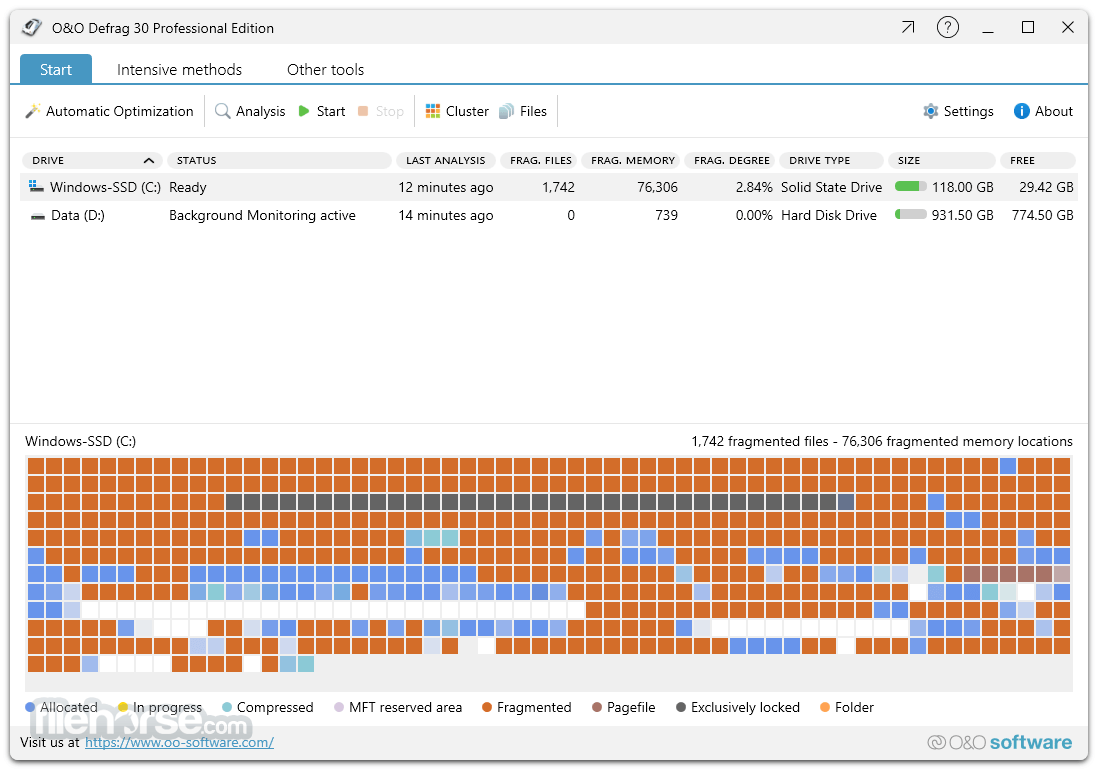
Don’t let a slow computer spoil your work or fun! Let O&O Defrag Professional Edition optimize your hard disks and you can experience speed increases of up to 100%! Regular disk defragmentation optimizes your PC performance!
When you defragment, the files that Windows splits up when saving documents across the hard disk are logically put back together again so that files can be quickly recognized and found by the reading and write heads inside your hardware.
Speed increases of up to 100% are not uncommon, and your hardware suffers much less wear and tear!
What's New
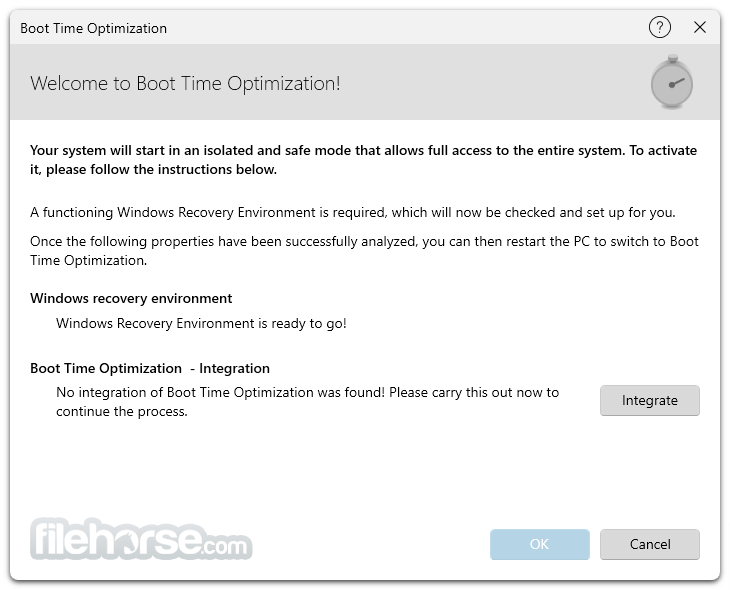
Boot-Time Optimization (BTO): Optimizes the system before Windows starts, allowing even locked system files to be defragmented.
IntensiveOptimize: Runs in an isolated Windows environment for full, autonomous optimization with maximum performance.
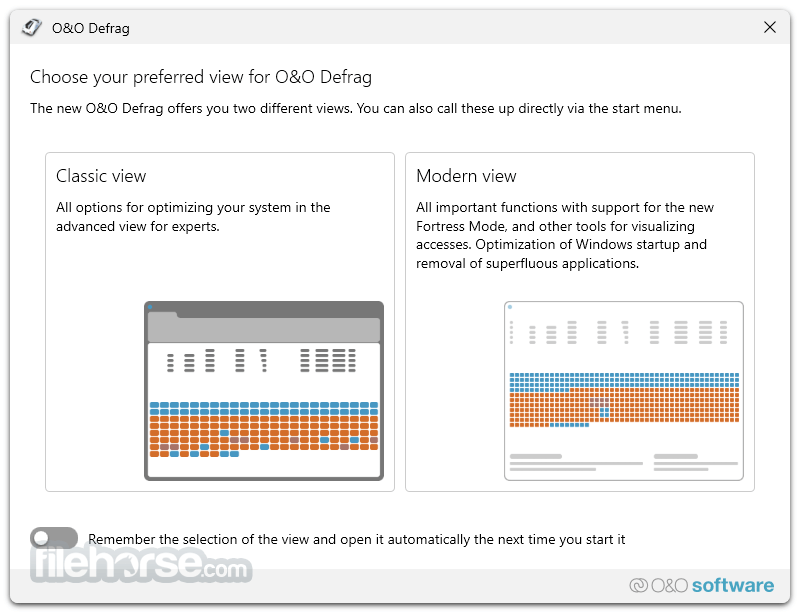
Revamped Interface: Version 30 introduces a modern, clearer, and more intuitive user interface.
Other New Features
Native ARM Platform Support
For the first time, O&O Defrag now offers native support for ARM architecture (Advanced RISC Machine) processors, in addition to Intel and AMD CPUs. ARM-based processors, commonly found in the latest Windows PCs with AI capabilities, are gaining popularity due to their energy efficiency and cost-effectiveness.
This update ensures that O&O Defrag is compatible with this growing segment of the market.
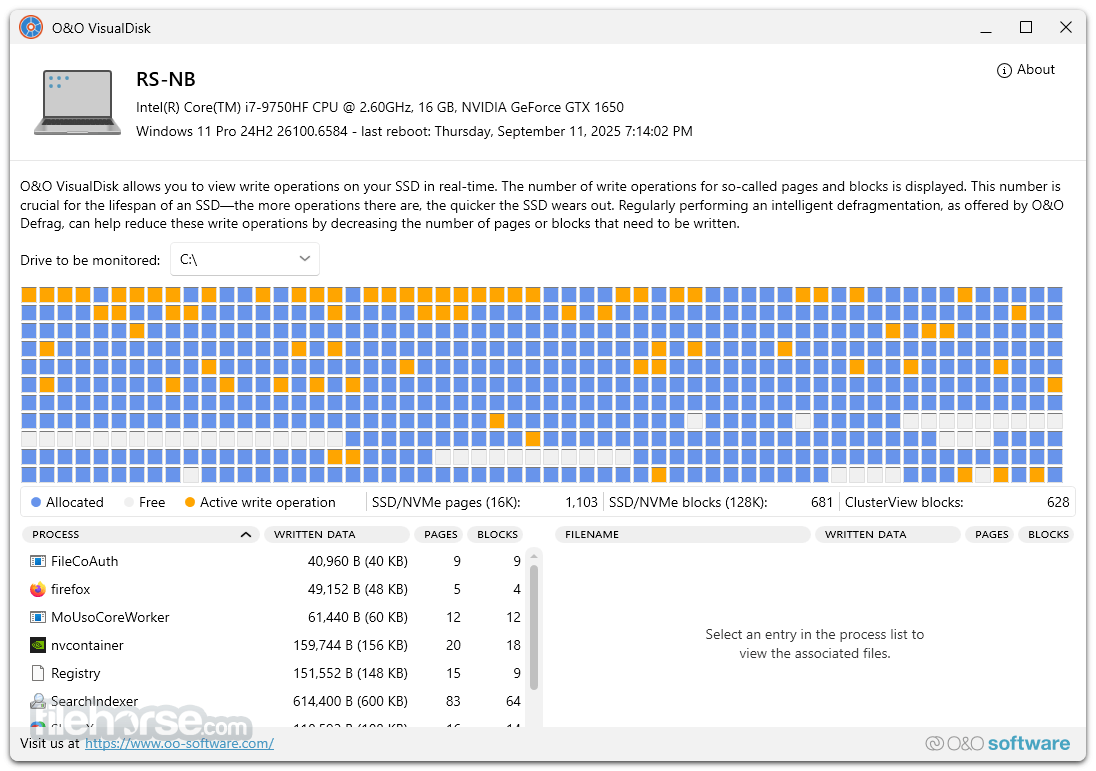
O&O VisualDisk - SSD Write Access Visualization
O&O VisualDisk introduces a new way to visualize write access to hard drives, particularly flash-based storage such as SSDs and NVMe drives. This feature highlights how defragmentation can help reduce future write operations, potentially extending the lifespan of SSDs.
Users can now clearly see how their storage is functioning and how performance can be optimized through strategic defragmentation.
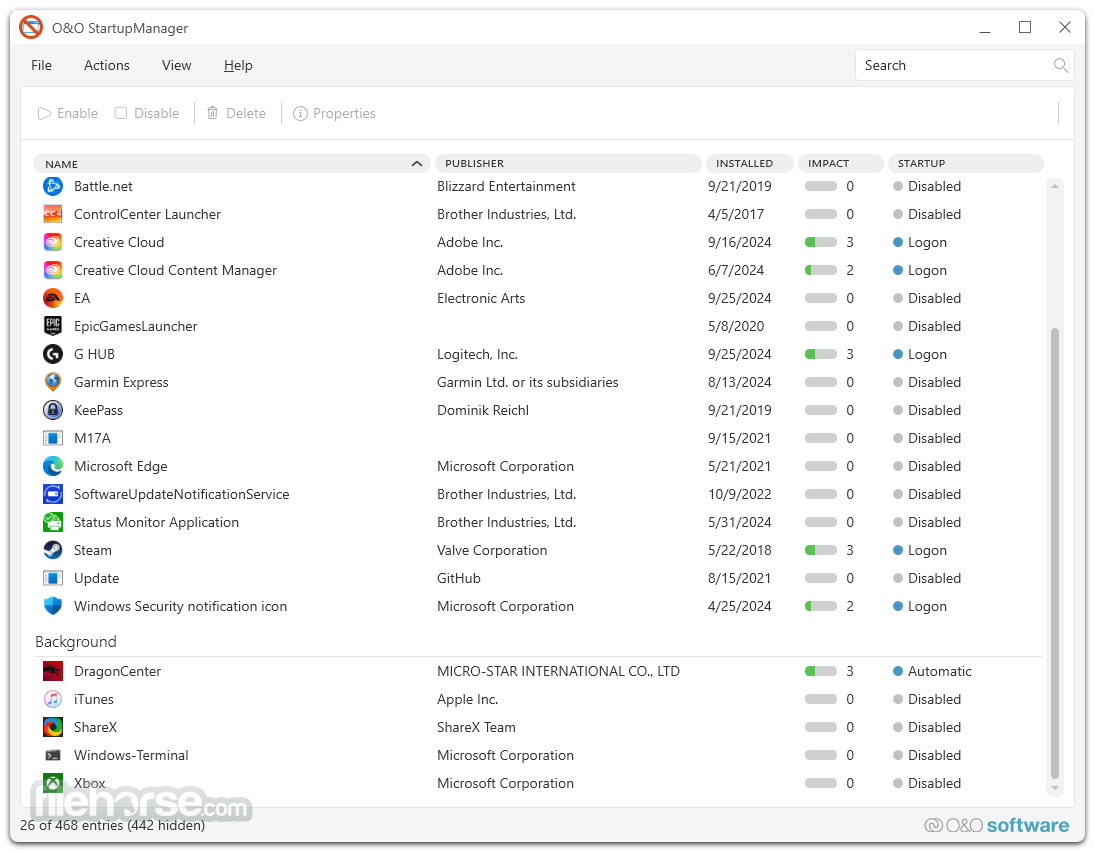
O&O StartupManager - Streamline Your Startup
The new O&O StartupManager provides a comprehensive overview of all programs, tasks, and services that launch automatically with Windows. It offers detailed insights into each program, including its impact on system startup time, enabling users to easily decide which programs should be enabled or disabled for a faster, more efficient boot process.
Enhanced Optimization with BitLocker Support
O&O Defrag now supports BitLocker-encrypted drives with its IntensiveOptimize feature, allowing users to apply the strongest optimization techniques even on encrypted systems.
Additionally, O&O Defrag checks and repairs the Windows rescue environment, which is essential for both system recovery and IntensiveOptimize. Many computers suffer from a damaged rescue environment due to faulty updates, and this feature ensures that the rescue environment is functional for optimal performance.
Key Features
O&O DiskStat
O&O DiskStat enables you to analyze used space on your hard disk with the help of Charts (Pie chart or Bar graph). As soon as you start the program, you are presented with a concise overview of your entire hard disk.
With the help of O&O DiskStat, you can identify and dispose of superfluous files, saving yourself valuable hard disk space in the process!
O&O DiskCleaner
The brand new in-built O&O DiskCleaner searches for and removes temporary and unnecessary files that are taking up memory and increasing fragmentation.
O&O DiskCleaner also increases the security of your data, as private content (e.g. Thumbs.db, copies of documents, drafts of emails, Dumps) will no longer be kept as copies in unnecessary system files.
Benefits of a clearly laid out hard disk
Whenever it saves data, Windows scatters file fragments all over the hard disk and this slows down access times considerably. Defragmentation reverses this by rearranging data and speeding up access times dramatically. This not only saves the user time, but it also reduces wear on hard disks and extends their life expectancy.
Defragmentation can even make the difference if you lose important data because chances of a full recovery are better on a defragmented disk. Why? After defragmentation, it’s easier for data recovery software such as O&O DiskRecovery to restore files when they’re not scattered across multiple areas of a hard disk.
Automatic background defragmentation
Automatic defragmentation can be configured with just three clicks and optimizes your disks behind the scenes with no negative impact on your computer’s performance. You can set O&O Defrag Pro to run defragmentation at a certain level of fragmentation, on particular days of the week, or whenever your screensaver is being used.
Defragmentation can be paused and resumed whenever you want because O&O Defrag 64bit automatically recognizes where defragmentation was interrupted.
Recommended use
We recommend manual defragmentation for PCs that are being used heavily because only a user can decide when the time is right to give up the performance needed for running defragmentation. On computers using video editing or graphics applications, the app can be configured to not start automatic optimization while certain programs are running.
The default settings in the tool are more than adequate for ordinary desktop PCs running mainly internet or office applications. This software is also perfect for notebooks. Whenever an external power supply is disconnected, O&ODefrag automatically goes into pause mode to save energy.
Highlights
Pricing
Download O&O Defrag Pro Latest Version Why is this app published on FileHorse? (More info)
When you defragment, the files that Windows splits up when saving documents across the hard disk are logically put back together again so that files can be quickly recognized and found by the reading and write heads inside your hardware.
Speed increases of up to 100% are not uncommon, and your hardware suffers much less wear and tear!
What's New
Boot-Time Optimization (BTO): Optimizes the system before Windows starts, allowing even locked system files to be defragmented.
IntensiveOptimize: Runs in an isolated Windows environment for full, autonomous optimization with maximum performance.
Revamped Interface: Version 30 introduces a modern, clearer, and more intuitive user interface.
Other New Features
Native ARM Platform Support
For the first time, O&O Defrag now offers native support for ARM architecture (Advanced RISC Machine) processors, in addition to Intel and AMD CPUs. ARM-based processors, commonly found in the latest Windows PCs with AI capabilities, are gaining popularity due to their energy efficiency and cost-effectiveness.
This update ensures that O&O Defrag is compatible with this growing segment of the market.
O&O VisualDisk - SSD Write Access Visualization
O&O VisualDisk introduces a new way to visualize write access to hard drives, particularly flash-based storage such as SSDs and NVMe drives. This feature highlights how defragmentation can help reduce future write operations, potentially extending the lifespan of SSDs.
Users can now clearly see how their storage is functioning and how performance can be optimized through strategic defragmentation.
O&O StartupManager - Streamline Your Startup
The new O&O StartupManager provides a comprehensive overview of all programs, tasks, and services that launch automatically with Windows. It offers detailed insights into each program, including its impact on system startup time, enabling users to easily decide which programs should be enabled or disabled for a faster, more efficient boot process.
Enhanced Optimization with BitLocker Support
O&O Defrag now supports BitLocker-encrypted drives with its IntensiveOptimize feature, allowing users to apply the strongest optimization techniques even on encrypted systems.
Additionally, O&O Defrag checks and repairs the Windows rescue environment, which is essential for both system recovery and IntensiveOptimize. Many computers suffer from a damaged rescue environment due to faulty updates, and this feature ensures that the rescue environment is functional for optimal performance.
Key Features
O&O DiskStat
O&O DiskStat enables you to analyze used space on your hard disk with the help of Charts (Pie chart or Bar graph). As soon as you start the program, you are presented with a concise overview of your entire hard disk.
With the help of O&O DiskStat, you can identify and dispose of superfluous files, saving yourself valuable hard disk space in the process!
O&O DiskCleaner
The brand new in-built O&O DiskCleaner searches for and removes temporary and unnecessary files that are taking up memory and increasing fragmentation.
O&O DiskCleaner also increases the security of your data, as private content (e.g. Thumbs.db, copies of documents, drafts of emails, Dumps) will no longer be kept as copies in unnecessary system files.
Benefits of a clearly laid out hard disk
Whenever it saves data, Windows scatters file fragments all over the hard disk and this slows down access times considerably. Defragmentation reverses this by rearranging data and speeding up access times dramatically. This not only saves the user time, but it also reduces wear on hard disks and extends their life expectancy.
Defragmentation can even make the difference if you lose important data because chances of a full recovery are better on a defragmented disk. Why? After defragmentation, it’s easier for data recovery software such as O&O DiskRecovery to restore files when they’re not scattered across multiple areas of a hard disk.
Automatic background defragmentation
Automatic defragmentation can be configured with just three clicks and optimizes your disks behind the scenes with no negative impact on your computer’s performance. You can set O&O Defrag Pro to run defragmentation at a certain level of fragmentation, on particular days of the week, or whenever your screensaver is being used.
Defragmentation can be paused and resumed whenever you want because O&O Defrag 64bit automatically recognizes where defragmentation was interrupted.
Recommended use
We recommend manual defragmentation for PCs that are being used heavily because only a user can decide when the time is right to give up the performance needed for running defragmentation. On computers using video editing or graphics applications, the app can be configured to not start automatic optimization while certain programs are running.
The default settings in the tool are more than adequate for ordinary desktop PCs running mainly internet or office applications. This software is also perfect for notebooks. Whenever an external power supply is disconnected, O&ODefrag automatically goes into pause mode to save energy.
Highlights
- Install & That’s All: No extra setup, program auto-selects best defragmentation method.
- SOLID/Quick: SSD-optimized, fast and gentle cleanup, deletes free space.
- SOLID/Complete: Thorough SSD optimization for maximum performance.
- ClusterView for SSDs: Displays logical SSD structure by grouping blocks.
- O&O DiskCleaner: Finds and removes temporary, unnecessary files.
- Fragment Filter: Identifies most fragmented files on a drive.
- Thin Provisioning: Optimizes systems with thin provisioning.
- Time History: Shows results of past defragmentation actions.
- Easy to Use: Suitable for both beginners and professionals.
- Faster System Boot: Quicker system and program startups.
- Reduced Duration: Shorter defragmentation times.
- Locked Files: Defragmentation of files normally locked.
- Check&Repair: Recovery environment check and repair.
- IntensiveOptimize: Now with BitLocker support.
- StartupManager: Removes unnecessary startup programs.
- VisualDisk: Visualizes SSD write operations.
- Prevents Fragmentation: Efficient long-term prevention.
- Extends Hardware Life: Prolongs SSD/HDD durability.
- Faster Internet: Improves browsing performance.
- Data Recovery: Increases chance of file recovery.
- Backup Speed: Accelerates backup and restore.
- One-Click Defrag: Quick PC optimization at a button press.
- OS Support: Fully supports Windows 11 and 10 (64-bit).
Pricing
- For 1 PC – buy once, use always, no subscription
- Free technical support for the first 30 days
- Compatible with Windows 10 & 11
- For a short time only: Professional remote management with O&O Syspectr worth €20 for 1 year included free of charge.
- Boosts Overall System Performance
- User-Friendly Interface Design
- Advanced Scheduling Options
- Supports SSD Optimization
- Detailed Performance Reports
- Requires Manual Customization
- Limited Free Trial Features
- Resource-Intensive on Older PCs
Download O&O Defrag Pro Latest Version Why is this app published on FileHorse? (More info)
##
畫面截圖
- 2026-07-02 O&O Defrag Professional 31.3 63.59 MB
- 2026-03-27 O&O Defrag Professional 31.2 62.98 MB
- 2026-03-24 O&O Defrag Professional 31.0 62.98 MB
- 2025-11-05 O&O Defrag Professional 30.5 61.31 MB
- 2025-09-17 O&O Defrag Professional 30.0 61.1 MB
- 2024-12-03 O&O Defrag Professional 29.1 58.49 MB
- 2024-09-17 O&O Defrag Professional 29.0 57.93 MB
- 2024-05-30 O&O Defrag Professional 28.1 78.29 MB