
O&O DiskRecovery Professional 11.0.17 (64-bit)
v 11.0.17 (64-bit)
Windows
商業試用
8.2/10 (57)
- 目前版本11.0.17 (64-bit)
- 更新日期2015-12-05
- 檔案大小14.13 MB
- 檔案名稱OODiskRecovery1164Enu.exe
- 作業系統Windows XP64 / Vista64 / Windows 7 64 / Windows 8 64
- 支援語系English
- 授權型式商業試用
- 開發商 O&O Software GmbH
- 軟體分類Windows 軟體 / 備份還原
##
編輯短評
O&O DiskRecovery Professional 是一套專為 Windows 設計的資料救援工具,主要解決檔案因誤刪、系統崩潰或軟體錯誤而遺失的問題。它會掃描整個硬碟、分割區或 USB 隨身碟,找出遺失的照片、影片、音樂與其他檔案類型,再進行重建與復原。這套軟體由德國開發商 O&O Software 出品,收錄至今已累積多個版本,近期仍有更新,屬於長期維護中的工具;在同類備份還原軟體中,依評分人數排名約在中段班,評價普遍不錯,但樣本數不算多。
這套軟體適合一般使用者或輕度辦公室環境,當不小心清空資源回收筒、格式化隨身碟,或遇到系統異常導致檔案消失時,可以用它來嘗試救回資料。與其他資料救援軟體相比,它的操作介面相對直覺,掃描與重建流程設計得較簡單,但功能深度可能不如專業級工具。要注意的是,這套是試用版,僅提供英文介面,沒有中文語系;使用前建議先確認儲存裝置的狀態,避免在救援過程中覆寫原有資料。
##
翻譯排程處理中,以下暫以英文原文呈現
軟體介紹
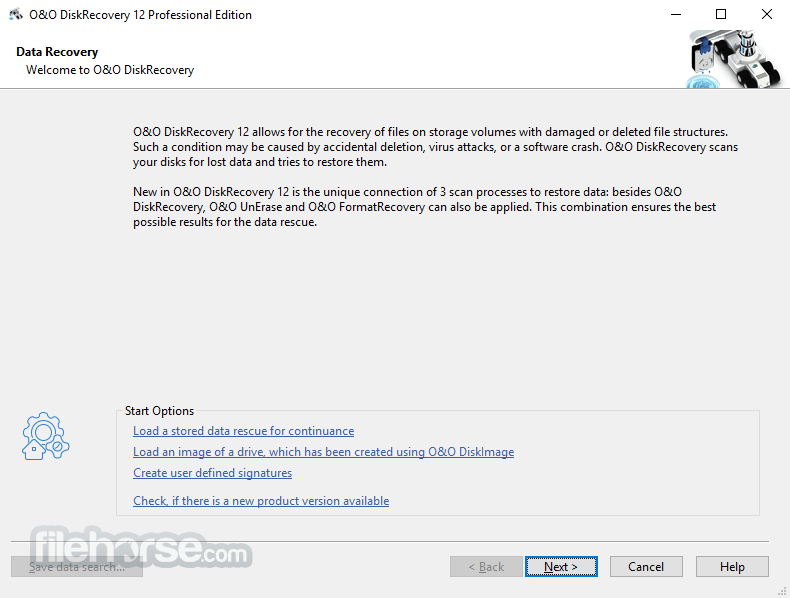
O&O DiskRecovery searches for files that were accidentally deleted or lost through a crash or software error. It then reconstructs and recovers the files quickly and easily.
It scans the entire hard disk, partition, or USB Stick for lost files, photos, videos, music files, and many other data types before reconstructing and recovering them.
O&O DiskRecovery Professional is a powerful data recovery app designed for Windows PCs. Developed by O&O Software GmbH, this application aims to help users recover lost or accidentally deleted files from various storage devices, including hard drives, SSDs, USB drives, and memory cards.
With its advanced algorithms and intuitive interface, it promises to retrieve lost data efficiently while maintaining the integrity of the files.
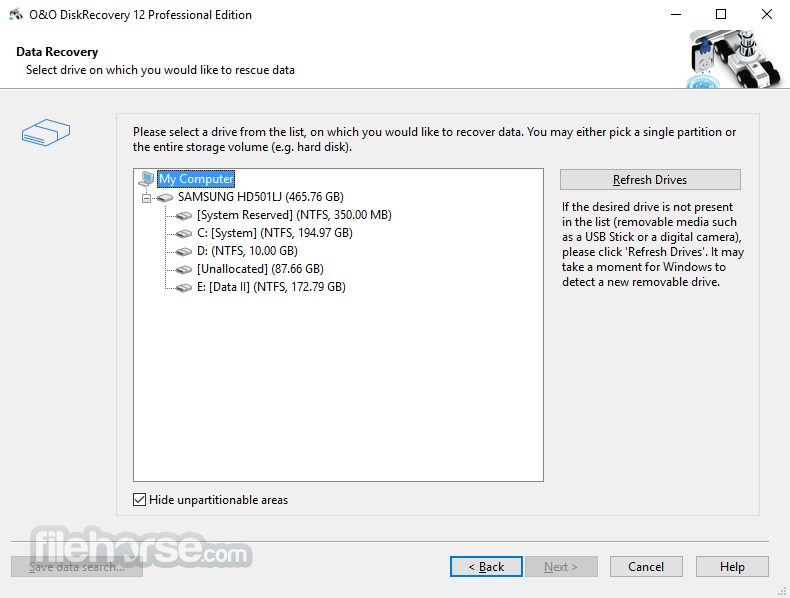
It can also carry out SD Card recovery. It is eminently easy to use, with a step-by-step wizard that tells you how to recover deleted files, making data recovery simple even for users with little or no experience. The free trial version lets users see before they buy just which lost files are recoverable.
Important Features at a Glance
It boasts an impressive range of features and functions for easy data recovery. It can recognize over 365 file types, including Microsoft Office 2016 documents.
The recovery download enables users to also undelete pictures and video files from digital cameras. Searching for deleted compressed files has never been smoother, in particular ZIP and 7-Zip files. The data recovery software is compatible with practically all popular Windows-compatible disks and digital media.
What to do when you lose or delete files
If you want to recover files that have been accidentally deleted, please immediately stop all further activity that writes data on the disk or card involved, as only files that have not been overwritten are capable of being accurately recovered.
Even searching for suitable file recovery software on the internet and downloading it can overwrite important data sectors and make data recovery more difficult, if not impossible. That’s why it’s so important to have the app already installed on your computer before disaster strikes.
Using O&O DiskRecovery in an emergency
If O&O DiskRecovery 64-bit is not already installed on your computer when disaster strikes, the instant installation is ready to help you. All you’ll need is a second computer and a removable hard disk or drive (e.g., a USB stick or external hard drive).
Start the installation on the second computer and save the “Instant Installation” on the removable drive. You can then connect this drive to the target computer from which you want to recover files and run the tool from there.
Doing so will let you avoid a complete installation on the target computer, which in turn could possibly overwrite important data on the hard disk that is needed for successful data recovery.
Three integrated search algorithms
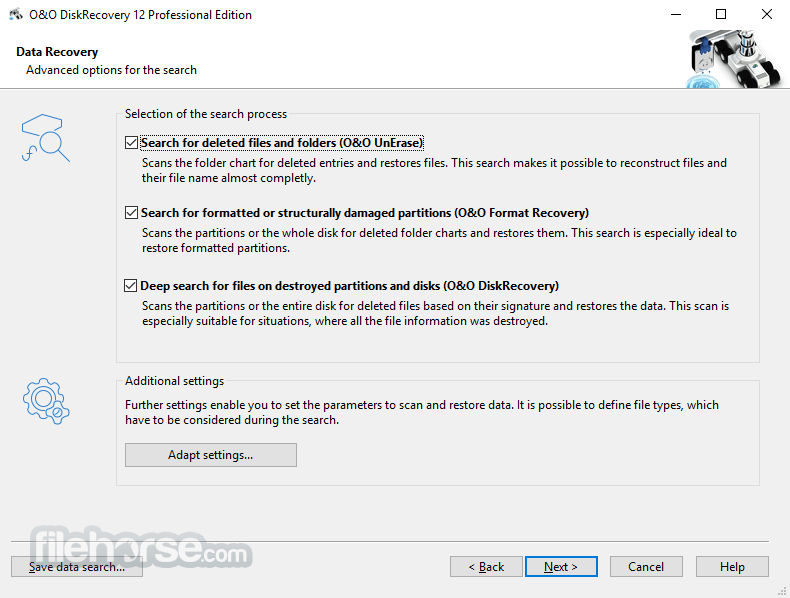
There are three integrated search options included, each one containing different recovery technologies that can be used separately or in combination with one another.
The search algorithm O&O UnErase can be used for quick scanning and quick undeleting. The search algorithm O&O FormatRecovery allows for file recovery on disks that are damaged but still accessible.
The search algorithms from the program scan every sector of a disk for file signatures, which can then be used to reconstruct files, even when the whole directory has been deleted or overwritten.
Highlights
It features an intuitive and user-friendly interface, making it accessible to both novice and experienced users. The main dashboard provides clear navigation options for initiating scans, reviewing search results, and initiating the recovery process.
The interface incorporates informative tooltips and prompts to guide users through each step, ensuring a seamless data recovery experience.
Installation and Setup
Installing this program is a straightforward process that involves downloading the setup file from the official website or FileHorse and following the on-screen instructions.
The software offers customizable installation options, allowing users to specify installation directories and shortcuts. Once installed, it automatically integrates into the Windows environment, enabling users to launch the application from the desktop or Start menu.
How to Use
Can O&O DiskRecovery recover files from formatted drives?
Yes, the tool is capable of recovering files from formatted drives, provided that the data has not been overwritten.
Does O&O DiskRecovery support the recovery of specific file types?
Yes, the software supports the recovery of various file types, including documents, photos, videos, and archives.
Is there a limit to the size of files that O&O DiskRecovery can recover?
It can recover files of any size, but larger files may take longer to scan and recover.
Can O&O DiskRecovery Pro recover files from damaged or corrupted drives?
Yes, the tool is equipped to recover files from damaged or corrupted drives, although success rates may vary depending on the extent of damage.
Is there a trial version of O&O DiskRecovery available for testing?
Yes, it offers a free trial version with limited functionality, allowing users to evaluate its performance before purchasing the full version.
Alternatives
Recoverit - Recoverit recovers your deleted, lost data with a high recovery rate!
Recuva - Developed by Piriform, Recuva is a popular data recovery software known for its ease of use and comprehensive scanning capabilities.
Stellar Windows Data Recovery - Stellar Data Recovery is a versatile data recovery solution that offers support for various file systems and storage devices, along with advanced scanning options.
EaseUS Data Recovery Wizard - EaseUS Data Recovery Wizard is a feature-rich data recovery software with an intuitive interface and efficient recovery algorithms, catering to both individual and business users.
Pricing
For 1 PC – $99.00
Everything from For 1 PC, plus:
Everything from For 1 PC, plus:
It stands out as a reliable and efficient data recovery solution for Windows 11/10 users, offering a combination of powerful features and ease of use. With its advanced scanning algorithms, file preview capabilities, and support for various file systems, the software provides a comprehensive solution for recovering lost or accidentally deleted files from diverse storage devices.
While the pricing may deter some users, the software's performance and reliability make it a worthwhile investment for individuals and businesses seeking a dependable data recovery desktop app.
Note: The unregistered version does not allow you to recover files.
Download O&O DiskRecovery Latest Version Why is this app published on FileHorse? (More info)
It scans the entire hard disk, partition, or USB Stick for lost files, photos, videos, music files, and many other data types before reconstructing and recovering them.
O&O DiskRecovery Professional is a powerful data recovery app designed for Windows PCs. Developed by O&O Software GmbH, this application aims to help users recover lost or accidentally deleted files from various storage devices, including hard drives, SSDs, USB drives, and memory cards.
With its advanced algorithms and intuitive interface, it promises to retrieve lost data efficiently while maintaining the integrity of the files.
It can also carry out SD Card recovery. It is eminently easy to use, with a step-by-step wizard that tells you how to recover deleted files, making data recovery simple even for users with little or no experience. The free trial version lets users see before they buy just which lost files are recoverable.
Important Features at a Glance
It boasts an impressive range of features and functions for easy data recovery. It can recognize over 365 file types, including Microsoft Office 2016 documents.
The recovery download enables users to also undelete pictures and video files from digital cameras. Searching for deleted compressed files has never been smoother, in particular ZIP and 7-Zip files. The data recovery software is compatible with practically all popular Windows-compatible disks and digital media.
What to do when you lose or delete files
If you want to recover files that have been accidentally deleted, please immediately stop all further activity that writes data on the disk or card involved, as only files that have not been overwritten are capable of being accurately recovered.
Even searching for suitable file recovery software on the internet and downloading it can overwrite important data sectors and make data recovery more difficult, if not impossible. That’s why it’s so important to have the app already installed on your computer before disaster strikes.
Using O&O DiskRecovery in an emergency
If O&O DiskRecovery 64-bit is not already installed on your computer when disaster strikes, the instant installation is ready to help you. All you’ll need is a second computer and a removable hard disk or drive (e.g., a USB stick or external hard drive).
Start the installation on the second computer and save the “Instant Installation” on the removable drive. You can then connect this drive to the target computer from which you want to recover files and run the tool from there.
Doing so will let you avoid a complete installation on the target computer, which in turn could possibly overwrite important data on the hard disk that is needed for successful data recovery.
Three integrated search algorithms
There are three integrated search options included, each one containing different recovery technologies that can be used separately or in combination with one another.
The search algorithm O&O UnErase can be used for quick scanning and quick undeleting. The search algorithm O&O FormatRecovery allows for file recovery on disks that are damaged but still accessible.
The search algorithms from the program scan every sector of a disk for file signatures, which can then be used to reconstruct files, even when the whole directory has been deleted or overwritten.
Highlights
- Numerous new signatures for files and file types are now recoverable (over 365 file types)
- An unlimited number of recoverable files
- Improved: Even partly damaged files and pictures can often be recovered
- Improved: Recovery from defective storage volumes
- Easy-to-use Wizard to search for and recover files
- New and improved data recovery methods
- Preview files before recovery
- Supports all Windows-compatible hard disks, removable drives, memory cards, USB Sticks, CompactFlash, and most digital cameras
- Fast Instant-Installation option
- Add User-defined signatures
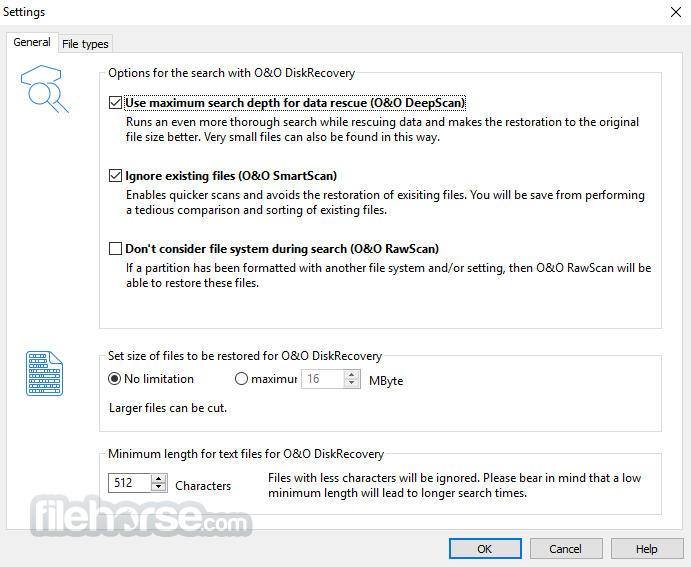
- Deep Scan Technology: It employs advanced scanning algorithms to search thoroughly for lost files on storage devices, ensuring a high chance of successful recovery.
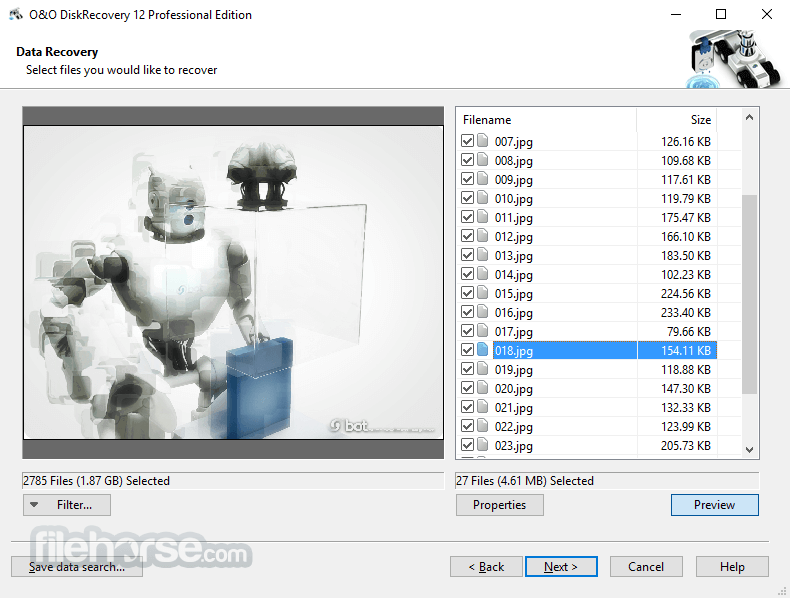
- File Preview: Users can preview recoverable files before initiating the recovery process, allowing them to restore specific items selectively.
- File Filter: The software includes filters to refine search results based on file type, size, and modification date, enabling users to locate desired files quickly.
- Support for Various File Systems: It supports a wide range of file systems, including NTFS, FAT16, FAT32, and exFAT, ensuring compatibility with diverse storage media.
- Secure Data Recovery: The application prioritizes data integrity and offers secure recovery methods to prevent further data loss during the retrieval process.
It features an intuitive and user-friendly interface, making it accessible to both novice and experienced users. The main dashboard provides clear navigation options for initiating scans, reviewing search results, and initiating the recovery process.
The interface incorporates informative tooltips and prompts to guide users through each step, ensuring a seamless data recovery experience.
Installation and Setup
Installing this program is a straightforward process that involves downloading the setup file from the official website or FileHorse and following the on-screen instructions.
The software offers customizable installation options, allowing users to specify installation directories and shortcuts. Once installed, it automatically integrates into the Windows environment, enabling users to launch the application from the desktop or Start menu.
How to Use
- Initiate Scan: Launch the app and select the drive or storage device to scan for lost files.
- Customize Scan Settings: Choose scan options such as Quick Scan or Deep Scan and apply filters to refine search results.
- Preview Recoverable Files: Once the scan is complete, preview the list of recoverable files and select the desired items for recovery.
- Initiate Recovery: Specify the destination for recovered files and initiate the recovery process.
Can O&O DiskRecovery recover files from formatted drives?
Yes, the tool is capable of recovering files from formatted drives, provided that the data has not been overwritten.
Does O&O DiskRecovery support the recovery of specific file types?
Yes, the software supports the recovery of various file types, including documents, photos, videos, and archives.
Is there a limit to the size of files that O&O DiskRecovery can recover?
It can recover files of any size, but larger files may take longer to scan and recover.
Can O&O DiskRecovery Pro recover files from damaged or corrupted drives?
Yes, the tool is equipped to recover files from damaged or corrupted drives, although success rates may vary depending on the extent of damage.
Is there a trial version of O&O DiskRecovery available for testing?
Yes, it offers a free trial version with limited functionality, allowing users to evaluate its performance before purchasing the full version.
Alternatives
Recoverit - Recoverit recovers your deleted, lost data with a high recovery rate!
Recuva - Developed by Piriform, Recuva is a popular data recovery software known for its ease of use and comprehensive scanning capabilities.
Stellar Windows Data Recovery - Stellar Data Recovery is a versatile data recovery solution that offers support for various file systems and storage devices, along with advanced scanning options.
EaseUS Data Recovery Wizard - EaseUS Data Recovery Wizard is a feature-rich data recovery software with an intuitive interface and efficient recovery algorithms, catering to both individual and business users.
Pricing
For 1 PC – $99.00
- License for 1 private PC
- Intuitive data recovery assistant
- Unlimited file recovery
- Supports 400+ file types and versions
- Works with hard disks, USB drives, memory cards, and more
- Compatible with Windows 8 to Windows 11
Everything from For 1 PC, plus:
- 12-month subscription
- Automatic access to the latest versions
- Includes O&O ToolBox with additional tools
- Supports Windows 10 and Windows 11
Everything from For 1 PC, plus:
- License for up to 5 private PCs
- Operating System: Windows 11, 10, 8.1, 8, 7 (32-bit or 64-bit)
- Processor: Intel/AMD 1 GHz or higher
- RAM: 1 GB or more
- Storage: 30 MB for installation
- Additional Requirements: Internet connection for product activation and updates
- Intuitive user interface
- Advanced scanning algorithms
- File preview and filtering options
- Support for various file systems
- Secure data recovery methods
- Limited support for macOS and Linux
- Pricing may be prohibitive for some users
It stands out as a reliable and efficient data recovery solution for Windows 11/10 users, offering a combination of powerful features and ease of use. With its advanced scanning algorithms, file preview capabilities, and support for various file systems, the software provides a comprehensive solution for recovering lost or accidentally deleted files from diverse storage devices.
While the pricing may deter some users, the software's performance and reliability make it a worthwhile investment for individuals and businesses seeking a dependable data recovery desktop app.
Note: The unregistered version does not allow you to recover files.
Download O&O DiskRecovery Latest Version Why is this app published on FileHorse? (More info)
##
畫面截圖
- 2026-04-08 O&O DiskRecovery Professional 14.0.17 (64-bit) 13.06 MB
- 2019-04-10 O&O DiskRecovery Professional 14.0.17 (32-bit) 11.01 MB
- 2018-12-12 O&O DiskRecovery Professional 12.0.65 (32-bit) 12.36 MB
- 2018-12-12 O&O DiskRecovery Professional 12.0.65 (64-bit) 14.17 MB
- 2017-03-02 O&O DiskRecovery Professional 12.0.63 (32-bit) 12.36 MB
- 2017-03-02 O&O DiskRecovery Professional 12.0.63 (64-bit) 14.17 MB
- 2015-12-05 O&O DiskRecovery Professional 11.0.17 (32-bit) 12.31 MB
- 2015-12-05 O&O DiskRecovery Professional 11.0.17 (64-bit) 14.13 MB