Passware Password Recovery Kit Business 2026.3.0
v 2026.3.0
Windows
試用版
7.76/10 (17)
- 目前版本2026.3.0
- 更新日期2026-07-23
- 檔案大小360 MB
- 檔案名稱PasswareKitBusiness_Demo_64bit_Setup.msi
- 作業系統Windows 7 / Windows 8 / Windows 10 / Windows 11
- 支援語系English
- 授權型式試用版
- 開發商 Passware
- 軟體分類Windows 軟體 / 系統優化
##
翻譯排程處理中,以下暫以英文原文呈現
軟體介紹
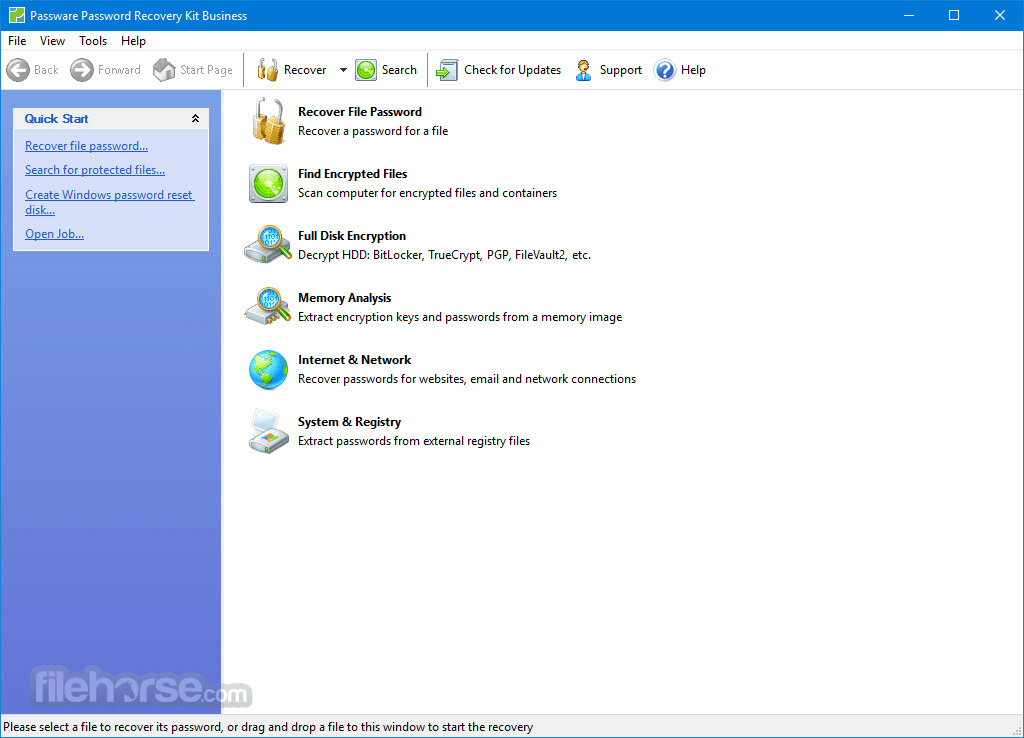
Passware Password Recovery Kit Business is a complete password recovery solution that provides corporate security administrators with full control over employees’ computers and files. System administrators, IT professionals, and help desk personnel can now gain access to any file or server whenever required.
Instant decryption of BitLocker, TrueCrypt, FileVault2, and PGP hard disks, MS Office documents, instant recovery of passwords for websites, Windows, and Mac users. Download NOW!
Passware Kit Business is a full password recovery software that provides corporate security administrators with full control over employees’ computers and files.
HIGHEST SPEED
Reports all the password-protected items on a computer and gains access to these items using the fastest decryption and password recovery algorithms.
OVER 360 FILE TYPES
Including BitLocker, TrueCrypt, FileVault2, VeraCrypt, and PGP hard disks, MS Office 2016 documents, and provides an all-in-one user interface.
HARD DISK DECRYPTION
Instantly decrypts hard disk images with live memory analysis or recovers passwords with accelerated brute-force attacks.
BATCH PROCESSING
Detects all the encrypted files and hard disk images, reports encryption type, and decryption complexity.
HARDWARE ACCELERATION
Uses multiple-core CPUs, NVIDIA and AMD GPUs, and Tableau TACC and Guidance TACC2 hardware accelerators.
INSTANT PASSWORDS RESET
Passware Kit Business recovers or resets many password types instantly.
New Features
PC platforms (64-bit only): Windows 11/10, or Microsoft Windows Server 2022/2019/2016
Hardware Requirements
GPU (Graphics Processing Unit) cards allow users to accelerate password recovery by up to 400 times compared to CPU-only systems. Passware Kit supports almost all types of NVIDIA (RTX, GTX, Tesla) and AMD GPUs. Mac version supports OpenCL acceleration on AMD GPU and NVIDIA/AMD eGPU.
Demo Version Limitations
Recovers either the first 3 letters of passwords or passwords containing no more than 3 characters
Allows each of the attacks to run for up to 1 minute
For Windows users, resets a 'Demo12345' password only
For FDE decryption, has limitations on the volume size:
Download Passware Kit Business Latest Version Why is this app published on FileHorse? (More info)
Instant decryption of BitLocker, TrueCrypt, FileVault2, and PGP hard disks, MS Office documents, instant recovery of passwords for websites, Windows, and Mac users. Download NOW!
Passware Kit Business is a full password recovery software that provides corporate security administrators with full control over employees’ computers and files.
HIGHEST SPEED
Reports all the password-protected items on a computer and gains access to these items using the fastest decryption and password recovery algorithms.
OVER 360 FILE TYPES
Including BitLocker, TrueCrypt, FileVault2, VeraCrypt, and PGP hard disks, MS Office 2016 documents, and provides an all-in-one user interface.
HARD DISK DECRYPTION
Instantly decrypts hard disk images with live memory analysis or recovers passwords with accelerated brute-force attacks.
BATCH PROCESSING
Detects all the encrypted files and hard disk images, reports encryption type, and decryption complexity.
HARDWARE ACCELERATION
Uses multiple-core CPUs, NVIDIA and AMD GPUs, and Tableau TACC and Guidance TACC2 hardware accelerators.
INSTANT PASSWORDS RESET
Passware Kit Business recovers or resets many password types instantly.
New Features
- Decryption of the latest VeraCrypt version using memory analysis
- Password recovery for MySQL SHA-1 hashes
- Faster recovery of Windows user passwords with Rainbow Tables
- Faster recovery of BitLocker keys and Mac user passwords from memory images
- Password recovery for newer versions of Hancom Office
- 3x larger Passware Dictionary
- Usability improvements
- Support for macOS 15 Sequoia
- Public GPU and CPU benchmarks
- GPU-accelerated password recovery for Hancom Office
- Password recovery for APFS hashes
- Display of password hints during encryption detection and decryption
- Improved the UI responsiveness of the Attacks Tab during the batch recovery for more than 100 files [SUP-1805]
- Optimized transfer of custom dictionaries to Passware Kit Agents for distributed password recovery
- 1Password: 4-6, 7, 8 (Mac, Windows, Linux)
- Acrobat: 3.0–11.0, Revisions 3-4
- Acronis Backup: 2010–2016, 2016–2020, 2020–2021
- Apple iTunes Backup: iOS 4.x–10.x
- Apple File System (APFS)
- Apple Notes: macOS, iOS/iPadOS
- Symantec ACT!: 2.0–2000
- AxCrypt: Windows 2.x, Private Key
- BestCrypt: 6.0–8.0
- Dashlane: Windows, Mac, Chrome/Safari Extension
- FileMaker Pro: 3.x–2023
- Google Chrome: Website
- Hancom Office: 2010, 2014–2025 (Hanword, Hancell, Hanshow)
- ICQ: 99a, 2000–2003
- iWork: 2009, 2013, 2020
- KeePass: AES-KDF, Argon2
- LastPass
- Lotus Notes: 4.x–8.x
- MS Access: 2.0–2019, System Database (2.0–2000)
- MS Excel: 4.0–2019, VBA
- MS Internet Explorer: Website, Webform, Content Advisor
- MS OneNote: 2003, 2007, 2010, 2013, 2019
- MS Outlook: 2000–2019
- MS PowerPoint: 2002–2019, VBA
- MS Project: 95–2003
- MS SQL: 2000–2019
- MS Windows: NT–11 (Administrator/User, BitLocker)
- MS Word: 1.0–2019, VBA
- OpenDocument
- Opera: Website, GX, Crypto
- QuickBooks: 3.x–2025
- RAR: 2.0, 2.9–5.x
- Safari: Website
- TrueCrypt: 5.0 or later
- VeraCrypt
- WinZip: 8.0 or earlier
- Zip Archive
- 7-Zip
PC platforms (64-bit only): Windows 11/10, or Microsoft Windows Server 2022/2019/2016
Hardware Requirements
- 1 GHz processor (2.4 GHz recommended)
- 4 GB of RAM (8 GB recommended)
- 1 GB of free hard disk space (more if you use custom dictionaries). For hardware acceleration on some strong file types, it is recommended to have 2 x (RAM + GPUs RAM) of free disk space for paging file.
GPU (Graphics Processing Unit) cards allow users to accelerate password recovery by up to 400 times compared to CPU-only systems. Passware Kit supports almost all types of NVIDIA (RTX, GTX, Tesla) and AMD GPUs. Mac version supports OpenCL acceleration on AMD GPU and NVIDIA/AMD eGPU.
Demo Version Limitations
Recovers either the first 3 letters of passwords or passwords containing no more than 3 characters
Allows each of the attacks to run for up to 1 minute
For Windows users, resets a 'Demo12345' password only
For FDE decryption, has limitations on the volume size:
- 64 MB for VeraCrypt, TrueCrypt, and PGP WDE,
- 384 MB for FileVault,
- 512 MB for APFS.
- Comprehensive Password Recovery
- Supports Multiple File Types
- High Recovery Speed
- User-Friendly Interface
- Advanced Reporting Features
- Resource-Intensive Operations
- Limited Cloud Integration
Download Passware Kit Business Latest Version Why is this app published on FileHorse? (More info)
##
影片介紹
##
畫面截圖