
- 目前版本2.7.0
- 更新日期2010-05-13
- 檔案大小8.69MB
- 檔案名稱pidgin-2.7.0.exe
- 作業系統Windows XP / Vista / Windows 7 / Windows 8 / Windows 10 / Windows 11
- 支援語系English
- 授權型式開源軟體
- 開發商 Pidgin Team
- 軟體分類Windows 軟體 / 社群通訊
編輯短評
Pidgin 是一款整合多種即時通訊協定的開源軟體,讓你在單一介面中同時登入 MSN、Yahoo! 即時通、ICQ、QQ 等帳號,省去安裝多套客戶端的麻煩。它的介面走樸實路線,沒有花俏裝飾,但對純聊天用途來說已經足夠,而且乾淨無廣告,是許多人懷念的經典工具。開發團隊長期持續維護,在同類工具中屬於穩定且有一定歷史地位的选择,雖然近年熱度不如主流通訊軟體,但仍有固定使用者依賴它來集中管理多個舊式帳號。
這套軟體適合需要同時處理多個即時通訊帳號、又不想被各家客戶端綁住的人,尤其是還在沿用舊協定的使用者。與 WhatsApp 或 Yahoo! Messenger 等單一服務的軟體相比,Pidgin 的優勢在於整合與輕量,但代價是介面較陽春、部分新功能支援較慢。它採開源授權,Windows 平台可免費使用,不過官方僅提供英文介面,若需要中文得靠社群語言包;下載時建議留意版本更新頻率,目前維護步調不算快,但基本功能仍能正常運作。
軟體介紹
最初於 1998 年以「Gaim」之名推出,後來因法律問題更名為 Pidgin。
它透過原生支援或第三方外掛,支援多種訊息協定,例如 XMPP (Jabber)、IRC、AIM 等。
主要設計用於桌面環境,Pidgin 以簡潔、可擴充性高,以及對舊版與現代 Windows 作業系統的相容性著稱。
主要特色
- 多協定支援:在單一介面中與來自不同服務的聯絡人聊天。
- 外掛系統:透過外掛擴充功能,例如離線記錄(OTR)訊息、拼字檢查、訊息通知等。
- 整合聯絡人清單:將不同服務的聯絡人合併到單一好友清單中。
- 群組聊天與檔案傳輸:依所使用的協定,支援基本群組聊天與檔案分享。
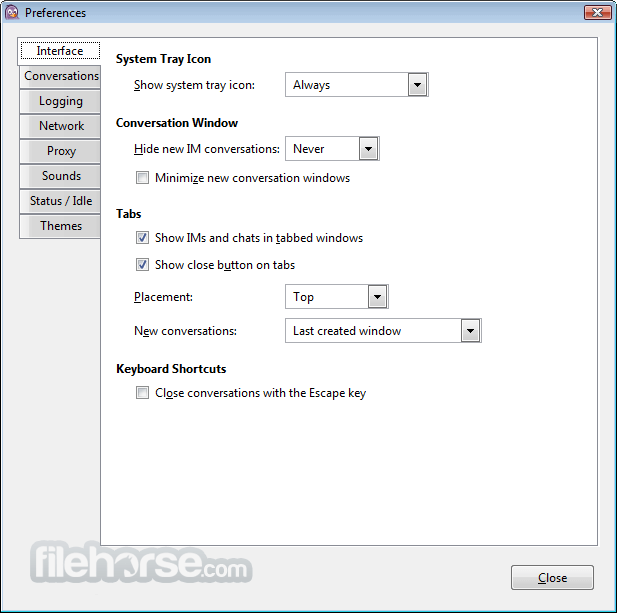
- 可自訂介面:可個人化主題、音效與通知。
- 加密選項:可加入 OTR 或其他安全外掛,進行加密對話。
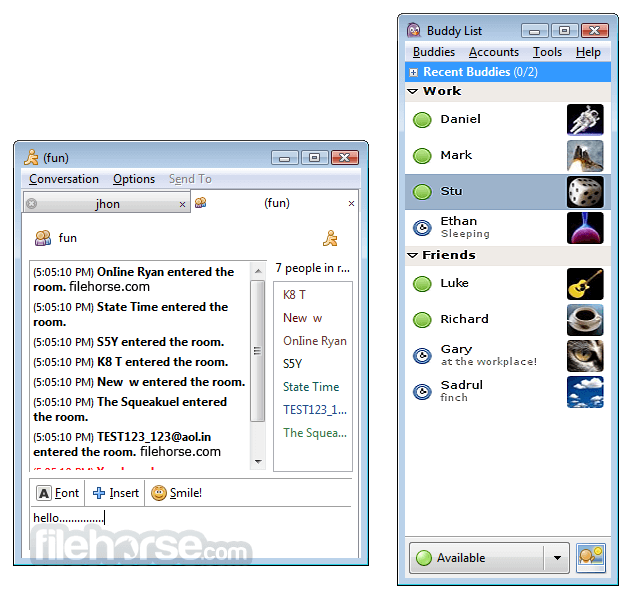
它擁有極簡且功能導向的介面。其 UI 設計著重於實用性,而非現代美學。主視窗顯示好友清單,聊天視窗則簡單、以分頁呈現,易於瀏覽。
雖然與現代通訊軟體相比可能顯得過時,但其簡潔性可減少干擾,並快速存取核心功能。
安裝與設定
- 執行安裝程式,並依照引導步驟操作。
- 在安裝過程中選擇所需的協定,或之後透過外掛選單新增。
- 使用各聊天網路現有的登入憑證來設定帳號。
- 也提供靜默安裝選項,供進階使用者或 IT 管理員使用。
Pidgin 支援 WhatsApp 或 Telegram 等現代通訊應用程式嗎?
原生不支援,但第三方外掛可能提供有限度的支援。
Pidgin 對私人對話安全嗎?
基本版 Pidgin 未加密,但可透過 OTR 等外掛加入端對端加密。
我可以用 Pidgin 進行工作聊天嗎?
可以,只要你的工作環境使用 XMPP、IRC 或類似受支援的協定即可。
Pidgin 仍在維護中嗎?
是的,雖然更新頻率不高,但社群仍持續維護。
Pidgin 可以跨裝置同步嗎?
無法直接同步。設定與紀錄僅儲存在本機,除非手動透過雲端工具同步。
Pidgin 在 2026 年仍具相關性嗎?
在 2026 年,Pidgin 仍可使用,但由於現代訊息平台多為封閉生態系且內建功能更強大,其主流相關性已有限。它主要仍適用於 XMPP、IRC 與自訂伺服器,但多數使用者偏好更新、整合更完整的聊天應用程式。
價格
此工具100% 免費且開放原始碼。沒有付費版本、廣告或鎖定功能。
系統需求
- 作業系統:Windows 11、10、8 或 7
- 記憶體:最低 512MB
- 儲存空間:約 50MB
- 網路:需連線以進行聊天
- 相依元件:安裝程式中包含 GTK+ 執行環境
- 免費且開放原始碼
- 支援多個聊天網路
- 輕量且資源占用低
- 可透過外掛擴充
- 介面簡潔且無干擾
- 介面過時
- 原生不支援現代通訊軟體
- 缺乏行動裝置支援
- 需外掛才能加密
- 檔案傳輸功能有限
Pidgin 對於重視開放原始碼彈性,且需要統一管理舊版與開放協定訊息的使用者來說,仍是一款強大的工具。雖然其介面可能顯得老舊,且缺乏對某些現代服務的支援,但其可擴充性、低系統負擔與外掛支援,使其成為開發者、注重隱私的使用者,或需要極簡聊天解決方案者的理想選擇。
如果你正在管理多個舊版聊天帳號,或在使用 XMPP 或 IRC 的環境中工作,這款應用程式仍是 Windows 電腦上可靠的選擇。
下載 Pidgin 最新版本 為什麼此應用程式發布在 FileHorse 上?(更多資訊)
畫面截圖
更新日誌
2.7.0 * General
- Changed GTK+ minimum version requirement to 2.10.0.
- Changed GLib minimum version requirement to 2.12.0.
- Using the --disable-nls argument to configure now works properly. You will no longer be forced to have intltool to configure and build.
- Fix two related crashes in the GnuTLS and NSS plugins when they suffer internal errors immediately upon attempting to establish an SSL connection.
- Fix NSS to work when reinitialized after being used. (Thanks to Ludovico Cavedon for the testcase)
- Added support for PURPLE_GNUTLS_PRIORITIES environment variable. This can be used to specify GnuTLS priorities on a per-host basis. The format is "host=priority;host2=priority;...". The default priority can be overridden by using "*" as the host. See the GnuTLS manual for documentation on the format of the priority strings.
- Fix autoconf detection of Python. (Brad Smith)
- Fix a crash when a Windows proxy (from IE) does not have a port. (Marten Klencke)
* Pidgin
- Moved the "Debugging Information" section of the About box to a "Build Information" dialog accessible on the Help menu.
- Moved the Developer and Crazy Patch Writer information from the About box to a "Developer Information" dialog accessible on the Help menu.
- Moved the Translator information from the About box to a "Translator Information" dialog accessible on the Help menu.
- Use G!tkStatusIcon for the docklet, providing better integration in notification area.
- Added UI for sending attentions (buzz, nudge) on supporting protocols.
- Make the search dialog unobtrusive in the conversation window (by making it look and behave like the search dialog in Firefox)
- The Recent Log Activity sort method for the Buddy List now distinguishes between no activity and a small amount of activity in the distant past. (Greg McNew)
- Added a menu set mood globally for all mood-supporting accounts (currently XMPP and ICQ).
- Default binding of Ctrl+Shift+v to 'Paste as Plain Text' in conversation windows. This can be changed in .gtkrc-2.0. For example, Ctrl+v can be bound to 'Paste as Plain Text' by default.
- Plugins can now handle markup in buddy names by attaching to the "drawing-buddy" signal. (Daniele Ricci, Andrea Piccinelli)
- Be more accommodating when scaling down large images for use as buddy icons.
- The 'Message Timestamp Formats' plugin allows changing the timestamp format from the timestamps' context menu in conversation log.
- The 'Message Timestamp Formats' plugin allows forcing 12-hour timestamps. (Jonathan Maltz)
- Fix pastes from Chrome (rich-text pastes and probably URLs having garbage appended to them).
- Show file transfer thumbnails for images on supporting protocols (currently only supported on MSN).
* Bonjour
- Added support for IPv6. (Thanks to T_X for testing)
* Gadu-Gadu
- Updated our bundled libgadu to 1.9.0-rc2 (many thanks to Krzysztof Klinikowski for the work and testing put in here!)
- Minimum requirement for external libgadu is now also 1.9.0-rc2.
* AIM and ICQ
- X-Status (Custom ICQ status icon) support. Since most of the icons available reflect moods, this is labeled "Set Mood" on the Accounts->ICQ Account menu. (Andrew Ivanov, Tomáš Kebert, Yuriy Yevgrafov, and trac users bob007, salieff, and nops)
- Allow setting and displaying icons between 1x1 and 100x100 pixels for ICQ. Previously only icons between 48x48 and 52x64 were allowed.
- When using the clientLogin authentication method, prompt for a password on reconnect when "Remember Password" is not checked and authentication fails due to an incorrect password. (This is the same behavior as the legacy authentication method)
- Support sending and receiving HTML-formatted messages for ICQ.
- Use the proper URL for "View web profile" link for ICQ buddies. (Alexander Nartov)
* MSN
- Support for version 9 of the MSN protocol has been removed. This version is no longer supported on the servers.
- Support file transfer thumbnails (previews) for images.
- Fix CVE-2010-1624 (custom emoticon remote crash).
* XMPP
- Direct messages to a specific resource only upon receipt of a message with content (as opposed to a typing notification, etc). (Thanks to rjoly for testing)
- Present a better error message when authentication fails while trying to connect to Facebook. (David Reiss, Facebook)
- When sending data using in-band-bytestreams, interpret the block-size attribute as the size of the BASE64-encoded representation of the data.
- Validate the hash on incoming BoB data objects (for custom smileys etc.), cache based per JID when the CID is not a valid hash (as specified by the BoB XEP).
- Send whitespace keepalives if we haven't sent data in a while (2 minutes). This fixes an issue with Openfire disconnecting a libpurple-baesd client that has just been quiet for about 6 minutes.
- Only support Google Talk's JID Domain Discovery extension (allowing a user to log in with "@gmail.com" or "@googlemail.com" interchangeably) for those two domains. This change was made due to interoperability issues with some BOSH Connection Managers and namespaced attributes.
* Yahoo/Yahoo JAPAN
- Attempt to better handle transparent proxies interfering with HTTP-based login.
- Fix handling of P2P packets, thus fixing the loss of some messages.
- Retrieve the pager server address from Yahoo!'s servers directly.
- Removed the "Pager server" account option, as it is no longer needed.
- The authentication code is now less order-sensitive with the components of the server's response.
- The authentication process now acts more like the official client.
* Finch
- New action 'history-search', with default binding ctrl+r, to search the entered string in the input history.
- 2026-02-17 Pidgin 2.14.14 30.85 MB
- 2024-02-24 Pidgin 2.14.13 30.84 MB
- 2023-01-02 Pidgin 2.14.12 33.39 MB
- 2022-06-03 Pidgin 2.14.10 33.49 MB
- 2022-04-29 Pidgin 2.14.9 33.48 MB
- 2021-10-15 Pidgin 2.14.8 33.49 MB
- 2021-09-17 Pidgin 2.14.7 33.48 MB
- 2021-07-09 Pidgin 2.14.6 33.49 MB