⚠ 這是歷史版本頁面 — 查看 Process Explorer 最新版本 →

- 目前版本16.43
- 更新日期2021-08-18
- 檔案大小2.53 MB
- 檔案名稱ProcessExplorer.zip
- 作業系統Windows 7 / Windows 8 / Windows 10 / Windows 11
- 支援語系English
- 授權型式免費軟體
- 開發商 Microsoft SysInternals
- 軟體分類Windows 軟體 / 系統優化
##
編輯短評
Process Explorer 是微軟 SysInternals 推出的進階系統工具,主要解決「哪個程式佔用了某個檔案或目錄」這類疑難雜症。它會列出所有執行中程序,並顯示每個程序開啟的控制代碼與載入的 DLL,讓你能深入追查系統資源被誰綁住。最有辨識度的特色是雙視窗介面:上視窗顯示程序清單與帳戶名稱,下視窗則依模式切換顯示控制代碼或 DLL 資訊。這套工具由微軟官方長期維護,更新相當活躍,在同類系統工具中屬於主流首選,評價普遍不錯。
它適合需要進階診斷的進階使用者,例如系統管理員、開發者或重度玩家,當你遇到檔案無法刪除、程式異常鎖定資源,或想確認某個 DLL 被哪個程序載入時,就會派上用場。與同分類的 FileHippo App Manager、Rufus 或 Glary Utilities 相比,Process Explorer 專注於系統內部資訊揭露,而非軟體管理或系統優化,功能取向更為純粹。授權為免費軟體,僅支援 Windows 平台,介面只有英文,沒有中文版,使用前需留意語系門檻。
##
翻譯排程處理中,以下暫以英文原文呈現
軟體介紹
Have you ever been curious about which program has a specific file or directory open? Now you can easily find out with Process Explorer.
This tool provides you with information about the handles and DLLs (Dynamic Link Libraries) that processes have opened or loaded.
User Interface
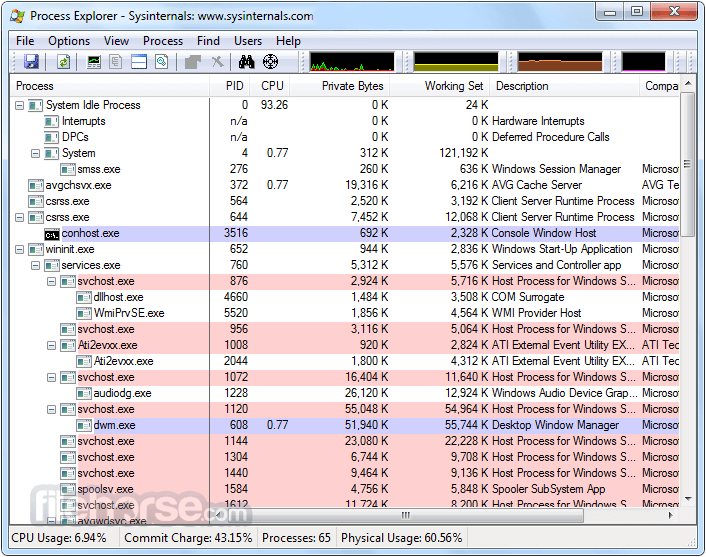
The Process Explorer interface consists of two sub-windows. The top window always displays a list of currently active processes, including the names of their associated accounts.
The information shown in the bottom window depends on the mode that the app is in. In handle mode, you can view the handles opened by the selected process in the top window.
In DLL mode, you can see the DLLs and memory-mapped files that the process has loaded. It also offers a powerful search feature, enabling you to quickly identify processes with specific handles opened or DLLs loaded.
Microsoft Process Explorer's unique capabilities make it invaluable for troubleshooting DLL version issues or handling leaks. It provides valuable insights into the inner workings of Windows and applications.
MS Process Explorer is a free, advanced utility developed by Microsoft Sysinternals, providing a comprehensive view of the processes, threads, and DLLs running on your Windows system.
It goes beyond the standard Task Manager to offer in-depth information about each process, including details on associated services, performance metrics, and even the ability to control running processes.
Process Explorer is a must-have tool for system administrators, power users, and troubleshooting enthusiasts.
Installation
Simply run the program (procexp.exe).
Key Features
Process and System Information
The program displays a tree-like structure of all active processes, allowing you to explore process dependencies and see how they interact with each other.
Detailed Process Information
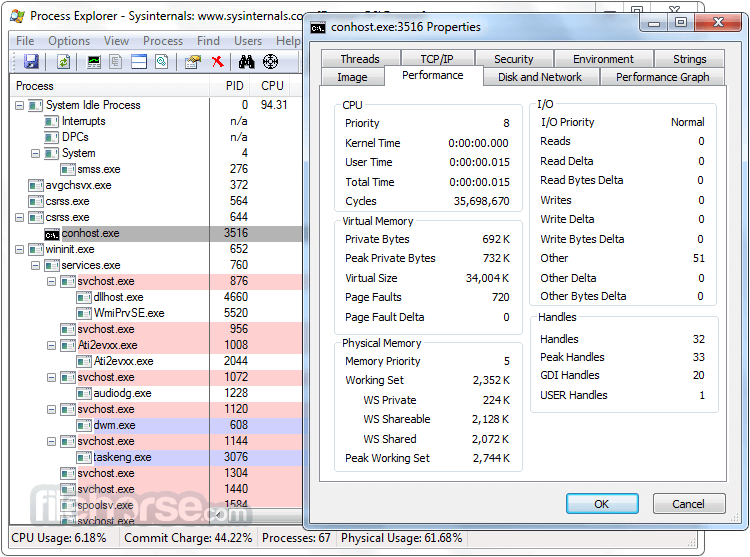
You can access extensive information about each process, including its executable path, command-line parameters, memory usage, open files, and loaded DLLs.
Real-Time CPU and GPU Monitoring
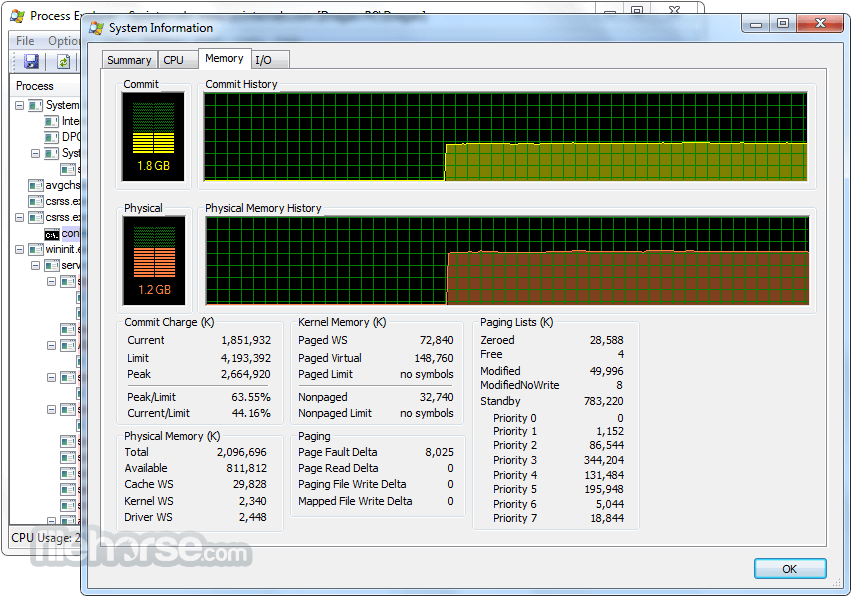
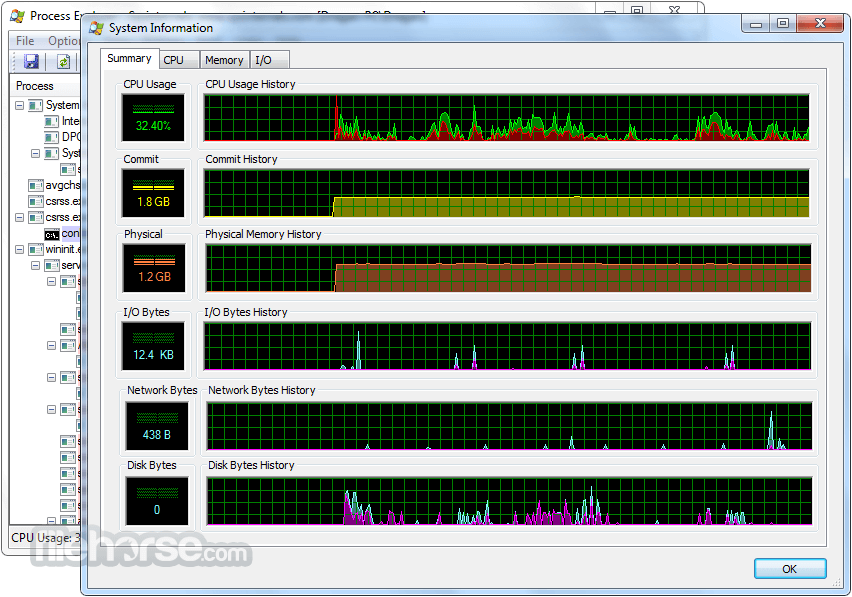
The software provides real-time monitoring of CPU and GPU activity, allowing you to identify resource-intensive processes and diagnose performance bottlenecks.
Powerful Search and Filtering
It enables you to search for specific processes, modules, handles, or DLLs, making it easier to locate and analyze specific components.
Process and Thread Highlighting
It highlights processes and threads related to specific windows or services, making it easier to trace back their origins.
Handles and DLLs
You can explore open handles and loaded DLLs, helping you understand the resources being used by running processes.
System Tray Integration
It can replace the standard Windows Task Manager and integrate with the system tray for quick access.
How to Use
Is Microsoft Process Explorer compatible with all Windows versions?
Yes, Microsoft Process Explorer is compatible with Windows 11, Windows 10, Windows 8, Windows 7, Windows Vista, and Windows XP.
Can I use Process Explorer to terminate processes?
Yes, it allows you to terminate processes, but exercise caution as terminating critical system processes can lead to instability or crashes.
How does Process Explorer differ from the default Task Manager?
It offers more detailed information about processes, handles, and DLLs. It also provides real-time CPU and GPU monitoring, advanced search and filtering options, and the ability to control processes.
Can I save the process information for future analysis?
Yes, the program allows you to save the process information as a snapshot or in a CSV file for further analysis.
Is Microsoft Process Explorer FREE to use?
Yes, the app is completely free to download and use for personal and commercial purposes.
Alternatives
There are several alternatives to BitDefender Free Edition available in the market, including Process Monitor or Process Lasso.
System Requirements
Microsoft Process Explorer is an invaluable software tool for gaining insights into the inner workings of your Windows system. With its wealth of information, real-time monitoring, and advanced search capabilities, the app surpasses the default Task Manager and empowers users to effectively analyze processes, troubleshoot performance issues, and maintain system stability.
Whether you're a system administrator, power user, or simply curious about your computer's processes, Process Explorer is a must-have utility in your software arsenal. Download it today and uncover the depths of your system like never before!
Download Process Explorer Latest Version Why is this app published on FileHorse? (More info)
This tool provides you with information about the handles and DLLs (Dynamic Link Libraries) that processes have opened or loaded.
User Interface
The Process Explorer interface consists of two sub-windows. The top window always displays a list of currently active processes, including the names of their associated accounts.
The information shown in the bottom window depends on the mode that the app is in. In handle mode, you can view the handles opened by the selected process in the top window.
In DLL mode, you can see the DLLs and memory-mapped files that the process has loaded. It also offers a powerful search feature, enabling you to quickly identify processes with specific handles opened or DLLs loaded.
Microsoft Process Explorer's unique capabilities make it invaluable for troubleshooting DLL version issues or handling leaks. It provides valuable insights into the inner workings of Windows and applications.
MS Process Explorer is a free, advanced utility developed by Microsoft Sysinternals, providing a comprehensive view of the processes, threads, and DLLs running on your Windows system.
It goes beyond the standard Task Manager to offer in-depth information about each process, including details on associated services, performance metrics, and even the ability to control running processes.
Process Explorer is a must-have tool for system administrators, power users, and troubleshooting enthusiasts.
Installation
Simply run the program (procexp.exe).
Key Features
Process and System Information
The program displays a tree-like structure of all active processes, allowing you to explore process dependencies and see how they interact with each other.
Detailed Process Information
You can access extensive information about each process, including its executable path, command-line parameters, memory usage, open files, and loaded DLLs.
Real-Time CPU and GPU Monitoring
The software provides real-time monitoring of CPU and GPU activity, allowing you to identify resource-intensive processes and diagnose performance bottlenecks.
Powerful Search and Filtering
It enables you to search for specific processes, modules, handles, or DLLs, making it easier to locate and analyze specific components.
Process and Thread Highlighting
It highlights processes and threads related to specific windows or services, making it easier to trace back their origins.
Handles and DLLs
You can explore open handles and loaded DLLs, helping you understand the resources being used by running processes.
System Tray Integration
It can replace the standard Windows Task Manager and integrate with the system tray for quick access.
How to Use
- Download and install the app from the official Microsoft Sysinternals website or FileHorse.
- Launch the application. By default, it shows a comprehensive list of running processes.
- Explore the different columns and tabs to gather information about individual processes, including CPU and memory usage.
- Right-click on a process to access a context menu offering various options like killing the process, searching online for more information, or analyzing its properties.
- Utilize the search and filtering options to find specific processes, handles, or DLLs.
- Customize the application's settings according to your preferences, such as adjusting the refresh rate or replacing the Task Manager.
Is Microsoft Process Explorer compatible with all Windows versions?
Yes, Microsoft Process Explorer is compatible with Windows 11, Windows 10, Windows 8, Windows 7, Windows Vista, and Windows XP.
Can I use Process Explorer to terminate processes?
Yes, it allows you to terminate processes, but exercise caution as terminating critical system processes can lead to instability or crashes.
How does Process Explorer differ from the default Task Manager?
It offers more detailed information about processes, handles, and DLLs. It also provides real-time CPU and GPU monitoring, advanced search and filtering options, and the ability to control processes.
Can I save the process information for future analysis?
Yes, the program allows you to save the process information as a snapshot or in a CSV file for further analysis.
Is Microsoft Process Explorer FREE to use?
Yes, the app is completely free to download and use for personal and commercial purposes.
Alternatives
There are several alternatives to BitDefender Free Edition available in the market, including Process Monitor or Process Lasso.
System Requirements
- Operating System: Windows XP or later (compatible with Windows 11)
- CPU: 1 GHz or higher
- RAM: 1 GB or more
- Disk Space: 10 MB (When a .zip file is unpacked)
- Offers detailed process and system information
- Real-time CPU and GPU monitoring
- Powerful search and filtering options
- Integration with the system tray for quick access
- Lightweight and free to use
- It may overwhelm casual users with its advanced features
- Requires some learning to fully utilize its capabilities
Microsoft Process Explorer is an invaluable software tool for gaining insights into the inner workings of your Windows system. With its wealth of information, real-time monitoring, and advanced search capabilities, the app surpasses the default Task Manager and empowers users to effectively analyze processes, troubleshoot performance issues, and maintain system stability.
Whether you're a system administrator, power user, or simply curious about your computer's processes, Process Explorer is a must-have utility in your software arsenal. Download it today and uncover the depths of your system like never before!
Download Process Explorer Latest Version Why is this app published on FileHorse? (More info)
##
畫面截圖
- 2026-08-13 Process Explorer 17.13 3.4 MB
- 2021-08-18 Process Explorer 16.43 2.53 MB