⚠ 這是歷史版本頁面 — 查看 ProPresenter 最新版本 →

- 目前版本7.16.3
- 更新日期2024-06-21
- 檔案大小77.82 MB
- 檔案名稱ProPresenter_7.16.3_118489862-Setup.exe
- 作業系統Windows 10 / Windows 11
- 支援語系English
- 授權型式商業試用
- 開發商 Renewed Vision
- 軟體分類Windows 軟體 / 影像設計
##
編輯短評
ProPresenter 是一套专为现场活动设计的跨平台演示与制作工具,主要用来在演唱会、教会敬拜、体育赛事或会议中,同步输出歌词、投影片与媒体内容。它最鲜明的特色是「输出永远即时」:操作者在一个萤幕上控制,观众端则能同时看到动态画面,不需要切换编辑与播映模式,也支援非线性的流程安排,让现场节奏更流畅。这套软体自 2022 年起持续有版本更新,近一年仍维持维护,在同类工具中属于评价普遍不错的长期选择,但并非最热门的那一类。
如果你常需要处理多萤幕的现场转播、即时经文查询或大厅与礼堂的独立输出,ProPresenter 会是相当实用的帮手;它尤其适合教会、活动统筹团队或小型转播单位。与一般简报软体相比,它更强调「现场制作」而非静态投影片,因此学习曲线稍陡,但换来的是更灵活的操控。要注意的是,它提供的是试用版授权,且介面仅支援英文,对中文使用者来说需要一些适应;不过 Windows 与 macOS 都有版本,跨平台使用上还算方便。
##
翻譯排程處理中,以下暫以英文原文呈現
軟體介紹
ProPresenter is a cross-platform for PC, presentation & production application for live events. It seamlessly displays lyrics, slides, and media, making high-quality live productions easy.
It is an indispensable tool for worship gatherings, sporting events, conferences, trade shows, and studio broadcasts.
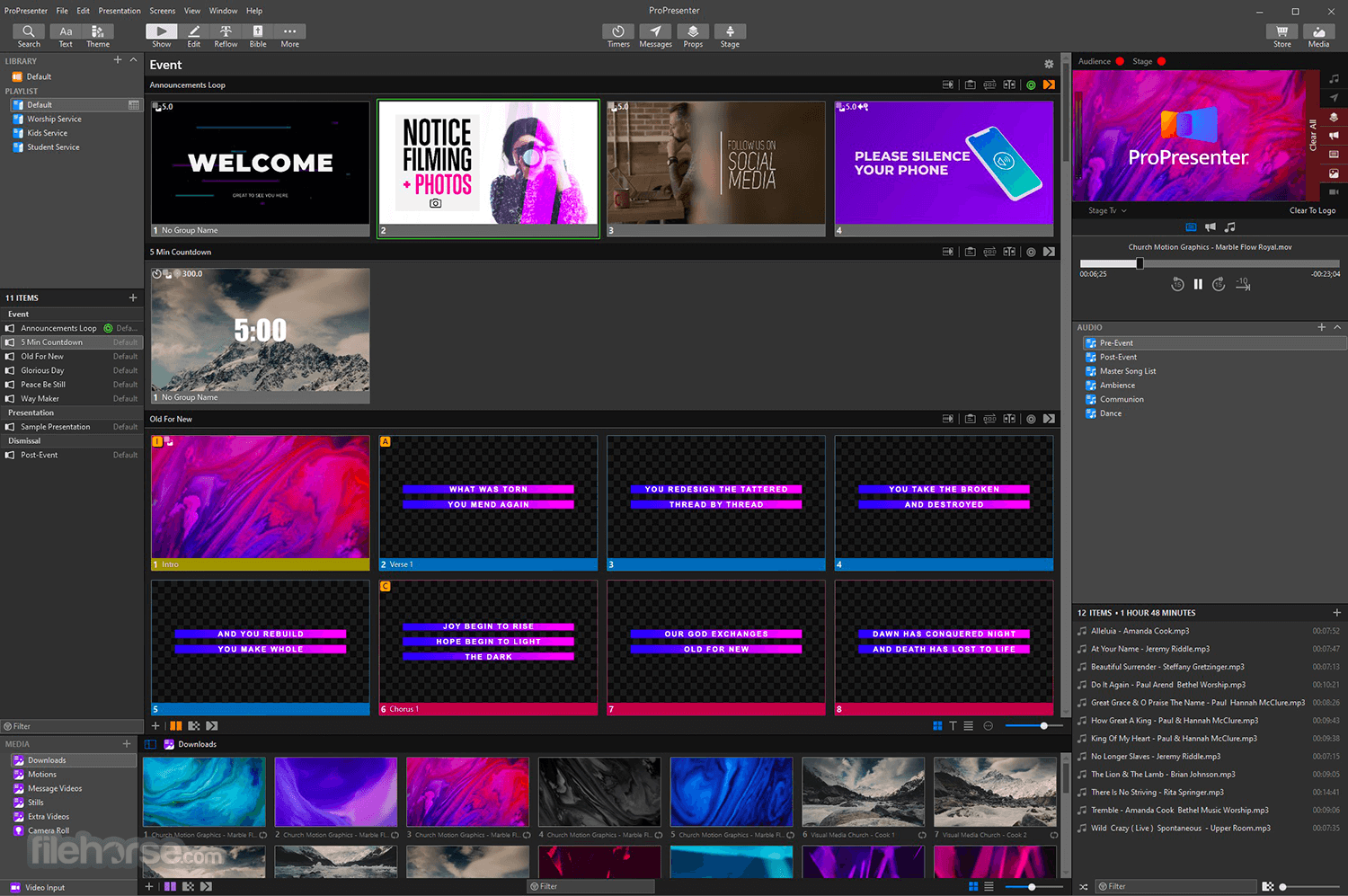
ProPresenter operators control presentations on one screen, while dynamically presenting to an audience on one or more additional screens.
With a completely revamped video engine that is equally suitable for powering presentations in a room of 100 people or 100,000, the quality and professionalism of ProPresenter’s output are unprecedented.
The ability to create high-quality videos is becoming increasingly easy, making the use of videos in productions more prevalent than ever. The video engine (the same as that at the heart of PVP3) is the perfect way to present your final edit.
You can import and play videos instantly in ProPresenter. It also includes the ability to set in and out points dynamically, affect color, brightness, and volume, and crop/scale videos dynamically. Video effects empower you to leverage your video library to create limitless new looks for your pre-produced content.
What’s New
A sophisticated Stage Display output empowers you to communicate information to the people on stage. Show the content your stage talent needs to see, including clocks, timers, the current slide, next slide, slide notes, and stage announcements. Maintain the flexibility of your Stage Display layouts using a free advanced editor. With the output capabilities of the Pro Presenter software, you can use any layout on as many stage displays as you have available.
Regardless of how powerful a tool is, its value is determined by how easy it is to access that power. ProPresenter was designed from the beginning to allow beginners to feel confident in running the software with only a few minutes of training.
Features and Highlights
What is ProPresenter actually used for in real scenarios?
ProPresenter is a live presentation and production tool primarily used in churches, conferences, and live events. It’s designed to display lyrics, Bible verses, announcements, and media on screens while giving the operator full control behind the scenes.
How is ProPresenter different from PowerPoint or similar tools?
Unlike traditional presentation software, ProPresenter is built for live production. It supports multi-screen output (audience screen, stage display), real-time control, seamless media playback, and quick switching between slides without interrupting the flow of a live event.
Can ProPresenter handle video and live media playback?
Yes, and this is one of its strengths. It can play videos, background loops, and overlays smoothly during presentations, making it suitable for dynamic events rather than static slides.
Is ProPresenter difficult to learn?
It has a learning curve, especially for beginners, because it includes many advanced features. However, once set up, it becomes very efficient for repeat use in structured environments like weekly services or events.
Is ProPresenter still relevant in 2026?
Yes. In 2026, ProPresenter remains one of the leading tools for live presentation workflows, especially in churches and event production, thanks to its specialized features and reliability in live environments.
ProPresenter Subscription Plans – Built for Every Team
Choose a flexible subscription plan that fits your team's size and budget.
✅ Flexible billing
✅ Easily add/remove seats
✅ Quick device activation/deactivation
✅ 7-day support access
✅ Ongoing updates and OS support
✅ Team/user account management
✅ Build/edit shows without activation
Plans:
EasyWorship – A presentation software designed for churches that allows users to display song lyrics, Bible verses, videos, and slides during services with an easy-to-use interface and live control features.
System Requirements
Minimum:
Also Available: Download ProPresenter for Mac
Download ProPresenter Latest Version Why is this app published on FileHorse? (More info)
It is an indispensable tool for worship gatherings, sporting events, conferences, trade shows, and studio broadcasts.
ProPresenter operators control presentations on one screen, while dynamically presenting to an audience on one or more additional screens.
- No separate edit and present modes
- Outputs are always live
- Completely non-linear flexibility
- On-demand Scripture lookup
- Separate Outputs for a lobby, auditorium, and stage displays
- Volunteer friendly
- On-the-fly run-of-show changes
With a completely revamped video engine that is equally suitable for powering presentations in a room of 100 people or 100,000, the quality and professionalism of ProPresenter’s output are unprecedented.
The ability to create high-quality videos is becoming increasingly easy, making the use of videos in productions more prevalent than ever. The video engine (the same as that at the heart of PVP3) is the perfect way to present your final edit.
You can import and play videos instantly in ProPresenter. It also includes the ability to set in and out points dynamically, affect color, brightness, and volume, and crop/scale videos dynamically. Video effects empower you to leverage your video library to create limitless new looks for your pre-produced content.
What’s New
- Fixed Library Duplication Issue: Renaming a library no longer creates duplicate presentations
- Improved Stability: Resolved multiple crashes related to audio import, props editing, and web fills
- Presentation Rendering Fixes: Fixed text being cut off in outputs and PowerPoint imports
- Editor Improvements: Resolved issues with pasting external images into the editor
- Playback & Timeline Fixes: Background media now continues correctly when stopping timecode
- Workspace Reliability: Fixed stage actions breaking when switching workspaces
- Integration Fixes: Planning Center Live content now reloads properly after a restart
- Update & Control Fixes: Resolved issues preventing slide triggering and app updates due to helper processes
- General Improvements: Various bug fixes and overall performance enhancements
A sophisticated Stage Display output empowers you to communicate information to the people on stage. Show the content your stage talent needs to see, including clocks, timers, the current slide, next slide, slide notes, and stage announcements. Maintain the flexibility of your Stage Display layouts using a free advanced editor. With the output capabilities of the Pro Presenter software, you can use any layout on as many stage displays as you have available.
Regardless of how powerful a tool is, its value is determined by how easy it is to access that power. ProPresenter was designed from the beginning to allow beginners to feel confident in running the software with only a few minutes of training.
Features and Highlights
- API Integration – Extend ProPresenter functionality with custom workflows and external tool integrations.
- Calendar Scheduling – Automate looping and streaming with scheduled events.
- MIDI & DMX Control – Sync presentations with lighting and audio systems for seamless production.
- Macros – Trigger complex action sequences from slides, devices, or on demand.
- MultiTracks Integration – Import lyrics, chord charts, and MIDI cues directly into your presentations.
- Network Link – Sync and control multiple ProPresenter machines across a local network.
- Planning Center Sync – Link with Planning Center’s service plans and stage display outputs.
- Playback Markers – Trigger actions or messages at precise times during playback.
- Resi Streaming – Stream resilient, high-quality video even with unstable internet.
- Slide Actions – Attach actions to slides for inputs, macros, and media control.
- SongSelect Access – Instantly import lyrics from your CCLI SongSelect account.
- Stream Deck Support – Control ProPresenter with Elgato Stream Deck for quick access.
- Timecode Sync – Lock presentations to external timecode-enabled systems.
- Timeline Playback – Automate slide and media playback with custom timing.
- Slide Arrangements – Create custom lyric flows for different song versions.
- Custom Slide Objects – Add styled text, shapes, and media layers to any slide.
- Playlists & Templates – Organize presentations and save reusable show templates.
- Media Effects – Apply advanced text and video effects for stunning visuals.
- Quick Edit & Search – Easily fix typos and find any past presentation fast.
- Themes & Reflow Editor – Maintain consistent styles and quickly reformat slides.
- Multi-Screen Output – Display unique content per screen with masks, looks, and layering.
- Live Video Inputs – Incorporate and overlay live camera feeds into presentations.
- Stage Display Tools – Deliver real-time prompts, messages, and previews to presenters.
- Download and install ProPresenter for Windows
- Launch the application
- Create a new presentation or import media
- Organize slides and media in sequence
- Configure display settings for outputs
- Preview and rehearse the presentation
- Start and control slides during the event
What is ProPresenter actually used for in real scenarios?
ProPresenter is a live presentation and production tool primarily used in churches, conferences, and live events. It’s designed to display lyrics, Bible verses, announcements, and media on screens while giving the operator full control behind the scenes.
How is ProPresenter different from PowerPoint or similar tools?
Unlike traditional presentation software, ProPresenter is built for live production. It supports multi-screen output (audience screen, stage display), real-time control, seamless media playback, and quick switching between slides without interrupting the flow of a live event.
Can ProPresenter handle video and live media playback?
Yes, and this is one of its strengths. It can play videos, background loops, and overlays smoothly during presentations, making it suitable for dynamic events rather than static slides.
Is ProPresenter difficult to learn?
It has a learning curve, especially for beginners, because it includes many advanced features. However, once set up, it becomes very efficient for repeat use in structured environments like weekly services or events.
Is ProPresenter still relevant in 2026?
Yes. In 2026, ProPresenter remains one of the leading tools for live presentation workflows, especially in churches and event production, thanks to its specialized features and reliability in live environments.
ProPresenter Subscription Plans – Built for Every Team
Choose a flexible subscription plan that fits your team's size and budget.
✅ Flexible billing
✅ Easily add/remove seats
✅ Quick device activation/deactivation
✅ 7-day support access
✅ Ongoing updates and OS support
✅ Team/user account management
✅ Build/edit shows without activation
Plans:
- Standard: $29/month per seat
- Campus: $59/month (includes 20 seats) – Worship customers only
- Free Trial: Try all features free for 14 days.
EasyWorship – A presentation software designed for churches that allows users to display song lyrics, Bible verses, videos, and slides during services with an easy-to-use interface and live control features.
System Requirements
Minimum:
- Windows 10 version 1903
- Intel i5 or equivalent AMD processor
- 8 GB RAM
- Integrated graphics with updated drivers
- Windows 11 (latest build)
- Intel i7/i9 or equivalent AMD processor
- 16 GB RAM
- Dedicated GPU with 8 GB VRAM
- Flexible presentation capabilities
- Integration with SongSelect and databases
- Supports multiple screen outputs
- User-friendly interface for volunteers
- Regular feature updates and support
- High subscription cost for small orgs
- Occasional need to roll back updates
- Limited advanced feature documentation
- Requires powerful hardware to run well
Also Available: Download ProPresenter for Mac
Download ProPresenter Latest Version Why is this app published on FileHorse? (More info)
##
影片介紹
##
畫面截圖
- 2026-04-03 ProPresenter 21.3.1 113.23 MB
- 2025-02-18 ProPresenter 18.3 80.72 MB
- 2024-06-21 ProPresenter 7.16.3 77.82 MB
- 2024-04-02 ProPresenter 7.16.2 77.9 MB
- 2024-03-02 ProPresenter 7.16.1 77.89 MB
- 2024-02-28 ProPresenter 7.16.0 77.86 MB
- 2023-11-22 ProPresenter 7.15.0 78.96 MB
- 2023-09-22 ProPresenter 7.14.1 73.09 MB