⚠ 這是歷史版本頁面 — 查看 Quick CPU 最新版本 →

- 目前版本6.1.0.0
- 更新日期2025-12-25
- 檔案大小34.93 MB
- 檔案名稱QuickCpuSetup.msi
- 作業系統Windows 10 (64-bit) / Windows 11
- 支援語系English
- 授權型式免費軟體
- 開發商 CoderBag
- 軟體分類Windows 軟體 / 系統優化
##
編輯短評
Quick CPU 是一款專注於 CPU 底層調校與監控的 Windows 免費工具,前身是 Core Parking Manager v3。它能即時查看處理器溫度、電壓、功耗、核心頻率等關鍵數據,並允許使用者調整核心停駐(Core Parking)、Turbo Boost、C-States 與 Speed Shift 等進階參數,解決系統效能被預設電源管理策略壓抑的問題。開發商持續維護,近一年更新相當頻繁,在同類工具中屬於評價普遍不錯的熱門選擇。
這套軟體適合對硬體有一定了解、想手動榨出 CPU 效能的進階使用者,例如超頻玩家或需要長時間穩定運作的專業工作者。與 Glary Utilities 這類全面型系統優化工具相比,Quick CPU 更聚焦於處理器層級的精細控制,但功能相對單一,且僅提供英文介面,對不熟悉英文操作介面的使用者稍有門檻。軟體為免費授權,可直接下載使用,無需安裝即可執行。
##
翻譯排程處理中,以下暫以英文原文呈現
軟體介紹
Quick CPU (formerly known as Core Parking Manager v3) is a software created to optimize and supervise vital CPU and System attributes, including CPU Temperature (Package and Core Temp), CPU Performance, Power, Voltage, Current, Core Parking, Frequency Scaling, System Memory, Turbo Boost, C-States, and Speed Shift FIVR Control.
Quick CPU for PC also enables users to make necessary modifications and monitor other essential system parameters. The following details explain the functionality of this application, the interpretation of application data and settings, and the ability to adjust and monitor various critical system parameters. Disable CPU Cores to save power!
Quick CPU is an advanced application that provides users with the ability to optimize their computer's CPU performance. It allows users to fine-tune various CPU parameters, such as core affinity, power management settings, and clock speeds, to achieve maximum efficiency and speed. The software is compatible with both Intel and AMD processors and offers a range of customization options to cater to different user preferences.
CPU performance and power consumption
In the past, desktop computers were primarily focused on delivering the highest possible performance, and technologies like SpeedStep and Turbo Boost were not necessary.
However, in today's world, power consumption has become a significant concern, sometimes outweighing the need for maximum performance. With advancements in technology and changing expectations, CPUs now come with a variety of features such as TurboBoost, SpeedStep, Hyper-Threading, and individual core states.
These features aim to reduce power consumption and heat generation. While these developments are beneficial, they can occasionally lead to situations where end users do not experience optimal performance when they need it most (performance delay).
The performance delay can be attributed to various unpredictable factors, including the system state, resource availability, CPU state, temperature, and many others.
Turbo Boost
Quick CPU Turbo Boost is a feature that enhances the performance of your CPU during normal system load. Under regular circumstances, the CPU operates at a standard clock speed, which indicates its overall performance.
However, when faced with more demanding tasks that require additional power, Turbo Boost automatically kicks in, temporarily increasing the CPU clock frequency.
By setting the Turbo Boost index to its maximum value, the CPU strives to deliver performance beyond the level corresponding to its base frequency at all times.
Both Intel Turbo Boost and AMD Turbo CORE technologies enable processors to achieve extra performance precisely when it is most beneficial, typically during high system loads. These technologies dynamically raise the CPU's operating frequency, resulting in improved performance in a non-deterministic manner.
Here’s what Intel states about their turbo boost technology:
According to Intel, their Turbo Boost Technology 2.0 accelerates processor and graphics performance during peak loads. It allows individual processor cores to run at speeds higher than the rated operating frequency if they are operating below-specified power, current, and temperature limits.
The extent to which the processor enters Intel Turbo Boost Technology 2.0 and the duration it remains in that state depend on the workload and operating environment.
Highlights
Core Affinity Control: It enables users to assign specific CPU cores to different applications, allowing for improved multitasking and performance optimization.
Power Management Settings: Users can adjust power profiles, including sleep and hibernate settings, to strike a balance between energy efficiency and performance.
Clock Speed Adjustment: Quick CPU tool provides the ability to modify CPU clock speeds, giving users the option to increase processing power for demanding tasks or conserve energy during lighter usage.
Real-Time Monitoring: The software offers real-time monitoring of CPU usage, temperatures, and clock speeds, providing users with valuable insights into their system's performance.
Profile Management: It allows users to save and load custom profiles, enabling quick and easy switching between different CPU configurations for various use cases.
Features
This chart control shows data for four different CPU indicators:
Is Quick CPU compatible with both Intel and AMD processors?
Yes, it supports both Intel and AMD processors, offering optimization features for a wide range of CPU models.
Will using Quick CPU void my warranty?
No, using the app does not void your CPU's warranty. The software operates within the manufacturer's specified limits and does not make any permanent changes to your hardware.
Can I revert the CPU settings to default values?
Yes, it allows you to reset the CPU settings to their default values at any time.
Does Quick CPU improve gaming performance?
It can enhance gaming performance by optimizing core affinity and clock speeds, resulting in smoother gameplay and reduced latency.
Does Quick CPU consume a significant amount of system resources?
No, the tool is designed to be lightweight and efficient, utilizing minimal system resources during operation.
Alternatives
While Quick CPU offers an impressive range of features, it's essential to consider alternative software options for CPU optimization.
Some notable alternatives to Quick CPU include ThrottleStop, Intel XTU (Extreme Tuning Utility), AMD Ryzen Master, and MSI Afterburner.
Each of these alternatives provides similar functionalities and may appeal to users with specific preferences or requirements.
System Requirements
Quick CPU is a powerful and user-friendly software application that enables users to optimize their CPU performance. With its intuitive interface, extensive customization options, and real-time monitoring capabilities, the tool empowers users to fine-tune their CPU settings and achieve optimal performance for their specific needs.
Whether you're a gamer, a content creator, or simply looking to boost your system's efficiency, Quick CPU proves to be a valuable tool in maximizing your computer's processing capabilities.
Note: It requires .NET Framework.
Download Quick CPU Latest Version Why is this app published on FileHorse? (More info)
Quick CPU for PC also enables users to make necessary modifications and monitor other essential system parameters. The following details explain the functionality of this application, the interpretation of application data and settings, and the ability to adjust and monitor various critical system parameters. Disable CPU Cores to save power!
Quick CPU is an advanced application that provides users with the ability to optimize their computer's CPU performance. It allows users to fine-tune various CPU parameters, such as core affinity, power management settings, and clock speeds, to achieve maximum efficiency and speed. The software is compatible with both Intel and AMD processors and offers a range of customization options to cater to different user preferences.
CPU performance and power consumption
In the past, desktop computers were primarily focused on delivering the highest possible performance, and technologies like SpeedStep and Turbo Boost were not necessary.
However, in today's world, power consumption has become a significant concern, sometimes outweighing the need for maximum performance. With advancements in technology and changing expectations, CPUs now come with a variety of features such as TurboBoost, SpeedStep, Hyper-Threading, and individual core states.
These features aim to reduce power consumption and heat generation. While these developments are beneficial, they can occasionally lead to situations where end users do not experience optimal performance when they need it most (performance delay).
The performance delay can be attributed to various unpredictable factors, including the system state, resource availability, CPU state, temperature, and many others.
Turbo Boost
Quick CPU Turbo Boost is a feature that enhances the performance of your CPU during normal system load. Under regular circumstances, the CPU operates at a standard clock speed, which indicates its overall performance.
However, when faced with more demanding tasks that require additional power, Turbo Boost automatically kicks in, temporarily increasing the CPU clock frequency.
By setting the Turbo Boost index to its maximum value, the CPU strives to deliver performance beyond the level corresponding to its base frequency at all times.
Both Intel Turbo Boost and AMD Turbo CORE technologies enable processors to achieve extra performance precisely when it is most beneficial, typically during high system loads. These technologies dynamically raise the CPU's operating frequency, resulting in improved performance in a non-deterministic manner.
Here’s what Intel states about their turbo boost technology:
According to Intel, their Turbo Boost Technology 2.0 accelerates processor and graphics performance during peak loads. It allows individual processor cores to run at speeds higher than the rated operating frequency if they are operating below-specified power, current, and temperature limits.
The extent to which the processor enters Intel Turbo Boost Technology 2.0 and the duration it remains in that state depend on the workload and operating environment.
Highlights
Core Affinity Control: It enables users to assign specific CPU cores to different applications, allowing for improved multitasking and performance optimization.
Power Management Settings: Users can adjust power profiles, including sleep and hibernate settings, to strike a balance between energy efficiency and performance.
Clock Speed Adjustment: Quick CPU tool provides the ability to modify CPU clock speeds, giving users the option to increase processing power for demanding tasks or conserve energy during lighter usage.
Real-Time Monitoring: The software offers real-time monitoring of CPU usage, temperatures, and clock speeds, providing users with valuable insights into their system's performance.
Profile Management: It allows users to save and load custom profiles, enabling quick and easy switching between different CPU configurations for various use cases.
Features
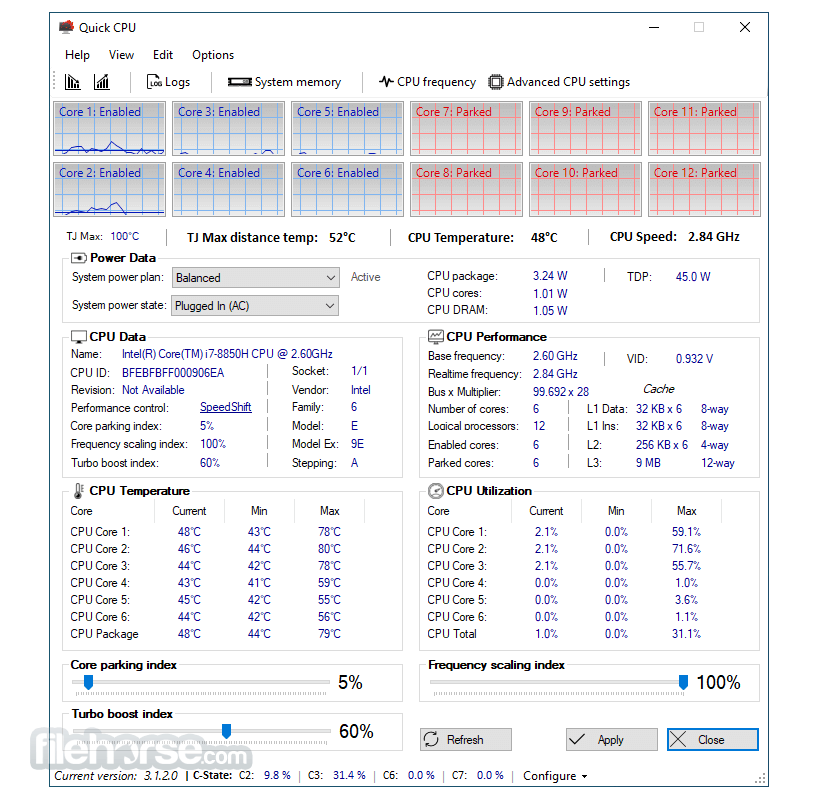
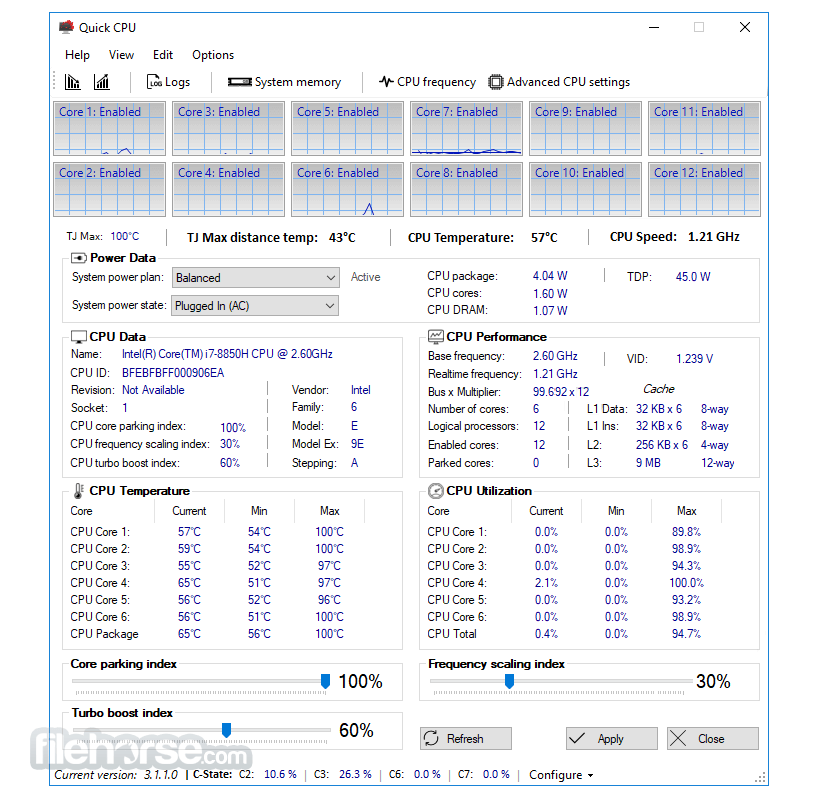
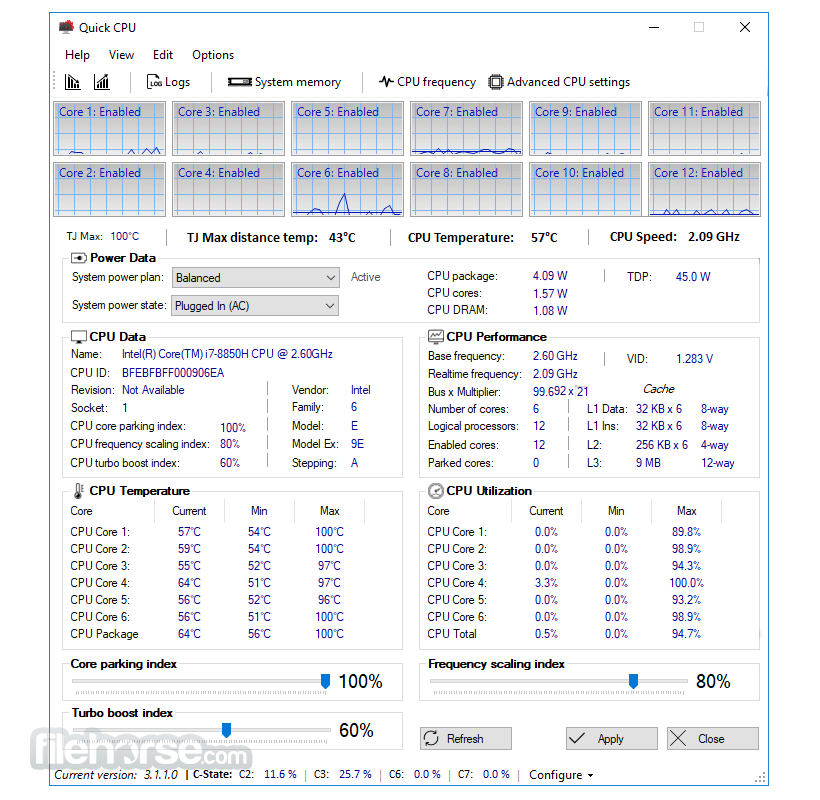
- Per-core performance graph indicator: Visualize the performance of individual CPU cores.
- Real-time counter: Monitor the number of active versus parked CPU cores.
- CPU Core Parking settings: Adjust settings related to core parking, allowing you to optimize CPU utilization.
- CPU Frequency Scaling settings: Fine-tune the scaling of CPU frequencies for improved performance or energy efficiency.
- CPU Turbo Boost settings: Configure Turbo Boost behavior to maximize CPU performance.
- Hardware sensors and adjustable settings: Monitor and modify hardware parameters such as temperature, power, and voltage.
- C-State Residency: Manage CPU C-States to control power consumption and performance trade-offs.
- Core Clock Frequency: Monitor and adjust the clock frequency of CPU cores.
- CPU Utilization: Keep track of CPU usage in real time.
- CPU Temperature: Monitor the temperature of the CPU to ensure optimal operating conditions.
- CPU Power and Voltage: Monitor and adjust the power and voltage settings of the CPU.
- FIVR Control: Fine-tune the FIVR (Fully Integrated Voltage Regulator) settings for enhanced performance and power management.
- System Power output: Track the power output of the entire system.
- System Tray notification: Receive notifications and alerts regarding CPU and system parameters in the system tray.
- Advanced system Power Plan management: Optimize power plans to achieve the desired balance between performance and energy efficiency.
- Real-time changes: Apply adjustments and settings on the fly without the need to restart the system.
This chart control shows data for four different CPU indicators:
- CPU Temperature
- CPU Temperature for Distance To Tj Max (Available for Intel and AMD Ryzen CPUs)
- CPU Load
- CPU Clock Speed
- Launch the application after installation.
- Familiarize yourself with the main dashboard, which displays vital CPU information.
- Use the various tabs and options to customize your CPU settings, such as core affinity, power management, and clock speeds.
- Monitor CPU performance in real time through the software's intuitive monitoring tools.
- Save and load different profiles to quickly switch between CPU configurations based on your needs.
Is Quick CPU compatible with both Intel and AMD processors?
Yes, it supports both Intel and AMD processors, offering optimization features for a wide range of CPU models.
Will using Quick CPU void my warranty?
No, using the app does not void your CPU's warranty. The software operates within the manufacturer's specified limits and does not make any permanent changes to your hardware.
Can I revert the CPU settings to default values?
Yes, it allows you to reset the CPU settings to their default values at any time.
Does Quick CPU improve gaming performance?
It can enhance gaming performance by optimizing core affinity and clock speeds, resulting in smoother gameplay and reduced latency.
Does Quick CPU consume a significant amount of system resources?
No, the tool is designed to be lightweight and efficient, utilizing minimal system resources during operation.
Alternatives
While Quick CPU offers an impressive range of features, it's essential to consider alternative software options for CPU optimization.
Some notable alternatives to Quick CPU include ThrottleStop, Intel XTU (Extreme Tuning Utility), AMD Ryzen Master, and MSI Afterburner.
Each of these alternatives provides similar functionalities and may appeal to users with specific preferences or requirements.
System Requirements
- Windows 11/10/8/7 (64-bit)
- Intel or AMD processor (compatible with Quick CPU)
- 4GB RAM or higher
- 100MB of available storage space
- Easy-to-use interface with comprehensive CPU performance monitoring
- Extensive customization options for advanced users
- Compatible with a wide range of Intel and AMD processors
- Real-time clock speed adjustment for optimal performance
- Profile management for quick switching between different CPU configurations
- Limited support for older operating systems
- Advanced features may be overwhelming for novice users
- No macOS or Linux support
Quick CPU is a powerful and user-friendly software application that enables users to optimize their CPU performance. With its intuitive interface, extensive customization options, and real-time monitoring capabilities, the tool empowers users to fine-tune their CPU settings and achieve optimal performance for their specific needs.
Whether you're a gamer, a content creator, or simply looking to boost your system's efficiency, Quick CPU proves to be a valuable tool in maximizing your computer's processing capabilities.
Note: It requires .NET Framework.
Download Quick CPU Latest Version Why is this app published on FileHorse? (More info)
##
畫面截圖
- 2026-06-25 Quick CPU 6.6.0.0 35.01 MB
- 2026-05-16 Quick CPU 6.5.0.0 34.99 MB
- 2026-04-15 Quick CPU 6.4.1.0 35 MB
- 2026-04-09 Quick CPU 6.4.0.0 35 MB
- 2026-03-06 Quick CPU 6.3.0.0 34.96 MB
- 2026-02-05 Quick CPU 6.2.1.0 34.95 MB
- 2025-12-25 Quick CPU 6.1.0.0 34.93 MB
- 2025-10-17 Quick CPU 5.3.0.0 34.89 MB