⚠ 這是歷史版本頁面 — 查看 Samsung Magician 最新版本 →

Samsung Magician 9.0.0
v 9.0.0
Windows
免費軟體
7.46/10 (99)
- 目前版本9.0.0
- 更新日期2025-12-02
- 檔案大小195.06 MB
- 檔案名稱Samsung_Magician_Installer_Official_9.0.0.910.exe
- 作業系統Windows 7 / Windows 8 / Windows 10 / Windows 11
- 支援語系English
- 授權型式免費軟體
- 開發商 Samsung Electronics Co., Ltd.
- 軟體分類Windows 軟體 / 系統優化
##
編輯短評
Samsung Magician 是三星官方推出的 SSD 管理工具,主要解決自家固態硬碟的維護與效能調校需求。它除了能顯示系統與 SSD 的基本資訊,也整合了效能測試、效能最佳化、韌體更新等進階功能,讓使用者不必另外尋找分散的工具。這套軟體自推出以來持續有版本更新,維護算是相當穩定,在同類工具中屬於特定品牌用戶會優先考慮的選擇,整體評價普遍不錯,但因為只支援三星產品,使用族群相對明確。
這套軟體最適合正在使用三星 SSD 的桌機或筆電用戶,尤其是想定期更新韌體、跑基準測試或調整效能設定的情境。與 Rufus、Glary Utilities 等通用工具相比,Samsung Magician 的優勢在於深度整合三星硬體特有的功能,但代價是對其他品牌硬碟完全無用。軟體本身免費,僅提供英文介面,中文使用者操作時需要稍微熟悉一下選單;另外它需要安裝而非免安裝版,下載前建議先確認自己的 SSD 型號在支援清單內。
##
翻譯排程處理中,以下暫以英文原文呈現
軟體介紹
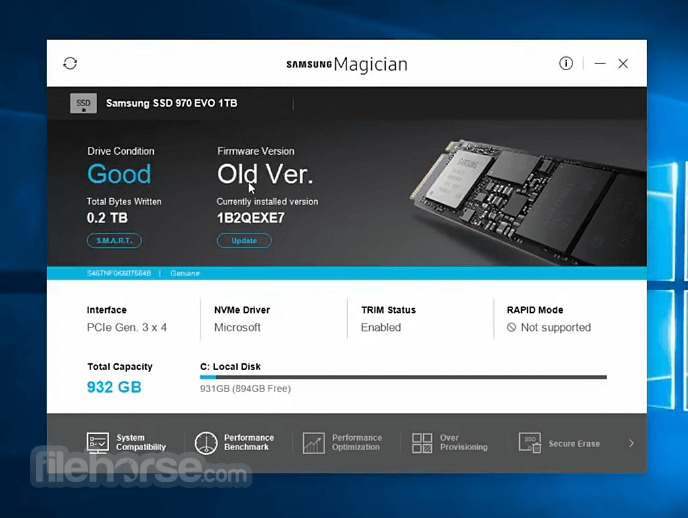
The Samsung Magician software facilitates easy maintenance and use of Samsung SSD products connected to a desktop or notebook computer.
In addition to providing information about the user's system and SSD product, Samsung Magician also supports advanced features, like SSD performance management, benchmarking for optimum performance, new firmware updates, etc.
Latest version of Magician software is recommended for optimal performance.
This Samsung-proprietary software was designed specifically for Samsung SSD products and is available for any Samsung SSDproduct, including:
Integrative Drive Health Check
Access the status of your SSDs at a glance on a real-time basis over many criteria including over-provisioning ratios, optimization rates, and diagnostic scans.
SSD Authenticity
Confirm the authenticity of your drive to ensure you have access to the superior performance and reliability that only comes from a genuine Samsung SSD.
S.M.A.R.T. Check
Check S.M.A.R.T. to inspect your SSD and detect possible drive Failure before it happens.
Performance Benchmark
Check that your SSD is maintaining the highest performance possible. Specific conditions such as the test volume, number of tests, chunk size, number of threads, and more can be adjusted to customize your benchmark tests.
Performance Optimization
Restore the performance of your SSD from degradation by performance enhancement (TRIM) and achieve faster performance through RAPID Mode which is intelligent DRAM caching of data.
Diagnostic Scan
Identify and fix potential problems with partial or full scans to maintain your drive’s capabilities.
Over Provisioning
Resize partitions to ensure your drive has enough free space to effectively carry out routine maintenance, such as TRIM and Garbage Collection. The over-provisioning feature helps the SSD prepare free blocks, which improves performance and extends your drive’s life span.
Customized Power Efficiency
When using performance optimization, you can set four modes according to your preferences: (1) Full Performance Mode maximizes the performance of the SSD, (2) Power Saving Mode increases power efficiency, (3) Standard Mode sets the SSD to use power at a moderate level, and (4) Custom Mode allows you to customize the power usage of your SSD.
Secure Erase
Permanently delete sensitive data without compromising the functionality of your SSD.
PSID Revert
Unlock and reset your drive to its factory setting by entering the 32- character PSID password printed on the drive label.
Encrypted Drive
Activate Encrypted Drive to protect private and sensitive data. Magician for PC lets you review your drive’s current security settings and helps you with the security setup process.
Information Check & Update
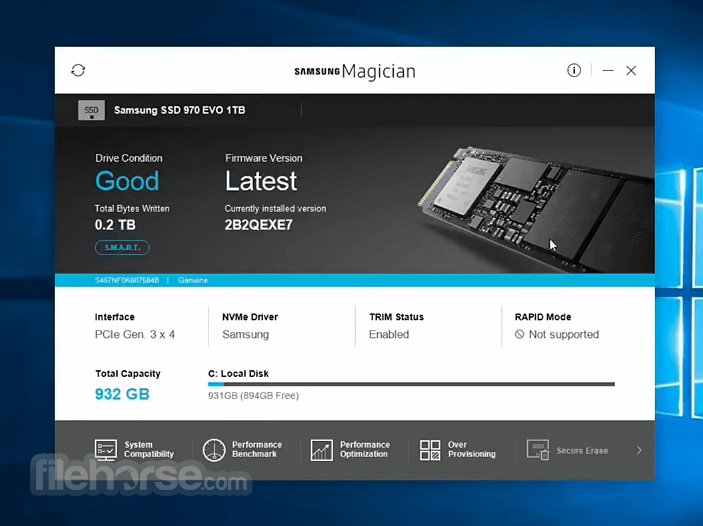
Review compatibility checks and system and drive information, including model name, serial number, and firmware version. In addition, receive reminders and keep track of updates to enhance your drive’s performance.
How to Use
Drive Information
Health Check, Genuine Authentication, and S.M.A.R.T. Check supported on all SSDs (not USBs).
Drive Management:
Internal SSD: Supports Performance Benchmark/Optimization, LED Setting (some), Diagnostic Scan (some), Over Provisioning (some).
Portable SSD: Partial support for Performance Benchmark, Diagnostic Scan, LED Setting.
USBs: Limited to Health Check, Genuine Authentication, Performance Benchmark only.
Data Management:
Internal SSD: Supports Data Migration, Secure Erase, PSID Revert (some), Encrypted Drive (some).
Portable SSD: Limited support for Secure Erase, PSID Revert (some).
USBs: Not supported.
Security Setting
Only available for Portable SSDs.
Information Tools:
System Details, Newsroom, Notice Board, Help Center, Chatbot, Mini Mode, Language and Skin options all supported.
F/W and S/W Updates supported (except USBs).
System Requirements
Download Samsung Magician Latest Version Why is this app published on FileHorse? (More info)
In addition to providing information about the user's system and SSD product, Samsung Magician also supports advanced features, like SSD performance management, benchmarking for optimum performance, new firmware updates, etc.
Latest version of Magician software is recommended for optimal performance.
This Samsung-proprietary software was designed specifically for Samsung SSD products and is available for any Samsung SSDproduct, including:
- 9100 PRO with Heatsink – Models: MZ-VAP1T0CW, 2T0CW, 4T0CW, 8T0CW
- 9100 PRO – Models: MZ-VAP1T0BW, 2T0BW, 4T0BW, 8T0BW
- 990 PRO with Heatsink – Models: MZ-V9P1T0C, 2T0C, MZ-V9P2T0C, 4T0C
- 990 PRO – Models: MZ-V9P1T0BW, 2T0BW, 4T0BW
- 980 PRO with Heatsink – Models: MZ-V8P1T0CW, 2T0CW
- 980 PRO – Models: MZ-V8P250BW, 500BW, 1T0BW, 2T0BW
- 990 EVO Plus – Models: MZ-V9T1T0BW, 2T0BW, 4T0BW
- 990 EVO – Models: MZ-V9E1T0BW, 2T0BW
- 970 EVO Plus – Models: MZ-V7S250B, 500B, 1T0B, 2T0B
- 980 – Models: MZ-V8V250BW, 500BW, 1T0BW
- 870 EVO – Models: MZ-77E250, 500, 1T0, 2T0, 4T0
- 870 QVO – Models: MZ-77Q1T0, 2T0, 4T0, 8T0
- 970 PRO – Models: MZ-V7P512, 1T0
- 970 EVO – Models: MZ-V7E250, 500, 1T0, 2T0
- 960 PRO – Models: MZ-V6P512, 1T0, 2T0
- 960 EVO – Models: MZ-V6E250, 500, 1T0
- 860 PRO – Models: MZ-76P256, 512, 1T0, 2T0, 4T0
- 860 EVO – Models: MZ-76E250, 500, 1T0, 2T0, 4T0 (multiple variations)
- 860 QVO – Models: MZ-76Q1T0, 2T0, 4T0
- 850 EVO – Models: MZ-75E250, 500, 1T0, 2T0, 4T0
- 850 PRO – Models: MZ-7KE256, 512, 1T0, 2T0, 4T0
- 850 EVO M.2 – Models: MZ-N5E120, 250, 500
- 850 EVO mSATA – Models: MZ-M5E120, 250, 500, 1T0
- 840 PRO – Models: MZ-7PD128, 256, 512
- SecureErase function can fully erase data on the drive in less than 1 minute.
- Update function confirms that the latest firmware is installed from the Samsung website.
- Automatic OS optimization for Superfetch/Prefetch, ReadyBoost, and DIPM settings.
- Benchmarking application tests performance of the SSD, and other connected devices.
- Fully compatible with all previously shipped Samsung SSD drives.
Integrative Drive Health Check
Access the status of your SSDs at a glance on a real-time basis over many criteria including over-provisioning ratios, optimization rates, and diagnostic scans.
SSD Authenticity
Confirm the authenticity of your drive to ensure you have access to the superior performance and reliability that only comes from a genuine Samsung SSD.
S.M.A.R.T. Check
Check S.M.A.R.T. to inspect your SSD and detect possible drive Failure before it happens.
Performance Benchmark
Check that your SSD is maintaining the highest performance possible. Specific conditions such as the test volume, number of tests, chunk size, number of threads, and more can be adjusted to customize your benchmark tests.
Performance Optimization
Restore the performance of your SSD from degradation by performance enhancement (TRIM) and achieve faster performance through RAPID Mode which is intelligent DRAM caching of data.
Diagnostic Scan
Identify and fix potential problems with partial or full scans to maintain your drive’s capabilities.
Over Provisioning
Resize partitions to ensure your drive has enough free space to effectively carry out routine maintenance, such as TRIM and Garbage Collection. The over-provisioning feature helps the SSD prepare free blocks, which improves performance and extends your drive’s life span.
Customized Power Efficiency
When using performance optimization, you can set four modes according to your preferences: (1) Full Performance Mode maximizes the performance of the SSD, (2) Power Saving Mode increases power efficiency, (3) Standard Mode sets the SSD to use power at a moderate level, and (4) Custom Mode allows you to customize the power usage of your SSD.
Secure Erase
Permanently delete sensitive data without compromising the functionality of your SSD.
PSID Revert
Unlock and reset your drive to its factory setting by entering the 32- character PSID password printed on the drive label.
Encrypted Drive
Activate Encrypted Drive to protect private and sensitive data. Magician for PC lets you review your drive’s current security settings and helps you with the security setup process.
Information Check & Update
Review compatibility checks and system and drive information, including model name, serial number, and firmware version. In addition, receive reminders and keep track of updates to enhance your drive’s performance.
How to Use
- Install the software by running the setup file
- Launch the application after installation
- Select your Samsung SSD from the main dashboard
- View drive health, temperature, and performance
- Run performance benchmark to test SSD speed
- Enable RAPID mode for faster performance
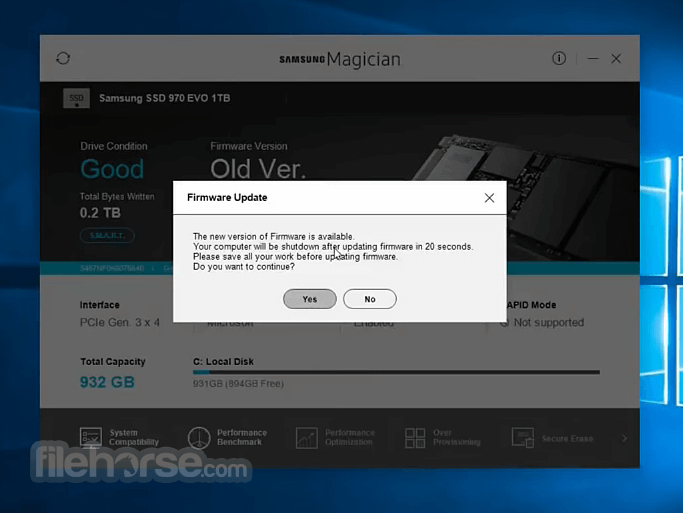
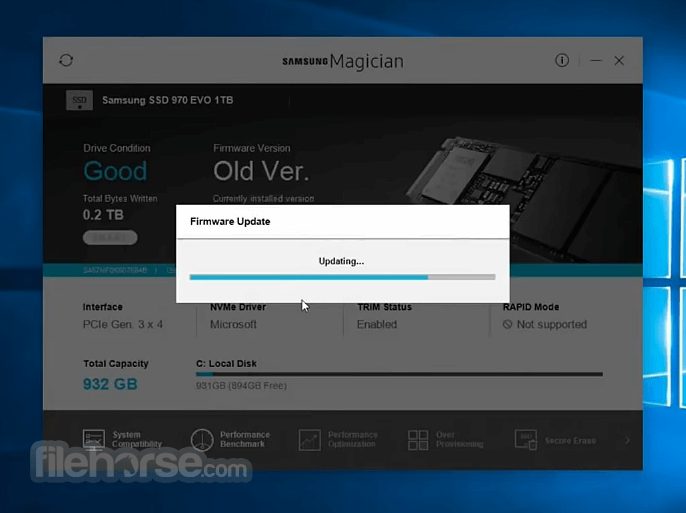
- Update SSD firmware if an update is available
- Use the Diagnostic Scan to check for issues
- Securely erase data with the Secure Erase tool
Drive Information
Health Check, Genuine Authentication, and S.M.A.R.T. Check supported on all SSDs (not USBs).
Drive Management:
Internal SSD: Supports Performance Benchmark/Optimization, LED Setting (some), Diagnostic Scan (some), Over Provisioning (some).
Portable SSD: Partial support for Performance Benchmark, Diagnostic Scan, LED Setting.
USBs: Limited to Health Check, Genuine Authentication, Performance Benchmark only.
Data Management:
Internal SSD: Supports Data Migration, Secure Erase, PSID Revert (some), Encrypted Drive (some).
Portable SSD: Limited support for Secure Erase, PSID Revert (some).
USBs: Not supported.
Security Setting
Only available for Portable SSDs.
Information Tools:
System Details, Newsroom, Notice Board, Help Center, Chatbot, Mini Mode, Language and Skin options all supported.
F/W and S/W Updates supported (except USBs).
System Requirements
- Operating System: Windows 10 or 11 (64-bit)
- CPU: 1 GHz or faster processor
- RAM: 2 GB or more
- Storage: 200 MB of free disk space
- SSD: Samsung-branded SSD (860 EVO, 970 EVO, etc.)
- Administrator privileges required
- Easy-to-use interface
- Fast SSD performance optimization
- Includes secure data erase
- Useful diagnostics and monitoring
- Firmware update support
- Only works with Samsung SSDs
- Limited advanced features
- RAPID mode uses system RAM
- Can be slow to load on startup
- Occasional compatibility issues
Download Samsung Magician Latest Version Why is this app published on FileHorse? (More info)
##
影片介紹
##
畫面截圖
- 2026-03-30 Samsung Magician 9.0.1 195.13 MB
- 2025-12-02 Samsung Magician 9.0.0 195.06 MB
- 2025-08-14 Samsung Magician 8.3.2 209.75 MB
- 2025-05-07 Samsung Magician 8.3.1 209.77 MB
- 2025-03-24 Samsung Magician 8.3.0 209.8 MB
- 2024-09-30 Samsung Magician 8.2.0 330.31 MB
- 2024-03-25 Samsung Magician 8.1.0 307.59 MB
- 2024-01-08 Samsung Magician 8.0.1 186.26 MB