⚠ 這是歷史版本頁面 — 查看 Sandra Lite 最新版本 →

- 目前版本31.119
- 更新日期2023-04-02
- 檔案大小191.7 MB
- 檔案名稱san31119.exe
- 作業系統Windows 7 / Windows 8 / Windows 10 / Windows 11
- 支援語系English
- 授權型式免費軟體
- 開發商 SiSoftware
- 軟體分類Windows 軟體 / 系統優化
##
編輯短評
Sandra Lite 是專為 Windows 打造的系統資訊與診斷工具,能深入剖析 CPU、GPU、記憶體與儲存裝置等硬體細節,並提供多面向的基準測試,協助使用者評估電腦效能、找出潛在瓶頸。它最大的辨識度在於能揭露許多未公開的硬體資訊,對想徹底了解自己電腦的人來說相當實用。這套軟體由 SiSoftware 長期維護,更新頻率穩定,在同類工具中屬於評價普遍不錯的熱門選擇,雖然介面僅有英文,但功能深度足以彌補語言門檻。
這款工具特別適合想自行檢測電腦健康狀況、比較硬體效能,或是在升級前評估零組件表現的使用者,無論是初學者或進階玩家都能從中獲益。相較於 Glary Utilities 這類偏重系統清理的軟體,Sandra Lite 更專注於診斷與分析,不提供一鍵優化,而是把數據攤開讓你自己判斷;若你只需要快速管理軟體或製作開機碟,Rufus 或 FileHippo App Manager 會更直接。它採免費授權,僅支援 Windows 平台,且目前只有英文介面,使用前需留意。
##
翻譯排程處理中,以下暫以英文原文呈現
軟體介紹
SiSoftware Sandra Lite (the System Analyser, Diagnostic and Reporting Assistant) is an information & diagnostic utility for Windows PC.
It’s especially useful for users looking to understand system performance, monitor components, and optimize their computer’s operation.
Sandra Lite caters to beginners and experienced tech enthusiasts alike, offering in-depth details on components like the CPU, GPU, memory, and storage, as well as robust benchmarking tools to evaluate performance across various aspects.
It should provide most of the information (including undocumented) you need to know about your hardware, software, and other devices, whether hardware or software.
Sandra is a (girl) name of Greek origin that means "defender", "helper of mankind". We think that's quite fitting. SiSoftware Sandra Lite was designed to be a 32 and 64-bit Windows system analyzer that includes benchmarking, testing, and listing modules. Great Benchmarking Software for Windows PC!
It works along the lines of other Windows utilities; however, it tries to go beyond them and show you more of what's really going on. Giving the user the ability to draw comparisons at both a high and low level.
You can get information about the CPU, chipset, video adapter, ports, printers, sound card, memory, network, Windows internals, AGP, PCI, PCIe, ODBC Connections, USB2, 1394/Firewire, etc.
Highlights
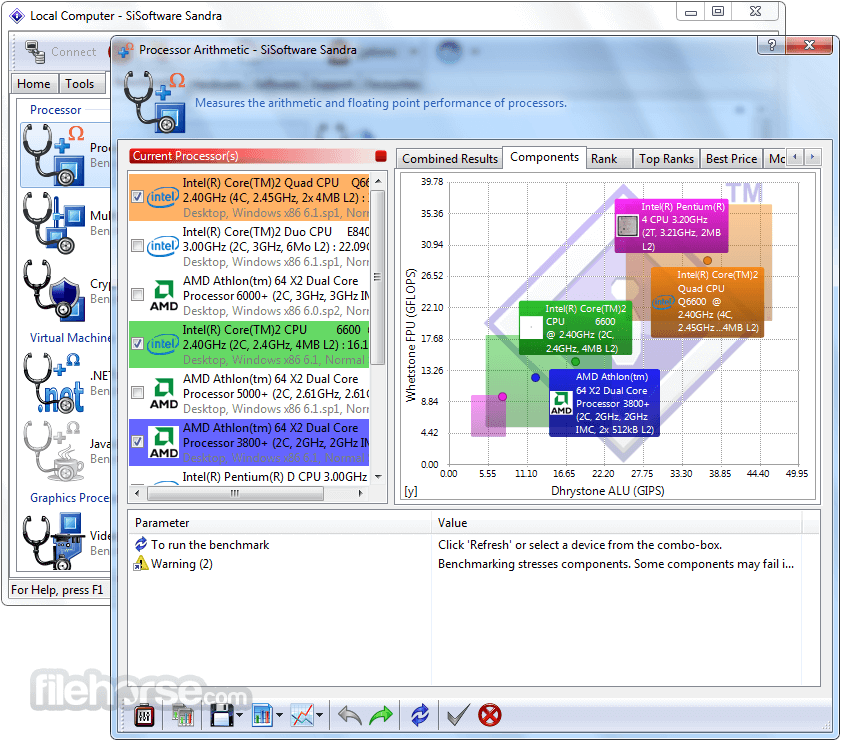
System Benchmarking: It includes a range of benchmarking tools for CPU, GPU, memory, and storage performance, allowing users to compare their system against others.
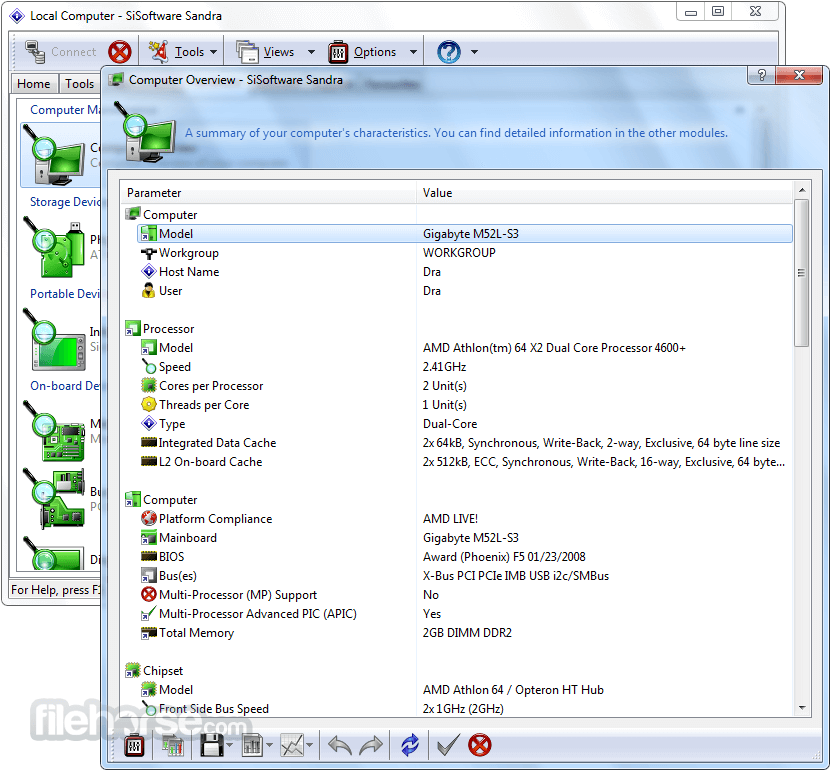
Detailed Component Analysis: Provides comprehensive reports on hardware specifications, including CPU model, GPU architecture, RAM capacity, disk health, and more.
Thermal Monitoring: Monitors temperature readings, power consumption, and performance under load for a better understanding of system cooling and stability.
Compatibility Testing: Offers compatibility checks for hardware and software, assisting with future upgrade decisions.
Network Analysis: Evaluates network connectivity and speed, allowing users to assess internet performance and optimize their network setup.
Device Interoperability Checks: Ensures components work together seamlessly, helping troubleshoot potential hardware conflicts.
User Interface
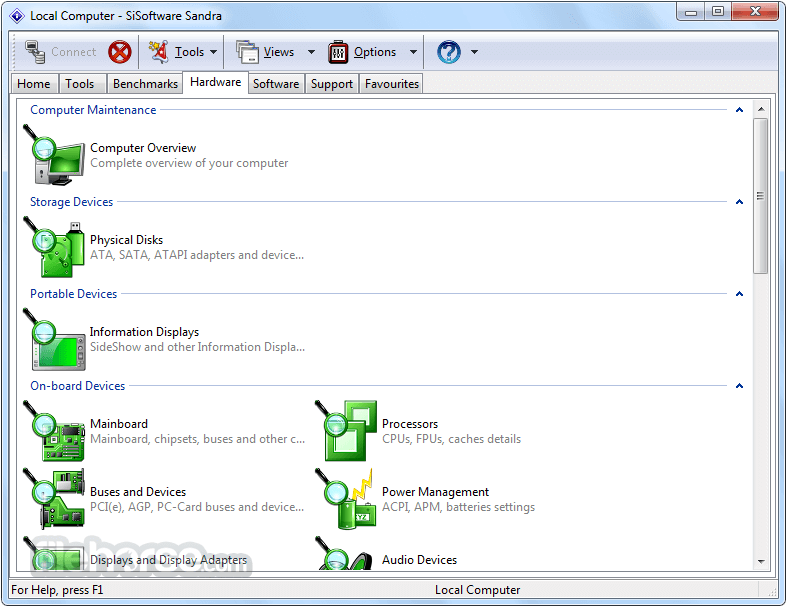
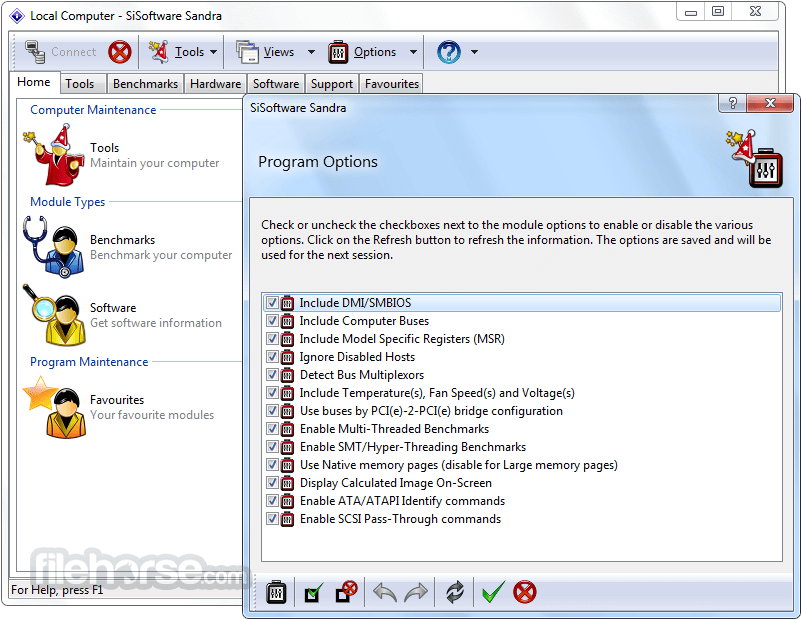
The tool boasts a highly functional, albeit slightly dated, interface. While it may not be the most visually modern software, it compensates with its logical layout and organized menus.
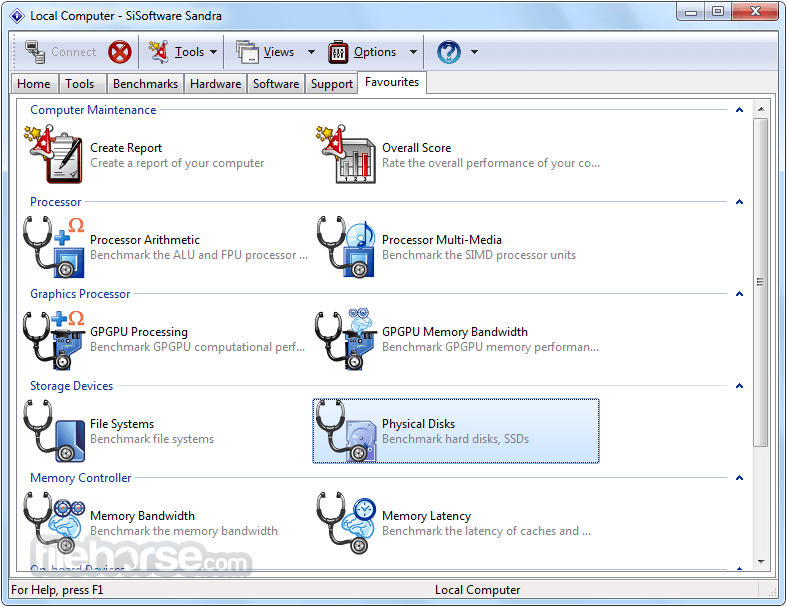
Categories are clearly labeled (e.g., “CPU and GPU Benchmarking,” “System Information”), making it straightforward to navigate even for newcomers. Each tool or analysis function includes brief descriptions, ensuring users understand what each feature does before proceeding.
The UI is packed with technical information but remains intuitive, with detailed visual graphs and tables for data-heavy insights.
Installation and Setup
Download: Visit the official SiSoftware website or FileHorse, navigate to the Lite edition, and download the installer.
Run the Installer: Launch the setup file and follow the on-screen instructions. It requires around 150 MB of disk space.
Choose Components: The setup wizard allows you to select specific features you want to install. For example, you can skip certain benchmarking tools if they aren’t relevant to your needs.
Finalize Setup: Complete the installation by following the prompts. You may need to restart your computer to ensure all drivers and components are correctly loaded.
The tool is available only for Windows, and it supports both 32-bit and 64-bit systems, making it compatible with older and newer PCs alike.
How to Use
Is SiSoftware Sandra Lite suitable for beginners?
Yes, though some features are technical, the UI is straightforward, and each section includes explanations, making it accessible for users with varying levels of experience.
Can Sandra Lite run on macOS or Linux?
No, this program is only available for Windows. Alternatives for other OSes include Geekbench for macOS and Hardinfo for Linux.
How reliable are the benchmarks provided by Sandra Lite?
It provides accurate and detailed benchmarks, suitable for both casual users and professionals. However, results may vary depending on system conditions during testing.
Is there a portable version of Sandra Lite?
No, this tool doesn’t currently offer a portable version. It must be installed on a Windows-based system.
Can I upgrade Sandra Lite to a paid version?
Yes, the Lite version is free but limited in features. Upgrading to SiSoftware Sandra Professional offers more extensive benchmarking and advanced analysis tools.
Alternatives
CPU-Z - A compact tool focusing on CPU, RAM, and GPU information, ideal for users who don’t need extensive benchmarking.
HWMonitor - Offers detailed information on temperatures, voltages, and fan speeds, making it ideal for users concerned with cooling and power consumption.
AIDA64 - Comprehensive system information software with in-depth diagnostics and extensive benchmark tools, though it comes at a cost.
Speccy - Developed by Piriform, this tool provides general system information in an easy-to-read format.
Pricing
This tool is FREE to download and use.
However, users looking for advanced features can opt for SiSoftware Sandra Professional, which offers expanded diagnostics, detailed stress testing, and deeper analytics.
The Professional version is available on a subscription basis, with prices starting from approximately $75 (Family 5 client Pack).
SiSoftware Sandra Lite is a powerful tool for users looking to dive deep into their computer’s performance and system health. The software excels in providing detailed hardware and software information, along with comprehensive benchmarking tools that help users optimize their setup and compare it to other systems.
While the free version lacks some advanced features, it’s an excellent starting point for anyone interested in understanding their computer's inner workings or conducting basic performance tests.
Note: Some modules are not available in the Lite version (they are grayed out). For private or educational use only (commercial use not allowed).
Download SiSoftware Sandra Lite Latest Version Why is this app published on FileHorse? (More info)
It’s especially useful for users looking to understand system performance, monitor components, and optimize their computer’s operation.
Sandra Lite caters to beginners and experienced tech enthusiasts alike, offering in-depth details on components like the CPU, GPU, memory, and storage, as well as robust benchmarking tools to evaluate performance across various aspects.
It should provide most of the information (including undocumented) you need to know about your hardware, software, and other devices, whether hardware or software.
Sandra is a (girl) name of Greek origin that means "defender", "helper of mankind". We think that's quite fitting. SiSoftware Sandra Lite was designed to be a 32 and 64-bit Windows system analyzer that includes benchmarking, testing, and listing modules. Great Benchmarking Software for Windows PC!
It works along the lines of other Windows utilities; however, it tries to go beyond them and show you more of what's really going on. Giving the user the ability to draw comparisons at both a high and low level.
You can get information about the CPU, chipset, video adapter, ports, printers, sound card, memory, network, Windows internals, AGP, PCI, PCIe, ODBC Connections, USB2, 1394/Firewire, etc.
Highlights
- 6 native architectures support (x86, x64 - Windows; ARM, ARM64, MIPS, MIPS64, x86, x64 - Android)
- Huge official hardware support through technology partners (AMD/ATI, Nvidia, Intel)
- 4 native (GP)GPU/APU platforms support (OpenCL, CUDA, DirectX Compute Shader, OpenGL Compute*)
- 4 native Graphics platforms support (DirectX 12, DirectX 11.x, DirectX 10.x, OpenGL 3.0+)
- 9 language versions (English, German, French, Italian, Spanish, Japanese, Chinese (Traditional, Simplified), Russian) in a single installer
- Enhanced SandraLite (Eval) version (free for personal/educational use, evaluation for other uses)
System Benchmarking: It includes a range of benchmarking tools for CPU, GPU, memory, and storage performance, allowing users to compare their system against others.
Detailed Component Analysis: Provides comprehensive reports on hardware specifications, including CPU model, GPU architecture, RAM capacity, disk health, and more.
Thermal Monitoring: Monitors temperature readings, power consumption, and performance under load for a better understanding of system cooling and stability.
Compatibility Testing: Offers compatibility checks for hardware and software, assisting with future upgrade decisions.
Network Analysis: Evaluates network connectivity and speed, allowing users to assess internet performance and optimize their network setup.
Device Interoperability Checks: Ensures components work together seamlessly, helping troubleshoot potential hardware conflicts.
User Interface
The tool boasts a highly functional, albeit slightly dated, interface. While it may not be the most visually modern software, it compensates with its logical layout and organized menus.
Categories are clearly labeled (e.g., “CPU and GPU Benchmarking,” “System Information”), making it straightforward to navigate even for newcomers. Each tool or analysis function includes brief descriptions, ensuring users understand what each feature does before proceeding.
The UI is packed with technical information but remains intuitive, with detailed visual graphs and tables for data-heavy insights.
Installation and Setup
Download: Visit the official SiSoftware website or FileHorse, navigate to the Lite edition, and download the installer.
Run the Installer: Launch the setup file and follow the on-screen instructions. It requires around 150 MB of disk space.
Choose Components: The setup wizard allows you to select specific features you want to install. For example, you can skip certain benchmarking tools if they aren’t relevant to your needs.
Finalize Setup: Complete the installation by following the prompts. You may need to restart your computer to ensure all drivers and components are correctly loaded.
The tool is available only for Windows, and it supports both 32-bit and 64-bit systems, making it compatible with older and newer PCs alike.
How to Use
- Access System Information: Open the tool and select “System Summary” to get an overview of your system specs.
- Run Benchmarks: Navigate to the “Benchmark” section and choose the hardware you want to test, such as CPU or GPU. It provides detailed explanations for each benchmark, which can be valuable for users who may be unfamiliar with technical jargon.
- Compare Performance: Once benchmarks are completed, results can be compared against a database of similar systems. This is especially useful for identifying areas where your system might be lagging.
- Analyze Network Performance: Use the “Network and Internet” tab to check your internet speed and connectivity stability.
- Check Temperatures: For users looking to monitor system heat, the thermal analysis tools are accessible under “Cooling Information.”
Is SiSoftware Sandra Lite suitable for beginners?
Yes, though some features are technical, the UI is straightforward, and each section includes explanations, making it accessible for users with varying levels of experience.
Can Sandra Lite run on macOS or Linux?
No, this program is only available for Windows. Alternatives for other OSes include Geekbench for macOS and Hardinfo for Linux.
How reliable are the benchmarks provided by Sandra Lite?
It provides accurate and detailed benchmarks, suitable for both casual users and professionals. However, results may vary depending on system conditions during testing.
Is there a portable version of Sandra Lite?
No, this tool doesn’t currently offer a portable version. It must be installed on a Windows-based system.
Can I upgrade Sandra Lite to a paid version?
Yes, the Lite version is free but limited in features. Upgrading to SiSoftware Sandra Professional offers more extensive benchmarking and advanced analysis tools.
Alternatives
CPU-Z - A compact tool focusing on CPU, RAM, and GPU information, ideal for users who don’t need extensive benchmarking.
HWMonitor - Offers detailed information on temperatures, voltages, and fan speeds, making it ideal for users concerned with cooling and power consumption.
AIDA64 - Comprehensive system information software with in-depth diagnostics and extensive benchmark tools, though it comes at a cost.
Speccy - Developed by Piriform, this tool provides general system information in an easy-to-read format.
Pricing
This tool is FREE to download and use.
However, users looking for advanced features can opt for SiSoftware Sandra Professional, which offers expanded diagnostics, detailed stress testing, and deeper analytics.
The Professional version is available on a subscription basis, with prices starting from approximately $75 (Family 5 client Pack).
- Easy “de facto” standard benchmarks for measuring performance.
- Improve understanding of what is inside your computer.
- Compare your system with reference systems and results.
- Check software configuration and settings, and much more.
- Designed especially for Home Users
- Works with Windows 10 & 11
- OS: Windows 7, 8, 8.1, 10, and 11 (32-bit and 64-bit)
- RAM: Minimum 2 GB (4 GB or more recommended for benchmarking)
- Storage: 150 MB of free disk space
- Processor: Compatible with Intel or AMD x86 processors
- Extensive benchmarking options: Covers everything from CPU and GPU to network performance.
- Detailed hardware diagnostics: Great for troubleshooting and system analysis.
- Free Lite version available: Offers core functionalities without any cost.
- User-friendly descriptions and explanations: Help users understand technical information.
- Reliable and accurate: Trusted by professionals for system diagnostics.
- Dated user interface: UI design feels somewhat outdated.
- Windows-only compatibility: Limits accessibility for macOS and Linux users.
- Heavy on system resources: Certain benchmarks can cause system slowdown.
- Limited features in Lite version: Some analysis tools require a paid upgrade.
- No portable version available: Requires installation on each device.
SiSoftware Sandra Lite is a powerful tool for users looking to dive deep into their computer’s performance and system health. The software excels in providing detailed hardware and software information, along with comprehensive benchmarking tools that help users optimize their setup and compare it to other systems.
While the free version lacks some advanced features, it’s an excellent starting point for anyone interested in understanding their computer's inner workings or conducting basic performance tests.
Note: Some modules are not available in the Lite version (they are grayed out). For private or educational use only (commercial use not allowed).
Download SiSoftware Sandra Lite Latest Version Why is this app published on FileHorse? (More info)
##
畫面截圖
- 2025-11-17 Sandra Lite 31.137 191.9 MB
- 2023-08-08 Sandra Lite 31.133 191.8 MB
- 2023-04-02 Sandra Lite 31.119 191.7 MB
- 2022-12-16 Sandra Lite 2021 31.115 192.41 MB
- 2022-11-19 Sandra Lite 2021 31.112 191.5 MB
- 2022-10-18 Sandra Lite 2021 31.109 191.49 MB
- 2022-09-07 Sandra Lite 2021 31.104 191.73 MB
- 2022-07-28 Sandra Lite 2021 31.99 191.35 MB