⚠ 這是歷史版本頁面 — 查看 Spark 最新版本 →

- 目前版本3.0.1
- 更新日期2022-12-13
- 檔案大小58.1 MB
- 檔案名稱spark_3_0_1.exe
- 作業系統Windows XP / Vista / Windows 7 / Windows 8 / Windows 10 / Windows 11
- 支援語系English
- 授權型式開源軟體
- 開發商 Ignite Realtime
- 軟體分類Windows 軟體 / 社群通訊
##
編輯短評
Spark 是一款以 XMPP 協定為核心的開源即時通訊軟體,主要鎖定企業與組織內部溝通需求,內建群組聊天、電話整合與較嚴謹的安全機制。它最鮮明的特色是提供分頁式對話、群組聊天室書籤與即時拼字檢查,讓使用者在大量訊息往來時仍能保持條理。此軟體由 Ignite Realtime 團隊長期維護,更新步調不算頻繁,但在同類社群通訊工具中屬於有一定歷史與口碑的選擇,評價普遍不錯,只是參與評分的人數不多。
這套軟體適合需要自建或搭配 XMPP 伺服器、重視通訊自主性的企業或組織,尤其當你希望避開商業通訊軟體的雲端依賴時,它會是務實的替代方案。與 Yahoo! Messenger 或 WhatsApp 等主流服務相比,Spark 沒有綁定特定平台或帳號體系,但相對地需要自行管理伺服器端,設定門檻較高。授權採用 LGPL 開源條款,可自由修改與散布;目前僅提供英文介面,且僅有 Windows 與 macOS 版本,使用前需確認團隊的語系與平台相容性。
##
翻譯排程處理中,以下暫以英文原文呈現
軟體介紹
Spark is an open-source, cross-platform IM client for Windows PC optimized for businesses and organizations. It features built-in support for group chat, telephony integration, and strong security.
It also offers a great end-user experience with features like in-line spell checking, group chat room bookmarks, and tabbed conversations.
The app is a full-featured instant messaging (IM) and group chat client that uses the XMPP protocol. The app source code is governed by the GNU Lesser General Public License (LGPL), which can be found in the LICENSE.html file in this distribution.
The app also contains open-source software from third parties. Licensing terms for those components are specifically noted in the relevant source files.
The Internet has revolutionized the way we connect with acquaintances, and one of its benefits is the availability of instant messaging. Spark is a Java-based client that provides features similar to those of popular messengers, including file transfers, group chat, and voice calling.
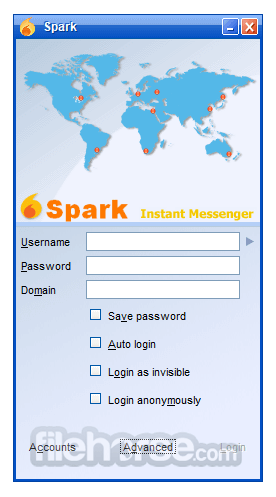
Although Spark is primarily designed for businesses and organizations, it can also be used by individuals who want an alternative to the popular messaging apps. The setup process is straightforward, requiring only a username, password, and server.
Key Features
Spark's interface is customizable but not exceptional. It offers support for avatars, emoticons, and user-defined colors, but the settings menu can be overwhelming. The conversation window has standard options, including sending files and taking screenshots.
The app's interface is well-organized, and conversations can be grouped into tabs, making it easy to chat with multiple users simultaneously. The settings menu offers options for group chat, media, privacy, login, file transfers, sounds, appearance, notifications, and taskbar flashing.
It runs smoothly and doesn't consume many resources. It includes a spell checker and a "Buzz" tool that requests the user's attention.
Installation and Setup
Download: Visit the official website and download the version compatible with your operating system.
Install: Run the installer and follow the installation instructions. It supports both Windows and macOS.
Connect to an XMPP Server: After installation, open Spark and connect it to your XMPP server. If you are using Ignite Realtime’s Openfire, enter your server's address, username, and password.
Configure Settings: Adjust preferences such as notifications, themes, and language within the settings.
How to UseLaunch the app: Open the app and log in to your server. Find Contacts: View and manage your contact list. Add colleagues by their usernames or organize contacts into groups. Initiate Chat: Start a one-on-one or group chat by selecting a contact or creating a new chat room. Send Files: Share files with a colleague by dragging them directly into the chat window or using the file transfer feature. Manage Chat History: Access chat history for easy reference to past conversations. Customize Notifications: Tailor notification settings for specific chats or groups as per your work needs. FAQs
Is Spark secure for corporate use?
Yes, it offers secure messaging within internal networks, and it supports encryption to protect data in transit. However, you may need to configure plugins or servers for advanced security settings.
Can Spark be integrated with third-party tools?
While this app is primarily focused on XMPP-based communication, you can integrate it with Openfire plugins or third-party tools compatible with the XMPP protocol.
Does Spark support video or voice calls?
Out of the box, this software does not support video or voice calls. However, with Openfire plugins, it’s possible to enable additional communication features.
Is there mobile support for Spark?
The app itself is desktop-only, but you can use mobile-compatible XMPP clients that connect to the same Openfire server for cross-platform accessibility.
How do I enable offline messages?
Offline messages are automatically stored and delivered when the recipient reconnects. For added control, check your server’s settings (especially if using Openfire) to ensure this feature is enabled.
Alternatives
Slack - Known for its intuitive design, Slack is a popular team messaging tool that supports chat rooms, file sharing, and integrates with various third-party applications.
Microsoft Teams - Another robust alternative, Teams offers secure messaging, video conferencing, and integrations with the Microsoft 365 suite. It is widely adopted in enterprise environments.
Rocket.Chat - An open-source communication platform similar to this app, Rocket.Chat also supports XMPP but offers more modern features such as video calling and mobile support.
Trillian - Chat with other Trillian users or those on Facebook, Twitter, Google...
Pidgin - An open-source XMPP-based chat app that’s compatible with multiple protocols and offers a straightforward user experience.
Pricing
This app is free to download and use under the Apache 2.0 license, which permits modifications and customizations to the codebase.
This makes Spark an attractive option for budget-conscious teams and businesses, especially those who value flexibility and customization.
System Requirements
PROS
Spark by Ignite Realtime is a solid choice for organizations prioritizing secure, internal text-based communication. As an open-source app, it’s flexible and customizable, and it integrates well with the Openfire server for streamlined deployment within corporate networks.
While it lacks the multimedia and advanced integrations of contemporary messaging apps like Slack or Teams, Spark’s focus on privacy, efficiency, and simplicity makes it a valuable tool for team communication.
Also Available: Download Spark for Mac
Download Spark Latest Version Why is this app published on FileHorse? (More info)
It also offers a great end-user experience with features like in-line spell checking, group chat room bookmarks, and tabbed conversations.
The app is a full-featured instant messaging (IM) and group chat client that uses the XMPP protocol. The app source code is governed by the GNU Lesser General Public License (LGPL), which can be found in the LICENSE.html file in this distribution.
The app also contains open-source software from third parties. Licensing terms for those components are specifically noted in the relevant source files.
The Internet has revolutionized the way we connect with acquaintances, and one of its benefits is the availability of instant messaging. Spark is a Java-based client that provides features similar to those of popular messengers, including file transfers, group chat, and voice calling.
Although Spark is primarily designed for businesses and organizations, it can also be used by individuals who want an alternative to the popular messaging apps. The setup process is straightforward, requiring only a username, password, and server.
Key Features
- Group Chat & Conference Rooms: Easily create group chats or join conference rooms, allowing for seamless collaboration.
- File Transfer: Share files directly in the chat, eliminating the need for third-party file-sharing services.
- Offline Messaging: Messages are stored and delivered once the recipient comes online, ensuring no important information is missed.
- Customizable Notifications: Tailor notifications by chat, status, or priority to avoid distractions.
- Chat Transcripts: Keep records of past chats for reference, helping with tracking project discussions or decisions.
- Encryption Support: Secure messages with encryption (with appropriate plugins) for added confidentiality.
- Spell Checking and Emoticons: Enhance user experience with built-in spell-check and support for emoticons.
- Customizable Interface: Modify themes and color schemes to fit your preferences.
Spark's interface is customizable but not exceptional. It offers support for avatars, emoticons, and user-defined colors, but the settings menu can be overwhelming. The conversation window has standard options, including sending files and taking screenshots.
The app's interface is well-organized, and conversations can be grouped into tabs, making it easy to chat with multiple users simultaneously. The settings menu offers options for group chat, media, privacy, login, file transfers, sounds, appearance, notifications, and taskbar flashing.
It runs smoothly and doesn't consume many resources. It includes a spell checker and a "Buzz" tool that requests the user's attention.
Installation and Setup
Download: Visit the official website and download the version compatible with your operating system.
Install: Run the installer and follow the installation instructions. It supports both Windows and macOS.
Connect to an XMPP Server: After installation, open Spark and connect it to your XMPP server. If you are using Ignite Realtime’s Openfire, enter your server's address, username, and password.
Configure Settings: Adjust preferences such as notifications, themes, and language within the settings.
How to Use
Is Spark secure for corporate use?
Yes, it offers secure messaging within internal networks, and it supports encryption to protect data in transit. However, you may need to configure plugins or servers for advanced security settings.
Can Spark be integrated with third-party tools?
While this app is primarily focused on XMPP-based communication, you can integrate it with Openfire plugins or third-party tools compatible with the XMPP protocol.
Does Spark support video or voice calls?
Out of the box, this software does not support video or voice calls. However, with Openfire plugins, it’s possible to enable additional communication features.
Is there mobile support for Spark?
The app itself is desktop-only, but you can use mobile-compatible XMPP clients that connect to the same Openfire server for cross-platform accessibility.
How do I enable offline messages?
Offline messages are automatically stored and delivered when the recipient reconnects. For added control, check your server’s settings (especially if using Openfire) to ensure this feature is enabled.
Alternatives
Slack - Known for its intuitive design, Slack is a popular team messaging tool that supports chat rooms, file sharing, and integrates with various third-party applications.
Microsoft Teams - Another robust alternative, Teams offers secure messaging, video conferencing, and integrations with the Microsoft 365 suite. It is widely adopted in enterprise environments.
Rocket.Chat - An open-source communication platform similar to this app, Rocket.Chat also supports XMPP but offers more modern features such as video calling and mobile support.
Trillian - Chat with other Trillian users or those on Facebook, Twitter, Google...
Pidgin - An open-source XMPP-based chat app that’s compatible with multiple protocols and offers a straightforward user experience.
Pricing
This app is free to download and use under the Apache 2.0 license, which permits modifications and customizations to the codebase.
This makes Spark an attractive option for budget-conscious teams and businesses, especially those who value flexibility and customization.
System Requirements
- Windows: Windows 7, 8, 10, and 11.
- macOS: OS X 10.9 and later.
- Linux: It can be run on Linux, though setup may require additional configurations.
PROS
- Free and open-source
- Supports secure internal messaging with encryption options
- Works well with the Openfire server for a customizable experience
- Lightweight with minimal resource demands
- Offers offline message storage and delivery
- Lacks native mobile support
- The user interface is somewhat outdated
- Limited multimedia features (no native video/voice calls)
- Relies on XMPP server configuration for optimal use
- Basic compared to more modern team communication apps
Spark by Ignite Realtime is a solid choice for organizations prioritizing secure, internal text-based communication. As an open-source app, it’s flexible and customizable, and it integrates well with the Openfire server for streamlined deployment within corporate networks.
While it lacks the multimedia and advanced integrations of contemporary messaging apps like Slack or Teams, Spark’s focus on privacy, efficiency, and simplicity makes it a valuable tool for team communication.
Also Available: Download Spark for Mac
Download Spark Latest Version Why is this app published on FileHorse? (More info)
##
畫面截圖
- 2025-11-20 Spark 3.0.2 59 MB
- 2022-12-13 Spark 3.0.1 58.1 MB
- 2022-11-14 Spark 3.0.0 58.7 MB
- 2020-11-15 Spark 2.9.4 51.8 MB
- 2020-10-24 Spark 2.9.3 51.8 MB
- 2020-08-31 Spark 2.9.2 51.8 MB
- 2020-08-26 Spark 2.9.1 51.8 MB
- 2020-08-17 Spark 2.9.0 51.8 MB