⚠ 這是歷史版本頁面 — 查看 TeXMaker 最新版本 →

- 目前版本6.0.0
- 更新日期2024-08-19
- 檔案大小105.84 MB
- 檔案名稱Texmaker_6.0.0_Win_x64.msi
- 作業系統Windows 10 (64-bit) / Windows 11
- 支援語系English
- 授權型式開源軟體
- 開發商 Pascal Brachet
- 軟體分類Windows 軟體 / 辦公商務
##
編輯短評
TeXMaker 是一套跨平台的 LaTeX 編輯器,主要解決撰寫學術論文、技術文件與書籍時,需要頻繁切換編輯、編譯與預覽流程的麻煩。它把寫作所需的工具整合在單一介面中,包含 Unicode 支援、拼字檢查、自動補全、程式碼折疊與內建 PDF 預覽,讓使用者不必在數個視窗間來回切換。這套軟體由 Pascal Brachet 自 2003 年起持續開發,至今仍維持更新,在同類工具中屬於歷史悠久且評價穩定的選擇,不過整體評價偏向中等,並非壓倒性的主流首選。
TeXMaker 適合需要頻繁排版複雜文件的研究人員、學者與研究生,尤其是理工領域經常使用 LaTeX 語法的使用者。與 Microsoft Office 這類所見即所得的文書軟體相比,TeXMaker 的學習曲線較陡,但換來的是更精確的排版控制與數學公式支援。它採用開源授權,Windows 與 macOS 都有對應版本,但介面僅提供英文,不熟悉英文操作環境的使用者需要花點時間適應。若你原本就在用其他 LaTeX 編輯器,TeXMaker 的整合性與免安裝特性或許值得一試。
##
翻譯排程處理中,以下暫以英文原文呈現
軟體介紹
TeXMaker for Windows is a free, modern, and cross-platform LaTeX editor for Linux, macOS, and Windows systems that integrates many tools needed to develop documents with LaTeX, in just one application.
TeXMaker is a comprehensive LaTeX editor designed to streamline the process of writing and editing LaTeX documents. Launched in 2003 by Pascal Brachet, it has since become a staple tool for researchers, scientists, academics, and other professionals who require high-quality typesetting for their documents.
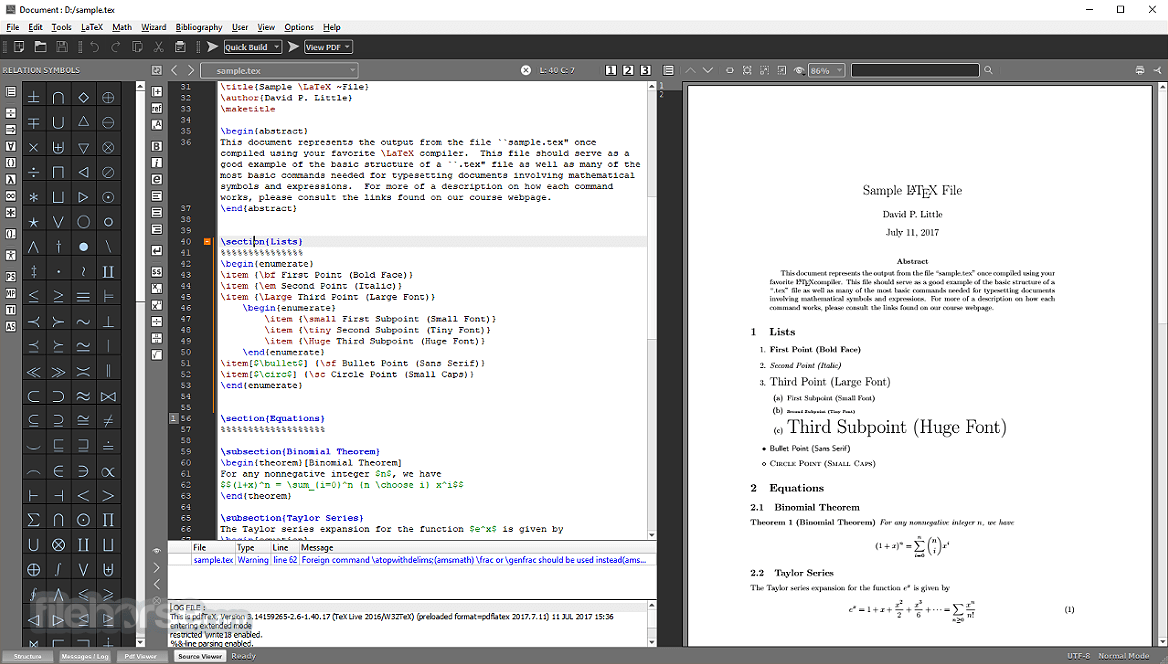
It includes Unicode support, spell checking, auto-completion, code folding, and a built-in PDF viewer with synctex support and continuous view mode. TeXMaker is easy to use and configure.
Highlights
Unicode editor
The tool is fully Unicode and supports a large variety of encodings.
Spell checker
This software includes spell checking while typing.
Code completion
The main LaTeX commands can be quickly inserted while typing.
Fast navigation
The platform includes a "structure view" which is automatically updated while typing.
"Master" mode
The app for Desktop allows you to work easily on documents separated into several files with the "master mode".
Integrated PDF viewer
The software includes a built-in PDF viewer with continuous scrolling and syncTeX support.
Easy compilation
"One-click" compilation with the predefined "Quick build" commands.
Mathematical symbols
370 mathematical symbols can be inserted with just one click.
Wizards
The product includes wizards to generate the most standard LaTeX code ('Quick document', 'Quick Beamer Presentation', 'Quick letter', tabular, tabbing, and array environments.
Error Handling
The app automatically locates errors and warnings detected in the log file after a compilation, and you can reach the corresponding lines in the document with one click.
Find in folders
With this program, you can search for text in all the LaTeX documents included in a folder (and the subfolders). If you click on a line, the software will open the corresponding document at the right line.
Rectangular block selection
Easy rectangular selection with the mouse+Alt key. Users can easily cut/copy/paste columns of a table.
LaTeX documentation
Extensive LaTeX documentation is furnished with this great app.
Unlimited number of snippets
With Tex maker, users can define an unlimited number of snippets with keyboard triggers.
Features
Installation is straightforward on all supported platforms. Users can download the installer from the official website or package managers for Linux distributions. Once installed, the program guides users through a simple setup process, including configuring compiler paths and other preferences.
How to Use
Can TeXMaker handle large documents efficiently?
Yes, the app is capable of handling large documents with ease, thanks to its efficient memory management and performance optimization.
Can I install additional LaTeX packages in TeXMaker?
Yes, users can install additional LaTeX packages and configure the software to use them in the compilation process.
Is TeXMaker suitable for collaborative writing projects?
While the software lacks built-in collaboration features, users can integrate external version control systems like Git for collaborative writing projects.
Does TeXMaker support mathematical typesetting?
Yes, it fully supports mathematical typesetting with LaTeX, including complex equations and symbols.
Can I customize the editor's appearance in TeXMaker?
Yes, it offers extensive customization options for the editor's appearance, including themes and syntax highlighting settings.
Pricing
This program is completely FREE and open-source, making it an attractive option for users seeking powerful LaTeX editing tools without any financial commitment.
System Requirements
It has modest system requirements and runs smoothly on most modern computers. It is compatible with Windows (XP/Vista/7/8/10/11), macOS, and various Linux distributions.
PROS
It stands as a robust LaTeX editor that caters to the needs of professionals and enthusiasts alike. With its rich feature set, customizable interface, and reliable performance, it remains a top choice for those working with LaTeX documents. While it may not be the most beginner-friendly option, its versatility and extensive documentation make it a valuable utility for anyone seeking to produce high-quality typeset documents.
Also Available: Download TeXMaker for Mac
Download TeXMaker Latest Version Why is this app published on FileHorse? (More info)
TeXMaker is a comprehensive LaTeX editor designed to streamline the process of writing and editing LaTeX documents. Launched in 2003 by Pascal Brachet, it has since become a staple tool for researchers, scientists, academics, and other professionals who require high-quality typesetting for their documents.
It includes Unicode support, spell checking, auto-completion, code folding, and a built-in PDF viewer with synctex support and continuous view mode. TeXMaker is easy to use and configure.
Highlights
Unicode editor
The tool is fully Unicode and supports a large variety of encodings.
Spell checker
This software includes spell checking while typing.
Code completion
The main LaTeX commands can be quickly inserted while typing.
Fast navigation
The platform includes a "structure view" which is automatically updated while typing.
"Master" mode
The app for Desktop allows you to work easily on documents separated into several files with the "master mode".
Integrated PDF viewer
The software includes a built-in PDF viewer with continuous scrolling and syncTeX support.
Easy compilation
"One-click" compilation with the predefined "Quick build" commands.
Mathematical symbols
370 mathematical symbols can be inserted with just one click.
Wizards
The product includes wizards to generate the most standard LaTeX code ('Quick document', 'Quick Beamer Presentation', 'Quick letter', tabular, tabbing, and array environments.
Error Handling
The app automatically locates errors and warnings detected in the log file after a compilation, and you can reach the corresponding lines in the document with one click.
Find in folders
With this program, you can search for text in all the LaTeX documents included in a folder (and the subfolders). If you click on a line, the software will open the corresponding document at the right line.
Rectangular block selection
Easy rectangular selection with the mouse+Alt key. Users can easily cut/copy/paste columns of a table.
LaTeX documentation
Extensive LaTeX documentation is furnished with this great app.
Unlimited number of snippets
With Tex maker, users can define an unlimited number of snippets with keyboard triggers.
Features
- Integrated LaTeX Environment: It provides a complete LaTeX environment with syntax highlighting, auto-completion, and error detection to enhance productivity.
- Built-in PDF Viewer: Users can view the output PDF directly within the editor, facilitating real-time previewing of document changes.
- Unicode Support: It supports Unicode, enabling users to work with multiple languages and characters seamlessly.
- Customizable Interface: The interface is highly customizable, allowing users to tailor the layout and toolbars to their preferences.
- Quick Build Options: It offers quick build options for compiling documents, including PDFLaTeX, XeLaTeX, and LuaLaTeX.
- Cross-Platform Compatibility: TeXMaker is available for Windows, macOS, and Linux, ensuring a consistent user experience across different operating systems.
- Auto-Save and Backup: The software automatically saves documents and provides backup options to prevent data loss.
Installation is straightforward on all supported platforms. Users can download the installer from the official website or package managers for Linux distributions. Once installed, the program guides users through a simple setup process, including configuring compiler paths and other preferences.
How to Use
- Creating a New Document: Launch the app and click on "New" to create a new LaTeX document.
- Editing: Use the built-in editor to write and edit your document, taking advantage of features like syntax highlighting and auto-completion.
- Compiling: Select the appropriate compiler (e.g., PDFLaTeX) and click on "Quick Build" to compile the document.
- Previewing: View the compiled PDF within the editor to check the document layout and formatting.
- Saving: Save your document regularly to avoid data loss.
Can TeXMaker handle large documents efficiently?
Yes, the app is capable of handling large documents with ease, thanks to its efficient memory management and performance optimization.
Can I install additional LaTeX packages in TeXMaker?
Yes, users can install additional LaTeX packages and configure the software to use them in the compilation process.
Is TeXMaker suitable for collaborative writing projects?
While the software lacks built-in collaboration features, users can integrate external version control systems like Git for collaborative writing projects.
Does TeXMaker support mathematical typesetting?
Yes, it fully supports mathematical typesetting with LaTeX, including complex equations and symbols.
Can I customize the editor's appearance in TeXMaker?
Yes, it offers extensive customization options for the editor's appearance, including themes and syntax highlighting settings.
Pricing
This program is completely FREE and open-source, making it an attractive option for users seeking powerful LaTeX editing tools without any financial commitment.
System Requirements
It has modest system requirements and runs smoothly on most modern computers. It is compatible with Windows (XP/Vista/7/8/10/11), macOS, and various Linux distributions.
PROS
- Feature-rich LaTeX editor with comprehensive tools.
- Cross-platform compatibility.
- User-friendly interface with extensive customization options.
- Active development and community support.
- Free and open-source.
- Lack of built-in collaboration features.
- Steeper learning curve for beginners compared to WYSIWYG editors.
- Occasional stability issues in certain configurations.
- Lack of official support and updates.
It stands as a robust LaTeX editor that caters to the needs of professionals and enthusiasts alike. With its rich feature set, customizable interface, and reliable performance, it remains a top choice for those working with LaTeX documents. While it may not be the most beginner-friendly option, its versatility and extensive documentation make it a valuable utility for anyone seeking to produce high-quality typeset documents.
Also Available: Download TeXMaker for Mac
Download TeXMaker Latest Version Why is this app published on FileHorse? (More info)
##
畫面截圖
- 2026-08-11 TeXMaker 6.0.2 105.82 MB
- 2025-04-28 TeXMaker 6.0.1 105.83 MB
- 2024-08-19 TeXMaker 6.0.0 105.84 MB
- 2023-05-01 TeXMaker 5.1.4 81.11 MB
- 2022-04-29 TeXMaker 5.1.3 81.1 MB
- 2021-09-03 TeXMaker 5.1.2 81.11 MB
- 2021-08-19 TeXMaker 5.1.1 81.1 MB
- 2021-08-14 TeXMaker 5.1.0 81.11 MB