⚠ 這是歷史版本頁面 — 查看 ThrottleStop 9.7.3 Beta 最新版本 →

- 目前版本9.4
- 更新日期2021-08-18
- 檔案大小1.68 MB
- 檔案名稱ThrottleStop_9.4.zip
- 作業系統Windows 7 / Windows 7 64 / Windows 8 / Windows 8 64 / Windows 10 / Windows 10 64 / Windows 11
- 支援語系English
- 授權型式免費軟體
- 開發商 Kevin Glynn
- 軟體分類Windows 軟體 / 系統優化
##
編輯短評
ThrottleStop 是一款專注於解決筆電 CPU 降頻問題的小工具,能監控並修正三種主要的 CPU throttling 現象。它提供詳細的 CPU 與熱行為資訊,讓使用者調整設定以優化效能。最初為筆電設計,後來也適用於桌機,是 Intel Core 2 與 Core i 系列處理器的性能監控與修改工具。這款軟體由 Kevin Glynn 開發,長期以來持續更新,雖然更新頻率不算高,但在同類工具中具有特定地位,使用者評價中等。
適合需要深入調整 CPU 效能、特別是遇到筆電降頻問題的進階使用者。當你發現筆電在負載下效能下降,或想手動控制倍頻、電壓等參數時,ThrottleStop 能提供比一般系統工具更細緻的調整。與其他系統優化工具相比,它專注於 CPU 層級,功能較為單一,但針對性強。軟體為免費授權,僅支援 Windows 平台,介面為英文,對不熟悉英文的使用者可能稍有門檻。使用時需注意,不當設定可能導致系統不穩定,建議先了解相關知識再操作。
##
翻譯排程處理中,以下暫以英文原文呈現
軟體介紹
ThrottleStop is a small app for Windows PC designed to monitor for and correct the three main types of CPU throttling that are being used on many laptop computers.
ThrottleStop is a performance monitoring and adjustment utility for Windows-based PCs. It provides detailed information about the CPU and its thermal behavior, allowing users to tweak various settings to optimize performance. Originally designed to address throttling issues on laptops, it has evolved to become a versatile tool for both laptops and desktops.
ThrottleStop is an Intel Core 2 and Core I performance monitoring and modification program for advanced users! Supported operating systems are Windows XP, Vista, 7, 8, and 8.1, Windows 10 (32-bit and 64-bit versions supported), and Windows 11.
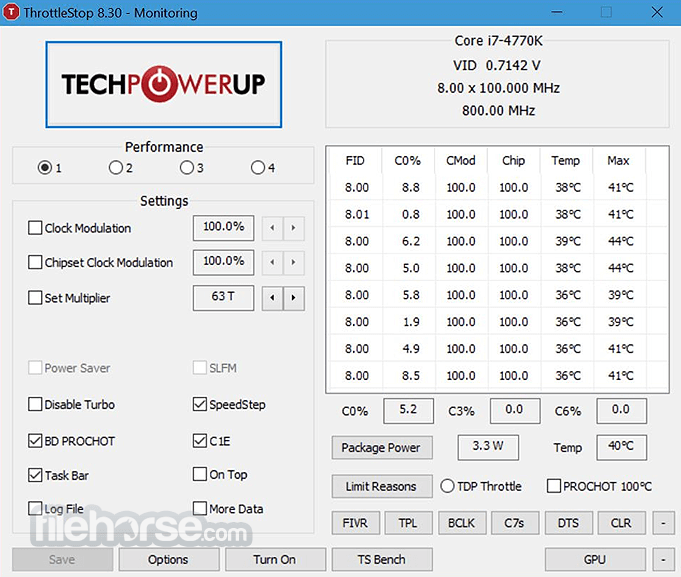
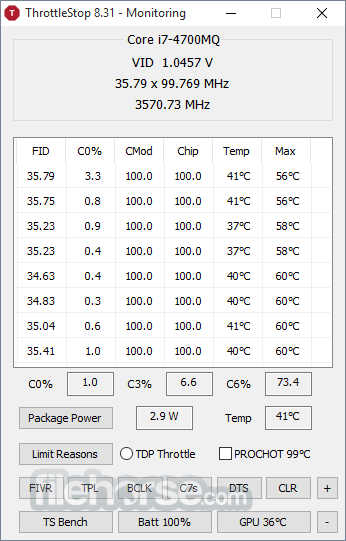
The left side of the app contains a variety of options that can be used to bypass CPU throttling, and on the right side is a Monitoring panel that shows you the current state of each thread on your CPU.
Some laptops use clock modulation and multiplier reductions to lower the performance and power consumption of your computer. This is done deliberately to either allow your computer to run cooler or to allow your laptop to operate with a power adapter that is not sufficient to fully power your laptop and recharge its battery at the same time.
When using Throttle Stop, it is strongly recommended to monitor power consumption at the wall with a Kill-a-Watt meter or similar device and make sure that you don't exceed the power capabilities of your power adapter. Use of Throttle Stop for PC to bypass these throttling schemes is at your own risk and can result in permanent damage to your power adapter or computer or both, which may not be covered by your warranty.
Key Features
Real-Time Monitoring: It provides real-time monitoring of CPU temperatures, clock speeds, and power consumption, allowing users to keep a close eye on their system's performance.
Voltage Control: The software allows for fine-tuning of CPU voltages, enabling users to lower power consumption and heat output without sacrificing performance.
Clock Control: Users can adjust the multiplier and clock speed of their CPU, helping to achieve higher performance levels or better power efficiency.
Thermal Throttling Control: It can disable or modify thermal throttling mechanisms, giving users more control over how their CPU handles heat.
Profiles: The software supports multiple profiles, which can be customized and switched between for different performance needs.
Alarm and Logging: It includes alarm settings to notify users of thermal or power issues and logs data for performance analysis.
ThrottleStop is a performance monitoring and adjustment utility for Windows-based PCs. It provides detailed information about the CPU and its thermal behavior, allowing users to tweak various settings to optimize performance. Originally designed to address throttling issues on laptops, it has evolved to become a versatile tool for both laptops and desktops.
ThrottleStop is an Intel Core 2 and Core I performance monitoring and modification program for advanced users! Supported operating systems are Windows XP, Vista, 7, 8, and 8.1, Windows 10 (32-bit and 64-bit versions supported), and Windows 11.
The left side of the app contains a variety of options that can be used to bypass CPU throttling, and on the right side is a Monitoring panel that shows you the current state of each thread on your CPU.
Some laptops use clock modulation and multiplier reductions to lower the performance and power consumption of your computer. This is done deliberately to either allow your computer to run cooler or to allow your laptop to operate with a power adapter that is not sufficient to fully power your laptop and recharge its battery at the same time.
When using Throttle Stop, it is strongly recommended to monitor power consumption at the wall with a Kill-a-Watt meter or similar device and make sure that you don't exceed the power capabilities of your power adapter. Use of Throttle Stop for PC to bypass these throttling schemes is at your own risk and can result in permanent damage to your power adapter or computer or both, which may not be covered by your warranty.
Key Features
Real-Time Monitoring: It provides real-time monitoring of CPU temperatures, clock speeds, and power consumption, allowing users to keep a close eye on their system's performance.
Voltage Control: The software allows for fine-tuning of CPU voltages, enabling users to lower power consumption and heat output without sacrificing performance.
Clock Control: Users can adjust the multiplier and clock speed of their CPU, helping to achieve higher performance levels or better power efficiency.
Thermal Throttling Control: It can disable or modify thermal throttling mechanisms, giving users more control over how their CPU handles heat.
Profiles: The software supports multiple profiles, which can be customized and switched between for different performance needs.
Alarm and Logging: It includes alarm settings to notify users of thermal or power issues and logs data for performance analysis.
##
畫面截圖
- 2025-12-28 ThrottleStop 9.7.3 Beta 1.71 MB
- 2024-12-26 ThrottleStop 9.7 1.71 MB
- 2023-05-26 ThrottleStop 9.6 1.7 MB
- 2022-06-28 ThrottleStop 9.5 1.7 MB
- 2021-08-18 ThrottleStop 9.4 1.68 MB
- 2021-02-18 ThrottleStop 9.3 1.68 MB
- 2020-08-11 ThrottleStop 9.2 1.67 MB
- 2020-06-20 ThrottleStop 9.0 1.64 MB