
Thunderbird 153.0.3 (64-bit)
v 153.0.3 (64-bit)
Windows
開源軟體
8.68/10 (88)
- 目前版本153.0.3 (64-bit)
- 更新日期2026-08-13
- 檔案大小79.1 MB
- 檔案名稱Thunderbird Setup 153.0.3.exe
- 作業系統Windows 7 64 / Windows 8 64 / Windows 10 64 / Windows 11
- 支援語系English
- 授權型式開源軟體
- 開發商 Mozilla Organization
- 軟體分類Windows 軟體 / 社群通訊
##
編輯短評
Thunderbird 是 Mozilla 基金會推出的開源郵件桌面用戶端,與 Firefox 同源,主要解決多帳號、多信箱的收發與管理問題,並整合行事曆與通訊錄。它最鮮明的特色是高度自訂性,從版面配置到擴充套件都能依個人需求調整,同時強調安全與隱私。這套軟體長期由社群與官方持續維護,更新相當活躍,在同類郵件軟體中屬於主流且評價普遍不錯的選擇。
它適合需要在本機管理大量郵件、重視離線存取與資料掌控權的使用者,尤其是商務人士或對隱私較敏感的人。與 Yahoo! Messenger、WhatsApp 等即時通訊軟體相比,Thunderbird 定位完全不同,是傳統的郵件用戶端,沒有聊天或視訊功能,但郵件處理能力更扎實。需要注意的是,目前僅提供英文介面,沒有官方中文版,且採開源授權可免費使用;若習慣中文操作,可能需要另尋語言包或考慮其他替代方案。
##
翻譯排程處理中,以下暫以英文原文呈現
軟體介紹
Thunderbird is a free and open-source email desktop client developed by Mozilla, the same organization behind the popular web browser, Firefox.
It is designed to provide a robust and reliable email management solution for users across different platforms.
Thunderbird 64bit aims to enhance productivity, security, and customization options, making it an appealing choice for individuals and businesses alike.
What`s New
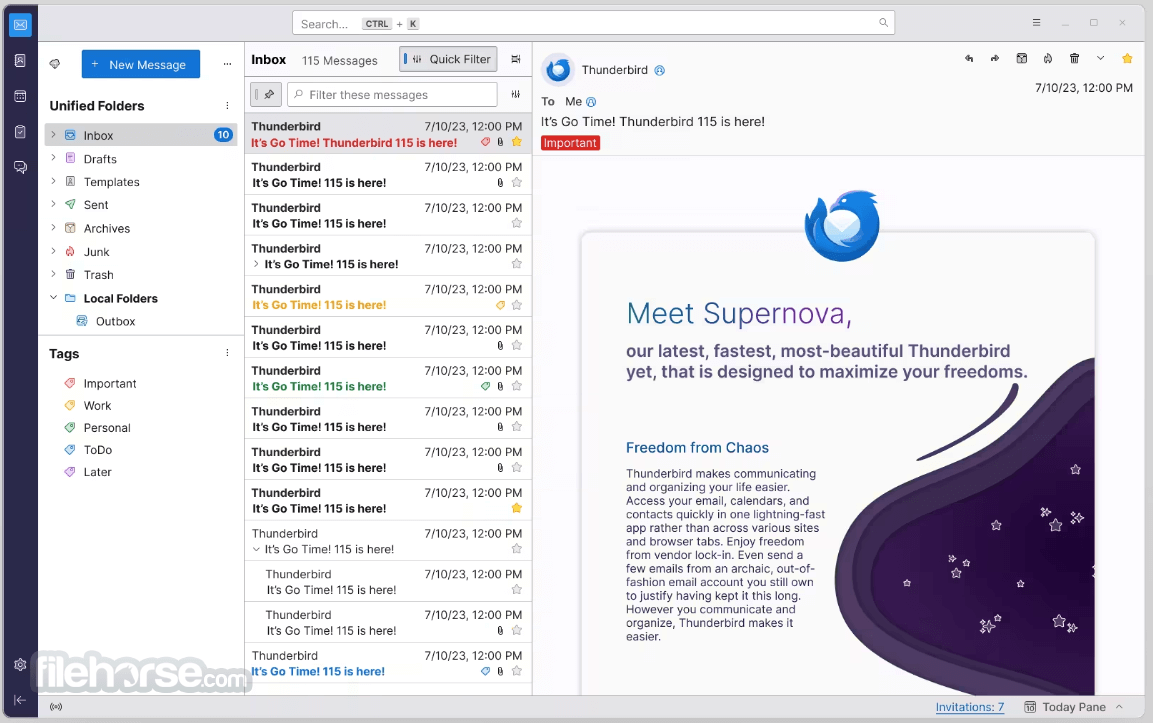
Thunderbird Supernova (latest version) is a stunning, high-speed release, redefining the email, calendar, and contacts experience. With a focus on maximizing your freedom, this desktop app combines all your messages, calendars, and contacts into one lightning-fast platform.
Take control of your communication with customizable filters and organization options. Whether you prefer managing accounts separately or having a unified inbox, the program streamlines your life effortlessly.
Thunderbird's default clean and elegant design sets the stage, while its flexibility allows you to tailor it to your workflow and visual preferences.
Packed with unparalleled and robust features, Mozilla Thunderbird Supernova is your ultimate solution for seamless communication and organization.
Key Features
Email Management
It supports multiple email accounts and offers a unified inbox, making it easy to manage all your emails in one place.
Advanced Search
It provides a powerful search feature, enabling users to find specific emails quickly using various criteria such as sender, recipient, keywords, and date range.
Junk Mail Filtering
The software incorporates a sophisticated junk mail filter that learns from your actions, helping to keep your inbox clean and free from spam.
Extensions and Add-ons
It allows users to enhance functionality through a vast array of add-ons and extensions available in their official repository.
Tabbed Email
Similar to web browsing, it enables you to open emails in separate tabs, making it easier to switch between different messages.
Calendar Integration
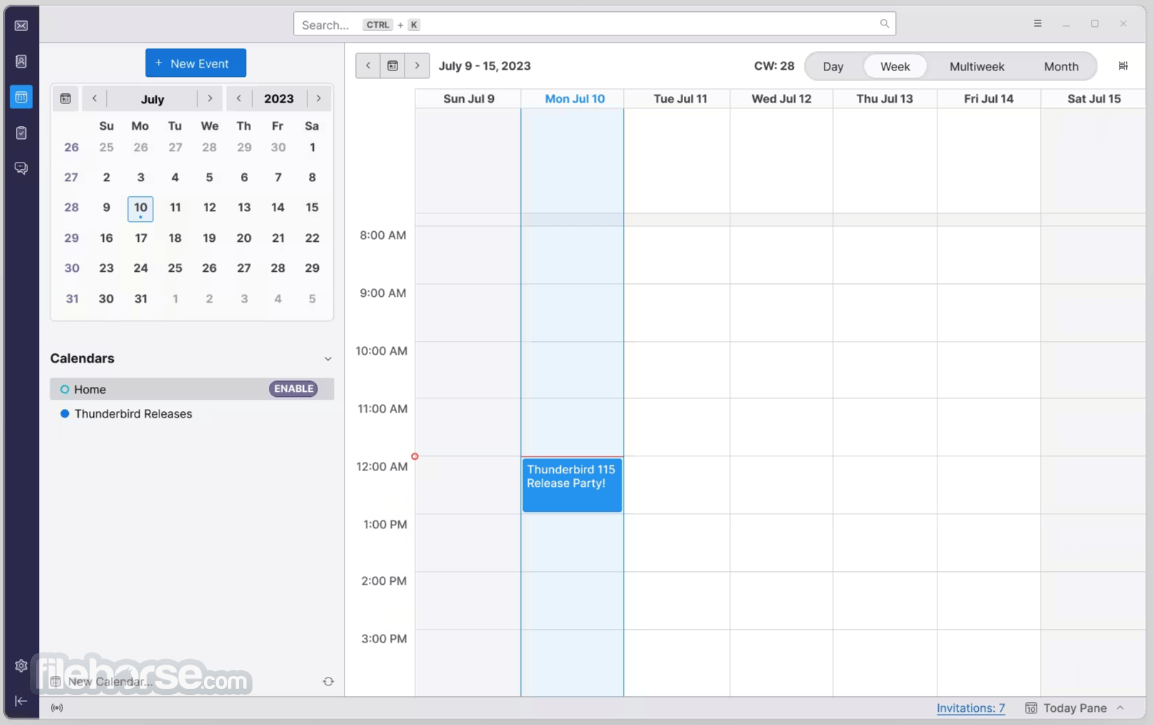
It comes with built-in calendar support, allowing users to manage appointments, events, and tasks alongside their emails.
Security Features
The software offers strong encryption and supports S/MIME, protecting your communications from unauthorized access.
Smart Folders
It automatically detects and consolidates folders for Sent, Archive, and Drafts, simplifying email organization.
User Interface
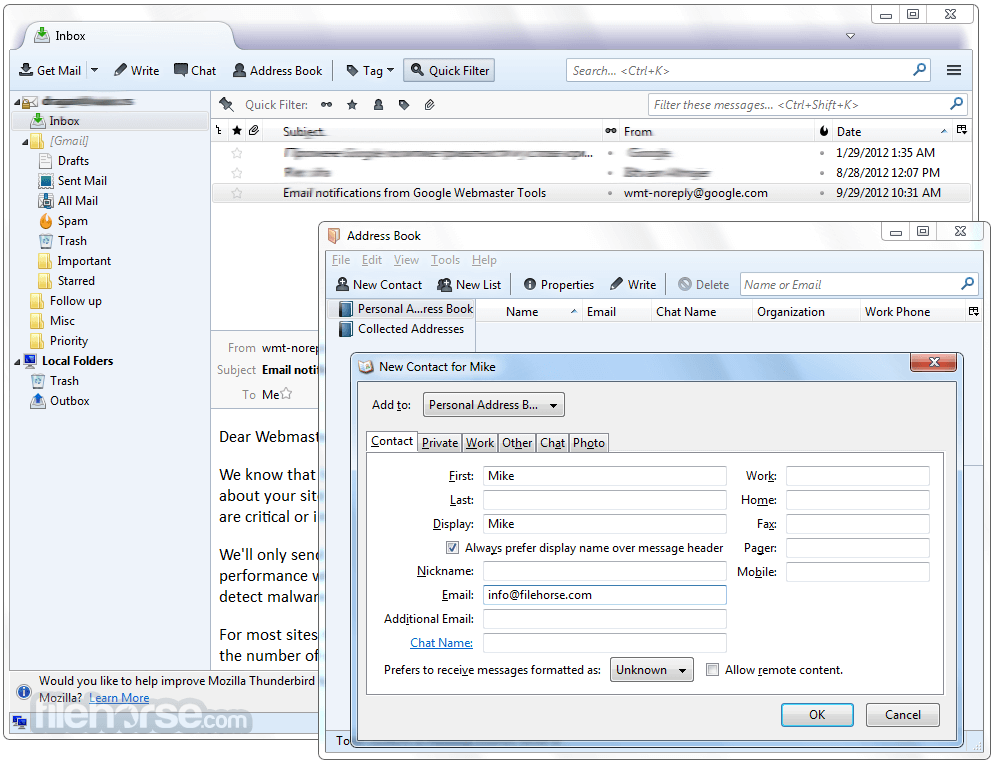
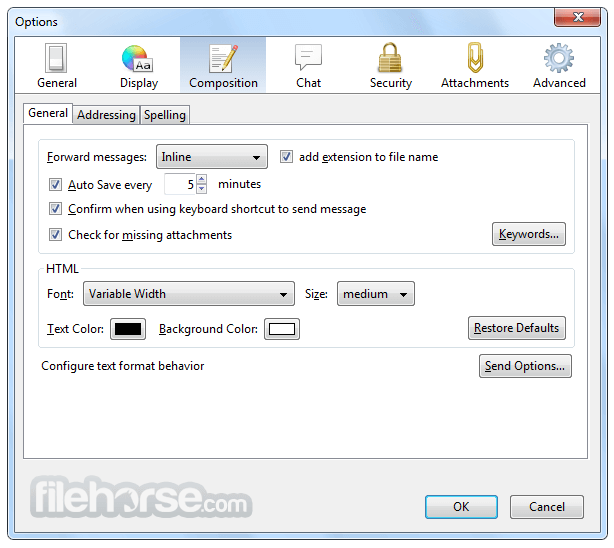
It boasts a user-friendly interface, with a layout that is both intuitive and customizable. The main window presents a classic three-panel design, featuring a folder pane on the left, message list in the center, and an email preview pane on the right.
The toolbar offers easy access to essential functions, while the top menu hosts additional options and settings. Users can personalize the interface further by applying themes and adjusting the layout according to their preferences.
Installation and Setup
Installing the program is a straightforward process, regardless of your operating system. Simply visit the official website or FileHorse, download the appropriate installer for your OS, and run the setup wizard.
During installation, It will prompt you to import data from other email clients, which can streamline the migration process.
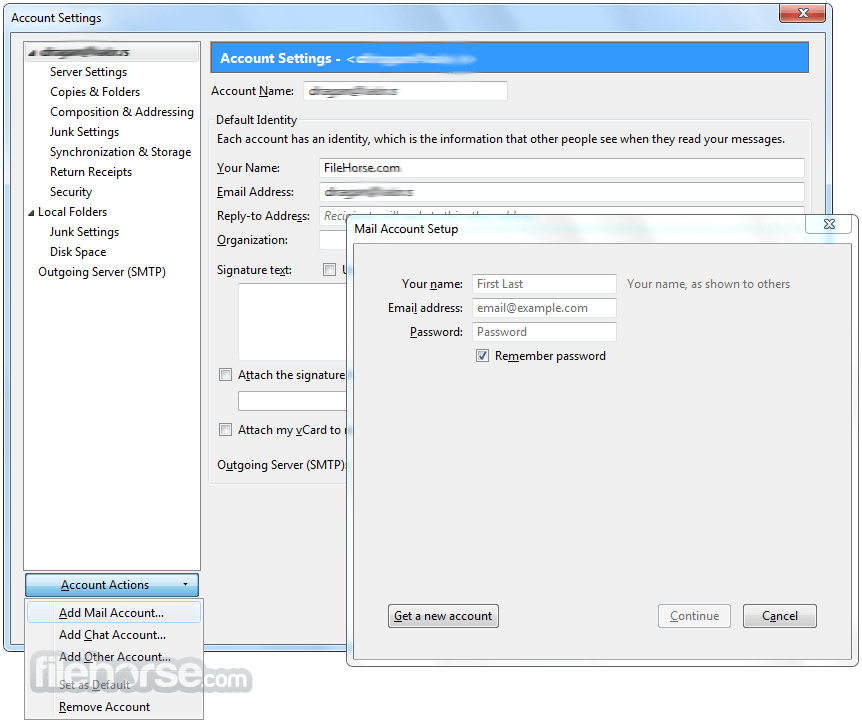
After setup, configuring email accounts is easy; Thunderbird automatically detects common email providers and guides you through the setup with minimal effort.
How to Use
Using Thunderbird is quite intuitive, even for those new to email clients. Here's a step-by-step guide to help you get started:
Is Thunderbird compatible with my email provider?
Thunderbird is compatible with most email providers that support IMAP, POP, and SMTP protocols. Major providers like Gmail, Outlook, and Yahoo are fully supported.
Can I use Thunderbird on my smartphone?
While Thunderbird is primarily designed for desktop use, it doesn't have official mobile apps. However, you can access your emails through the web interface on your smartphone.
Does Thunderbird work on Windows, macOS, and Linux?
Yes, Thunderbird is cross-platform and runs on Windows, macOS, and Linux distributions.
Is Thunderbird secure?
Yes, it prioritizes security and privacy. It supports encryption, digital signatures, and follows industry best practices to protect your data.
Can I import data from other email clients?
The app facilitates importing data from popular email clients like Outlook, Windows Mail, and Apple Mail during the setup process.
Alternatives
Microsoft Outlook: A feature-rich email client with tight integration with the Microsoft Office suite. It's well-suited for business users and offers advanced collaboration features.
Microsoft Mail and Calendar: It helps you stay up-to-date on your email & manage your schedule.
Mailbird: Known for its simplicity and productivity-focused design, Mailbird is a popular choice for individuals seeking an easy-to-use email client.
Mailspring: An open-source email client that emphasizes speed, customizable layouts, and advanced features like read receipts and link tracking.
Pricing
The software is completely FREE to use and distribute, which makes it an attractive option for individuals, businesses, and organizations with budget constraints.
System Requirements
Thunderbird is a reliable and feature-rich email client for Windows 11/10 that offers a compelling solution for managing emails and calendars efficiently. Its flexibility, cross-platform compatibility, and extensive customization options make it a standout choice among free email clients.
Thunderbird's focus on security, privacy, and user control sets it apart. Whether you're an individual, a small business, or a large organization, Thunderbird is a worthy option for all your email communication needs.
Also Available: Thunderbird (32-bit) and Thunderbird for Mac
Download Thunderbird (64-bit) Latest Version Why is this app published on FileHorse? (More info)
It is designed to provide a robust and reliable email management solution for users across different platforms.
Thunderbird 64bit aims to enhance productivity, security, and customization options, making it an appealing choice for individuals and businesses alike.
What`s New
Thunderbird Supernova (latest version) is a stunning, high-speed release, redefining the email, calendar, and contacts experience. With a focus on maximizing your freedom, this desktop app combines all your messages, calendars, and contacts into one lightning-fast platform.
Take control of your communication with customizable filters and organization options. Whether you prefer managing accounts separately or having a unified inbox, the program streamlines your life effortlessly.
Thunderbird's default clean and elegant design sets the stage, while its flexibility allows you to tailor it to your workflow and visual preferences.
Packed with unparalleled and robust features, Mozilla Thunderbird Supernova is your ultimate solution for seamless communication and organization.
Key Features
Email Management
It supports multiple email accounts and offers a unified inbox, making it easy to manage all your emails in one place.
Advanced Search
It provides a powerful search feature, enabling users to find specific emails quickly using various criteria such as sender, recipient, keywords, and date range.
Junk Mail Filtering
The software incorporates a sophisticated junk mail filter that learns from your actions, helping to keep your inbox clean and free from spam.
Extensions and Add-ons
It allows users to enhance functionality through a vast array of add-ons and extensions available in their official repository.
Tabbed Email
Similar to web browsing, it enables you to open emails in separate tabs, making it easier to switch between different messages.
Calendar Integration
It comes with built-in calendar support, allowing users to manage appointments, events, and tasks alongside their emails.
Security Features
The software offers strong encryption and supports S/MIME, protecting your communications from unauthorized access.
Smart Folders
It automatically detects and consolidates folders for Sent, Archive, and Drafts, simplifying email organization.
User Interface
It boasts a user-friendly interface, with a layout that is both intuitive and customizable. The main window presents a classic three-panel design, featuring a folder pane on the left, message list in the center, and an email preview pane on the right.
The toolbar offers easy access to essential functions, while the top menu hosts additional options and settings. Users can personalize the interface further by applying themes and adjusting the layout according to their preferences.
Installation and Setup
Installing the program is a straightforward process, regardless of your operating system. Simply visit the official website or FileHorse, download the appropriate installer for your OS, and run the setup wizard.
During installation, It will prompt you to import data from other email clients, which can streamline the migration process.
After setup, configuring email accounts is easy; Thunderbird automatically detects common email providers and guides you through the setup with minimal effort.
How to Use
Using Thunderbird is quite intuitive, even for those new to email clients. Here's a step-by-step guide to help you get started:
- Adding Email Accounts: Launch the app and navigate to "Tools" > "Account Settings." Click on the "Account Actions" button and select "Add Mail Account." Follow the on-screen instructions to set up your email account.
- Sending and Receiving Emails: To compose a new email, click on the "Write" button or press "Ctrl+N" (or "Cmd+N" on macOS). Enter the recipient's email address, subject, and message content. To check for new emails, click on the "Get Messages" button or press "Ctrl+T" (or "Cmd+T" on macOS).
- Managing Folders: Right-click on the "Inbox" in the folder pane and select "New Folder" to create custom folders for organizing emails. To move an email to a specific folder, drag and drop it into the desired folder.
- Using the Calendar: Click on the "Calendar" tab to access the integrated calendar. To add events, double-click on the desired date, enter event details, and save.
- Customizing the prpogram: Go to "Tools" > "Add-ons" to explore the available extensions and themes. Install the ones you like, and they will enhance Thunderbird's functionality and appearance.
Is Thunderbird compatible with my email provider?
Thunderbird is compatible with most email providers that support IMAP, POP, and SMTP protocols. Major providers like Gmail, Outlook, and Yahoo are fully supported.
Can I use Thunderbird on my smartphone?
While Thunderbird is primarily designed for desktop use, it doesn't have official mobile apps. However, you can access your emails through the web interface on your smartphone.
Does Thunderbird work on Windows, macOS, and Linux?
Yes, Thunderbird is cross-platform and runs on Windows, macOS, and Linux distributions.
Is Thunderbird secure?
Yes, it prioritizes security and privacy. It supports encryption, digital signatures, and follows industry best practices to protect your data.
Can I import data from other email clients?
The app facilitates importing data from popular email clients like Outlook, Windows Mail, and Apple Mail during the setup process.
Alternatives
Microsoft Outlook: A feature-rich email client with tight integration with the Microsoft Office suite. It's well-suited for business users and offers advanced collaboration features.
Microsoft Mail and Calendar: It helps you stay up-to-date on your email & manage your schedule.
Mailbird: Known for its simplicity and productivity-focused design, Mailbird is a popular choice for individuals seeking an easy-to-use email client.
Mailspring: An open-source email client that emphasizes speed, customizable layouts, and advanced features like read receipts and link tracking.
Pricing
The software is completely FREE to use and distribute, which makes it an attractive option for individuals, businesses, and organizations with budget constraints.
System Requirements
- Windows: Windows 11/10
- RAM: 1GB or more
- Disk Space: 200MB of free space
- Free and open-source software.
- Multi-platform support (Windows, macOS, and Linux).
- Highly customizable interface.
- Strong security and privacy features.
- Robust email management tools.
- No official mobile apps, except K-9 Mail app.
- Limited integration with cloud storage services.
- Some users may find the interface dated compared to modern email clients.
Thunderbird is a reliable and feature-rich email client for Windows 11/10 that offers a compelling solution for managing emails and calendars efficiently. Its flexibility, cross-platform compatibility, and extensive customization options make it a standout choice among free email clients.
Thunderbird's focus on security, privacy, and user control sets it apart. Whether you're an individual, a small business, or a large organization, Thunderbird is a worthy option for all your email communication needs.
Also Available: Thunderbird (32-bit) and Thunderbird for Mac
Download Thunderbird (64-bit) Latest Version Why is this app published on FileHorse? (More info)
##
畫面截圖
- 2026-08-13 Thunderbird 153.0.3 (64-bit) 79.1 MB
- 2026-08-09 Thunderbird 153.0.2 (64-bit) 79.1 MB
- 2026-07-31 Thunderbird 153.0.1 (64-bit) 79 MB
- 2026-07-23 Thunderbird 153.0 (64-bit) 79.1 MB
- 2026-07-01 Thunderbird 152.0.1 (64-bit) 77.6 MB
- 2026-06-17 Thunderbird 152.0 (64-bit) 77.5 MB
- 2026-05-27 Thunderbird 151.0.1 (64-bit) 76.7 MB
- 2026-05-20 Thunderbird 151.0 (64-bit) 76.7 MB