USBDeview 3.10 (64-bit)
v 3.10 (64-bit)
Windows
免費軟體
7/10 (41)
- 目前版本3.10 (64-bit)
- 更新日期2026-05-15
- 檔案大小102.4 KB
- 檔案名稱usbdeview-x64.zip
- 作業系統Windows 7 64 / Windows 8 64 / Windows 10 64 / Windows 11
- 支援語系English
- 授權型式免費軟體
- 開發商 Nir Sofer
- 軟體分類Windows 軟體 / 系統優化
##
翻譯排程處理中,以下暫以英文原文呈現
軟體介紹
USBDeview 64-bit is a small utility that lists all USB devices that currently connected to your computer, as well as all USB devices that you previously used.
For each USB device, extended information is displayed: Device name/description, device type, serial number (for mass storage devices), the date/time that device was added, VendorID, ProductID, and more...
Italso allows you to uninstall USB devices that you previously used, disconnect USB devices that are currently connected to your computer, as well as to disable and enable USB devices.
You can also use USBDeview 64-bit on a remote computer, as long as you log in to that computer with the admin user.
Overview
USBDeview, developed by Nir Sofer, is a free and lightweight utility designed to provide comprehensive information about all USB devices that are either currently connected or have been connected to your PC.
It is particularly useful for managing USB devices, including uninstalling previously used devices, disabling USB ports, or simply obtaining detailed device information.
USBDeview is popular among system administrators, technical support staff, and users who need more insight and control over USB hardware activity. The software offers functionality that helps track and manage USB devices effectively.
Key Features
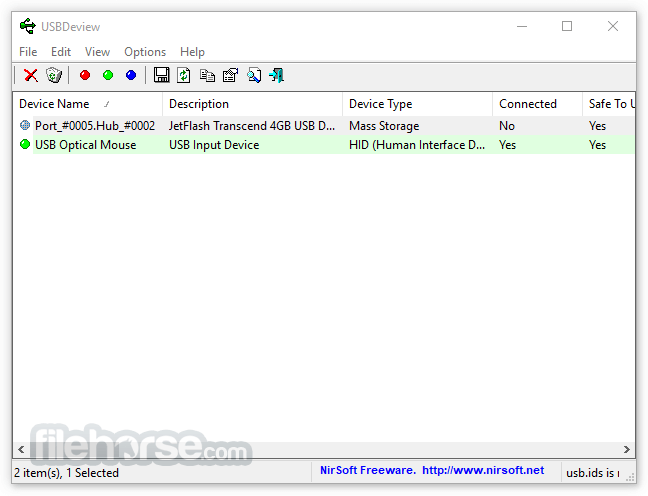
Device Listing: It lists all USB devices connected to the computer, along with useful information such as the device name, description, serial number, connection date, last plug/unplug time, and vendor ID.
Device Management: You can enable, disable, uninstall, or disconnect USB devices directly through the interface. This feature is particularly useful for troubleshooting faulty USB hardware or clearing unused device entries.
Remote Computer Support: It can be used to view and manage USB devices on remote computers, which is useful for IT support teams managing multiple workstations.
Export Data: It allows users to export information about the USB devices into various formats such as text, HTML, or XML for reporting or documentation purposes.
Speed Testing: It includes a simple benchmarking tool to test the read/write speeds of USB devices.
Portable: This program is a portable tool, meaning it does not require installation and can be run from any external drive, making it a convenient utility for tech professionals on the go.
User Interface
It has a no-nonsense, utilitarian interface. The main window consists of a list view that displays all connected and previously connected USB devices, with columns showing detailed information about each device.
The columns can be customized based on user preferences, and the interface supports sorting for easier navigation. The UI may not win design awards, but it’s built for efficiency and ease of use.
The interface also supports right-click menus, allowing users to quickly perform actions like uninstalling or disabling devices. While it is straightforward, some advanced features, like remote access, might require a bit more technical understanding, but overall, it is intuitive for both novice and experienced users.
Installation and Setup
As a portable tool, USBDeview does not require a traditional installation process. It comes as a small executable file that can be downloaded from the NirSoft website.
Once downloaded, the user simply runs the executable to launch the program. This portability is one of the biggest advantages, as it can be carried on a USB stick and run on any Windows machine without the need for administrative privileges.
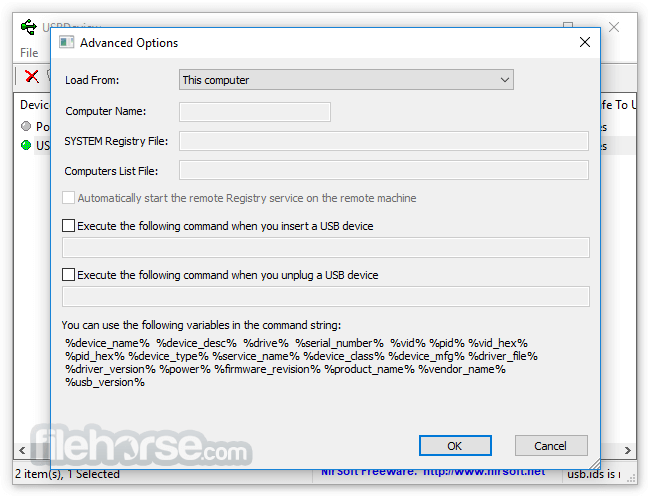
To enable remote access or more advanced options, some configuration might be necessary. For example, if you're using this software to manage devices on remote machines, you’ll need to configure the necessary permissions and have administrative access to the target machines.
How to Use
Is USBDeview safe to use?
Yes, this tool is safe. It’s a tool developed by Nir Sofer, a reputable software developer known for creating lightweight utilities for system management. However, like any system management tool, it should be used carefully to avoid uninstalling critical devices.
Can USBDeview be used on any Windows version?
The program is compatible with most versions of Windows, including Windows XP, Vista, 7, 8, 10, and 11. However, remote computer management requires administrative privileges and proper configuration.
Does USBDeview require installation?
No, this tool is a portable application, which means you don’t need to install it. You simply download the executable file and run it directly.
Can I use USBDeview to disable USB ports?
Yes, it allows you to disable individual USB devices or ports. This is useful in environments where you need to control which devices can be connected to a system.
Does USBDeview work with USB hubs?
Yes, it provides information about all devices connected through USB hubs and allows you to manage them individually.
Pricing
This program is completely FREE to use. It is part of NirSoft’s collection of utilities, which are all offered as freeware.
There are no hidden costs or premium versions, making it an excellent tool for both casual users and professionals.
System Requirements
Download USBDeview (64-bit) Latest Version Why is this app published on FileHorse? (More info)
For each USB device, extended information is displayed: Device name/description, device type, serial number (for mass storage devices), the date/time that device was added, VendorID, ProductID, and more...
Italso allows you to uninstall USB devices that you previously used, disconnect USB devices that are currently connected to your computer, as well as to disable and enable USB devices.
You can also use USBDeview 64-bit on a remote computer, as long as you log in to that computer with the admin user.
Overview
USBDeview, developed by Nir Sofer, is a free and lightweight utility designed to provide comprehensive information about all USB devices that are either currently connected or have been connected to your PC.
It is particularly useful for managing USB devices, including uninstalling previously used devices, disabling USB ports, or simply obtaining detailed device information.
USBDeview is popular among system administrators, technical support staff, and users who need more insight and control over USB hardware activity. The software offers functionality that helps track and manage USB devices effectively.
Key Features
Device Listing: It lists all USB devices connected to the computer, along with useful information such as the device name, description, serial number, connection date, last plug/unplug time, and vendor ID.
Device Management: You can enable, disable, uninstall, or disconnect USB devices directly through the interface. This feature is particularly useful for troubleshooting faulty USB hardware or clearing unused device entries.
Remote Computer Support: It can be used to view and manage USB devices on remote computers, which is useful for IT support teams managing multiple workstations.
Export Data: It allows users to export information about the USB devices into various formats such as text, HTML, or XML for reporting or documentation purposes.
Speed Testing: It includes a simple benchmarking tool to test the read/write speeds of USB devices.
Portable: This program is a portable tool, meaning it does not require installation and can be run from any external drive, making it a convenient utility for tech professionals on the go.
User Interface
It has a no-nonsense, utilitarian interface. The main window consists of a list view that displays all connected and previously connected USB devices, with columns showing detailed information about each device.
The columns can be customized based on user preferences, and the interface supports sorting for easier navigation. The UI may not win design awards, but it’s built for efficiency and ease of use.
The interface also supports right-click menus, allowing users to quickly perform actions like uninstalling or disabling devices. While it is straightforward, some advanced features, like remote access, might require a bit more technical understanding, but overall, it is intuitive for both novice and experienced users.
Installation and Setup
As a portable tool, USBDeview does not require a traditional installation process. It comes as a small executable file that can be downloaded from the NirSoft website.
Once downloaded, the user simply runs the executable to launch the program. This portability is one of the biggest advantages, as it can be carried on a USB stick and run on any Windows machine without the need for administrative privileges.
To enable remote access or more advanced options, some configuration might be necessary. For example, if you're using this software to manage devices on remote machines, you’ll need to configure the necessary permissions and have administrative access to the target machines.
How to Use
- Launch the app: After downloading the executable file, run the application. The software automatically scans for connected and previously connected USB devices.
- View Device Information: The main window will display a list of devices with detailed information in the columns. You can click on any device to view more details or export the list for external use.
- Manage Devices: Right-click on any device to see options like uninstalling, disabling, or enabling the device. You can also disconnect a device or refresh the list to get updated information.
- Remote Access: To access USB devices on a remote computer, go to "Options" and select "Advanced Options." You will need to input the necessary credentials and have network access to the remote machine.
- Speed Test: To test the speed of a connected USB drive, right-click on the device and select "Speed Test." It will measure the read and write speed of the selected device.
Is USBDeview safe to use?
Yes, this tool is safe. It’s a tool developed by Nir Sofer, a reputable software developer known for creating lightweight utilities for system management. However, like any system management tool, it should be used carefully to avoid uninstalling critical devices.
Can USBDeview be used on any Windows version?
The program is compatible with most versions of Windows, including Windows XP, Vista, 7, 8, 10, and 11. However, remote computer management requires administrative privileges and proper configuration.
Does USBDeview require installation?
No, this tool is a portable application, which means you don’t need to install it. You simply download the executable file and run it directly.
Can I use USBDeview to disable USB ports?
Yes, it allows you to disable individual USB devices or ports. This is useful in environments where you need to control which devices can be connected to a system.
Does USBDeview work with USB hubs?
Yes, it provides information about all devices connected through USB hubs and allows you to manage them individually.
Pricing
This program is completely FREE to use. It is part of NirSoft’s collection of utilities, which are all offered as freeware.
There are no hidden costs or premium versions, making it an excellent tool for both casual users and professionals.
System Requirements
- Operating System: Windows 7, Windows 8, Windows 10, Windows 11
- Memory: Minimal, as the executable file is less than 1 MB in size.
- Administrative Privileges: Required for managing devices and accessing remote computers.
- Network: Necessary for remote computer management features.
- Lightweight and portable
- Provides detailed USB device information
- Supports remote computer management
- Includes USB speed testing
- Free and easy to use
- Lack of official support and updates
- Basic user interface
- Lacks advanced features found in premium tools
- Remote access can be tricky to set up for less experienced users
Download USBDeview (64-bit) Latest Version Why is this app published on FileHorse? (More info)
##
畫面截圖