⚠ 這是歷史版本頁面 — 查看 VoiceMeeter Banana 最新版本 →

VoiceMeeter Banana 2.0.5.0
v 2.0.5.0
Windows
免費軟體
8.52/10 (33)
- 目前版本2.0.5.0
- 更新日期2019-10-16
- 檔案大小19.83 MB
- 檔案名稱VoicemeeterProSetup.exe
- 作業系統Windows 7 / Windows 8 / Windows 10 / Windows 11
- 支援語系English
- 授權型式免費軟體
- 開發商 Vincent Burel
- 軟體分類Windows 軟體 / 音訊軟體
##
編輯短評
VoiceMeeter Banana 是一套進階的虛擬音訊混音器,專為需要更細膩掌控聲音配置的 Windows 使用者設計。它扮演實體與虛擬音訊裝置之間的中介角色,讓使用者能有效率地混合、路由與處理多個音訊來源,解決系統內建音效設定過於陽春的問題。其最具辨識度的特色在於支援多組虛擬與實體輸入輸出裝置,並提供五組音訊輸入的混音能力,在同類工具中屬於持續維護且有一定知名度的選擇。
這套軟體特別適合播客錄製、直播串流、音樂製作或任何需要複雜音訊路由的專業情境。與 Virtual DJ 或 iTunes 這類偏重播放或編曲的軟體不同,VoiceMeeter Banana 更聚焦於系統層級的混音與串接,取捨在於它需要花時間理解路由邏輯,且介面僅提供英文。它為免費授權,僅支援 Windows 平台,使用前建議先確認自己的音效裝置相容性,並可考慮下載免安裝版本先行試用。
##
翻譯排程處理中,以下暫以英文原文呈現
軟體介紹
VoiceMeeter Banana is an advanced virtual audio mixer designed for Windows PC users who need more control over their sound setup.
Developed by VB-Audio, it serves as an intermediary between physical and virtual audio devices, allowing users to mix, route, and process audio sources efficiently.
Whether you're a podcaster, live streamer, musician, or professional audio engineer, VoiceMeeter Banana provides a powerful solution for managing complex audio configurations.
Main Features
Virtual Audio Mixing – Supports multiple audio input and output devices, both virtual and physical.
Five Audio Inputs and Five Audio Outputs – Includes three hardware inputs and two virtual inputs for advanced routing.
Parametric Equalizer – Built-in equalizer with customizable settings for each audio channel.
Audio Processing Tools – Includes compressors, limiters, and noise gates to improve sound quality.
Virtual Cables – Allows for seamless integration between different applications and audio sources.
Multi-Channel Audio Support – Supports stereo and multi-channel audio configurations.
Voice Effects and Sound Processing – Provides advanced control over audio levels, effects, and surround sound.
Built-in Recording Feature – Enables direct audio recording to file formats like WAV and MP3.
MIDI Mapping Support – Can be controlled via MIDI devices for enhanced usability.
ASIO Support – Ideal for musicians and professionals who use ASIO-based applications.
User Interface
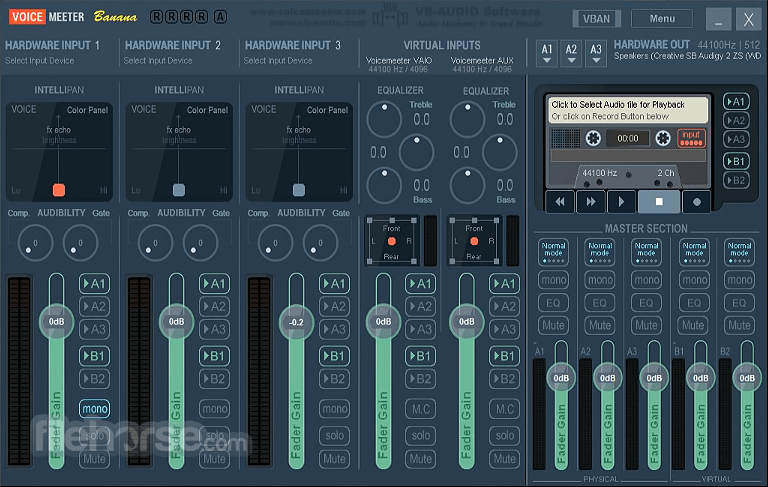
VoiceMeeter Banana has a visually dense but functional interface, designed primarily for audio professionals and advanced users.
The UI consists of multiple sliders, buttons, and controls that allow users to fine-tune their audio settings.
While the learning curve can be steep for beginners, once familiar with its functions, it becomes a powerful tool for audio management.
Installation and Setup
How do I fix audio stuttering in VoiceMeeter Banana?
Adjust the buffer size in the settings. Increasing the buffer size can help reduce stuttering and lag.
Can I use VoiceMeeter Banana with OBS Studio for streaming?
Yes. Set VoiceMeeter Banana as the default input/output device and route the audio through OBS Studio using virtual cables.
Is VoiceMeeter Banana free to use?
It operates on a donationware model, meaning it's free to use, but donations are encouraged for continued development.
How do I reset VoiceMeeter Banana settings?
Press Menu > Reset Settings, or manually delete configuration files from the installation directory.
Why is my microphone not working in VoiceMeeter Banana?
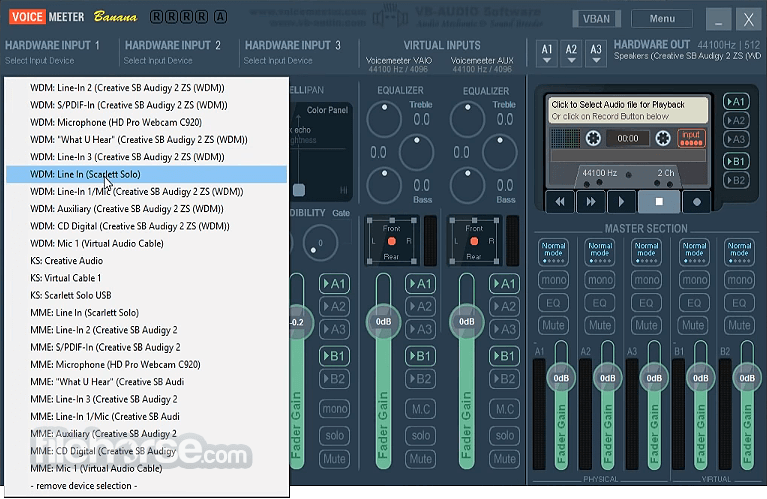
Check if the correct hardware input is selected and ensure the microphone is not muted or disabled in Windows settings.
Alternatives
VB-Audio VoiceMeeter Standard – A simplified version with fewer features for basic audio mixing.
Equalizer APO – An open-source equalizer with a lightweight footprint.
Pricing
This program is donationware, meaning users can access its full functionality for FREE, but donations are encouraged to support further development.
System Requirements
VoiceMeeter Banana is a powerful and versatile audio mixer for Windows users looking to manage complex sound setups. Whether you're a streamer, podcaster, musician, or just someone who wants better control over their audio, this software provides robust features without the hefty price tag. While it may take some time to master, its flexibility and high-quality processing make it a worthy tool for any serious audio enthusiast.
Download VoiceMeeter Banana Latest Version Why is this app published on FileHorse? (More info)
Developed by VB-Audio, it serves as an intermediary between physical and virtual audio devices, allowing users to mix, route, and process audio sources efficiently.
Whether you're a podcaster, live streamer, musician, or professional audio engineer, VoiceMeeter Banana provides a powerful solution for managing complex audio configurations.
Main Features
Virtual Audio Mixing – Supports multiple audio input and output devices, both virtual and physical.
Five Audio Inputs and Five Audio Outputs – Includes three hardware inputs and two virtual inputs for advanced routing.
Parametric Equalizer – Built-in equalizer with customizable settings for each audio channel.
Audio Processing Tools – Includes compressors, limiters, and noise gates to improve sound quality.
Virtual Cables – Allows for seamless integration between different applications and audio sources.
Multi-Channel Audio Support – Supports stereo and multi-channel audio configurations.
Voice Effects and Sound Processing – Provides advanced control over audio levels, effects, and surround sound.
Built-in Recording Feature – Enables direct audio recording to file formats like WAV and MP3.
MIDI Mapping Support – Can be controlled via MIDI devices for enhanced usability.
ASIO Support – Ideal for musicians and professionals who use ASIO-based applications.
User Interface
VoiceMeeter Banana has a visually dense but functional interface, designed primarily for audio professionals and advanced users.
The UI consists of multiple sliders, buttons, and controls that allow users to fine-tune their audio settings.
While the learning curve can be steep for beginners, once familiar with its functions, it becomes a powerful tool for audio management.
Installation and Setup
- Run the installer and follow the on-screen instructions.
- After installation, reboot your PC to ensure proper integration with the system audio drivers.
- Set VoiceMeeter Banana as the default audio device in Windows.
- Configure input and output channels according to your needs.
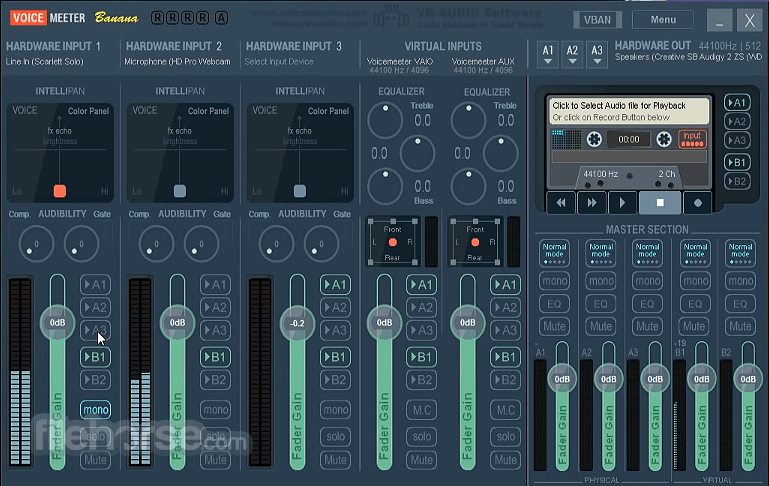
- Open this software and select hardware inputs and outputs.
- Adjust volume levels and audio routing between different sources.
- Apply equalization, compression, and noise gate effects as required.
- Use virtual audio cables to route sound between applications.
- Save and recall settings for different audio configurations.
How do I fix audio stuttering in VoiceMeeter Banana?
Adjust the buffer size in the settings. Increasing the buffer size can help reduce stuttering and lag.
Can I use VoiceMeeter Banana with OBS Studio for streaming?
Yes. Set VoiceMeeter Banana as the default input/output device and route the audio through OBS Studio using virtual cables.
Is VoiceMeeter Banana free to use?
It operates on a donationware model, meaning it's free to use, but donations are encouraged for continued development.
How do I reset VoiceMeeter Banana settings?
Press Menu > Reset Settings, or manually delete configuration files from the installation directory.
Why is my microphone not working in VoiceMeeter Banana?
Check if the correct hardware input is selected and ensure the microphone is not muted or disabled in Windows settings.
Alternatives
VB-Audio VoiceMeeter Standard – A simplified version with fewer features for basic audio mixing.
Equalizer APO – An open-source equalizer with a lightweight footprint.
Pricing
This program is donationware, meaning users can access its full functionality for FREE, but donations are encouraged to support further development.
System Requirements
- Operating System: Windows 7, 8, 10, 11 (32-bit & 64-bit)
- Processor: 1 GHz or faster
- RAM: 512MB minimum (2GB recommended)
- Storage: 50MB available disk space
- Audio Interface: Supports standard Windows and ASIO drivers
- Advanced virtual mixing capabilities for professional users
- Supports multiple input and output channels
- Customizable audio effects and processing tools
- Works seamlessly with streaming and recording software
- Free to use with an optional donation model
- UI can feel cluttered and overwhelming
- Occasional compatibility issues with certain Windows updates
- Requires manual setup and tweaking for best performance
- Limited official support; relies on community forums
VoiceMeeter Banana is a powerful and versatile audio mixer for Windows users looking to manage complex sound setups. Whether you're a streamer, podcaster, musician, or just someone who wants better control over their audio, this software provides robust features without the hefty price tag. While it may take some time to master, its flexibility and high-quality processing make it a worthy tool for any serious audio enthusiast.
Download VoiceMeeter Banana Latest Version Why is this app published on FileHorse? (More info)
##
畫面截圖
- 2025-12-12 VoiceMeeter Banana 2.1.2.2 41.81 MB
- 2024-12-17 VoiceMeeter Banana 2.1.1.9 48.24 MB
- 2024-10-30 VoiceMeeter Banana 2.1.1.8 48.23 MB
- 2024-07-09 VoiceMeeter Banana 2.1.1.3 47.87 MB
- 2024-03-04 VoiceMeeter Banana 2.1.1.1 45.28 MB
- 2023-11-07 VoiceMeeter Banana 2.0.6.8 24.71 MB
- 2022-01-27 VoiceMeeter Banana 2.0.6.2 20.91 MB
- 2019-10-16 VoiceMeeter Banana 2.0.5.0 19.83 MB