⚠ 這是歷史版本頁面 — 查看 X-Mouse Button Control 最新版本 →

X-Mouse Button Control 2.19.1
v 2.19.1
Windows
免費軟體
7.8/10 (69)
- 目前版本2.19.1
- 更新日期2020-03-17
- 檔案大小2.6 MB
- 檔案名稱XMouseButtonControlSetup.2.19.1.exe
- 作業系統Windows 7 / Windows 8 / Windows 10 / Windows 11
- 支援語系English
- 授權型式免費軟體
- 開發商 Highresolution Enterprises
- 軟體分類Windows 軟體 / 系統優化
##
編輯短評
X-Mouse Button Control(簡稱 XMBC)是一款專為 Windows 設計的滑鼠按鍵增強工具,核心功能是讓使用者針對不同應用程式或視窗建立專屬的按鍵設定檔,並可為每個設定檔配置多達十組按鍵配置層,透過熱鍵或滑鼠按鍵快速切換。它最特別的地方在於設定檔會自動偵測滑鼠游標所在的視窗或區域並即時啟用,例如在特定軟體上將滾輪改為調整音量,省去手動切換的麻煩。這款軟體自 2017 年起持續收錄更新,近期仍有維護,屬於長期經營的小眾工具,在系統優化分類中評價人數不多,但使用者評分普遍不錯。
這套工具適合需要頻繁在不同軟體間切換操作習慣的使用者,例如設計師、影音剪輯者或重度辦公族,能大幅減少重複的滑鼠手勢負擔。與同分類的 FileHippo App Manager、Rufus 或 Glary Utilities 相比,XMBC 專注於滑鼠行為的深度客製化,而非系統清理或檔案管理,定位更為單一。它提供免安裝的綠色版本,方便隨身攜帶使用,但僅有英文介面,對不熟悉英文的使用者稍有門檻;授權為免費軟體,可安心下載使用,不過需留意其設定邏輯較為進階,初次使用可能需要花點時間熟悉。
##
翻譯排程處理中,以下暫以英文原文呈現
軟體介紹
X-Mouse Button Control (XMBC) enables the creation of application- and window-specific profiles, allowing for customized mouse behavior per application or window.
Users can configure up to 10 distinct 'layers' of button configurations for each profile, which are easily switchable through hotkeys or mouse buttons.
Profiles are activated automatically when the mouse moves over the associated application, window, or region, streamlining the user experience. This feature is particularly useful for:
It is designed to run natively on x64 editions of Windows but also fully supports 32-bit editions. The installation process automatically detects and installs the appropriate version (x64 or x86).
While XMBC is optimized for newer Windows versions, it should still function on older versions such as Windows XP, Vista, 7, 8, and Server editions up to 2012. However, users encountering issues with these older versions are encouraged to consider upgrading their Windows installation.
Key Features
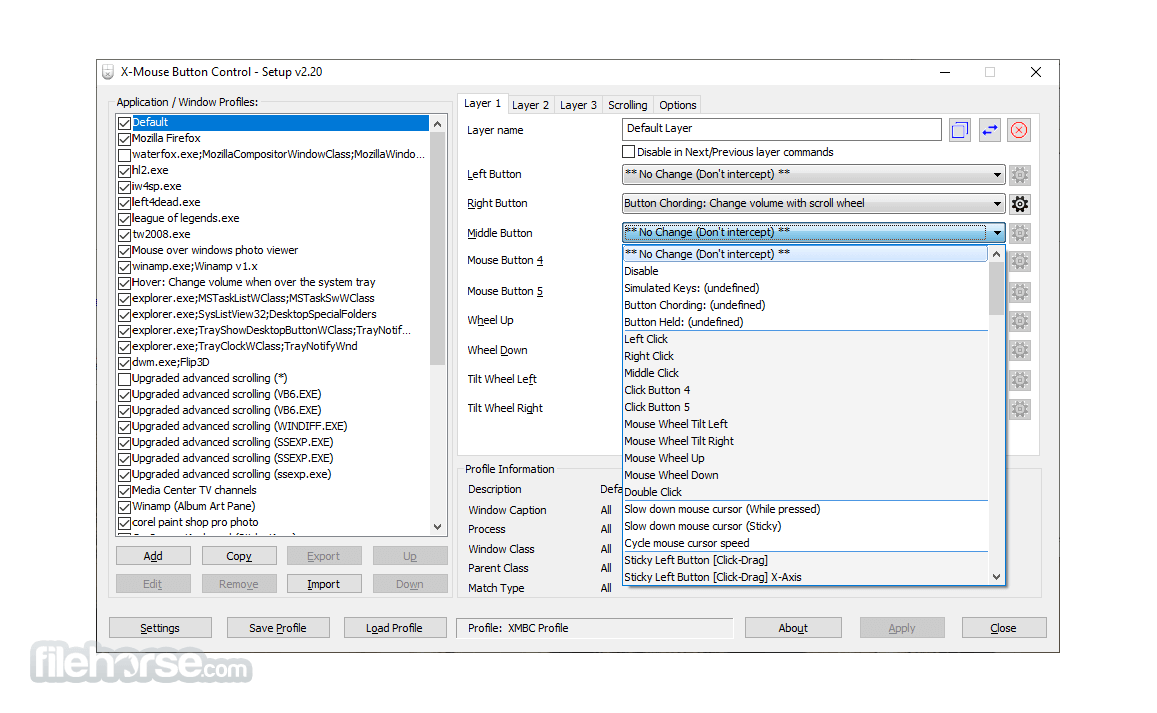
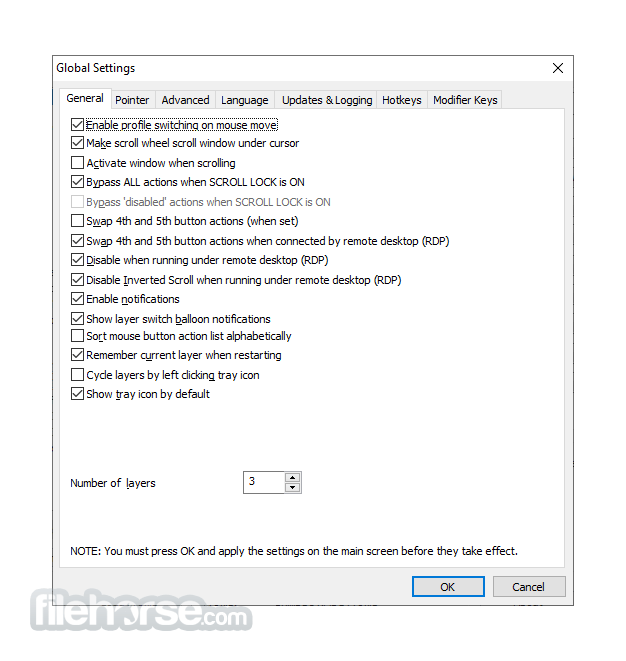
It features a straightforward, albeit somewhat dated, interface. It consists of a main window where profiles and button assignments are managed.
The layout is functional: a list of profiles on the left, specific settings and button configurations for the selected profile in the center, and options for profile activation on the right. Although not the most modern in appearance, it's designed with clarity and simplicity in mind.
Installation and Setup
FAQs
Can I use XMBC for gaming?
Absolutely. It can be highly beneficial for gamers needing specific controls for different games.
Is there a limit to the number of profiles I can create?
No, it allows the creation of unlimited profiles.
How do I ensure XMBC switches profiles automatically?
Ensure each profile is correctly linked to an executable file under the profile configuration.
Does XMBC work on all Windows versions?
It supports Windows XP through Windows 10. Compatibility with Windows 11 should be verified on the official website.
Is it possible to export and import profiles?
Yes, profiles can be exported and imported, facilitating backup and sharing.
Alternatives
While this utility offers extensive features, alternatives like AutoHotkey, Logitech G Hub, and Razer Synapse provide similar functionalities with varying degrees of complexity and user interface design.
Pricing
The tool is freeware. However, the developer accepts donations through the software’s website to support continued development and maintenance.
System Requirements
Note: If your mouse has 5 buttons but the 4th and 5th buttons don't function by default, then XMBC might not be suitable for you. This software depends on the standard mouse driver to transmit the default 4th and 5th button messages, which typically correspond to BACK/NEXT in browsers and other programs. However, you can still remap the standard 2 or 3 buttons and the scroll wheel.
Note: It supports up to 5 mouse buttons because it relies on and intercepts the Windows mouse message queue, which also only supports 5 buttons.
PROS
X-Mouse Button Control is an invaluable tool for anyone looking to enhance their mouse functionality beyond conventional limits. Whether for professional use in software applications or enhancing gaming setups, XMBC’s rich feature set and robust profile management make it a standout choice.
While it may not have the most contemporary interface, its performance and depth of customization more than compensate for aesthetic shortcomings.
Note: Requires a mouse and a driver that supports 5 buttons.
Download X-Mouse Button Control Latest Version Why is this app published on FileHorse? (More info)
Users can configure up to 10 distinct 'layers' of button configurations for each profile, which are easily switchable through hotkeys or mouse buttons.
Profiles are activated automatically when the mouse moves over the associated application, window, or region, streamlining the user experience. This feature is particularly useful for:
- Modifying mouse behavior in specific contexts, such as adjusting volume with the mouse wheel when over the system tray or a YouTube video.
- Mapping keys to the mouse's extended, fourth, and fifth buttons in applications that don't natively support them.
- X-Mouse Button Control (XMBC for PC) offers an extensive array of functions that can be mapped to mouse buttons, enhancing productivity and convenience.
- Simulated keystrokes
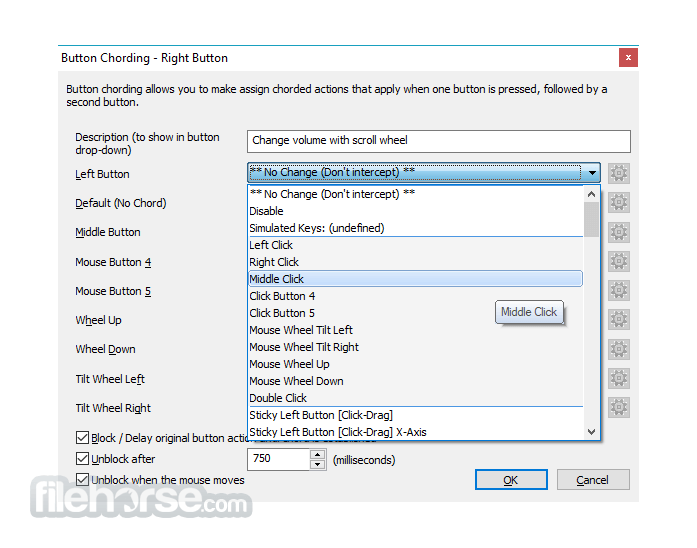
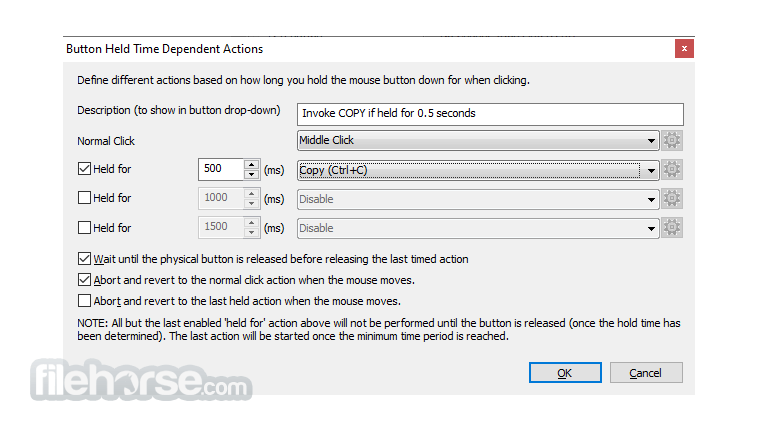
- Button coding and timed button actions for dynamic button responses
- Launching any Windows application
- Clipboard management (copy, cut, paste)
- Media controls (play, pause, stop, volume adjustment, mute)
- Screen or active window capture to the clipboard
- Sticky buttons/keys for click-drag actions
It is designed to run natively on x64 editions of Windows but also fully supports 32-bit editions. The installation process automatically detects and installs the appropriate version (x64 or x86).
While XMBC is optimized for newer Windows versions, it should still function on older versions such as Windows XP, Vista, 7, 8, and Server editions up to 2012. However, users encountering issues with these older versions are encouraged to consider upgrading their Windows installation.
Key Features
- Button Remapping: Allows users to change the function of each mouse button, including the scroll wheel.
- Application-Specific Profiles: Users can create multiple profiles for different applications, which this app automatically switches between.
- Layer Switching: Toggle between different layers of commands within the same profile.
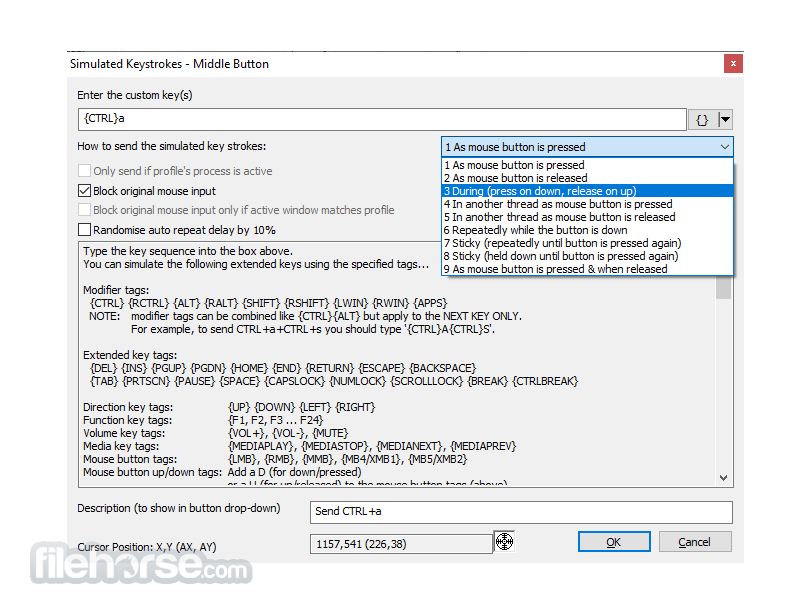
- Simulated Keys: Assign complex keyboard commands to mouse buttons.
- Adjustable Pointer Speed: Change the DPI and speed settings per profile.
- Scrolling & Navigation Enhancements: Customize scrolling behavior and directions.
- Fixed unable to abort WAIT/WAITMS/HOLD/HOLDMS even with {flush} queue.
- Fixed bug with sticky repeat sim keys where it would not work properly after being released/aborted by pressing another button.
- Fix problem where volume down {VOL-} simkeys stop working, but volume up {VOL+} continues to work!
- Attempt to fix hang/lockup deadlock conflict between the repeat timer thread and the main hook thread.
It features a straightforward, albeit somewhat dated, interface. It consists of a main window where profiles and button assignments are managed.
The layout is functional: a list of profiles on the left, specific settings and button configurations for the selected profile in the center, and options for profile activation on the right. Although not the most modern in appearance, it's designed with clarity and simplicity in mind.
Installation and Setup
- Download the installer from the official website or FileHorse.
- Run the executable file and follow the on-screen instructions - typically a standard process of accepting terms, selecting a destination folder, and choosing whether to create shortcuts.
- Once installed, launching the tool presents a main window where users can immediately start creating or modifying profiles.
- Create a New Profile: Name it after the application it’s intended for.
- Select the Mouse Button: Choose which button to customize.
- Assign an Action: From simple reassignments to complex macros or simulated keystrokes.
- Adjust Settings: Fine-tune other mouse behaviors as required.
- Activate the Profile: Ensure it’s set to activate automatically when the specified application is opened.
FAQs
Can I use XMBC for gaming?
Absolutely. It can be highly beneficial for gamers needing specific controls for different games.
Is there a limit to the number of profiles I can create?
No, it allows the creation of unlimited profiles.
How do I ensure XMBC switches profiles automatically?
Ensure each profile is correctly linked to an executable file under the profile configuration.
Does XMBC work on all Windows versions?
It supports Windows XP through Windows 10. Compatibility with Windows 11 should be verified on the official website.
Is it possible to export and import profiles?
Yes, profiles can be exported and imported, facilitating backup and sharing.
Alternatives
While this utility offers extensive features, alternatives like AutoHotkey, Logitech G Hub, and Razer Synapse provide similar functionalities with varying degrees of complexity and user interface design.
Pricing
The tool is freeware. However, the developer accepts donations through the software’s website to support continued development and maintenance.
System Requirements
- Operating System: Windows XP/Vista/7/8/10/11.
- Memory: Minimal RAM required, as this tool is lightweight.
- Storage: Less than 50 MB of free disk space.
Note: If your mouse has 5 buttons but the 4th and 5th buttons don't function by default, then XMBC might not be suitable for you. This software depends on the standard mouse driver to transmit the default 4th and 5th button messages, which typically correspond to BACK/NEXT in browsers and other programs. However, you can still remap the standard 2 or 3 buttons and the scroll wheel.
Note: It supports up to 5 mouse buttons because it relies on and intercepts the Windows mouse message queue, which also only supports 5 buttons.
PROS
- Highly customizable.
- Supports multiple profiles.
- Freeware.
- The interface may feel outdated.
- Steep learning curve for advanced configurations.
- Lack of official support and updates.
X-Mouse Button Control is an invaluable tool for anyone looking to enhance their mouse functionality beyond conventional limits. Whether for professional use in software applications or enhancing gaming setups, XMBC’s rich feature set and robust profile management make it a standout choice.
While it may not have the most contemporary interface, its performance and depth of customization more than compensate for aesthetic shortcomings.
Note: Requires a mouse and a driver that supports 5 buttons.
Download X-Mouse Button Control Latest Version Why is this app published on FileHorse? (More info)
##
畫面截圖
- 2026-08-10 X-Mouse Button Control 2.20.5 2.91 MB
- 2023-05-08 X-Mouse Button Control 2.20.4 2.91 MB
- 2023-04-23 X-Mouse Button Control 2.20.3 2.91 MB
- 2023-03-04 X-Mouse Button Control 2.20.2 2.86 MB
- 2023-02-26 X-Mouse Button Control 2.20.1 2.85 MB
- 2023-02-20 X-Mouse Button Control 2.20 2.85 MB
- 2020-05-23 X-Mouse Button Control 2.19.2 2.61 MB
- 2020-03-17 X-Mouse Button Control 2.19.1 2.6 MB