⚠ 這是歷史版本頁面 — 查看 YouCam 最新版本 →

YouCam 7.0.4129
v 7.0.4129
Windows
商業試用
8.2/10 (214)
- 目前版本7.0.4129
- 更新日期2018-06-28
- 檔案大小336.37 MB
- 檔案名稱YouCam_7.0.4129.0_Essential_Essential_YUC180507-02.exe
- 作業系統Windows 7 / Windows 8 / Windows 10 / Windows 11
- 支援語系English
- 授權型式商業試用
- 開發商 CyberLink
- 軟體分類Windows 軟體 / 社群通訊
##
編輯短評
YouCam 是 CyberLink 推出的網路攝影機應用,把視訊聊天與錄影功能整合成一個完整的直播工作室。它提供美顏工具、多種即時特效,以及螢幕錄影和監控功能,讓使用者能快速調整視訊畫面。在社群通訊分類中,它屬於熱門選擇,使用者評價普遍不錯,開發商持續維護,但僅提供英文介面。
適合需要視訊會議、線上教學或直播的使用者,尤其想讓畫面更生動或修飾外觀的人。與 Yahoo! Messenger 或 WhatsApp 等通訊軟體相比,YouCam 是輔助工具,需搭配其他通訊軟體使用,但提供更豐富的視訊效果和錄影功能。試用版有功能限制,且僅支援 Windows,英文介面可能對部分使用者有門檻。下載時注意版本更新狀況。
##
翻譯排程處理中,以下暫以英文原文呈現
軟體介紹
YouCam delivers the functionality of a complete live video studio for your webcam. It includes face beautifier tools, over 200 fun effects for video chats and recordings, and a full set of video screen capture tools.
In addition, it offers simple-to-use and efficient security tools, such as surveillance and face login. YouCam for PC lets you transform your virtual presence and always put your best face forward. Enjoy!
Highlights
Real-Time Video Effects Keep the Fun Going
Choose from over 200 fun and interesting effects that can be applied to your video chats and recording projects, with thousands more available for download on DirectorZone.
Make it Fancy with Frames and Scenes
Both frames and scenes let you blend the image from your webcam with another image effect. Use them not only to spice up your videos, but also to compose the perfect portrait, or an ultra-cool profile picture.
Liven Things up with Particles, Filters, & Distortions
The many entertaining effects available in the program include colorful interactive particles and many funhouse-like filter and distortion effects.
Emoticons & Gadgets Let You Express Yourself
Choose a face-tracking accessory that moves when you do, and then express yourself with hilarious animated emoticons. Emoticons can also be paired up with other effects for double the fun!
Get Creative with the Photo Editing Workspace
Enhance your webcam photos using a range of brush sizes and colors, or try freestyle drawing using your fingers on your touchscreen. Photo presets let you easily and quickly adjust the mood and artistic feel of your pictures. Rotate and crop webcam photos to extract the best parts for sharing.
Perfect Profile Pics with New Face Beautification Tools
When you are editing your webcam pictures, the software’s facial recognition technology and a suite of beautifying tools allow you to touch up your portraits, removing imperfections and making subtle enhancements.
Automatic Smart Video Enhancements
CyberLink’s proprietary TrueTheater™ technology automatically adjusts lighting and sharpness. You can also take full control by manually adjusting noise reduction levels, contrast, and brightness.
Real-time Wrinkle Removal with New Skin Smoothener
Don’t let bad lighting make you look old or tired. When recording video or webcam chatting, the real-time skin smoother reduces visible blemishes and wrinkles in face shots.
Desktop Recording: Full HD and Higher Frame rate
The tool's desktop recording feature delivers better performance and higher frame rate video (30 fps) than ever before. You can capture the area around the mouse pointer, select a specific region to capture, or capture the desktop full screen.
Get to the point faster with PowerPoint Video Presentations
The app lets you integrate an existing PowerPoint file into a video chat or recording session. Choose from a variety of screen layouts, and freely draw on the presentation slide when you need to highlight key messages.
Features
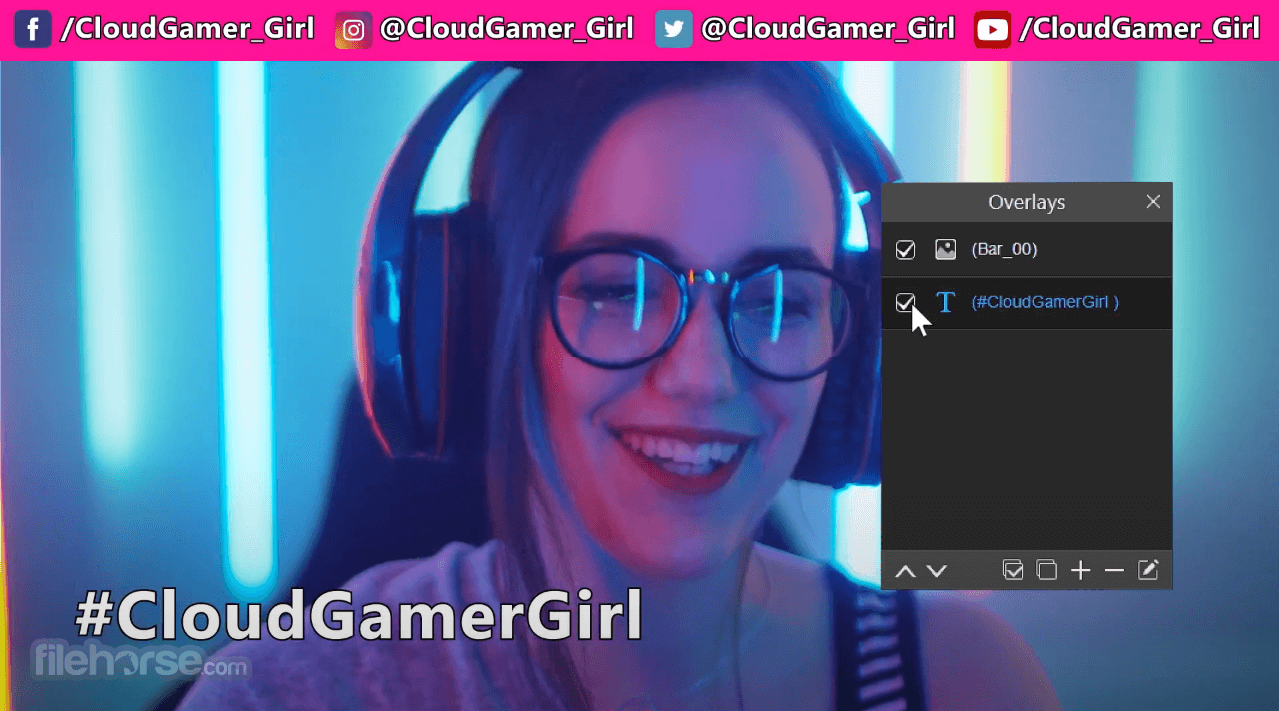
Real-Time Video Effects: Includes augmented reality (AR) effects, background removal, and overlays to personalize your videos.
Beauty Tools: Enhancements like skin smoothing, blemish removal, and face reshaping for live or recorded sessions.
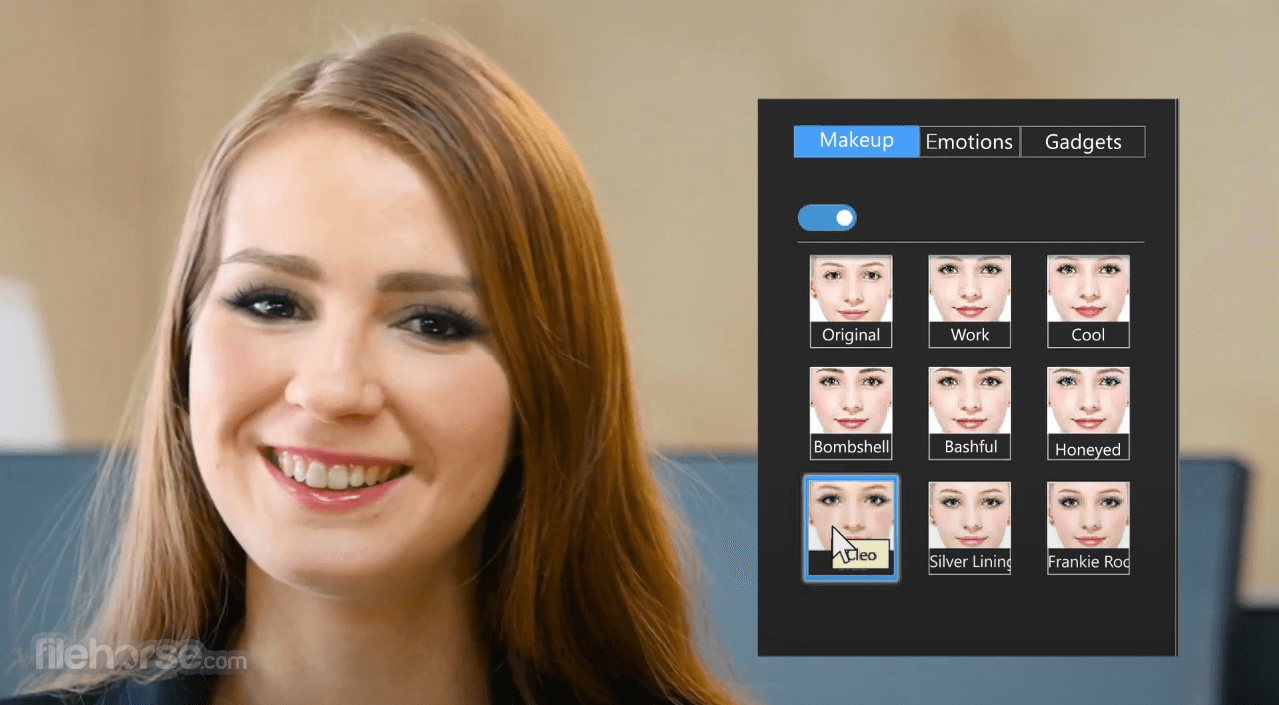
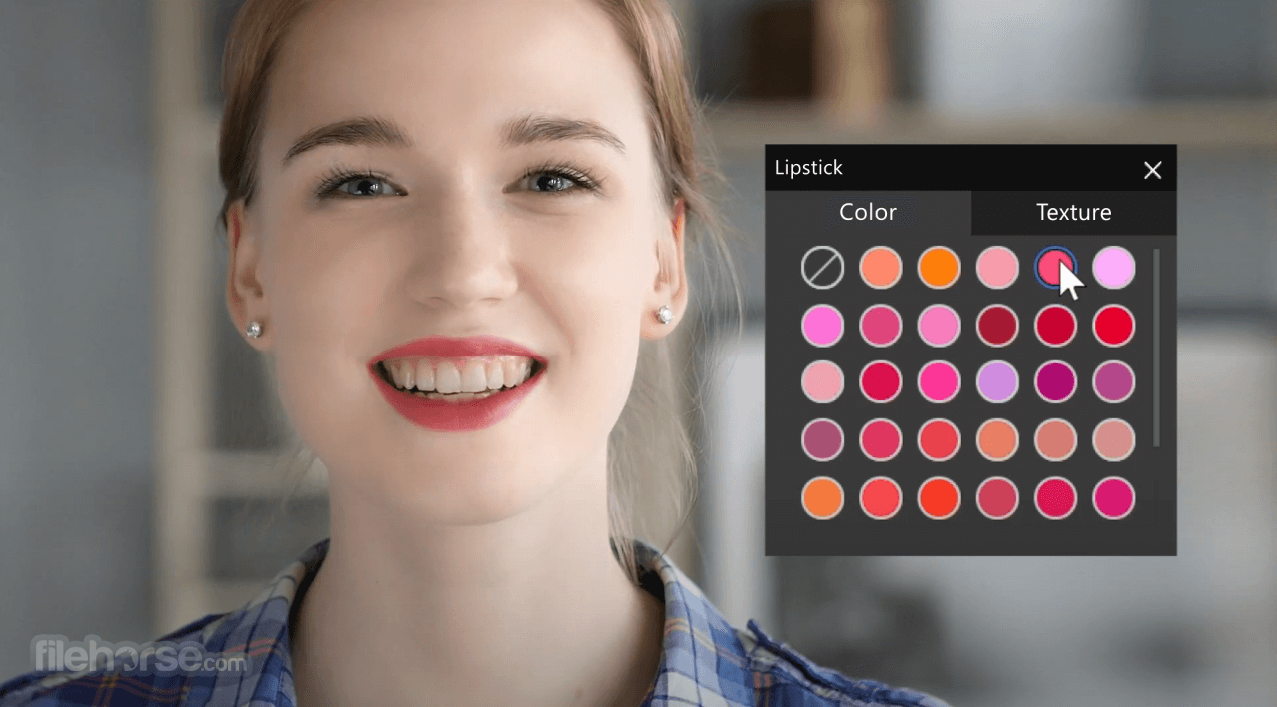
Virtual Makeup: Offers a range of virtual makeup styles, customizable colors, and effects for a polished appearance.
Background Customization: Enables background blur, replacement, or chroma key effects for immersive video environments.
Presentation Tools: Integrated screen sharing, annotation tools, and PowerPoint presentation integration, ideal for webinars or meetings.
Recording and Editing: High-definition video recording with built-in editing tools to trim and enhance recorded content.
Compatibility: Seamless integration with popular video conferencing platforms like Zoom and Google Meet.
User Interface
Sidebar Menus: Easily accessible tabs for effects, beauty tools, and settings.
Preview Window: A live feed display for real-time adjustments and effect previews.
Quick Toolbar: Shortcuts to frequently used features like snapshots, recording, and screen sharing.
The interface’s responsive design ensures smooth performance, even when utilizing resource-intensive features like background replacement or AR effects.
Installation and SetupDownload: Visit the CyberLink website or FileHorse.com and download the latest version. Install: Run the installer and follow the on-screen prompts. Activate: Enter your license key or opt for the free trial version. Configuration: Connect your webcam and configure settings like resolution, frame rate, and preferred video effects. YouCam’s guided setup ensures compatibility with your webcam and video conferencing software.
How to Use
Can I use YouCam with my existing video conferencing software?
Yes, it integrates seamlessly with platforms like Zoom, Microsoft Teams, and Google Meet. Simply select YouCam as your camera source.
Does YouCam support virtual backgrounds without a green screen?
Yes, it offers AI-powered background replacement and blur effects without requiring a green screen.
Is YouCam suitable for live streaming?
Absolutely. It provides live streaming features with customizable overlays and AR effects, making it ideal for platforms like YouTube and Twitch.
Can I use YouCam on multiple devices?
The app licenses are typically device-specific, but CyberLink offers multi-device plans. Check your license terms for details.
Does YouCam work on Mac?
No, YouCam is currently only available for Windows. CyberLink’s website provides detailed system requirements.
Alternatives
ManyCam - Offers similar features like AR effects, virtual backgrounds, and streaming tools.
Snap Camera - Focused on filters and AR effects, suitable for casual users.
OBS Studio - A professional-grade tool for live streaming and recording, though less user-friendly for beginners.
XSplit VCam - Specializes in background removal and replacement for video calls.
Logitech Capture - Designed for Logitech webcams, with basic recording and streaming features.
Pricing
It offers flexible pricing options:
Free Trial: Limited access to features for 30 days.
Standard License: One-time purchase starting at $39.99.
Premium License: Includes advanced features like full beauty tools and unlimited AR effects, starting at $49.99.
Subscription Plans: Annual subscriptions available, starting at $4.99/month.
YouCam 10 Deluxe: Starting at $59.99/month.
System Requirements
Language Support
It stands out as a versatile webcam enhancement tool, suitable for both casual and professional use. Its blend of real-time effects, productivity tools, and beauty enhancements makes it an invaluable asset for video content creators, remote workers, and online presenters.
The FileHorse review team highly recommends this exceptional Live-Stream, Record & Enhance software.
While its lack of Mac compatibility and potential resource demands might deter some users, its affordable pricing and rich feature set ensure it’s a top contender in the webcam software market. For Windows users seeking to elevate their video interactions, YouCam is an excellent choice!
Note: 30-day trial version. Selected scenes/frames/particle effects/emotions only.
Download YouCam Latest Version Why is this app published on FileHorse? (More info)
In addition, it offers simple-to-use and efficient security tools, such as surveillance and face login. YouCam for PC lets you transform your virtual presence and always put your best face forward. Enjoy!
Highlights
Real-Time Video Effects Keep the Fun Going
Choose from over 200 fun and interesting effects that can be applied to your video chats and recording projects, with thousands more available for download on DirectorZone.
Make it Fancy with Frames and Scenes
Both frames and scenes let you blend the image from your webcam with another image effect. Use them not only to spice up your videos, but also to compose the perfect portrait, or an ultra-cool profile picture.
Liven Things up with Particles, Filters, & Distortions
The many entertaining effects available in the program include colorful interactive particles and many funhouse-like filter and distortion effects.
Emoticons & Gadgets Let You Express Yourself
Choose a face-tracking accessory that moves when you do, and then express yourself with hilarious animated emoticons. Emoticons can also be paired up with other effects for double the fun!
Get Creative with the Photo Editing Workspace
Enhance your webcam photos using a range of brush sizes and colors, or try freestyle drawing using your fingers on your touchscreen. Photo presets let you easily and quickly adjust the mood and artistic feel of your pictures. Rotate and crop webcam photos to extract the best parts for sharing.
Perfect Profile Pics with New Face Beautification Tools
When you are editing your webcam pictures, the software’s facial recognition technology and a suite of beautifying tools allow you to touch up your portraits, removing imperfections and making subtle enhancements.
Automatic Smart Video Enhancements
CyberLink’s proprietary TrueTheater™ technology automatically adjusts lighting and sharpness. You can also take full control by manually adjusting noise reduction levels, contrast, and brightness.
Real-time Wrinkle Removal with New Skin Smoothener
Don’t let bad lighting make you look old or tired. When recording video or webcam chatting, the real-time skin smoother reduces visible blemishes and wrinkles in face shots.
Desktop Recording: Full HD and Higher Frame rate
The tool's desktop recording feature delivers better performance and higher frame rate video (30 fps) than ever before. You can capture the area around the mouse pointer, select a specific region to capture, or capture the desktop full screen.
Get to the point faster with PowerPoint Video Presentations
The app lets you integrate an existing PowerPoint file into a video chat or recording session. Choose from a variety of screen layouts, and freely draw on the presentation slide when you need to highlight key messages.
Features
Real-Time Video Effects: Includes augmented reality (AR) effects, background removal, and overlays to personalize your videos.
Beauty Tools: Enhancements like skin smoothing, blemish removal, and face reshaping for live or recorded sessions.
Virtual Makeup: Offers a range of virtual makeup styles, customizable colors, and effects for a polished appearance.
Background Customization: Enables background blur, replacement, or chroma key effects for immersive video environments.
Presentation Tools: Integrated screen sharing, annotation tools, and PowerPoint presentation integration, ideal for webinars or meetings.
Recording and Editing: High-definition video recording with built-in editing tools to trim and enhance recorded content.
Compatibility: Seamless integration with popular video conferencing platforms like Zoom and Google Meet.
User Interface
Sidebar Menus: Easily accessible tabs for effects, beauty tools, and settings.
Preview Window: A live feed display for real-time adjustments and effect previews.
Quick Toolbar: Shortcuts to frequently used features like snapshots, recording, and screen sharing.
The interface’s responsive design ensures smooth performance, even when utilizing resource-intensive features like background replacement or AR effects.
Installation and Setup
How to Use
- Launch the Application: Open the app and select your desired mode (Live Video, Capture, or Presentation).
- Choose Effects: Browse the effects library and apply filters, AR effects, or virtual makeup.
- Adjust Settings: Fine-tune video quality, lighting, and beauty enhancements.
- Integrate with Other Apps: Select this app as the default camera in your video conferencing or streaming software.
- Record or Stream: Start recording or live streaming with your customized settings and effects.
Can I use YouCam with my existing video conferencing software?
Yes, it integrates seamlessly with platforms like Zoom, Microsoft Teams, and Google Meet. Simply select YouCam as your camera source.
Does YouCam support virtual backgrounds without a green screen?
Yes, it offers AI-powered background replacement and blur effects without requiring a green screen.
Is YouCam suitable for live streaming?
Absolutely. It provides live streaming features with customizable overlays and AR effects, making it ideal for platforms like YouTube and Twitch.
Can I use YouCam on multiple devices?
The app licenses are typically device-specific, but CyberLink offers multi-device plans. Check your license terms for details.
Does YouCam work on Mac?
No, YouCam is currently only available for Windows. CyberLink’s website provides detailed system requirements.
Alternatives
ManyCam - Offers similar features like AR effects, virtual backgrounds, and streaming tools.
Snap Camera - Focused on filters and AR effects, suitable for casual users.
OBS Studio - A professional-grade tool for live streaming and recording, though less user-friendly for beginners.
XSplit VCam - Specializes in background removal and replacement for video calls.
Logitech Capture - Designed for Logitech webcams, with basic recording and streaming features.
Pricing
It offers flexible pricing options:
Free Trial: Limited access to features for 30 days.
Standard License: One-time purchase starting at $39.99.
Premium License: Includes advanced features like full beauty tools and unlimited AR effects, starting at $49.99.
Subscription Plans: Annual subscriptions available, starting at $4.99/month.
YouCam 10 Deluxe: Starting at $59.99/month.
System Requirements
- Operating System: Windows 11/10/8/7 (64-bit).
- Processor: Intel Core i5 or equivalent.
- RAM: 8GB
- Storage: 1GB of available space.
- Webcam: Compatible with most external and built-in webcams.
Language Support
- English
- French
- German
- Italian
- Spanish (European)
- Chinese Simplified
- Chinese Traditional
- Japanese
- Korean
- User-friendly interface.
- Extensive library of effects and beauty tools.
- Seamless integration with video conferencing and streaming platforms.
- High-quality video recording and editing.
- Affordable pricing options.
- Windows-only support limits accessibility for Mac users.
- Resource-intensive features may slow down older systems.
- Some advanced features are locked behind premium plans.
It stands out as a versatile webcam enhancement tool, suitable for both casual and professional use. Its blend of real-time effects, productivity tools, and beauty enhancements makes it an invaluable asset for video content creators, remote workers, and online presenters.
The FileHorse review team highly recommends this exceptional Live-Stream, Record & Enhance software.
While its lack of Mac compatibility and potential resource demands might deter some users, its affordable pricing and rich feature set ensure it’s a top contender in the webcam software market. For Windows users seeking to elevate their video interactions, YouCam is an excellent choice!
Note: 30-day trial version. Selected scenes/frames/particle effects/emotions only.
Download YouCam Latest Version Why is this app published on FileHorse? (More info)
##
影片介紹
##
畫面截圖


- 2026-01-04 YouCam 365 1.1 MB
- 2023-12-27 YouCam 10.1.2717 352.85 MB
- 2023-03-03 YouCam 10.1.2130 353.51 MB
- 2020-03-26 YouCam 9.0.1029 301.46 MB
- 2019-06-15 YouCam 8.0.1708 291.69 MB
- 2018-06-28 YouCam 7.0.4129 336.37 MB
- 2017-05-25 YouCam 7.0.0623 311.52 MB