⚠ 這是歷史版本頁面 — 查看 Adobe DNG Converter 最新版本 →

- 目前版本18.4.1
- 更新日期2026-07-10
- 檔案大小1.7 GB
- 檔案名稱AdobeDNGConverter_x64_18_4_1.exe
- 作業系統Windows 10 (32-bit) / Windows 10 (64-bit) / Windows 11
- 支援語系English
- 授權型式免費軟體
- 開發商 Adobe Inc.
- 軟體分類Windows 軟體 / 影像設計
##
編輯短評
Adobe DNG Converter 是 Adobe 官方提供的免費轉檔工具,核心功能是將超過六百款相機的專屬 RAW 檔,轉換成開放標準的 DNG 格式。對攝影師來說,不同相機的 RAW 檔格式各異,長期保存或跨軟體使用時容易遇到相容性問題,而 DNG 正是為了解決這個痛點而生。這款工具本身沒有複雜的編輯功能,就是專注把 RAW 轉成 DNG,介面簡潔,操作直覺。開發商 Adobe 持續維護,近一年更新相當頻繁,在同分類軟體中屬於中段班,評價人數不多但整體評價中等偏上。
這套工具適合手邊有多台不同品牌相機、或希望將 RAW 檔案統一格式以便長期歸檔的攝影愛好者。當你擔心舊相機的 RAW 格式未來可能不被支援,或想在不同軟體間流暢切換工作流程時,DNG 轉檔就是一個務實的選擇。與功能完整的 Photoshop 相比,它只做轉檔這件事,但完全免費且不需訂閱,是輕量級的替代方案。需要注意的是,軟體介面僅提供英文,沒有中文版;不過操作流程單純,即使不熟悉英文也能順利上手。Windows 與 macOS 都有對應版本,下載前記得確認系統相容性。
##
翻譯排程處理中,以下暫以英文原文呈現
軟體介紹
Adobe DNG Converter is a free utility that converts files from more than 600 cameras to DNG, enables you to easily convert camera-specific raw files to a more universal DNG raw file.
Adobe DNG Converter is a powerful and essential utility software developed by Adobe Inc. Designed for both amateur and professional photographers, this PC software is an indispensable tool for converting raw image files from a wide range of digital cameras into Adobe's Digital Negative (DNG) format.
DNG is an open standard image format that preserves the raw data of your photos, ensuring consistent image quality and enabling long-term archival and compatibility with Adobe's Creative Cloud suite and other image editing software.
Digital Negative was developed to address the lack of an open standard for the proprietary and unique raw files created by each digital camera. DNG allows photographers to archive their raw camera files in a single format for easy cataloging and access in the future.
With the format specification freely available, any developer can build software that supports and takes advantage of DNG. For more information, visit the Digital Negative page. Download and install DNG Converter by Adobe today!
Hundreds of software manufacturers such as Apple and Google have developed support for DNG. Respected camera manufacturers such as Leica, Casio, Ricoh, Samsung, and Pentax have introduced cameras that provide direct DNG support.
Support for the following cameras has been added. Visit the Camera Raw page for a complete list of supported cameras.
Highlights
For Photographers:
Universal Compatibility: It supports a vast array of camera models, ensuring compatibility with most popular camera brands, including Canon, Nikon, Sony, Fujifilm, and many more.
Preservation of Raw Data: When you convert your raw image files to DNG format, the software retains all the original image data, including metadata, color profiles, and more. This ensures that you have maximum flexibility when editing your photos.
Enhanced Editing: DNG files offer improved editing capabilities, such as better noise reduction, highlight recovery, and white balance adjustments when compared to proprietary raw formats.
Long-term Archiving: DNG is an open standard, which means your photos will remain accessible and editable for years to come, even if your camera's native raw format becomes obsolete.
Batch Processing: It allows you to convert multiple raw files simultaneously, streamlining your workflow and saving you valuable time.
Integration: Seamlessly integrates with Adobe Creative Cloud applications like Photoshop, Lightroom, and Bridge, ensuring a smooth editing experience.
User Interface
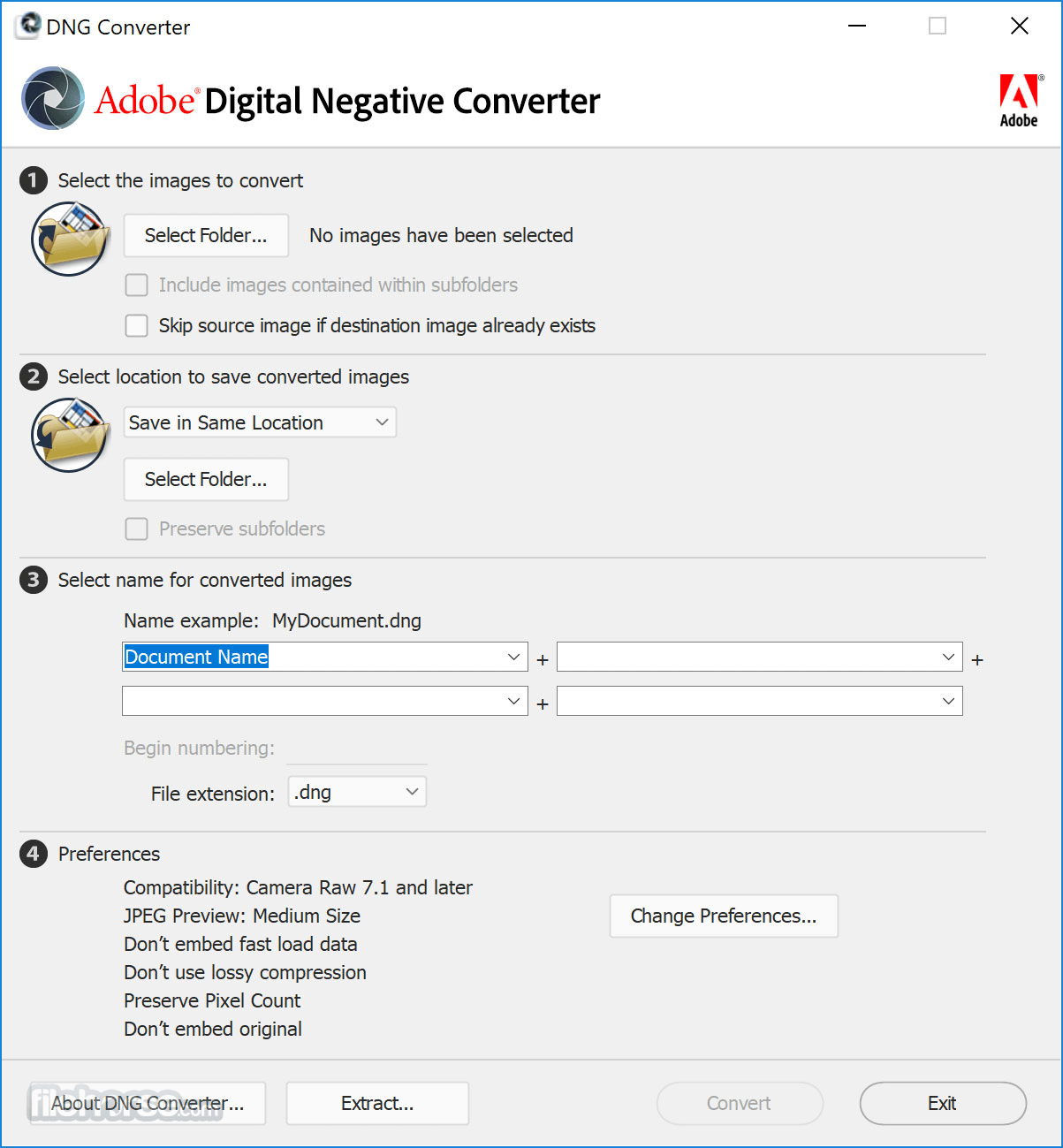
It features a user-friendly interface with a straightforward design. Upon launching the application, users are presented with a clean and intuitive window.
The software guides you through the conversion process, making it accessible for both beginners and experienced photographers. The main window provides options for selecting the source folder containing raw files and the destination folder for the converted DNG files.
Overall, the user interface is well-organized and easy to navigate.
Installation and Setup
What is the benefit of converting my raw files to DNG format?
Converting raw files to DNG format preserves the original image data, ensuring long-term compatibility and improved editing capabilities in Adobe software.
Can I convert multiple raw files at once?
Yes, it supports batch processing, allowing you to convert multiple raw files simultaneously.
Is Adobe DNG Converter compatible with my camera model?
It supports a wide range of camera models. Check Adobe's official website for a list of supported cameras.
Does converting to DNG format affect image quality?
No, converting to DNG format does not degrade image quality. It preserves the original raw data.
Is Adobe DNG Converter a free tool?
Yes, Adobe DNG Converter is available for free, making it accessible to all photographers.
Alternatives
Adobe Lightroom: Adobe's own Lightroom software includes raw file conversion capabilities and offers extensive photo editing features.
Capture One: Capture One is a professional-grade raw image processing and editing software with its own conversion tools.
DXO PhotoLab: DXO PhotoLab offers advanced raw conversion and photo editing capabilities, making it a solid choice for photographers.
RawTherapee: RawTherapee is a free and open-source raw image processing software that provides conversion to DNG and extensive editing options.
Pricing
The program is available for FREE, making it an attractive option for photographers looking for a reliable raw file conversion tool without additional costs.
System Requirements
Adobe DNG Converter is an essential utility for photographers who want to preserve their raw image files in a future-proof and widely compatible format. Its ease of use, wide camera compatibility, and integration with Adobe's creative suite make it a valuable addition to any photographer's toolkit.
While it lacks advanced editing features found in dedicated photo editing software, its primary function of converting raw files to DNG is executed flawlessly. Best of all, it's available for free, making it a must-have for photographers seeking efficient and reliable raw file conversion.
Also Available: Download Adobe DNG Converter for Mac
Download Adobe DNG Converter Latest Version Why is this app published on FileHorse? (More info)
Adobe DNG Converter is a powerful and essential utility software developed by Adobe Inc. Designed for both amateur and professional photographers, this PC software is an indispensable tool for converting raw image files from a wide range of digital cameras into Adobe's Digital Negative (DNG) format.
DNG is an open standard image format that preserves the raw data of your photos, ensuring consistent image quality and enabling long-term archival and compatibility with Adobe's Creative Cloud suite and other image editing software.
Digital Negative was developed to address the lack of an open standard for the proprietary and unique raw files created by each digital camera. DNG allows photographers to archive their raw camera files in a single format for easy cataloging and access in the future.
With the format specification freely available, any developer can build software that supports and takes advantage of DNG. For more information, visit the Digital Negative page. Download and install DNG Converter by Adobe today!
Hundreds of software manufacturers such as Apple and Google have developed support for DNG. Respected camera manufacturers such as Leica, Casio, Ricoh, Samsung, and Pentax have introduced cameras that provide direct DNG support.
Support for the following cameras has been added. Visit the Camera Raw page for a complete list of supported cameras.
Highlights
For Photographers:
- The DNG format enhances confidence in long-term archival preservation, as it ensures future compatibility with digital imaging software for opening raw files.
- Utilizing a single raw processing solution streamlines workflow efficiency when working with raw files from various camera models and manufacturers.
- The publicly documented and easily accessible specification facilitates its adoption by camera manufacturers, making it adaptable to technological advancements.
- DNG eliminates potential barriers to the adoption of new camera models, as it offers immediate support for raw files from these new devices in applications like Photoshop.
- Implementing the DNG format results in research and development cost savings by reducing the necessity to create new formats and simplifying camera testing.
- The common format grants better control over the quality of raw file conversions by third-party applications.
- The specification also allows the inclusion of private metadata in DNG files, enabling product differentiation.
Universal Compatibility: It supports a vast array of camera models, ensuring compatibility with most popular camera brands, including Canon, Nikon, Sony, Fujifilm, and many more.
Preservation of Raw Data: When you convert your raw image files to DNG format, the software retains all the original image data, including metadata, color profiles, and more. This ensures that you have maximum flexibility when editing your photos.
Enhanced Editing: DNG files offer improved editing capabilities, such as better noise reduction, highlight recovery, and white balance adjustments when compared to proprietary raw formats.
Long-term Archiving: DNG is an open standard, which means your photos will remain accessible and editable for years to come, even if your camera's native raw format becomes obsolete.
Batch Processing: It allows you to convert multiple raw files simultaneously, streamlining your workflow and saving you valuable time.
Integration: Seamlessly integrates with Adobe Creative Cloud applications like Photoshop, Lightroom, and Bridge, ensuring a smooth editing experience.
User Interface
It features a user-friendly interface with a straightforward design. Upon launching the application, users are presented with a clean and intuitive window.
The software guides you through the conversion process, making it accessible for both beginners and experienced photographers. The main window provides options for selecting the source folder containing raw files and the destination folder for the converted DNG files.
Overall, the user interface is well-organized and easy to navigate.
Installation and Setup
- Visit the program website and locate the official download page.
- Download the software package compatible with your operating system (Windows or macOS).
- Run the installer and follow the on-screen instructions.
- Once installation is complete, launch the app.
- The setup process is user-friendly and should take just a few minutes to complete.
- Open the application.
- Select the source folder containing your raw image files.
- Choose the destination folder where you want to save the converted DNG files.
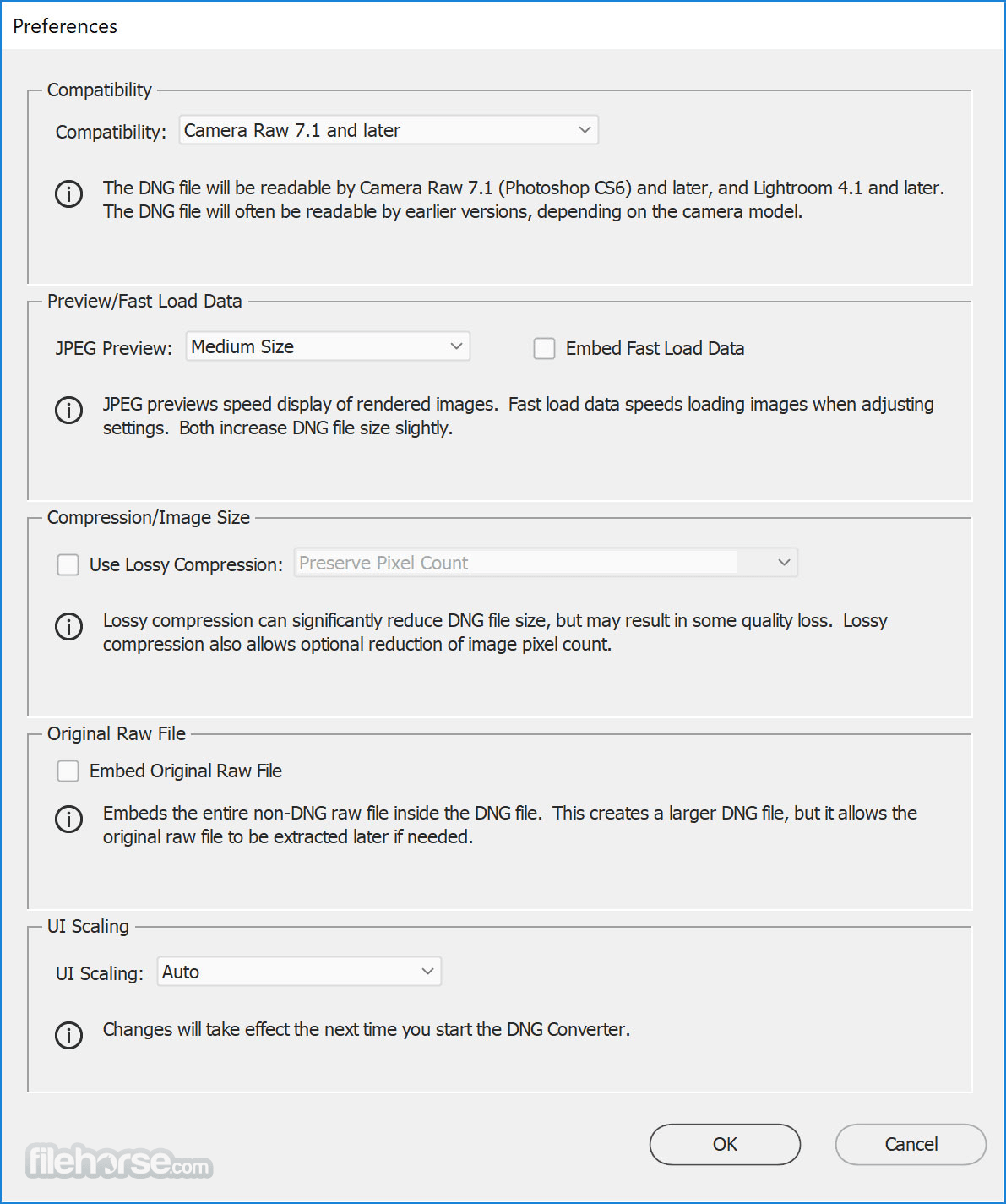
- Configure any additional settings, such as renaming options or compatibility settings.
- Click the "Convert" button to start the conversion process.
- It will then process your raw files and create DNG copies in the specified destination folder.
What is the benefit of converting my raw files to DNG format?
Converting raw files to DNG format preserves the original image data, ensuring long-term compatibility and improved editing capabilities in Adobe software.
Can I convert multiple raw files at once?
Yes, it supports batch processing, allowing you to convert multiple raw files simultaneously.
Is Adobe DNG Converter compatible with my camera model?
It supports a wide range of camera models. Check Adobe's official website for a list of supported cameras.
Does converting to DNG format affect image quality?
No, converting to DNG format does not degrade image quality. It preserves the original raw data.
Is Adobe DNG Converter a free tool?
Yes, Adobe DNG Converter is available for free, making it accessible to all photographers.
Alternatives
Adobe Lightroom: Adobe's own Lightroom software includes raw file conversion capabilities and offers extensive photo editing features.
Capture One: Capture One is a professional-grade raw image processing and editing software with its own conversion tools.
DXO PhotoLab: DXO PhotoLab offers advanced raw conversion and photo editing capabilities, making it a solid choice for photographers.
RawTherapee: RawTherapee is a free and open-source raw image processing software that provides conversion to DNG and extensive editing options.
Pricing
The program is available for FREE, making it an attractive option for photographers looking for a reliable raw file conversion tool without additional costs.
System Requirements
- Windows 11/10/8/7
- Intel or AMD processor (64-bit)
- 2GB of RAM (8GB recommended)
- 1GB of available hard-disk space
- 1024x768 screen resolution
- Free to use.
- Wide compatibility with various camera models.
- Preserves original raw data.
- Seamless integration with Adobe Creative Cloud.
- Batch processing for efficiency.
- Long-term archival benefits.
- Limited to raw file conversion and lacks advanced editing features.
- May not be suitable for users who don't use Adobe software.
Adobe DNG Converter is an essential utility for photographers who want to preserve their raw image files in a future-proof and widely compatible format. Its ease of use, wide camera compatibility, and integration with Adobe's creative suite make it a valuable addition to any photographer's toolkit.
While it lacks advanced editing features found in dedicated photo editing software, its primary function of converting raw files to DNG is executed flawlessly. Best of all, it's available for free, making it a must-have for photographers seeking efficient and reliable raw file conversion.
Also Available: Download Adobe DNG Converter for Mac
Download Adobe DNG Converter Latest Version Why is this app published on FileHorse? (More info)
##
畫面截圖
- 2026-08-05 Adobe DNG Converter 18.5 1.7 GB
- 2026-07-10 Adobe DNG Converter 18.4.1 1.7 GB
- 2026-06-22 Adobe DNG Converter 18.4 1.7 GB
- 2026-06-04 Adobe DNG Converter 18.3.2 1.7 GB
- 2026-05-20 Adobe DNG Converter 18.3.1 1.7 GB
- 2026-04-24 Adobe DNG Converter 18.3 1.7 GB
- 2026-03-14 Adobe DNG Converter 18.2.2 1.7 GB
- 2026-02-20 Adobe DNG Converter 18.2 1.7 GB