⚠ 這是歷史版本頁面 — 查看 CrystalDiskMark 最新版本 →

CrystalDiskMark 9.0.0
v 9.0.0
Windows
免費軟體
7.82/10 (101)
- 目前版本9.0.0
- 更新日期2025-06-16
- 檔案大小9.11 MB
- 檔案名稱CrystalDiskMark9_0_0Ads.exe
- 作業系統Windows 7 / Windows 8 / Windows 10 / Windows 11
- 支援語系English
- 授權型式免費軟體
- 開發商 Hiyohiyo (Crystal Dew World)
- 軟體分類Windows 軟體 / 系統優化
##
編輯短評
CrystalDiskMark 是 Windows 平台上相當知名的磁碟效能測試工具,主要用來測量傳統硬碟、固態硬碟(SSD)及其他儲存裝置的讀寫速度。它提供循序與隨機讀寫測試,並內建多種測試模式(如 Peak、Real World、Demo),讓使用者能依需求切換不同情境來評估儲存效能。這套軟體由 Hiyohiyo(Crystal Dew World)開發,體積輕巧、操作直覺,在同類工具中屬於熱門選擇,且長期持續維護,更新頻率穩定。
這套工具適合需要驗證儲存裝置實際效能的使用者,例如剛購入新硬碟或 SSD 想確認跑分是否正常,或是想比較不同裝置之間的讀寫差異。與 Rufus、Glary Utilities 等系統工具相比,CrystalDiskMark 專注於磁碟效能測試,功能單一但深入,沒有多餘的系統優化或管理功能。軟體為免費授權,僅支援 Windows 平台,介面目前以英文為主,但操作流程簡單,即使不熟悉英文也能快速上手。若需要更貼近日常使用情境的測試結果,可搭配 Real World 模式參考。
##
翻譯排程處理中,以下暫以英文原文呈現
軟體介紹
CrystalDiskMark is a popular disk benchmark utility for Windows that allows users to measure the performance of their hard drives, solid-state drives (SSDs), and other storage devices.
Main Features
It features a simple and intuitive user interface, with clearly labeled options and minimalistic design. Users can easily navigate through the software and initiate benchmark tests with just a few clicks.
Installation and Setup
Installing this program is straightforward and hassle-free. Users can download the installer from the official website or trusted sources, and follow the on-screen instructions to complete the installation process. Alternatively, the portable version can be directly extracted and run without installation.
How to Use
Can CrystalDiskMark be used to benchmark both HDDs and SSDs?
Yes, it supports benchmarking both hard disk drives (HDDs) and solid-state drives (SSDs), providing valuable performance insights for various types of storage media.
Does CrystalDiskMark support RAID configurations?
Yes, it can be used to benchmark RAID configurations, allowing users to assess the performance of their RAID arrays.
Is CrystalDiskMark compatible with macOS or Linux?
No, the tool is currently only available for Windows operating systems.
What is the difference between the installer and portable versions of CrystalDiskMark?
The installer version requires installation on the system, whereas the portable version can be run directly from a USB drive without installation, offering greater flexibility for users.
Can CrystalDiskMark be used for stress testing storage devices?
While the software primarily focuses on benchmarking storage performance, it can also be used as a basic tool for stress testing storage devices by running multiple consecutive tests.
Alternatives
HD Tune Pro: HD Tune is a comprehensive disk utility that includes benchmarking, health monitoring, and error scanning functionalities, providing a holistic approach to disk management.
ATTO Disk Benchmark: Similar to this app, ATTO Disk Benchmark is another popular disk benchmarking tool that offers detailed insights into storage performance.
AS SSD Benchmark: AS SSD Benchmark is specifically tailored for SSD benchmarking, offering specialized tests to evaluate SSD performance and endurance.
Pricing
The tool is available for FREE, making it an attractive option for users seeking a simple yet effective disk benchmarking solution.
System Requirements
The program is compatible with Windows operating systems including Windows 7, 8, 10 or 11. The software has minimal system requirements and can run on most modern PC configurations.
PROS
CrystalDiskMark is a versatile and user-friendly disk benchmarking utility that provides valuable insights into the performance of storage devices. With its simple interface, customizable test parameters, and detailed results, it serves as an essential tool for users looking to evaluate and optimize their system's storage performance.
While it may lack some advanced features found in enterprise-grade benchmarking tools, its ease of use and free availability make it a preferred choice for both casual users and enthusiasts alike.
Also Available: Download CrystalDiskMark Portable
Download CrystalDiskMark Latest Version Why is this app published on FileHorse? (More info)
- Measure Sequential and Random Performance (Read/Write/Mix)
- Various measure mode (Peak/Real World/Demo)
- Many languages support
- Themes
Main Features
- Multiple Test Modes: It offers various test modes including sequential and random read/write tests, allowing users to evaluate different aspects of their storage device's performance.
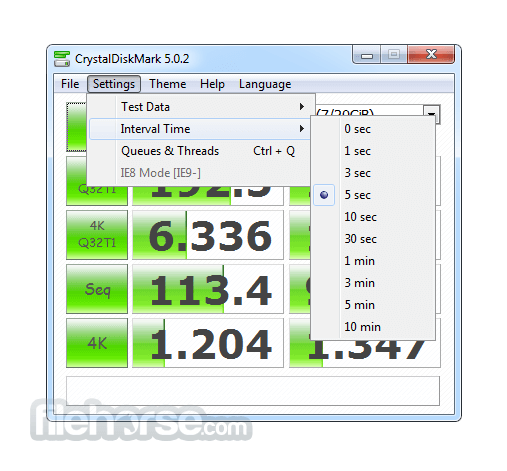
- Customizable Parameters: Users can customize test parameters such as test size, test count, and drive selection to tailor the benchmark according to their specific requirements.
- Detailed Results: The software provides detailed results including sequential and random read/write speeds, as well as input/output operations per second (IOPS), enabling users to accurately assess their storage device's performance.
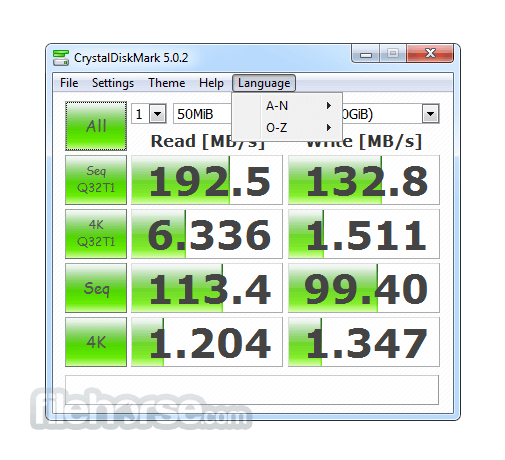
- Multi-Language Support: It supports multiple languages, enhancing accessibility for users worldwide.
- Portable Version: In addition to the installer version, it also offers a portable version that can be run directly from a USB drive without installation, making it convenient for on-the-go use.
- it may shorten SSD/USB Memory life.
- Benchmark result is NOT compatible between different major version.
- “MB/s” means 1,000,000 byte/sec.
- The result depends on Test File Size, Test File Position, Fragmentation, IDE(PATA)/SATA/RAID/SCSI/NVMe controller and CPU speed etc…
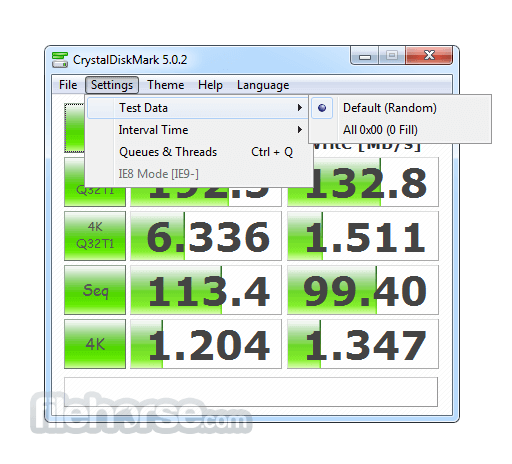
- A part of SSDs depend on test data(random, 0fill).
- If you execute CrystalDiskMark with Administrator rights, it does not show Network Drive. If you would like to measure Network Drive, please run as w/o Administrator rights. UAC Dialog: YES -> w/ Administrator Rights, NO -> w/o Administrator Rights
- 1GiB = 1024MiB = 1024x1024KiB = 1024x1024x1024B
- 1GB = 1000MB = 1000x1000KB = 1000x1000x1000B
It features a simple and intuitive user interface, with clearly labeled options and minimalistic design. Users can easily navigate through the software and initiate benchmark tests with just a few clicks.
Installation and Setup
Installing this program is straightforward and hassle-free. Users can download the installer from the official website or trusted sources, and follow the on-screen instructions to complete the installation process. Alternatively, the portable version can be directly extracted and run without installation.
How to Use
- Launch the app after installation or extraction.
- Select the target drive from the drop-down menu.
- Choose the desired test parameters or stick with the default settings.
- Click on the "All" button to perform a complete benchmark test.
- Once the test is completed, review the results to evaluate the storage device's performance.
Can CrystalDiskMark be used to benchmark both HDDs and SSDs?
Yes, it supports benchmarking both hard disk drives (HDDs) and solid-state drives (SSDs), providing valuable performance insights for various types of storage media.
Does CrystalDiskMark support RAID configurations?
Yes, it can be used to benchmark RAID configurations, allowing users to assess the performance of their RAID arrays.
Is CrystalDiskMark compatible with macOS or Linux?
No, the tool is currently only available for Windows operating systems.
What is the difference between the installer and portable versions of CrystalDiskMark?
The installer version requires installation on the system, whereas the portable version can be run directly from a USB drive without installation, offering greater flexibility for users.
Can CrystalDiskMark be used for stress testing storage devices?
While the software primarily focuses on benchmarking storage performance, it can also be used as a basic tool for stress testing storage devices by running multiple consecutive tests.
Alternatives
HD Tune Pro: HD Tune is a comprehensive disk utility that includes benchmarking, health monitoring, and error scanning functionalities, providing a holistic approach to disk management.
ATTO Disk Benchmark: Similar to this app, ATTO Disk Benchmark is another popular disk benchmarking tool that offers detailed insights into storage performance.
AS SSD Benchmark: AS SSD Benchmark is specifically tailored for SSD benchmarking, offering specialized tests to evaluate SSD performance and endurance.
Pricing
The tool is available for FREE, making it an attractive option for users seeking a simple yet effective disk benchmarking solution.
System Requirements
The program is compatible with Windows operating systems including Windows 7, 8, 10 or 11. The software has minimal system requirements and can run on most modern PC configurations.
PROS
- Lightweight and easy-to-use interface
- Multiple test modes for comprehensive benchmarking
- Detailed results for accurate performance evaluation
- Portable version for on-the-go use
- Free to download and use
- Limited platform support (Windows only)
- Lacks advanced features found in enterprise-grade benchmarking tools
CrystalDiskMark is a versatile and user-friendly disk benchmarking utility that provides valuable insights into the performance of storage devices. With its simple interface, customizable test parameters, and detailed results, it serves as an essential tool for users looking to evaluate and optimize their system's storage performance.
While it may lack some advanced features found in enterprise-grade benchmarking tools, its ease of use and free availability make it a preferred choice for both casual users and enthusiasts alike.
Also Available: Download CrystalDiskMark Portable
Download CrystalDiskMark Latest Version Why is this app published on FileHorse? (More info)
##
畫面截圖
- 2026-05-24 CrystalDiskMark 9.0.3 4.31 MB
- 2026-02-17 CrystalDiskMark 9.0.2 9.35 MB
- 2025-06-20 CrystalDiskMark 9.0.1 9.36 MB
- 2025-06-16 CrystalDiskMark 9.0.0 9.11 MB
- 2024-11-21 CrystalDiskMark 8.0.6 4.02 MB
- 2024-02-24 CrystalDiskMark 8.0.5 4.01 MB
- 2022-10-30 CrystalDiskMark 8.0.4c 4 MB
- 2022-07-18 CrystalDiskMark 8.0.4b 4 MB