
- 目前版本6.1.123
- 更新日期2026-06-18
- 作業系統Windows XP / Vista / Windows 7 / Windows 8 / Windows 10
- 支援語系English
- 授權型式未分類
- 開發商 Devart
- 軟體分類Windows 軟體 / 開發者工具
##
翻譯排程處理中,以下暫以英文原文呈現
軟體介紹
dotConnect for SQL Server, formerly known as SQLDirect .NET, is an enhanced data provider for SQL Server that builds on ADO.NET technology and SqlClient to present a complete solution for developing SQL Server-based database applications.
As part of the Devart database application development framework, this tool for SQL Server offers both high-performance native connectivity to SQL Server and a number of innovative development tools and technologies.
dotConnect for SQL Server introduces new approaches for designing application architecture, boosts productivity, and leverages database application implementation.
As part of the Devart database application development framework, this tool for SQL Server offers both high-performance native connectivity to SQL Server and a number of innovative development tools and technologies.
dotConnect for SQL Server introduces new approaches for designing application architecture, boosts productivity, and leverages database application implementation.
##
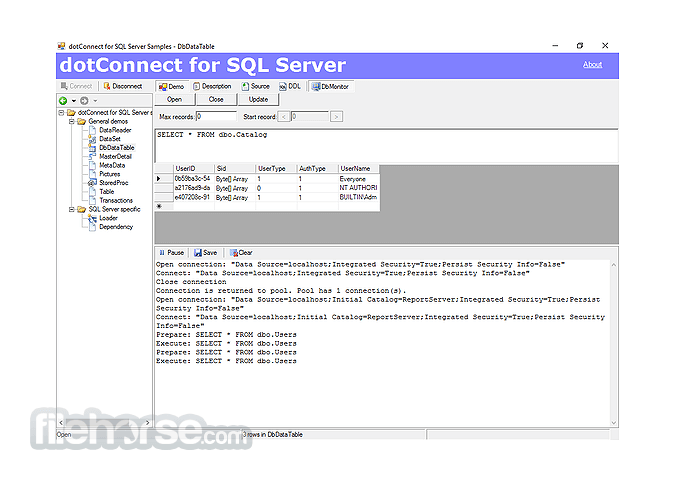
畫面截圖
##
更新日誌
6.1.123- Introduced compatibility with .NET 10.
- Added support for Visual Studio 2026.
- Enabled support for Visual Studio 2026 Insiders (version 18.3).
- Implemented trial activation functionality for product evaluation.
- Introduced license key–based activation for .NET Framework assemblies.
- Added a License Key parameter to the connection string for .NET Framework assemblies.
- Expanded capabilities with support for high-performance batch update operations.
By providing access to the most advanced database functionality, the software for SQL Server allows developers to harness the full capabilities of SQL Server and optimize their database applications. The software for SQL Server stands out as the set of components with the widest support of SQL Server functionality.
Optimized Code
The goal of dotConnect for SQL Server is to enable developers to write efficient and flexible database applications. The program for SQL Server assemblies is implemented using optimized code and advanced data access algorithms. Components undergo comprehensive performance tests and are designed to help you write thin and efficient product data access layers.
Database Application Development Extensions
The tool for SQL Server has a rich set of design-time tools that leverage the development process greatly. Particularly, there are convenient design-time component editors, wizards, and managers for typed SQL Server-specific components, a toolset for live data binding, cross-form components cooperation, and much more. This app for SQL Server integrates tightly with Visual Studio 2008 - 2017 and Delphi.
Both Connected and Disconnected Models
This app for SQL Server combines connected and disconnected data access models in a single SqlDataTable component, which allows you to design a more flexible application architecture and use the full power of data binding.
Comprehensive Support for ADO.NET Technology Features
The app for SQL Server supports new ADO.NET features and technologies as soon as they are released. This includes a base-class-based provider model, provider factories, connection string builder, metadata schemas, asynchronous commands, pooling enhancements, batch update support, provider-specific types, server enumeration, database change notification support, and so on. dot Connect for SQL Server will continue supporting the newest standards and innovations of the .NET Framework.
Features and Highlights
- Direct access to SQL Server within 100% managed code
- High performance
- Operates in both connected and disconnected models
- Powerful SQLDataTable component as an all-in-one table data access solution
- Auxiliary components for SQL scripts and bulk data transfer
- ASP.NET Provider Model support
- Extra data binding capabilities
- Cross-form components cooperation
- The ability of monitoring query execution
- Easy to deploy
- Supports the latest versions of SQL Server
- All SQL Server data types support
- Licensed royalty-free per developer, per team, or per site
- Open your development environment (e.g., Visual Studio)
- Configure a new database connection
- Enter SQL Server credentials and test the connection
- Use Entity Framework or direct SQL queries
- Develop and debug applications with database access
- Optimize queries using built-in tools
- Deploy your application with the configured database
What is dotConnect for SQL Server used for?
dotConnect for SQL Server is an enhanced ADO.NET data provider developed by Devart. It enables developers to build .NET applications that connect efficiently to Microsoft SQL Server databases, offering advanced ORM support, high-performance data access, and additional productivity tools beyond the standard Microsoft provider.
How is dotConnect different from the default SQL Server provider?
Compared to Microsoft’s built-in SQL Server provider, dotConnect offers extended features such as enhanced Entity Framework support, LINQ to SQL integration, advanced connection management, and performance optimizations. It also includes design-time tools for Visual Studio that simplify development workflows.
Does dotConnect support modern .NET versions?
Yes. dotConnect for SQL Server supports modern .NET frameworks, including .NET Core and .NET 5/6+ (depending on the current release). It is designed to integrate with contemporary development environments and enterprise-grade applications.
Is dotConnect suitable for enterprise applications?
Yes. dotConnect is widely used in enterprise environments that require reliable database connectivity, high performance, and advanced ORM features. It is suitable for business-critical systems where stability and optimization are priorities.
Is dotConnect for SQL Server still relevant in 2026?
Yes. In 2026, dotConnect remains relevant for organizations and developers seeking enhanced SQL Server connectivity in .NET ecosystems. Its value depends on project requirements, especially when advanced features or performance optimizations beyond the default provider are needed.
Pricign
- 1 Year - $219.95 + $50 Premium Support
- 2 Year - $319.95 + $70 Premium Support
- 3 Year - $399.95 + $80 Premium Support
- One-Year License – Includes free updates and full product support for one year.
- Perpetual License – One-time purchase that allows you to use the licensed version indefinitely (no subscription required).
- OEM License (For Companies) – Allows integration and redistribution of the software within your own application, including royalty-free distribution and unlimited installations.
System Requirements
- Windows 7, 8, 10, 11 (32-bit or 64-bit)
- .NET Framework 4.0 or higher
- Microsoft SQL Server 2005 or newer
- 1 GHz or faster processor
- 512 MB RAM or more
- 100 MB of available disk space
- Easy integration with Visual Studio
- Supports Entity Framework and LinqConnect
- High performance and optimized connectivity
- Secure and encrypted data transmission
- Comprehensive documentation and support
- Requires .NET Framework dependency
- Limited support for older SQL versions
- Can be complex for beginners
- Higher cost for premium features
- Occasional compatibility issues
Download dotConnect for SQL Server Latest Version Why is this app published on FileHorse? (More info)