
- 目前版本7.1.123
- 更新日期2026-06-18
- 作業系統Windows 7 64 / Windows 8 64 / Windows 10 64 / Windows 11
- 支援語系English
- 授權型式未分類
- 開發商 Devart
- 軟體分類Windows 軟體 / 開發者工具
##
翻譯排程處理中,以下暫以英文原文呈現
軟體介紹
dotConnect for SQLite is an enhanced ORM-enabled data provider for SQLite that builds on ADO.NET technology to present a complete solution for developing SQLite-based database applications.
With support for Entity Framework, NHibernate, and LinqConnect ORMs, it introduces new approaches for designing application architecture, boosts productivity, and leverages database applications.
With support for Entity Framework, NHibernate, and LinqConnect ORMs, it introduces new approaches for designing application architecture, boosts productivity, and leverages database applications.
##
畫面截圖
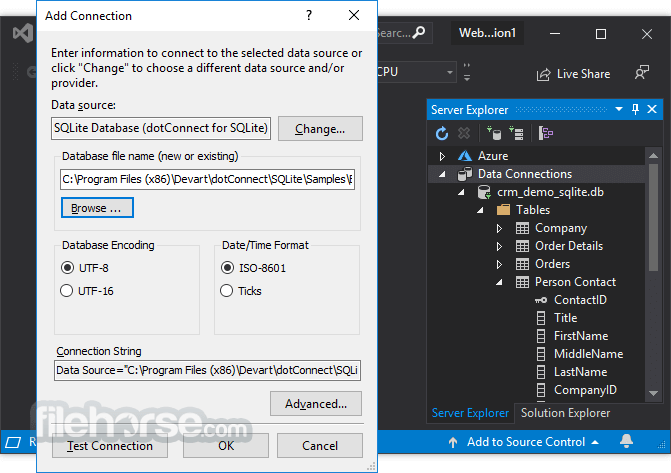
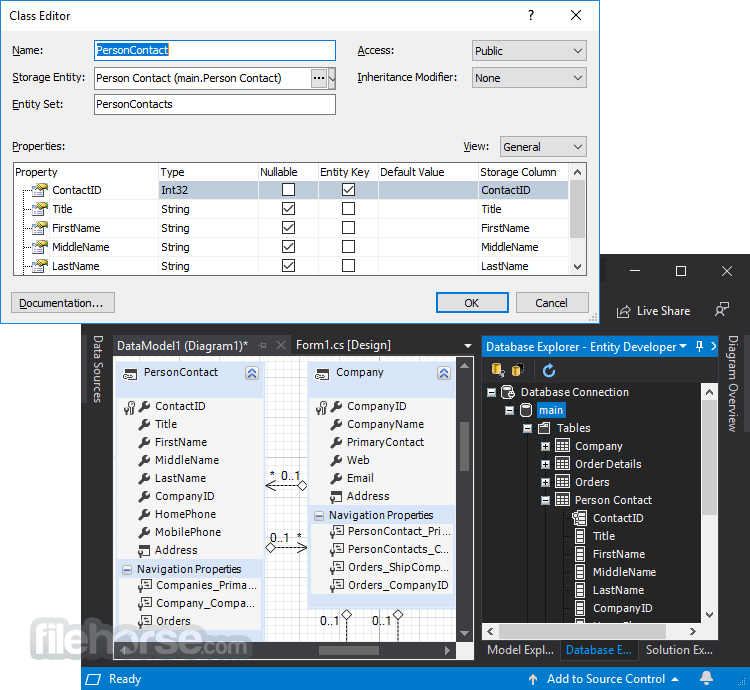
##
更新日誌
7.1.123- Added support for .NET 10.
- Enabled compatibility with Visual Studio 2026, including Visual Studio 2026 Insiders (v18.3).
- Introduced trial activation to simplify product evaluation.
- Implemented license key–based activation for .NET Framework assemblies, along with a new License Key connection string parameter.
- Added support for high-performance batch update operations.
- Introduced savepoint support in the SQLiteTransaction class.
- Extended compatibility with SQL Server Reporting Services 2017 (15), 2019 (16), and 2022 (17).
- Resolved an issue related to the TransactionScope class.
- Updated Entity Framework Core support to v9.0.11 (EF Core 9) and v8.0.22 (EF Core 8).
- Fixed comparison issues involving variables and literal values in Entity Framework Core 9.
- Addressed a Performance Profiler issue in Visual Studio 2022 and later.
- Resolved a licensing issue affecting dotConnect for SQLite Professional Edition when using LinqConnect functionality.
- Corrected a problem related to the EntitySet.ListChanged event.
dotConnect for SQLite offers both high-performance connectivity to the SQLite database and several innovative development tools and technologies. It supports a wide range of SQLite-specific features, such as user-defined functions, CEROD and SEE encryption extensions, support for enabling SQLite extensions with connection string parameters, etc.
RAD Approach
dotConnect for SQLite provides a vast number of GUI tools that increase your productivity. It integrates into Visual Studio Server Explorer and other tools and provides advanced visual component editors to simplify component tweaking. DataSet tools, such as DataSet Wizard, DataSet Editor, and DataSet Manager, provide you with an easy way to create and edit typed and untyped DataSets.
ORM Solutions
The app for SQLite offers enhanced ORM support with a bundled visual designer for ORM models - Entity Developer. dot Connect for SQLite supports ADO.NET Entity Framework, NHibernate, and LinqConnect (formerly known as LINQ to SQLite) - our own ORM solution, closely compatible with Microsoft LINQ to SQL, while extending its functionality with its own features.
Features and Highlights
- General usability
- Real RAD for database applications
- Fully compliant with ADO.NET
- 100% managed code
- Highly usable design-time support
- Easy to deploy
- Compatibility
- Full support of the latest versions of SQLite
- Full support for x64 architecture
- Visual Studio .NET 2005 and 2008 support
- CodeGear RAD Studio 2007 support
- SQL Server 2005 Business Intelligence Solutions support
- SQLite technology support
- All SQLite data types support
- SQLiteDump component to store a database or its parts as a script and then restore it
- Performance
- High overall performance
- Intelligent fetch block size control
- Advanced connection pooling
- High-performance batch processing
- ADO.NET technology support
- Full support for ADO.NET Entity Framework
- Batch update support
- Extended metadata information retrieval
- Enhanced pooling control through the connection string
- Connection string builder
- Provider factory for generating key data access classes
- Asynchronous command execution
- Provider-specific types support
- Extended data access technologies and functionality
- Powerful SQLiteDataTable component for manipulating individual tables or query results
- Non-blocking mode allows fetching data asynchronously in the background
- On-demand data fetch for data-bound controls
- Paginal access tothe query result
- Server-side master-detail relation based on queries
- Support for Enterprise Library Data Access Application Block (DAAB)
- The object-oriented building of SELECT statements
- Extended warning and error information retrieval
- Extended interface for processing execution exceptions
- SQLiteDataAdapter.Fill method with sequential fetch support
- Ability to defer fetching of some columns in a resultset
- Named parameters support
- WinForms-specific features
- Flexible data binding with the DataLink component
- InterForm technology for cross-form components cooperation
- Global position synchronization within a data source
- ASP.NET-specific features
- ASP.NET data providers: Membership provider, Role provider, Session State provider, and Profile provider
- SQLiteDataSource web component
- SQLiteCacheDependency component to control Cache item dependencies in ASP.NET applications
- Script execution
- IntelliSense descriptions for SQLite classes
- Syntax highlighting in design-time editors
- TableMappings editor
- Convenient instant data preview and management in design time
- Product clarity
- Complete documentation sets integrated into Visual Studio .NET and Borland Delphi
- Integration with Visual Studio and MSDN helps collections
- Documentation available as a standalone chm file
- A large number of helpful demos in C#, VB, C++, and Delphi
How to Use
- Download and install dotConnect for SQLite
- Configure the SQLite connection in your project
- Use the Visual Studio integration for database tasks
- Execute SQL queries using the built-in tools
- Manage data with DataSet, Entity Framework, or LinqConnect
- Optimize queries with advanced caching features
- Debug database connections and troubleshoot errors
- Deploy applications with embedded or server SQLite databases
What is dotConnect for SQLite used for?
dotConnect for SQLite is an enhanced ADO.NET data provider developed by Devart. It enables .NET applications to connect to SQLite databases efficiently while offering advanced ORM integration, performance optimizations, and design-time tools.
How does dotConnect for SQLite differ from the standard SQLite provider?
Compared to the default SQLite ADO.NET provider, dotConnect offers extended support for Entity Framework, LINQ to SQL, and advanced data access features. It also includes integrated tools for Visual Studio that simplify configuration and development workflows.
Does dotConnect support modern .NET versions?
Yes. dotConnect for SQLite supports modern .NET platforms, including .NET Core and current .NET releases, allowing developers to build cross-platform applications with SQLite databases.
Is dotConnect suitable for commercial or enterprise projects?
Yes. dotConnect is designed for both commercial and enterprise applications that require stable, optimized SQLite connectivity. It includes features such as connection pooling, performance tuning options, and professional-grade support.
Is dotConnect for SQLite still relevant in 2026?
Yes. In 2026, dotConnect remains relevant for developers who need enhanced SQLite integration within the .NET ecosystem. Its value is particularly evident in projects that require advanced ORM support, tooling integration, or optimized database access beyond basic functionality.
Pricing
- 1 Year - $269.95 + $60 Premium Support
- 2 Year - $389.95 + $80 Premium Support
- 3 Year - $489.95 + $100 Premium Support
- One-Year License – Includes free updates and full product support for one year.
- Perpetual License – One-time purchase that allows you to use the licensed version indefinitely (no subscription required).
- OEM License (For Companies) – Allows integration and redistribution of the software within your own application, including royalty-free distribution and unlimited installations.
System Requirements
- Windows 7, 8, 10, or 11 (32-bit or 64-bit)
- .NET Framework 4.5 or later
- At least 1 GHz processor
- Minimum 512 MB RAM (1 GB recommended)
- 50 MB free disk space
- Easy integration with Visual Studio
- Supports Entity Framework and LinqConnect
- High-performance data processing
- Secure and reliable database connectivity
- Comprehensive documentation and support
- Paid license required for full features
- Complex setup for beginners
- Limited support for some advanced SQLite features
- Performance overhead in large datasets
- Requires a .NET environment for full functionality
Download dotConnect for SQLite Latest Version Why is this app published on FileHorse? (More info)