⚠ 這是歷史版本頁面 — 查看 f.lux 最新版本 →

- 目前版本4.133
- 更新日期2024-02-21
- 檔案大小670.28 KB
- 檔案名稱flux-setup4.exe
- 作業系統Windows 7 / Windows 8 / Windows 10 / Windows 11
- 支援語系English
- 授權型式免費軟體
- 開發商 Michael Herf
- 軟體分類Windows 軟體 / 桌面強化
##
編輯短評
f.lux 是一款免費的 Windows 螢幕色溫調整工具,會根據一天當中的時間與所在位置,自動改變螢幕的色溫與亮度,讓夜間使用電腦時減少藍光刺激,有助於減輕眼睛疲勞並改善睡眠。它的最大特色是無需手動切換,只要設定好地理位置,就會依照日出日落規律調整,也提供細部自訂選項。這款軟體由 Michael Herf 開發,長期以來持續維護,但更新頻率不算高;在桌面強化同類工具中,它算是歷史悠久的老牌選擇,使用者評價中等,不算特別熱門,但有一定口碑。
如果你常在夜間工作、閱讀或追劇,f.lux 能讓螢幕光線更柔和,減少藍光對生理時鐘的干擾,特別適合熬夜族或睡前使用電腦的人。相較於其他螢幕調色工具,f.lux 的優勢在於免費且設定簡單,但介面僅提供英文,對不熟悉英文的使用者可能稍有門檻;另外它只支援 Windows 平台,且更新步調較慢,若需要更頻繁的調整或進階功能,可以考慮其他替代方案。整體而言,它是一款輕巧、實用的免費小工具,值得一試。
##
翻譯排程處理中,以下暫以英文原文呈現
軟體介紹
f.lux is a free program for Windows designed to automatically adjust the color temperature of your computer screen based on the time of day.
It helps reduce eye strain, improve sleep quality, and create a more comfortable viewing experience by shifting the screen’s brightness and warmth according to natural daylight cycles.
The flux desktop app is particularly beneficial for users who work late at night, reducing exposure to blue light that can disrupt sleep patterns.
Key Features
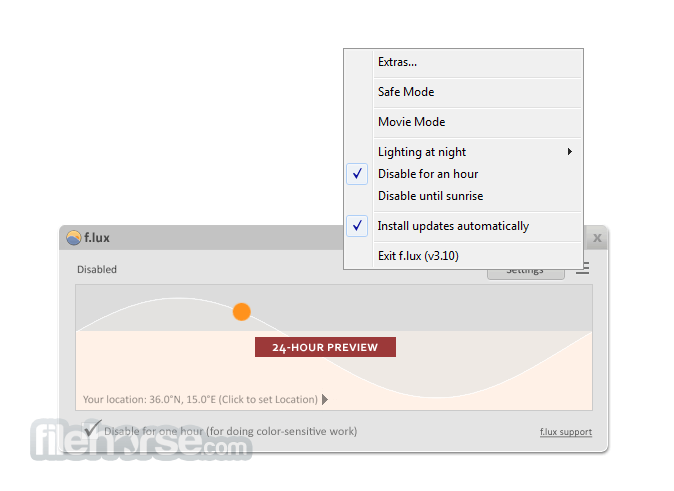
It has a minimalistic and straightforward interface. The main dashboard features a graph that visually represents color temperature changes throughout the day.
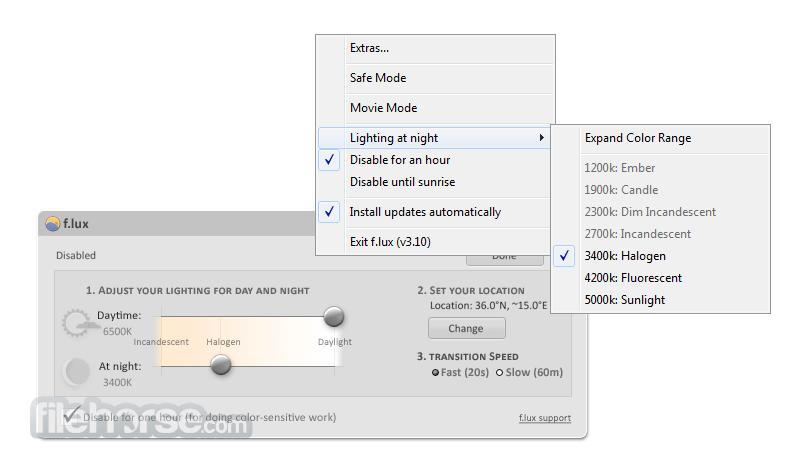
Users can easily adjust settings via sliders, toggle different modes, and configure advanced preferences with just a few clicks. The UI is clean, lightweight, and non-intrusive, running silently in the system tray after setup.
Installation and Setup
Can I disable f.lux for certain apps?
Yes, you can create an exclusion list by right-clicking the app icon in the system tray and selecting “Disable when using (app).”
Does f.lux affect gaming or video editing?
Yes, this small program alters screen colors, which may interfere with tasks requiring color accuracy. Use “Disable for an Hour” or “Gaming Mode” to temporarily turn it off.
Is f.lux free?
Yes, this program is completely FREE for personal use.
Does f.lux reduce blue light completely?
No, it minimizes blue light but does not eliminate it. For full protection, consider blue light-filtering glasses.
Can f.lux improve sleep quality?
Yes, by reducing blue light exposure at night, it can help maintain a healthier sleep cycle.
Alternatives
Iris – Advanced eye-care software with more customization options.
CareUEyes – Includes screen dimming and blue light filtering.
Pricing
This program is completely free for personal use. There are no premium or paid versions, making it an excellent choice for users looking for a free screen-adjustment tool.
System Requirements
f.lux is an essential tool for anyone who spends long hours in front of a screen. Intelligently adjusting screen color temperature throughout the day, it helps reduce eye strain and improve sleep quality.
While it may not be suitable for professionals working with color-sensitive tasks, it remains a must-have for general users who want a more comfortable viewing experience. Best of all, it's completely FREE, making it an easy recommendation for Windows users looking to minimize blue light exposure.
Also Available: Download f.lux for Mac
Download f.lux Latest Version Why is this app published on FileHorse? (More info)
It helps reduce eye strain, improve sleep quality, and create a more comfortable viewing experience by shifting the screen’s brightness and warmth according to natural daylight cycles.
The flux desktop app is particularly beneficial for users who work late at night, reducing exposure to blue light that can disrupt sleep patterns.
Key Features
- Automatic Color Temperature Adjustment – Changes screen color based on time and location.
- Customizable Settings – Users can manually adjust brightness and color temperature.
- Presets for Different Environments – Includes modes like “Working Late,” “Movie Mode,” and “Darkroom Mode.”
- Sunset and Sunrise Detection – Adapts brightness based on local time.
- Sleep and Circadian Rhythm Support – Helps users maintain better sleep habits.
- Gaming Mode – Temporarily disables f.lux for color-sensitive tasks.
- Compatibility with Smart Lights – Works with Philips Hue and other smart lighting systems.
- Improved Snapdragon Compatibility: Added workarounds to improve support for Qualcomm Snapdragon systems (Adreno GPU), particularly with external monitors.
- Crash Fixes: Resolved multiple crashes that occurred when the app closed while a dialog box was still open.
- Per-Monitor Calibration Progress: Continued development on individual monitor calibration, improving multi-display color handling.
- Remote Desktop Fixes: Addressed issues affecting f.lux behavior during remote desktop sessions.
- New Colorspace Stability Testing: Introduced updated monitor colorspace code, currently undergoing stability testing before full activation.
It has a minimalistic and straightforward interface. The main dashboard features a graph that visually represents color temperature changes throughout the day.
Users can easily adjust settings via sliders, toggle different modes, and configure advanced preferences with just a few clicks. The UI is clean, lightweight, and non-intrusive, running silently in the system tray after setup.
Installation and Setup
- Download the latest version of this app from the official website or FileHorse.
- Run the installer and follow the on-screen instructions.
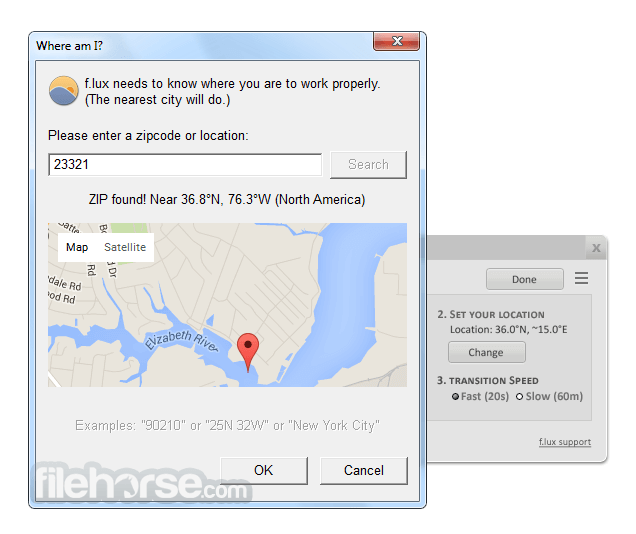
- After installation, enter your location (city or latitude/longitude) to allow f.lux to adjust lighting based on your local sunrise and sunset times.
- Adjust color settings using the slider to find a comfortable balance.
- Customize advanced settings if needed, such as disabling f.lux for specific apps.
- Adjust Temperature Manually – Use the slider to change screen warmth.
- Enable or Disable for Certain Apps – Exclude apps that require color accuracy, such as Photoshop.
- Switch Between Presets – Choose different modes based on activity.
- Turn Off Temporarily – Right-click the system tray icon and select “Disable for an Hour” if needed.
- Use Sleep Mode – Set up this app to reduce blue light before bedtime.
Can I disable f.lux for certain apps?
Yes, you can create an exclusion list by right-clicking the app icon in the system tray and selecting “Disable when using (app).”
Does f.lux affect gaming or video editing?
Yes, this small program alters screen colors, which may interfere with tasks requiring color accuracy. Use “Disable for an Hour” or “Gaming Mode” to temporarily turn it off.
Is f.lux free?
Yes, this program is completely FREE for personal use.
Does f.lux reduce blue light completely?
No, it minimizes blue light but does not eliminate it. For full protection, consider blue light-filtering glasses.
Can f.lux improve sleep quality?
Yes, by reducing blue light exposure at night, it can help maintain a healthier sleep cycle.
Alternatives
Iris – Advanced eye-care software with more customization options.
CareUEyes – Includes screen dimming and blue light filtering.
Pricing
This program is completely free for personal use. There are no premium or paid versions, making it an excellent choice for users looking for a free screen-adjustment tool.
System Requirements
- OS: Windows 7, 8, 10, 11
- Processor: Any modern Intel or AMD processor
- RAM: 2GB minimum
- Storage: 10MB of free space
- Internet Connection: Required for location-based adjustments
- Free and lightweight
- Automatically adjusts screen colors based on time of day
- Simple and easy-to-use interface
- Helps reduce eye strain and improve sleep quality
- Works with smart lighting systems
- May interfere with color-sensitive work like photo editing
- No built-in scheduler for precise manual control
- Requires temporary disabling for gaming or video editing
f.lux is an essential tool for anyone who spends long hours in front of a screen. Intelligently adjusting screen color temperature throughout the day, it helps reduce eye strain and improve sleep quality.
While it may not be suitable for professionals working with color-sensitive tasks, it remains a must-have for general users who want a more comfortable viewing experience. Best of all, it's completely FREE, making it an easy recommendation for Windows users looking to minimize blue light exposure.
Also Available: Download f.lux for Mac
Download f.lux Latest Version Why is this app published on FileHorse? (More info)
##
畫面截圖
- 2026-05-30 f.lux 4.141 673.34 KB
- 2024-08-09 f.lux 4.137 670.28 KB
- 2024-03-06 f.lux 4.134 670.28 KB
- 2024-02-21 f.lux 4.133 670.28 KB
- 2024-01-18 f.lux 4.131 670.28 KB
- 2023-12-06 f.lux 4.130 670.14 KB
- 2023-09-30 f.lux 4.127 670.14 KB
- 2023-09-27 f.lux 4.126 670.14 KB