⚠ 這是歷史版本頁面 — 查看 iCloud Control Panel 最新版本 →

iCloud Control Panel 12.5.74
v 12.5.74
Windows
免費軟體
7.8/10 (42)
- 目前版本12.5.74
- 更新日期2021-08-11
- 檔案大小242.5 MB
- 檔案名稱iCloud_12.5.74.Appx
- 作業系統Windows 10 / Windows 11
- 支援語系English
- 授權型式免費軟體
- 開發商 Apple Inc
- 軟體分類Windows 軟體 / 備份還原
##
編輯短評
iCloud Control Panel 是 Apple 官方為 Windows 平台推出的同步工具,主要解決 Windows 電腦與 iPhone、iPad、Mac 之間資料流通的問題。安裝後可將照片串流、郵件、聯絡人、行事曆與書籤等內容自動同步,也能透過共享照片串流與親友分享相簿並接收留言通知。這套軟體在備份還原分類中屬於主流選擇,評價人數不算多但整體評價中等偏上,開發商持續維護,更新頻率不算頻繁但仍有在運作。
這套工具適合同時使用 Windows 電腦與 Apple 裝置的使用者,尤其是需要讓兩邊聯絡人、行事曆與書籤保持一致的日常情境。與其他第三方同步工具相比,它最大的優勢是 Apple 官方出品、穩定性較有保障,但功能僅限於 iCloud 服務範圍,不像一般備份軟體能涵蓋整台電腦的檔案備份。軟體本身免費,僅支援英文介面,且只提供 Windows 版本,使用前需確認自己的 iCloud 帳號與系統相容性。
##
翻譯排程處理中,以下暫以英文原文呈現
軟體介紹
iCloud for Windows is required to use Photo Stream, Mail, Contacts and Calendars, and Bookmarks. Itmakes it easy to keep your contacts, calendars, and bookmarks up to date automatically between your iOS devices, Mac, and Windows PC.
You can also share select photos with friends and family using Shared Photo Streams, complete with notifications and comments.
iCloud is a Windows-based software developed by Apple Inc. It's designed to seamlessly integrate your Windows PC with your Apple ecosystem, allowing you to access and sync your iCloud content, including photos, videos, documents, emails, and more.
This software bridges the gap between your Windows computer and your account, making it easier to manage and transfer your data.
Highlights
Get everything you love, on every device you use
When you download and set up the tool on your Windows PC, your photos, videos, mail, files, and bookmarks are accessible on all of your devices. If you need help, you can find solutions to common issues or learn more about iCloud Desktop.
One convenient home for all of your photos
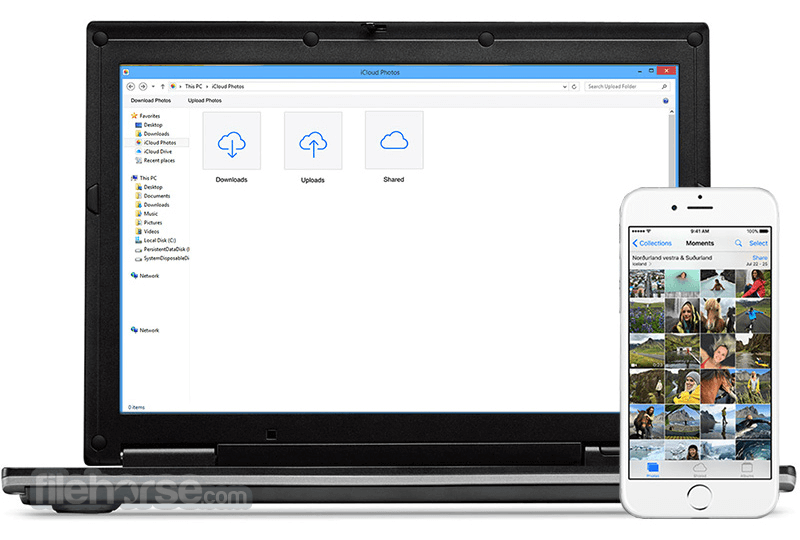
Use Photo Library on your Windows PC to download all of the photos and videos from your Apple devices to your computer, or upload your Windows Pictures library to the app. And when you turn on the app Photo Sharing, you can share your captured memories with just the people you choose.
Make the most of your account
Learn more about using It to access your files in the Drive, connect with Mail in Outlook, and easily share photos, calendars, and bookmarks across your devices. If you reach your iCloud storage limit, Apple helps you manage your storage so you can always have the latest versions of your most important things.
Features
iCloud Photos
Can I use iCloud on Windows 11?
Yes, iCloud Control Panel is compatible with Windows 7 and later, including Windows 11.
Is there a cost associated with using iCloud for PC?
The software is free to download and use, but you'll need an Apple ID and account, which may have associated costs based on your iCloud storage plan.
Can I access my iCloud photos on Windows using this software?
Yes, you can sync and access your iCloud photos and videos on your Windows PC using this program.
Does iCloud for PC support two-factor authentication (2FA)?
Yes, it supports two-factor authentication for enhanced security.
Can I use iCloud Control Panel to back up my Windows PC?
No, iCloud Control Panel is primarily designed for syncing your Windows PC with your iCloud account. It doesn't serve as a backup solution for your PC.
Alternatives
iCloud.com: You can access your content through a web browser on your Windows PC by visiting iCloud.com. This doesn't require any software installation but may offer fewer features than this app.
Microsoft OneDrive: If you're primarily using Windows and want seamless cloud integration, Microsoft's OneDrive is an alternative for syncing files and photos across devices.
Google Drive: Google Drive is a popular cloud storage and synchronization service that works well on both Windows and macOS. It offers cross-platform compatibility.
pCloud Drive: Sign up and get 10 GB FREE cloud storage for your documents!
Pricing
The program itself is FREE to download and use. However, you may incur costs associated with your iCloud account, depending on the storage plan you choose.
Apple offers a limited amount of free storage and various paid plans with different storage capacities.
System Requirements
iCloud for Windows is a valuable tool for individuals who use both Apple and Windows devices. It simplifies the process of synchronizing content between your account and your Windows PC, allowing you to access photos, emails, calendars, and more seamlessly.
While it may have some limitations, such as being primarily tailored to Windows users, it offers a user-friendly experience and enhances your ability to work across different platforms. If you're deeply entrenched in the Apple ecosystem but also rely on a Windows PC, it can be a bridge that simplifies your digital life.
Note: Requires Apple ID.
Download iCloud for PC Latest Version Why is this app published on FileHorse? (More info)
You can also share select photos with friends and family using Shared Photo Streams, complete with notifications and comments.
iCloud is a Windows-based software developed by Apple Inc. It's designed to seamlessly integrate your Windows PC with your Apple ecosystem, allowing you to access and sync your iCloud content, including photos, videos, documents, emails, and more.
This software bridges the gap between your Windows computer and your account, making it easier to manage and transfer your data.
Highlights
Get everything you love, on every device you use
When you download and set up the tool on your Windows PC, your photos, videos, mail, files, and bookmarks are accessible on all of your devices. If you need help, you can find solutions to common issues or learn more about iCloud Desktop.
One convenient home for all of your photos
Use Photo Library on your Windows PC to download all of the photos and videos from your Apple devices to your computer, or upload your Windows Pictures library to the app. And when you turn on the app Photo Sharing, you can share your captured memories with just the people you choose.
Make the most of your account
Learn more about using It to access your files in the Drive, connect with Mail in Outlook, and easily share photos, calendars, and bookmarks across your devices. If you reach your iCloud storage limit, Apple helps you manage your storage so you can always have the latest versions of your most important things.
Features
iCloud Photos
- Keep your photo collection synchronized across all your devices and your PC.
- Create Shared Albums and invite others to contribute their own photos, videos, and comments.
- Easily manage your iCloud Shared Photo Library, adding or removing photos and videos.
- Seamlessly view your photos within the Microsoft Photos app on Windows 11.
- Safely store and access your files and folders in iCloud Drive.
- Share files directly with friends, family, and colleagues using File Explorer.
- Effortlessly view and manage your passwords on your Windows PC through the Passwords app.
- Securely save and sync your passwords across your devices and PC in Chrome or Edge using the Passwords extension.
- Generate Time-based One-Time Passwords (TOTP) within the Passwords app for added security.
- Ensure your contacts and calendars are consistently updated across all your devices and your PC.
- Easily view your iCloud Calendar within Outlook.
- Automatically sync Edge, Firefox, and Google Chrome Bookmarks with Safari for a seamless browsing experience.
- Visit the official Apple website to download iCloud for PC.
- Run the installer, and follow the on-screen instructions.
- Sign in with your Apple ID or create a new one if you don't have an account.
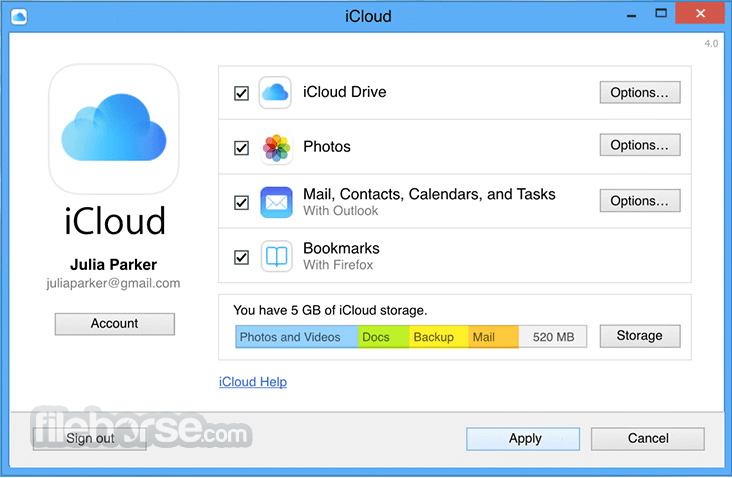
- Customize your synchronization preferences for photos, emails, contacts, calendars, and more.
- Click "Apply" to start syncing your content with your Windows PC.
- Access the settings to configure your synchronization preferences.
- Select the types of content you want to sync (e.g., photos, contacts, calendars).
- Access your content from the designated folders in Windows Explorer.
- Manage your files directly from your PC.
- Monitor the status of your synchronization through the system tray icon.
Can I use iCloud on Windows 11?
Yes, iCloud Control Panel is compatible with Windows 7 and later, including Windows 11.
Is there a cost associated with using iCloud for PC?
The software is free to download and use, but you'll need an Apple ID and account, which may have associated costs based on your iCloud storage plan.
Can I access my iCloud photos on Windows using this software?
Yes, you can sync and access your iCloud photos and videos on your Windows PC using this program.
Does iCloud for PC support two-factor authentication (2FA)?
Yes, it supports two-factor authentication for enhanced security.
Can I use iCloud Control Panel to back up my Windows PC?
No, iCloud Control Panel is primarily designed for syncing your Windows PC with your iCloud account. It doesn't serve as a backup solution for your PC.
Alternatives
iCloud.com: You can access your content through a web browser on your Windows PC by visiting iCloud.com. This doesn't require any software installation but may offer fewer features than this app.
Microsoft OneDrive: If you're primarily using Windows and want seamless cloud integration, Microsoft's OneDrive is an alternative for syncing files and photos across devices.
Google Drive: Google Drive is a popular cloud storage and synchronization service that works well on both Windows and macOS. It offers cross-platform compatibility.
pCloud Drive: Sign up and get 10 GB FREE cloud storage for your documents!
Pricing
The program itself is FREE to download and use. However, you may incur costs associated with your iCloud account, depending on the storage plan you choose.
Apple offers a limited amount of free storage and various paid plans with different storage capacities.
System Requirements
- Windows 11 or Windows 10 (64-bit)
- For Contacts and Calendars: Outlook 2019 or later
- For Passwords: Chrome 100 or later, or Edge 100 or later
- For Bookmarks: Chrome 100 or later, Firefox 92 or later, or Edge 100 or later
- Apple ID
- Internet connection for syncing and updates
- Seamless integration between Windows and Apple ecosystems.
- Access to iCloud Drive files directly from Windows Explorer.
- Synchronization of photos, emails, contacts, calendars, and more.
- Easy-to-use interface with straightforward setup.
- Find My Device feature for added security.
- Limited to Windows compatibility, may not fully integrate with all Windows apps.
- Requires an Apple ID and the account, which might have associated costs.
- Limited storage capacity on free accounts.
- Some advanced features available on macOS are not supported.
iCloud for Windows is a valuable tool for individuals who use both Apple and Windows devices. It simplifies the process of synchronizing content between your account and your Windows PC, allowing you to access photos, emails, calendars, and more seamlessly.
While it may have some limitations, such as being primarily tailored to Windows users, it offers a user-friendly experience and enhances your ability to work across different platforms. If you're deeply entrenched in the Apple ecosystem but also rely on a Windows PC, it can be a bridge that simplifies your digital life.
Note: Requires Apple ID.
Download iCloud for PC Latest Version Why is this app published on FileHorse? (More info)
##
畫面截圖
- 2026-08-06 iCloud Control Panel 15.9.60.0 1 MB
- 2022-05-26 iCloud Control Panel 7.21 153.68 MB
- 2022-05-13 iCloud Control Panel 13.4.9 288.63 MB
- 2021-08-11 iCloud Control Panel 12.5.74 242.5 MB
- 2020-12-11 iCloud Control Panel 11.6.32 111.2 MB
- 2020-08-11 iCloud Control Panel 7.20 153.65 MB