⚠ 這是歷史版本頁面 — 查看 Nikon Camera Control Pro 最新版本 →

- 目前版本2.33.1
- 更新日期2021-02-25
- 檔案大小299.92 MB
- 檔案名稱S-CCPRO_-023300WF-ALLIN-ALL___.exe
- 作業系統Windows 8 / Windows 8 64 / Windows 10 / Windows 10 64 / Windows 11
- 支援語系English
- 授權型式商業試用
- 開發商 Nikon Corporation
- 軟體分類Windows 軟體 / 影像設計
##
編輯短評
Nikon Camera Control Pro 是 Nikon 官方推出的相機遙控軟體,主要解決攝影師需要從電腦端操作單眼相機的需求。透過 USB 或無線傳輸器連接後,可遠端控制 Nikon 數位單眼的大多數拍攝功能,包括即時預覽、影像選擇與 Picture Control 等進階設定。這套軟體與 Nikon 自家的 Capture NX 和 ViewNX 工作流程整合良好,是 Nikon 用戶在棚拍或長時間曝光等情境下的實用工具。目前仍持續維護,但更新頻率不高,屬於 Nikon 生態系中的專業輔助軟體,使用者評價普遍不錯,惟評分人數不多,屬小眾工具。
這套軟體適合需要精準控制相機的 Nikon 用戶,例如商品攝影、縮時攝影或需要即時檢視畫面的工作場合。與 Adobe Photoshop 等後製軟體相比,它不處理影像編輯,而是專注於拍攝端的遠端控制,兩者定位不同。替代方案方面,Nikon 另有免費的 SnapBridge 或 Webcam Utility 等工具,但功能深度不及本軟體。需注意的是,此為試用版授權,僅提供英文介面,Windows 與 macOS 皆有對應版本,但安裝前建議確認相機型號是否在支援清單內。
##
翻譯排程處理中,以下暫以英文原文呈現
軟體介紹
Nikon Camera Control Pro software remotely controls most functions of Nikon digital SLRs from a computer that is connected via USB cable or through wired or wireless LAN using a wireless transmitter.
Advanced functions of the new Nikon D3 and D300, such as the Viewer for preview and selection of images before transfer to a computer, Liveview function, and Picture Control System, are supported.
Nikon Camera Control Pro also supports the workflows of Nikon’s exclusive photofinishing software, Capture NX (optional), and browser and viewer software, ViewNX.
Most settings of Nikon digital SLRs, which are connected via USB cables, such as exposure mode, shutter speed, and aperture, can be controlled remotely from a computer.
Wired or wireless LAN is also available when using a wireless transmitter. In addition to a direct transfer of images from a camera to a computer, all procedures from shooting to saving images are smoothly processed.
Enhanced viewer function enables thumbnail display of images stored in a computer.
Compatible with the new functions of the Nikon D3/D300
What is Nikon Camera Control Pro actually used for in real workflows?
Nikon Camera Control Pro is designed for tethered shooting, meaning you control a Nikon DSLR or mirrorless camera directly from your computer. It’s widely used in studio photography (product, fashion, portraits) where you need instant preview, precise control over settings, and the ability to save images directly to a PC instead of the camera.
What advantages does it have over shooting directly into the camera?
The biggest advantage is full remote control and live preview on a larger screen. You can adjust exposure, focus, white balance, and shooting parameters in real time, instantly review high-resolution shots, and streamline workflows by automatically transferring files to your computer or editing software.
Is Nikon Camera Control Pro still worth using in 2026?
Yes, but mainly for professionals. In 2026, it’s still relevant for tethered studio setups where precision and workflow efficiency matter. However, some users may prefer newer or lighter alternatives depending on their camera model and workflow, especially as wireless and cloud-based solutions become more common.
System Requirements
Also Available: Download Nikon Camera Control Pro for Mac
Download Nikon Camera Control Pro Latest Version Why is this app published on FileHorse? (More info)
Advanced functions of the new Nikon D3 and D300, such as the Viewer for preview and selection of images before transfer to a computer, Liveview function, and Picture Control System, are supported.
Nikon Camera Control Pro also supports the workflows of Nikon’s exclusive photofinishing software, Capture NX (optional), and browser and viewer software, ViewNX.
Most settings of Nikon digital SLRs, which are connected via USB cables, such as exposure mode, shutter speed, and aperture, can be controlled remotely from a computer.
Wired or wireless LAN is also available when using a wireless transmitter. In addition to a direct transfer of images from a camera to a computer, all procedures from shooting to saving images are smoothly processed.
Enhanced viewer function enables thumbnail display of images stored in a computer.
Compatible with the new functions of the Nikon D3/D300
- Images in a camera buffer can be confirmed with a thumbnail or preview display on a computer before transferring, enabling the deletion of unnecessary images. This remarkably increases efficiency.
- Supporting the Liveview mode (Hand-held mode and Tripod mode) of the D3 and D300, it permits adjustment of the focus point and shutter release while confirming the image on a computer. In Tripod mode, focal-plane contrast AF on a desired point within a specific area is possible.
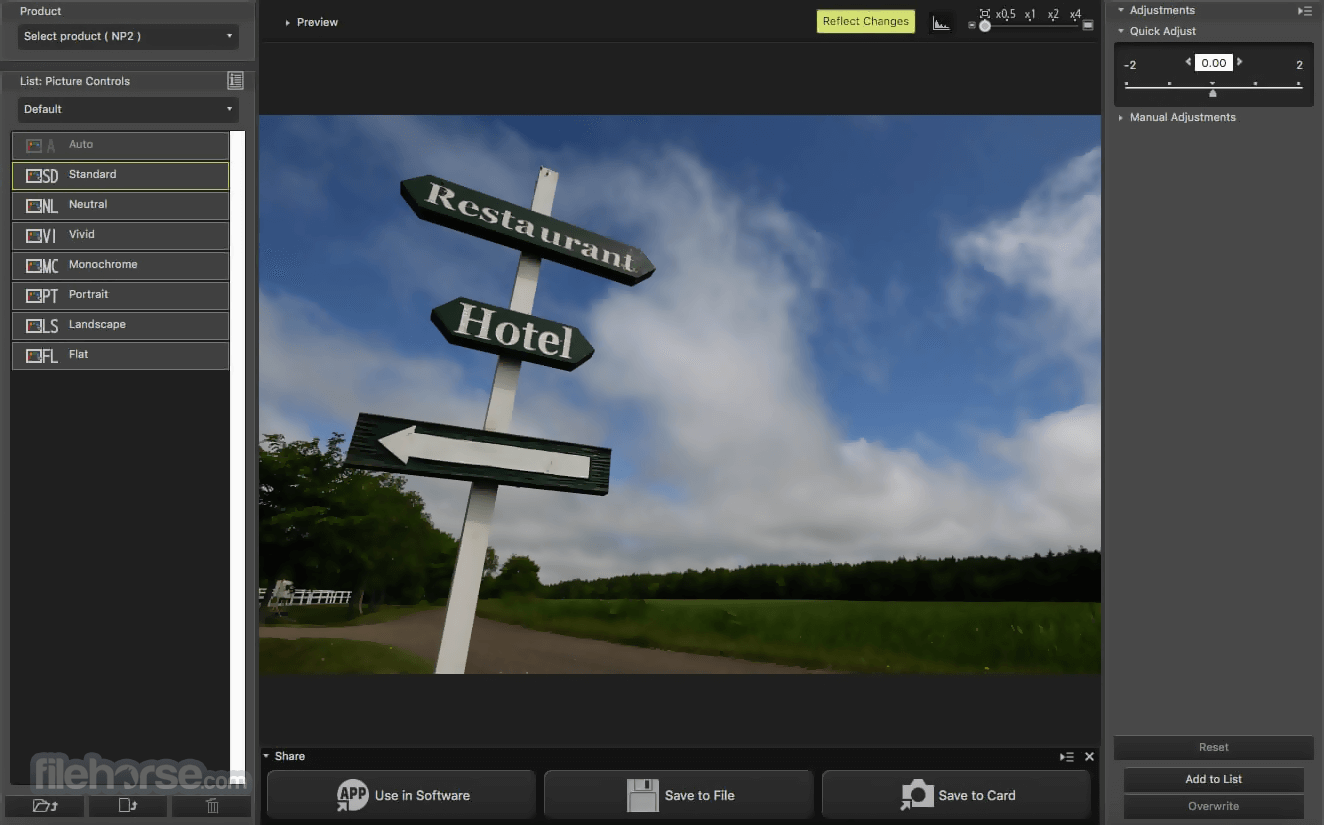
- It also supports the Picture Control System of the cameras. Picture Control parameters can be selected and adjusted on a computer, and custom curves (tone compensation data) can be created and registered
- 51-point AF can be controlled and displayed.
- Fine-tuning of the new white balance is available.
- Support for the ViewNX browser and viewer software
- Support for Capture NX photo-finishing software
- Remote control of most Nikon digital SLR settings, including exposure mode, shutter speed, and aperture, from a computer.
- Operation by wired and wireless LAN when using a wireless transmitter.
- The direct transfer of images from a camera to a computer and workflow management of all procedures from shooting to saving images.
- Enhanced Viewer function enables thumbnail display of images stored on a computer.
- Images on a camera buffer can be confirmed or deleted with a thumbnail or preview display on a computer before transfer.
- Supports It also supports workflows from Nikon's exclusive photofinishing and browser software.
- Modes (Hand-held and Tripod) where the camera sensor is used to provide a real-time preview through the objective lens. LiveView support enables simultaneous adjustment of the focus point and/or shutter release, and confirmation of the image on a computer screen. In Tripod mode, remote selection of the desired autofocus point is possible.
- Supports the Picture Control system, which allows image parameters to be selected and adjusted on a computer, and custom curves (tone compensation data) to be created and saved back to the camera.
- Install the software using the official Nikon installer
- Connect your Nikon camera via USB or network
- Launch the application and detect your camera
- Configure shooting settings from your PC interface
- Use live view mode to preview and compose shots
- Capture images remotely with full control
- Transfer and save images directly to your computer
- Adjust white balance, exposure, and focus remotely
- Monitor the camera battery and storage status
- Disconnect the camera safely after your session
What is Nikon Camera Control Pro actually used for in real workflows?
Nikon Camera Control Pro is designed for tethered shooting, meaning you control a Nikon DSLR or mirrorless camera directly from your computer. It’s widely used in studio photography (product, fashion, portraits) where you need instant preview, precise control over settings, and the ability to save images directly to a PC instead of the camera.
What advantages does it have over shooting directly into the camera?
The biggest advantage is full remote control and live preview on a larger screen. You can adjust exposure, focus, white balance, and shooting parameters in real time, instantly review high-resolution shots, and streamline workflows by automatically transferring files to your computer or editing software.
Is Nikon Camera Control Pro still worth using in 2026?
Yes, but mainly for professionals. In 2026, it’s still relevant for tethered studio setups where precision and workflow efficiency matter. However, some users may prefer newer or lighter alternatives depending on their camera model and workflow, especially as wireless and cloud-based solutions become more common.
System Requirements
- OS: Windows 11, 10 (64-bit only)
- Processor: Intel Core i5 or higher
- RAM: Minimum 4 GB (8 GB recommended)
- Storage: 1 GB free disk space for installation
- Display: 1024 x 768 resolution or higher
- USB 3.0/2.0 port for camera connection
- Network support for compatible cameras
- Full remote control of Nikon DSLR settings
- Live view shooting from the computer
- Direct image transfer to PC storage
- Supports time-lapse and interval shooting
- Professional workflow and tethered support
- Paid software with no free version
- Limited compatibility with non-Nikon cameras
- Interface feels outdated and non-intuitive
- Occasional connection issues via USB
- Lacks advanced editing or batch tools
Also Available: Download Nikon Camera Control Pro for Mac
Download Nikon Camera Control Pro Latest Version Why is this app published on FileHorse? (More info)
##
畫面截圖
- 2026-04-03 Nikon Camera Control Pro 2.37.1 229.13 MB
- 2024-02-07 Nikon Camera Control Pro 2.37.0 229.11 MB
- 2023-05-23 Nikon Camera Control Pro 2.36.0 229.09 MB
- 2022-10-26 Nikon Camera Control Pro 2.35.1 227.66 MB
- 2022-04-20 Nikon Camera Control Pro 2.34.2 226.16 MB
- 2021-12-22 Nikon Camera Control Pro 2.34.1 225.75 MB
- 2021-11-04 Nikon Camera Control Pro 2.34.0 225.77 MB
- 2021-02-25 Nikon Camera Control Pro 2.33.1 299.92 MB