⚠ 這是歷史版本頁面 — 查看 WD Discovery 最新版本 →

WD Discovery 4.5.420
v 4.5.420
Windows
免費軟體
7.86/10 (22)
- 目前版本4.5.420
- 更新日期2023-10-19
- 檔案大小1.01 MB
- 檔案名稱Install WD Discovery for Windows.exe
- 作業系統Windows 10 / Windows 11
- 支援語系English
- 授權型式免費軟體
- 開發商 Western Digital
- 軟體分類Windows 軟體 / 系統優化
##
編輯短評
WD Discovery是Western Digital推出的免费工具,专门用来在网络上快速寻找并管理自家品牌的硬盘。它最大的特色是能设定过滤器,只显示WD设备,忽略其他硬盘,省去逐一扫描的麻烦。从版本纪录来看,这款软件持续有更新,维护还算活跃,不过使用人数不多,评价属于中等偏上,算是同分类里的小众选择。
这套工具适合拥有多台WD硬盘、且常透过路由器或NAS存取的使用者,能帮你快速建立桌面捷径、映射网络磁碟,甚至用LED灯找出实体装置。和FileHippo App Manager、Rufus等通用工具相比,WD Discovery只专注WD设备,功能更专一,但相对地,如果你用的是其他品牌硬盘,它就派不上用场。它采免费授权,仅支援Windows,而且介面只有英文,中文用户可能需要适应一下。
##
翻譯排程處理中,以下暫以英文原文呈現
軟體介紹
WD Discovery is an application that lets users quickly find Western Digital drives that are connected to routers, NAS devices, and other types of network equipment.
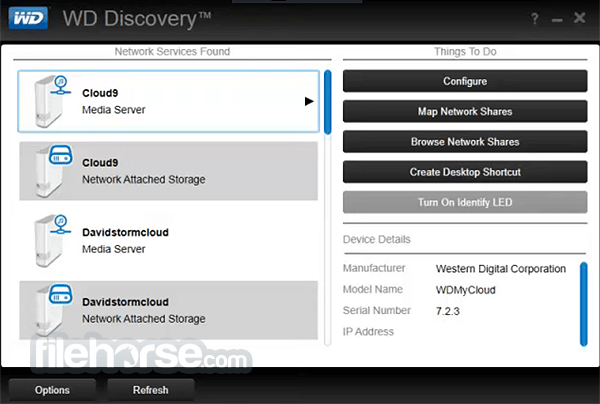
WD Discovery tool can save you time because it lets you set filters so that you can quickly find your WD storage devices on a connected network. Meanwhile, it ignores other hard drives on the network that are not WD drives. Then you can configure the WD drives as well as create a desktop shortcut, browse shares of the network, map network drive, and/or activate the identity LED to physically search for it.
You don’t need to possess any skills in HDD detection because the WD Discovery Desktop app is designed for novices to use it. If you’re an advanced user, then you’ll appreciate its extra-fast network scanning. As soon as you start it, the results are displayed within a few seconds.
The user interface of Western Digital Discovery features just 2 columns with big separated buttons to select the necessary options. This makes navigation super easy.
WD Discovery is a software application developed by Western Digital, a well-known manufacturer of computer storage devices. The primary purpose of WD Discovery is to help users manage and interact with their Western Digital products, particularly external hard drives and network-attached storage (NAS) devices. It provides a unified interface that allows users to access and control various features and functions of their Western Digital devices.
Features
Device Detection: It automatically detects and recognizes compatible Western Digital devices connected to your computer. This includes external hard drives, NAS devices, and other supported storage solutions.
Drive Management: Once your device is detected, it enables you to manage and configure its settings. You can perform tasks such as formatting drives, setting up automatic backups, adjusting energy-saving features, and managing user access rights for NAS devices.
Data Backup and Sync: It offers tools for backing up and synchronizing your important data. You can set up regular backups to safeguard your files, create system backups, and sync files between your computer and your Western Digital storage devices.
Security and Privacy: The software includes features to enhance security and privacy. You can encrypt your files, set up password protection, and configure network access permissions to protect your data from unauthorized access.
Software Updates: It provides a convenient way to keep your Western Digital devices up to date with the latest firmware and software. It notifies you when updates are available and assists in downloading and installing them.
App Marketplace: The app often includes an app marketplace or a collection of additional software tools and applications that can be installed and used alongside your Western Digital devices. These apps can extend the functionality of your devices, such as media server applications, cloud storage integrations, or file synchronization tools.
FAQ
Q: What is WD Discovery, and do I need it on my PC?
A: WD Discovery is a software application developed by Western Digital that allows you to manage and interact with your Western Digital storage devices. If you own Western Digital external hard drives or network-attached storage (NAS) devices, WD Discovery provides convenient features such as drive management, data backup and sync, security settings, and software updates. It is recommended to install WD Discovery to maximize the functionality of your Western Digital devices.
Q: How do I install WD Discovery on my PC?
A: To install WD Discovery on your PC, follow these steps:
Visit the Western Digital support website.
Locate the software download page.
Download the latest version of WD Discovery compatible with your operating system.
Run the downloaded file and follow the on-screen instructions to complete the installation.
Once installed, launch the app, and it will automatically detect compatible Western Digital devices connected to your PC.
Q: Can I use WD Discovery with non-Western Digital storage devices?
A: WD Discovery is primarily designed for use with Western Digital storage devices. While it may detect other external drives connected to your PC, its features and functionalities are optimized for Western Digital products. For optimal performance and compatibility, it is recommended to use WD Discovery with Western Digital devices.
Q: How do I update the firmware of my Western Digital device using WD Discovery?
A: It provides a simple way to update the firmware of your Western Digital devices. Follow these steps:
Launch WD Discovery on your PC.
Select the Western Digital device for which you want to update the firmware.
Check for firmware updates within the WD Discovery interface.
If updates are available, follow the prompts to download and install the latest firmware for your device.
It is important to ensure that your device remains connected and powered on during the firmware update process.
Q: Can I uninstall WD Discovery from my PC after setting up my Western Digital device?
A: Yes, you can uninstall the app from your PC if you no longer require its features or functionalities. However, keep in mind that by uninstalling WD Discovery, you may lose access to certain management and configuration options provided by the software. If you primarily use your Western Digital device for basic storage purposes, you can still access and use it without WD Discovery.
PROS
Overall, the WD Discovery application simplifies the task of locating WD storage drives that are connected to a network. It also has the best tools for configurations, shares browsing, and mapping network drives within just a couple of minutes.
Download WD Discovery Latest Version Why is this app published on FileHorse? (More info)
WD Discovery tool can save you time because it lets you set filters so that you can quickly find your WD storage devices on a connected network. Meanwhile, it ignores other hard drives on the network that are not WD drives. Then you can configure the WD drives as well as create a desktop shortcut, browse shares of the network, map network drive, and/or activate the identity LED to physically search for it.
You don’t need to possess any skills in HDD detection because the WD Discovery Desktop app is designed for novices to use it. If you’re an advanced user, then you’ll appreciate its extra-fast network scanning. As soon as you start it, the results are displayed within a few seconds.
The user interface of Western Digital Discovery features just 2 columns with big separated buttons to select the necessary options. This makes navigation super easy.
WD Discovery is a software application developed by Western Digital, a well-known manufacturer of computer storage devices. The primary purpose of WD Discovery is to help users manage and interact with their Western Digital products, particularly external hard drives and network-attached storage (NAS) devices. It provides a unified interface that allows users to access and control various features and functions of their Western Digital devices.
Features
Device Detection: It automatically detects and recognizes compatible Western Digital devices connected to your computer. This includes external hard drives, NAS devices, and other supported storage solutions.
Drive Management: Once your device is detected, it enables you to manage and configure its settings. You can perform tasks such as formatting drives, setting up automatic backups, adjusting energy-saving features, and managing user access rights for NAS devices.
Data Backup and Sync: It offers tools for backing up and synchronizing your important data. You can set up regular backups to safeguard your files, create system backups, and sync files between your computer and your Western Digital storage devices.
Security and Privacy: The software includes features to enhance security and privacy. You can encrypt your files, set up password protection, and configure network access permissions to protect your data from unauthorized access.
Software Updates: It provides a convenient way to keep your Western Digital devices up to date with the latest firmware and software. It notifies you when updates are available and assists in downloading and installing them.
App Marketplace: The app often includes an app marketplace or a collection of additional software tools and applications that can be installed and used alongside your Western Digital devices. These apps can extend the functionality of your devices, such as media server applications, cloud storage integrations, or file synchronization tools.
FAQ
Q: What is WD Discovery, and do I need it on my PC?
A: WD Discovery is a software application developed by Western Digital that allows you to manage and interact with your Western Digital storage devices. If you own Western Digital external hard drives or network-attached storage (NAS) devices, WD Discovery provides convenient features such as drive management, data backup and sync, security settings, and software updates. It is recommended to install WD Discovery to maximize the functionality of your Western Digital devices.
Q: How do I install WD Discovery on my PC?
A: To install WD Discovery on your PC, follow these steps:
Visit the Western Digital support website.
Locate the software download page.
Download the latest version of WD Discovery compatible with your operating system.
Run the downloaded file and follow the on-screen instructions to complete the installation.
Once installed, launch the app, and it will automatically detect compatible Western Digital devices connected to your PC.
Q: Can I use WD Discovery with non-Western Digital storage devices?
A: WD Discovery is primarily designed for use with Western Digital storage devices. While it may detect other external drives connected to your PC, its features and functionalities are optimized for Western Digital products. For optimal performance and compatibility, it is recommended to use WD Discovery with Western Digital devices.
Q: How do I update the firmware of my Western Digital device using WD Discovery?
A: It provides a simple way to update the firmware of your Western Digital devices. Follow these steps:
Launch WD Discovery on your PC.
Select the Western Digital device for which you want to update the firmware.
Check for firmware updates within the WD Discovery interface.
If updates are available, follow the prompts to download and install the latest firmware for your device.
It is important to ensure that your device remains connected and powered on during the firmware update process.
Q: Can I uninstall WD Discovery from my PC after setting up my Western Digital device?
A: Yes, you can uninstall the app from your PC if you no longer require its features or functionalities. However, keep in mind that by uninstalling WD Discovery, you may lose access to certain management and configuration options provided by the software. If you primarily use your Western Digital device for basic storage purposes, you can still access and use it without WD Discovery.
PROS
- Easy device management
- Convenient data backup and sync
- Enhanced security features
- Regular software updates
- Additional app marketplace
- Limited compatibility with non-Western Digital devices
- Some features may be redundant for basic storage needs
- Potential resource usage on PC
- Dependency on WD Discovery for advanced configurations
- Occasional stability issues with software updates
Overall, the WD Discovery application simplifies the task of locating WD storage drives that are connected to a network. It also has the best tools for configurations, shares browsing, and mapping network drives within just a couple of minutes.
Download WD Discovery Latest Version Why is this app published on FileHorse? (More info)
##
畫面截圖
- 2025-12-17 WD Discovery 5.3.819 1.2 MB
- 2024-03-19 WD Discovery 4.6.433 1.01 MB
- 2023-10-19 WD Discovery 4.5.420 1.01 MB
- 2022-02-01 WD Discovery 4.3.361 1.01 MB
- 2019-11-22 WD Discovery 3.6.163 64 KB
- 2019-08-21 WD Discovery 3.4.89 1016.9 KB