⚠ 這是歷史版本頁面 — 查看 Wise Care 365 Free 最新版本 →

Wise Care 365 Free 7.2.8
v 7.2.8
Windows
試用版
8.02/10 (442)
- 目前版本7.2.8
- 更新日期2025-08-13
- 檔案大小16.57 MB
- 檔案名稱WiseCare365_7.2.8.709.exe
- 作業系統Windows 7 / Windows 8 / Windows 10 / Windows 11
- 支援語系English
- 授權型式試用版
- 開發商 WiseCleaner
- 軟體分類Windows 軟體 / 系統優化
##
編輯短評
Wise Care 365 Free 是一套整合系统清理、效能提升与隐私保护的 PC 优化工具,由 WiseCleaner 开发,主要解决电脑垃圾文件堆积、注册表错误和启动程序拖慢系统等问题。它的介面设计相当亲民,同时兼顾新手与进阶用户,辨识度最高的特色是提供一键式的系统清理与优化流程。这款软件在同类工具中属于热门选择,评价普遍不错,且更新相当活跃,近一年来持续维护,适合需要免费但有效率的系统维护方案的使用者。
这套软件适合想要定期清理电脑、提升开机速度的使用者,无论是日常使用还是系统变慢时都能派上用场。与 Glary Utilities 等替代软件相比,Wise Care 365 Free 更强调操作简单,但功能上可能较为基础,取舍在于深度优化选项较少。授权为试用版,仅支援 Windows 平台,且介面只有英文,对不熟悉英文的使用者来说可能需要适应,但基本操作不难上手。
##
翻譯排程處理中,以下暫以英文原文呈現
軟體介紹
Wise Care 365 Free is a comprehensive PC optimization tool that combines system cleaning, performance enhancement, and privacy protection.
Developed by WiseCleaner, the Wise Care 365 software is tailored to both novice and experienced users, aiming to boost system performance by cleaning junk files, fixing registry errors, and managing startup programs.
Its user-friendly approach and robust feature set have made it a popular choice for users looking for a free but efficient PC maintenance solution.
Key Features
System Cleaner: Removes junk files, invalid shortcuts, and other unnecessary data to free up disk space and improve performance.
Registry Cleaner: Scans and repairs registry issues to enhance system stability.
Startup Manager: Optimizes boot time by allowing users to disable unnecessary startup programs.
Privacy Protector: Deletes sensitive browsing history and offers file shredding capabilities to protect user data.
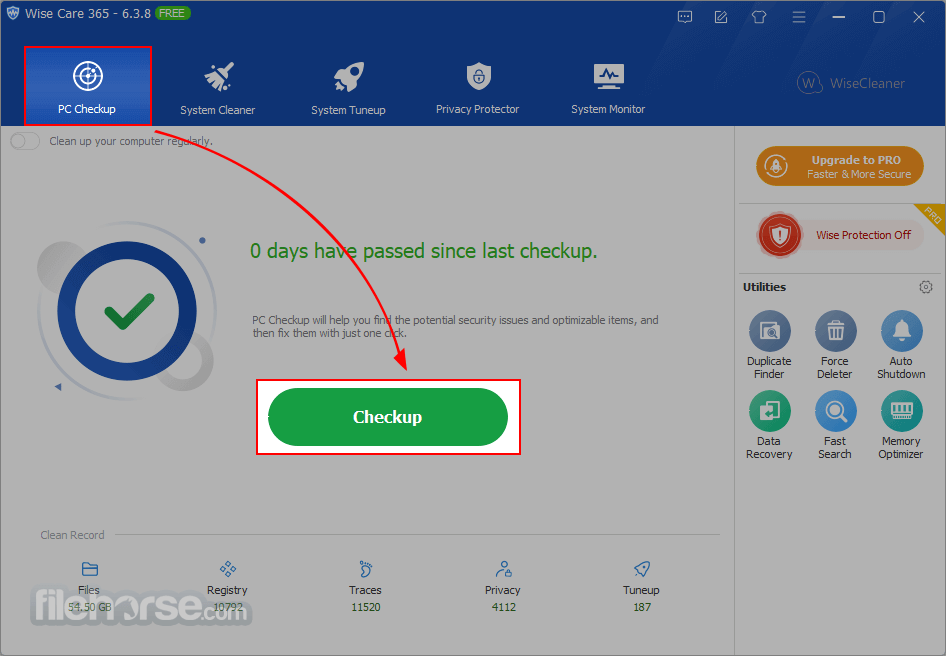
PC Checkup: Conducts a comprehensive health scan to detect issues and provide solutions in a single click.
System Monitor: Displays real-time system performance metrics, including CPU and RAM usage.
Utilities Hub: Offers additional tools like disk defragmentation, file recovery, and hardware overview.
What`s New
Say Goodbye to Blurriness!
The all-new Wise XUI eliminates the scaling issues from the previous version. Wise Care 365 now seamlessly supports 100%, 125%, 150%, 175%, and 200% scaling, automatically adjusting to Windows system scale settings without requiring manual configuration.
Enjoy crystal-clear visuals with this tool, fully optimized for 4K UHD monitors. No more blurriness!
Other Features
The program sports a clean and intuitive interface that organizes its features into tabs such as PC Checkup, System Cleaner, System Tuneup, Privacy Protector, and Utilities.
The dashboard provides a quick overview of system health, making navigation simple for users of all expertise levels. Its design uses vibrant icons and clear labels, ensuring tasks are easy to execute without technical confusion.
Installation and Setup
How to Use
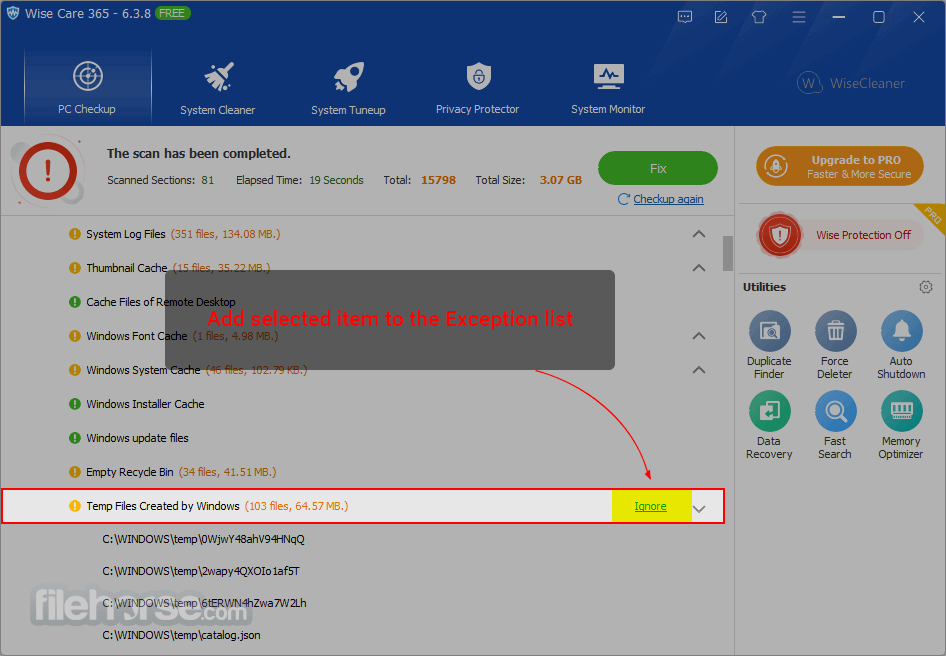
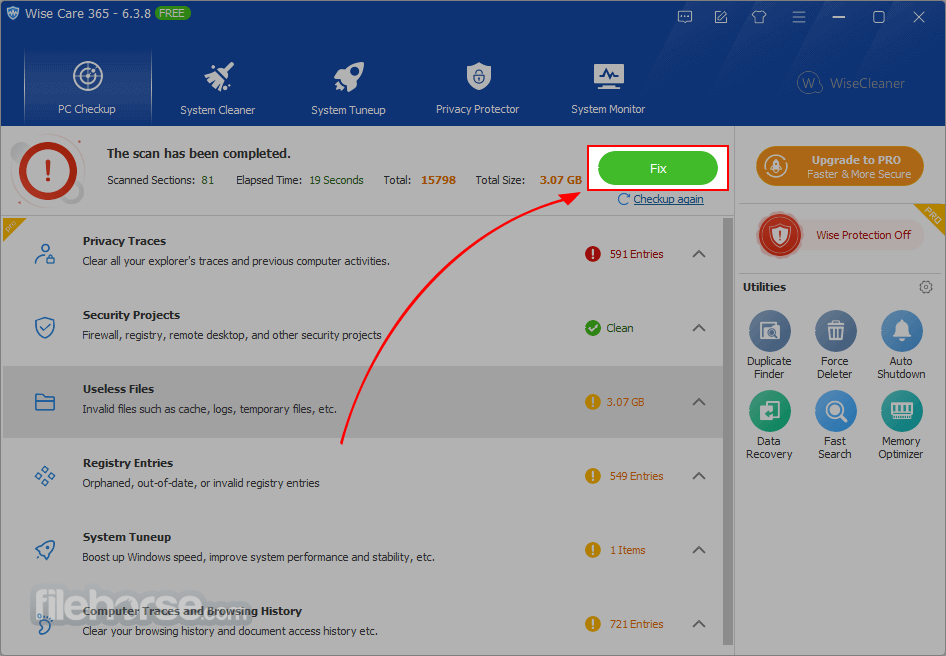
PC Checkup: Open the software and click on the "PC Checkup" tab. Press the "Checkup" button to initiate a system scan. Review and resolve detected issues with one click.
System Cleaner: Navigate to the "System Cleaner" tab to remove junk files and unnecessary data. Select the areas you wish to clean and click "Scan." Once completed, choose "Clean" to free up space.
Startup Manager: In the "System Tuneup" tab, find "Startup Manager" to manage boot programs. Disable unwanted apps to speed up startup times.
Privacy Protector: Head to the "Privacy Protector" tab to delete browsing traces or securely shred sensitive files.
Additional Utilities: Explore the "Utilities" tab for advanced tools like file recovery, disk defragmentation, and more.
FAQ
Is Wise Care 365 Free safe to use?
Yes, the software is safe and regularly updated by WiseCleaner. It does not contain malware or harmful components.
Does Wise Care 365 Free support Windows 11?
Yes, this software is compatible with Windows 11, along with earlier versions like Windows 10, 8 and 7.
Can Wise Care 365 Free recover deleted files?
Yes, it includes a file recovery tool that can restore accidentally deleted files, provided they haven’t been overwritten.
How often should I use Wise Care 365 Free?
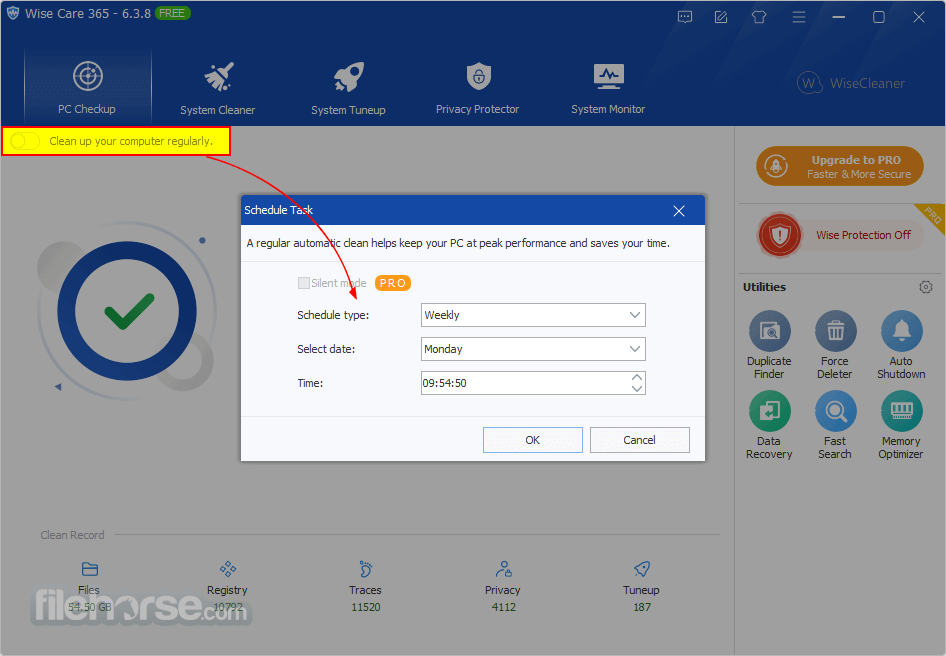
For optimal performance, it’s recommended to run PC Checkup and System Cleaner at least once a week.
What’s the difference between Wise Care 365 Free and the Pro version?
The Pro version offers advanced features such as real-time monitoring, automatic updates, and premium technical support.
Alternatives
CCleaner: Offers similar features for cleaning and optimizing PCs but comes with a paid version for advanced functionalities.
Glary Utilities Free: Another free option with a comprehensive suite of tools for system optimization and file management.
IObit Advanced SystemCare Free: Known for its modern interface and robust optimization tools.
Ashampoo WinOptimizer: A reliable alternative with strong emphasis on privacy protection and disk optimization.
Pricing
FREE Version
Wise Care 365 Free is a powerful and user-friendly PC optimization tool that delivers excellent performance enhancement, privacy protection, and system cleaning at no cost. Its intuitive interface and robust feature set make it a strong choice for users who want to keep their PCs running smoothly without spending a dime.
While the Pro version unlocks additional capabilities, the free version is more than sufficient for everyday optimization needs.
Note: Limited functionality in the free version.
Download Wise Care 365 Free Latest Version Why is this app published on FileHorse? (More info)
Developed by WiseCleaner, the Wise Care 365 software is tailored to both novice and experienced users, aiming to boost system performance by cleaning junk files, fixing registry errors, and managing startup programs.
Its user-friendly approach and robust feature set have made it a popular choice for users looking for a free but efficient PC maintenance solution.
Key Features
System Cleaner: Removes junk files, invalid shortcuts, and other unnecessary data to free up disk space and improve performance.
Registry Cleaner: Scans and repairs registry issues to enhance system stability.
Startup Manager: Optimizes boot time by allowing users to disable unnecessary startup programs.
Privacy Protector: Deletes sensitive browsing history and offers file shredding capabilities to protect user data.
PC Checkup: Conducts a comprehensive health scan to detect issues and provide solutions in a single click.
System Monitor: Displays real-time system performance metrics, including CPU and RAM usage.
Utilities Hub: Offers additional tools like disk defragmentation, file recovery, and hardware overview.
What`s New
Say Goodbye to Blurriness!
The all-new Wise XUI eliminates the scaling issues from the previous version. Wise Care 365 now seamlessly supports 100%, 125%, 150%, 175%, and 200% scaling, automatically adjusting to Windows system scale settings without requiring manual configuration.
Enjoy crystal-clear visuals with this tool, fully optimized for 4K UHD monitors. No more blurriness!
Other Features
- Prevent changes to Internet Explorer homepage, default browser, Windows startup, and context menus.
- Erase browsing history, accessed files, and cookies for confidentiality (Privacy Eraser).
- Securely delete files to prevent recovery (File Shredder, Disk Eraser).
- Clean temporary files, browser caches, download history, invalid shortcuts, and more.
- Remove invalid Windows registry entries and back up/restore registry.
- Defragment hard drives and registry for faster, more stable performance.
- Manage and disable unnecessary startup programs to improve boot speed.
- Scan and clean files with specific extensions across local drives.
- Manage websites sending notifications (allow or block).
- Monitor and terminate unnecessary processes for smoother operation.
- Display detailed hardware information and Windows system summary (OS tab).
- Fast and efficient defragmentation.
- Tools for maintaining confidentiality and preventing data recovery.
The program sports a clean and intuitive interface that organizes its features into tabs such as PC Checkup, System Cleaner, System Tuneup, Privacy Protector, and Utilities.
The dashboard provides a quick overview of system health, making navigation simple for users of all expertise levels. Its design uses vibrant icons and clear labels, ensuring tasks are easy to execute without technical confusion.
Installation and Setup
- Download the installer from the official WiseCleaner website or FileHorse.
- Launch the executable file and follow the step-by-step instructions.
- Choose between a standard or custom installation to specify options like shortcut creation and default language.
- Once installed, the software opens with a guided tour of its main features.
How to Use
PC Checkup: Open the software and click on the "PC Checkup" tab. Press the "Checkup" button to initiate a system scan. Review and resolve detected issues with one click.
System Cleaner: Navigate to the "System Cleaner" tab to remove junk files and unnecessary data. Select the areas you wish to clean and click "Scan." Once completed, choose "Clean" to free up space.
Startup Manager: In the "System Tuneup" tab, find "Startup Manager" to manage boot programs. Disable unwanted apps to speed up startup times.
Privacy Protector: Head to the "Privacy Protector" tab to delete browsing traces or securely shred sensitive files.
Additional Utilities: Explore the "Utilities" tab for advanced tools like file recovery, disk defragmentation, and more.
FAQ
Is Wise Care 365 Free safe to use?
Yes, the software is safe and regularly updated by WiseCleaner. It does not contain malware or harmful components.
Does Wise Care 365 Free support Windows 11?
Yes, this software is compatible with Windows 11, along with earlier versions like Windows 10, 8 and 7.
Can Wise Care 365 Free recover deleted files?
Yes, it includes a file recovery tool that can restore accidentally deleted files, provided they haven’t been overwritten.
How often should I use Wise Care 365 Free?
For optimal performance, it’s recommended to run PC Checkup and System Cleaner at least once a week.
What’s the difference between Wise Care 365 Free and the Pro version?
The Pro version offers advanced features such as real-time monitoring, automatic updates, and premium technical support.
Alternatives
CCleaner: Offers similar features for cleaning and optimizing PCs but comes with a paid version for advanced functionalities.
Glary Utilities Free: Another free option with a comprehensive suite of tools for system optimization and file management.
IObit Advanced SystemCare Free: Known for its modern interface and robust optimization tools.
Ashampoo WinOptimizer: A reliable alternative with strong emphasis on privacy protection and disk optimization.
Pricing
FREE Version
- One-click PC Checkup
- Clean & Speed-up Computer
- Hardware Inventory
- One-click PC Checkup
- Clean & Speed-up Computer
- Hardware Inventory
- Privacy Protection
- Real-time System Protection
- Auto clean system in Silent Mode
- Faster Boot-up Speed
- Free-up More Disk Space
- Automatic Updates
- Premium Tech Support
- 60-Day Money-Back Guarantee
- Operating System: Windows 7, 8, 10, and 11
- Processor: 1 GHz or faster
- RAM: 1 GB minimum
- Disk Space: 50 MB free space
- Easy to use with a clean interface
- Comprehensive optimization features
- Lightweight and fast performance
- Regular updates
- Free for personal use
- Limited advanced features compared to Pro version
- Occasional prompts to upgrade to Pro
Wise Care 365 Free is a powerful and user-friendly PC optimization tool that delivers excellent performance enhancement, privacy protection, and system cleaning at no cost. Its intuitive interface and robust feature set make it a strong choice for users who want to keep their PCs running smoothly without spending a dime.
While the Pro version unlocks additional capabilities, the free version is more than sufficient for everyday optimization needs.
Note: Limited functionality in the free version.
Download Wise Care 365 Free Latest Version Why is this app published on FileHorse? (More info)
##
畫面截圖
- 2026-08-10 Wise Care 365 Free 8.0.5 36.12 MB
- 2026-06-02 Wise Care 365 Free 8.0.2 37.02 MB
- 2026-05-19 Wise Care 365 Free 8.0.1 36.34 MB
- 2026-02-09 Wise Care 365 Free 7.3.5 29.22 MB
- 2026-01-13 Wise Care 365 Free 7.3.3 30.68 MB
- 2025-11-10 Wise Care 365 Free 7.3.2 16.55 MB
- 2025-08-13 Wise Care 365 Free 7.2.8 16.57 MB
- 2025-05-23 Wise Care 365 Free 7.2.5 17.58 MB